You Might Also Like
Learn Coding Visually
Learn to code with interactive, live-preview playgrounds — HTML, CSS, JavaScript, React & more.
 HTML Playground42 lessons · Click-based · Live preview
 CSS PlaygroundLearn CSS with a live editor
 JavaScript Playground60 lessons · DOM · Async · Canvas
 React PlaygroundLearn React with a live code editor
 GSAP PlaygroundLearn GSAP animation interactively
 SVG Playground44 lessons · shapes · paths · animation
 SCSS Playground45 lessons · Sass modules · tokens
 Tailwind PlaygroundLearn Tailwind CSS with a live editor
 Bootstrap 5 Playground50 lessons · live preview
AOS Fade-Up Gallery — Free Animate On Scroll Gallery Snippet
AOS Fade-Up Gallery · Scroll · Plain HTML, CSS & JS · Live preview
What's included
Features
About this UI Snippet
AOS Fade-Up Gallery — Scroll Reveals with Declarative data-aos Attributes
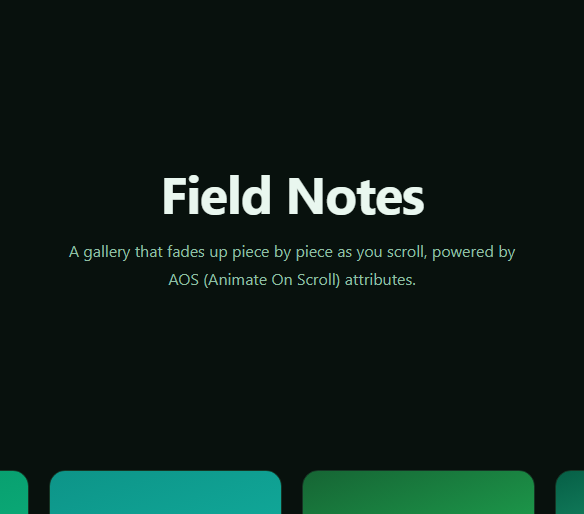
AOS (Animate On Scroll) is one of the oldest and most widely used scroll-reveal libraries because of how little code it asks for: mark any element with a data-aos attribute, call AOS.init() once, and the library handles observing scroll position and toggling the reveal — no bespoke IntersectionObserver setup, no manual class-toggling logic. This snippet builds a photo/card gallery that fades each item upward as it scrolls into view, entirely through HTML attributes.
Attribute-driven, not code-driven
Every card carries data-aos="fade-up" and an optional data-aos-delay. AOS scans the DOM on init, attaches a single shared scroll listener (internally using an IntersectionObserver-like strategy), and adds a visibility class to each element as it crosses its trigger offset — the corresponding CSS transition, already defined in AOS's own stylesheet, handles the actual fade and translate. This is fundamentally different from the Scroll Reveal Grid snippet's GSAP-driven approach: there's no JavaScript describing the animation itself, only markup describing intent.
Per-column stagger via data-aos-delay
Rather than JavaScript computing a stagger, this gallery hand-assigns data-aos-delay values (0, 80, 160ms) cycling across the three-column grid, so each row reveals with a gentle left-to-right cascade. Because AOS applies delay via plain CSS transition-delay, this scales to any number of items without any stagger-calculation logic — you're placing the delay directly where the element is defined.
Configuring global behavior
AOS.init({ duration: 650, easing: 'ease-out-cubic', once: false, offset: 80 }) sets library-wide defaults: once: false means elements fade out and back in every time they cross the trigger point (rather than firing only the first time, which is AOS's default), and offset: 80 triggers the reveal 80px before the element's edge would otherwise cross the viewport, giving reveals a slight head start. Every one of these can also be overridden per-element with matching data-aos-* attributes if you need item-level control.
When AOS is the right tool
For straightforward "fade/slide/zoom on scroll" reveals across many elements — galleries, feature lists, testimonial rows — AOS's attribute-based approach is faster to wire up and easier to hand off to non-JS-heavy contributors than a bespoke animation script. For more elaborate sequencing, pinning, or scrubbing, a library like GSAP ScrollTrigger (see Scroll Reveal Grid) or native CSS scroll timelines (see View Timeline Image Reveal) offer more control at the cost of more code.
Customizing it
Swap fade-up for any of AOS's built-in animations (fade-down, zoom-in, flip-left, and more), adjust data-aos-duration per element, or combine with a Photo Gallery layout using real images instead of gradient swatches.
Build with AI
Build, Understand, Optimize, and Extend It With AI
You don't have to memorize AOS's attribute vocabulary. Paste this snippet's HTML, CSS, and JS into an AI coding assistant like Claude and ask it to explain exactly what data-aos, data-aos-delay, and the offset/once options in AOS.init() each control, and how AOS internally decides when an element has "entered" the viewport enough to trigger its reveal. The same assistant can help you extend the gallery — asking it to swap fade-up for a different built-in AOS animation like zoom-in or flip-left on alternating cards, or to compute the data-aos-delay values programmatically instead of hand-assigning them so the stagger still works if you add or remove grid columns. It's also useful for comparing approaches: ask it when AOS's declarative attributes are the better choice versus a library like GSAP ScrollTrigger or native CSS scroll timelines for a given use case. Treat the code less like a finished artifact and more like a starting point for a conversation.
Prompt to recreate it
Copy this into your AI assistant of choice to build the effect from scratch, or as a jumping-off point for your own variant:
Build a scroll-reveal photo/card gallery in plain HTML, CSS, and JavaScript using the AOS (Animate On Scroll) library loaded from a CDN (both its CSS and JS) — the animation itself must be driven by data-aos HTML attributes, not custom animation code.

Requirements:
- A responsive CSS grid gallery of at least six card/figure elements, each with a colored swatch or image placeholder and a caption.
- Every gallery card must carry a data-aos="fade-up" attribute, and a data-aos-delay attribute assigned by column position (for example 0ms, 80ms, 160ms cycling across a three-column layout) to create a manual left-to-right stagger within each row.
- Include an intro heading section and an outro section, both also marked with data-aos="fade-up", so the whole page demonstrates the reveal, not just the gallery.
- In JavaScript, initialize the library with a single AOS.init() call configuring duration, an easing curve (for example ease-out-cubic), once: false so elements replay their fade every time they re-enter the viewport, and a numeric offset so the trigger point is reached slightly before the element's edge crosses the viewport.
- Add a window resize listener that calls AOS.refresh() so trigger points stay accurate if the layout reflows.
- Do not write any manual IntersectionObserver, scroll listener, or custom class-toggling code — the entire reveal behavior must come from AOS's own attribute-driven engine.
Want to tighten it up first? Run this prompt through the AI Prompt Studio to score it across 8 quality dimensions, catch anti-patterns, and tune the wording for Claude, ChatGPT, or Gemini before you paste it in.
Step by step
How to Use
- 1Add the AOS CDN CSS and JSInclude aos.css and aos.js from the CDN panel.
- 2Paste HTML, CSS, and JSAn intro, a six-card gallery, and an outro render, each tagged with data-aos.
- 3Call AOS.init()The JS panel initializes AOS once with duration, easing, and offset options.
- 4Scroll the galleryCards fade upward in a staggered cascade as each row enters view.
- 5Scroll back upBecause once is false, cards fade back out and replay on re-entry.
- 6Adjust data-aos attributesChange fade-up, delays, or add data-aos-duration per card.
Real-world uses
Common Use Cases
Got questions?
Frequently Asked Questions
AOS.init() scans the document for elements carrying a data-aos attribute and tracks their position relative to the viewport as the page scrolls. When an element's trigger point (adjustable via the offset option or a per-element data-aos-offset) is crossed, AOS adds a class that the library's own CSS uses to transition the element from its hidden state to its visible one.
By default, AOS animates each element only the first time it enters the viewport and leaves it visible afterward. Setting once: false makes AOS remove the visible class again when an element scrolls back out of view, so scrolling up and back down replays the fade — useful for demos or pages where users frequently scroll up and down through content.
The delay values (0, 80, 160ms) are assigned by hand to create a left-to-right stagger across the three-column grid — AOS itself doesn't compute a grid-aware stagger automatically the way a library like GSAP's stagger: { grid: "auto" } option does, so the cascade is achieved simply by placing incrementing delay attributes on each column's cards.
Only if content changes after the initial page load in a way that shifts element positions — for example, images loading asynchronously and changing layout height, or items being added dynamically. This snippet calls AOS.refresh() on window resize as a simple example; in a single-page app you'd also call it after route changes or dynamic content updates.
Install the aos npm package (or keep using the CDN scripts), import AOS and its CSS, and call AOS.init() inside a mount effect (useEffect, onMounted, or ngAfterViewInit). Keep the data-aos attributes directly on your JSX/template elements exactly as in this snippet — AOS works by scanning rendered DOM attributes, so no framework-specific wiring is required beyond calling init() once after mount.