You Might Also Like
Learn Coding Visually
Learn to code with interactive, live-preview playgrounds — HTML, CSS, JavaScript, React & more.
 HTML Playground42 lessons · Click-based · Live preview
 CSS PlaygroundLearn CSS with a live editor
 JavaScript Playground60 lessons · DOM · Async · Canvas
 React PlaygroundLearn React with a live code editor
 GSAP PlaygroundLearn GSAP animation interactively
 SVG Playground44 lessons · shapes · paths · animation
 SCSS Playground45 lessons · Sass modules · tokens
 Tailwind PlaygroundLearn Tailwind CSS with a live editor
 Bootstrap 5 Playground50 lessons · live preview
Reconnect Backoff Visualizer — Free JS Snippet
Reconnect Backoff Visualizer · Dashboards · Plain HTML, CSS & JS · Live preview
What's included
Features
About this UI Snippet
Reconnect Backoff Visualizer — Exponential Backoff With Jitter for WebSocket and API Reconnection, Animated
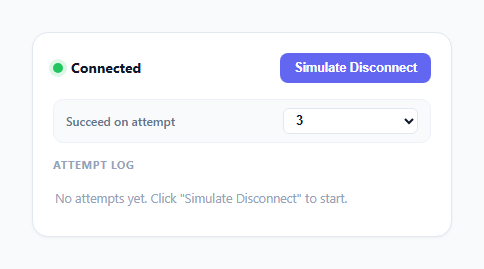
When a WebSocket drops or an API call fails, the obvious naive fix is to retry every second on a fixed timer. That works fine for one client. It falls apart the moment a server goes down and every one of its thousands of connected clients starts hammering it at the exact same fixed interval the instant it comes back up, often taking it straight back down again — a pattern with a real name, the "thundering herd" problem. This snippet visualizes the standard production fix: exponential backoff with jitter, the same strategy used by AWS SDKs, gRPC clients, and every serious WebSocket reconnection library. A status indicator, a "Simulate Disconnect" trigger, and an animated per-attempt timeline make the otherwise-invisible retry math visible in real time.
Why fixed-interval retry is actively harmful
A server that is struggling — overloaded, restarting, or behind a saturated network link — needs load to *decrease* while it recovers, not to receive a constant, unrelenting stream of retry requests from every disconnected client at once. Fixed-interval retrying does the opposite: it applies steady, undiminished pressure exactly while the system is least able to absorb it. Worse, if many clients disconnected at roughly the same moment (a deploy, a network blip, a load balancer restart), fixed intervals mean they will all retry in near-perfect sync forever, since nothing in the algorithm ever spreads them apart.
The exponential part: computeDelay()
computeDelay(attemptIndex) computes BASE_DELAY * MULTIPLIER ** attemptIndex, clamped to MAX_DELAY with Math.min. With BASE_DELAY = 1000 and MULTIPLIER = 2, the capped wait sequence is 1s, 2s, 4s, 8s, 16s, 16s, 16s… — each failure roughly doubles how long the client waits before trying again, so a genuinely down server sees retry pressure fall off rapidly instead of staying constant. The MAX_DELAY cap exists so the wait does not grow unbounded forever; without it, a client that has been retrying for an hour would end up waiting increasingly absurd amounts of time between attempts, which is just as unhelpful as retrying too often.
The jitter part: why 0-300ms of randomness matters more than the doubling
On top of the exponential base, computeDelay() adds Math.random() * JITTER_MAX milliseconds. This is the detail that actually solves the thundering herd problem — exponential backoff alone does not. If ten thousand clients disconnect from the same outage at the same second, pure exponential backoff (no jitter) means all ten thousand retry at exactly 1s, then all retry again at exactly 3s, then all at exactly 7s, forever perfectly synchronized. Adding a random jitter component spreads each client's retry moment across a window instead of a single instant, so the server sees a smoothed trickle of reconnection attempts rather than repeated synchronized spikes. The visualizer's log deliberately prints the jitter contribution on every line (e.g. "jitter 47ms") so this normally-invisible randomness is visibly proven, not just claimed — running the simulation twice never produces identical wait times.
Animating the wait without blocking the UI
Each attempt's countdown is driven by animateWait(), an async function wrapping a requestAnimationFrame loop that computes elapsed time against performance.now() and resolves its promise once the duration has passed. The main sequence function, runBackoffSequence(), is itself async and simply awaits each wait, then a short simulated "connection attempt pulse" delay, then decides the outcome — reading as a clean, linear sequence of steps despite being entirely non-blocking and interruptible at any point via the running flag.
Deciding success: random chance vs. a deterministic test control
decideOutcome() supports two modes tied to the "Succeed on attempt" dropdown. In deterministic mode, a specific attempt number is chosen up front and the sequence succeeds exactly on or after that attempt — essential for demos, screenshots, and tests where a random outcome would be unreproducible. In random mode, the success chance is deliberately *not* fixed: it grows with each attempt (0.15 + attemptIndex * 0.18, capped at 90%), simulating a server that is gradually recovering rather than one that is either permanently broken or fixed on a coin flip — a small touch that makes the random mode feel like a real outage curve rather than arbitrary noise.
Why the status dot has three states, not two
The connection indicator cycles through three distinct visual states rather than a simple connected/disconnected toggle: solid green (connected), solid red (disconnected, no attempt in flight), and pulsing amber (reconnecting, actively counting down or attempting). That middle "reconnecting" state matters because a user watching a real app benefits from knowing a retry is actively in progress versus the app having simply given up — the pulsing amber animation (a CSS opacity keyframe) is the one piece of motion that runs continuously for the whole backoff sequence, independent of the per-attempt progress bar underneath it.
Build with AI
Build, Understand, Optimize, and Extend It With AI
Paste this snippet's JS into an AI assistant like Claude and ask it to walk through exactly how computeDelay() combines the exponential term with the jitter term, and why the async/await structure in runBackoffSequence() is preferable to a chain of nested setTimeout callbacks for this kind of sequential animation. It's also worth asking whether the growing random-mode success curve models a realistic recovering server or whether a different distribution (like a fixed probability per attempt) would be more honest. Good extensions to request: a "decorrelated jitter" variant (the AWS-recommended formula that uses the previous delay as an input, not just the attempt count), a live chart plotting wait time against attempt number across a run, or wiring the sequence to a real WebSocket connection instead of a simulated outcome.
Prompt to recreate it
Copy this into your AI assistant of choice to build the effect from scratch, or as a jumping-off point for your own variant:
Build an animated exponential-backoff-with-jitter reconnection visualizer in plain HTML, CSS, and JavaScript, no libraries.

Requirements:
- A connection status indicator with three distinct visual states (connected, disconnected, reconnecting) and a "Simulate Disconnect" button that starts a reconnection sequence.
- Implement a real computeDelay(attemptIndex) function: base delay multiplied by a fixed multiplier raised to the attempt index, clamped to a maximum delay with Math.min, plus a separate random jitter component (e.g. Math.random() times a jitter cap) added on top — the jitter amount must visibly differ between runs and be displayed to the user, not just applied silently.
- Animate each attempt's wait period with a progress bar driven by requestAnimationFrame and performance.now(), not a plain CSS transition, and show a live countdown of remaining time.
- After each wait, show a brief "attempting connection" pulse, then resolve the attempt as either a failure (red, continue the backoff sequence to the next attempt) or a success (green, flip status to Connected, stop the sequence).
- Support two outcome modes: a deterministic "succeed on attempt N" test control for reproducible demos, and a random mode where success probability grows with each attempt to simulate a gradually recovering server.
- Log every attempt to a visible timeline showing the attempt number, the exact computed wait time, the jitter contribution in milliseconds, and whether it failed or succeeded.
- Structure the sequence using async/await around the animation and timeout logic rather than nested setTimeout callbacks, with a single boolean flag that can interrupt the loop cleanly on success.
Want to tighten it up first? Run this prompt through the AI Prompt Studio to score it across 8 quality dimensions, catch anti-patterns, and tune the wording for Claude, ChatGPT, or Gemini before you paste it in.
Step by step
How to Use
- 1Watch the status indicator start green ("Connected")The dot is solid green with a soft glow, matching a healthy, idle connection state.
- 2Click "Simulate Disconnect"The dot turns solid red, the status flips to "Disconnected", and after a brief pause the first reconnection attempt begins automatically.
- 3Watch attempt 1 count downThe dot pulses amber ("Reconnecting"), a progress bar fills over roughly 1 second plus a small random jitter, and the formula line beneath it shows the exact base delay, multiplier, and jitter contribution being used.
- 4Watch each subsequent attempt roughly double its waitAttempt 2 waits close to 2 seconds, attempt 3 close to 4, and so on up to the 16-second cap — each with a different random jitter amount, so no two attempts wait an identical number of milliseconds even at the same exponential step.
- 5See each attempt logged with its exact wait timeEvery attempt appends a row to the log below showing a red cross for failure or green check for success, the precise wait duration, and the jitter contribution in milliseconds.
- 6Set "Succeed on attempt" to force a deterministic outcomeChoose a specific attempt number from the dropdown to make the sequence always succeed on that attempt, or leave it on "Random chance" to see a probability that grows with each retry, simulating a gradually recovering server.
Real-world uses
Common Use Cases
Got questions?
Frequently Asked Questions
Exponential backoff alone spreads out how long a single client waits, but it does nothing to desynchronize many clients that disconnected at the same moment — without jitter, every client retries at exactly the same doubled intervals in perfect lockstep, recreating synchronized load spikes at 1s, 2s, 4s, 8s after the outage for the entire fleet simultaneously. Adding a randomized jitter component to each wait spreads those retries across a window instead of a single instant, which is what actually prevents the thundering herd, not the exponential growth by itself.
Uncapped exponential growth means a client that has been failing for a while ends up waiting minutes or hours between attempts, which is just as bad as retrying too aggressively — the user experience becomes "it will reconnect eventually, maybe," with no predictable upper bound. Capping at a reasonable ceiling like 16 or 30 seconds keeps the maximum wait bounded and predictable while still getting the benefit of rapidly decreasing retry pressure during the first several attempts.
Replace the simulated 350ms "connection attempt pulse" and the decideOutcome() function with an actual new WebSocket(url) call (or fetch()), listening for its open/error events instead of rolling dice. On error, call computeDelay(attempt), await a real setTimeout for that duration, increment attempt, and retry; on open, reset attempt to 0 and stop the loop. The animateWait() countdown and the timeline logging can stay exactly as they are, since they only visualize the delay, not the network call itself.
Yes. Move attempt, running, and the delay numbers into component state (React useState, Vue ref, or an Angular signal), and start the async runBackoffSequence() loop from a useEffect/onMounted/ngAfterViewInit triggered by the disconnect action. Because the sequence uses requestAnimationFrame and setTimeout internally, make sure the running flag is flipped to false in the component's cleanup/unmount function so a lingering countdown does not keep calling setState (or writing to a ref) after the component has already unmounted.
A fixed success probability per attempt would make the simulation feel like arbitrary noise rather than a real outage. Real recovering services tend to come back gradually as load balancers reroute traffic and instances restart, so modeling the success chance as growing with each attempt (0.15 plus 0.18 per attempt, capped at 90%) produces a more realistic-feeling curve where early attempts are likely to fail and later attempts are increasingly likely to succeed, without ever guaranteeing an exact outcome the way the deterministic dropdown does.