You Might Also Like
Learn Coding Visually
Learn to code with interactive, live-preview playgrounds — HTML, CSS, JavaScript, React & more.
 HTML Playground42 lessons · Click-based · Live preview
 CSS PlaygroundLearn CSS with a live editor
 JavaScript Playground60 lessons · DOM · Async · Canvas
 React PlaygroundLearn React with a live code editor
 GSAP PlaygroundLearn GSAP animation interactively
 SVG Playground44 lessons · shapes · paths · animation
 SCSS Playground45 lessons · Sass modules · tokens
 Tailwind PlaygroundLearn Tailwind CSS with a live editor
 Bootstrap 5 Playground50 lessons · live preview
360° Product Spin Viewer — Free HTML CSS JS Snippet
360° Product Spin Viewer · Cards · Plain HTML, CSS & JS · Live preview
What's included
Features
About this UI Snippet
360° Product Spin Viewer — Drag-Driven Frame Swapping, Pointer Events & CSS-Simulated Photography
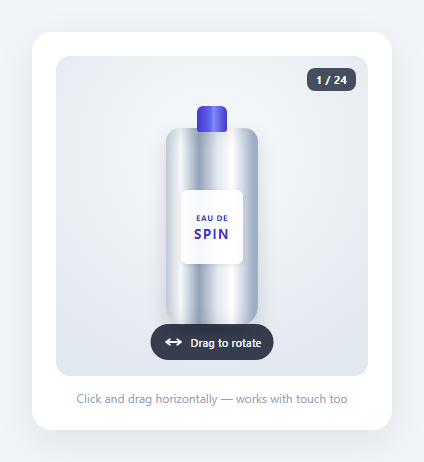
Interactive 360° product viewers let shoppers drag or swipe to "spin" a product and inspect it from every angle, a pattern popularized by e-commerce categories like footwear, watches, and cosmetics where texture, shape, and material catch matter more than a single static photo can convey. This snippet builds the full interaction — pointer-driven drag tracking, frame index calculation with wraparound, a fading first-use hint, and a live frame counter — using only CSS and vanilla JavaScript.
How real 360° viewers work
In production, a 360° viewer is backed by a sprite sequence: a product is photographed on a motorized turntable at fixed angle increments (commonly 24, 36, or 72 shots for a full rotation), producing a numbered set of images like frame-01.jpg through frame-24.jpg. The viewer preloads all frames, tracks the user's horizontal drag distance, converts that distance into a frame index using a fixed pixels-per-frame ratio, and swaps the visible <img> source (or background-image) to the corresponding frame. Because the swap happens dozens of times per second during a drag, the eye perceives continuous rotation even though it's really a fast slideshow of discrete photographs.
Faking the illusion without real photography
This demo has no product photography to work with, so it fakes the same illusion using a single CSS-shaded shape instead of 24 separate images. The .bottle-body element uses a repeating-linear-gradient with alternating light and dark bands to mimic how light rakes across a cylindrical glass surface — bright highlight, mid-tone, shadow, repeat. That gradient is rendered at background-size: 400% 100%, four times wider than the element itself, so shifting its background-position-x slides a different portion of the banded pattern into view. The JS layer computes a currentFrame value from 0–23 exactly as a real viewer would, then converts that frame index into a background-position percentage: (currentFrame / 24) * 400. The result reads convincingly as a rotating cylindrical object, even though under the hood it's one gradient sliding sideways rather than 24 discrete photos — the same trick used by CSS-only "spinning" demos before real photography is swapped in.
Pointer tracking and frame math
The interaction uses the unified Pointer Events API (pointerdown, pointermove, pointerup, pointercancel) rather than separate mouse and touch listeners, so the exact same code handles a desktop mouse drag and a mobile touch-drag without branching. On pointerdown, the stage captures the pointer via setPointerCapture() so drag tracking continues correctly even if the cursor leaves the element's bounds mid-drag, and records the starting X coordinate and starting frame. On every pointermove, the horizontal delta since the drag began is divided by a fixed PX_PER_FRAME constant (9px here) and rounded to the nearest whole frame — a smaller constant makes the spin more sensitive to short drags, a larger one requires more deliberate dragging per frame. The resulting frame index wraps around with a double modulo (((frame % 24) + 24) % 24) so dragging past frame 0 in either direction correctly loops to frame 23 or frame 1 instead of hitting a dead stop.
Hint fade and frame indicator
A small "drag to rotate" pill overlay sits at the bottom of the stage on first render, disappearing permanently the moment the user starts their first drag — implemented with a single hasInteracted boolean guard so it never reappears even if the user later releases and re-drags. A frame indicator in the corner ("1 / 24") gives the user a concrete sense of progress through the full rotation, reinforcing that this is a bounded, explorable object rather than an open-ended interaction.
Why this matters for 2026 product pages
As shoppers increasingly compare products across many tabs and rely on visual detail instead of long descriptions, drag-to-inspect viewers reduce return rates by setting accurate physical expectations before purchase. Building the interaction mechanics correctly — smooth wraparound, pointer capture, a fading hint that never annoys returning users — matters more than which rendering technique (real photos vs. CSS) drives the final frame.
Build with AI
Build, Understand, Optimize, and Extend It With AI
Paste this snippet into an AI coding assistant like Claude and ask it to explain exactly how a raw pointermove delta in pixels gets converted into a wrapping 0–23 frame index, and why the double-modulo formula is needed for correct wraparound in both drag directions. It's also a strong candidate for extension with AI help: ask it to swap the CSS-gradient illusion for a real preloaded 24-image sprite sequence with a loading spinner shown until all frames finish downloading, add momentum/inertia so releasing mid-drag continues spinning briefly before settling, or add keyboard arrow-key support so the viewer is usable without a mouse or touchscreen at all.
Prompt to recreate it
Copy this into your AI assistant of choice to build the effect from scratch, or as a jumping-off point for your own variant:
Build a drag-to-rotate 360° product viewer in plain HTML, CSS, and JavaScript, using the unified Pointer Events API so the same code handles both mouse and touch input.

Requirements:
- A fixed-size viewer stage that the user can press and horizontally drag (or touch-drag on mobile) to rotate through a bounded sequence of frames, wrapping around seamlessly at both ends (dragging past the last frame loops back to the first, and vice versa).
- Track drag state with pointerdown/pointermove/pointerup/pointercancel, capture the pointer on pointerdown via setPointerCapture so tracking stays correct even if the cursor briefly leaves the stage element mid-drag, and release capture cleanly on pointerup/pointercancel.
- Convert the running horizontal drag distance into a discrete frame index using a single tunable "pixels per frame" constant, rounding to the nearest whole frame rather than jumping continuously.
- Since there's no real product photography available, simulate the rotation illusion using pure CSS — a shaded object built from a repeating gradient or layered box-shadows whose position shifts as the computed frame index changes — but write it so the frame-swap logic is cleanly separable from the illusion technique (i.e. swapping in a real 24-image sprite sequence later should only require changing one function).
- Show a small overlay hint ("Drag to rotate") on first load that permanently fades out the moment the user starts their very first drag, and never reappears afterward even after further drags.
- Show a live frame counter (e.g. "14 / 24") that updates in real time as the user drags.
- Ensure vertical page scrolling still works normally on touch devices even while horizontal drag-to-rotate is active on the stage.
Want to tighten it up first? Run this prompt through the AI Prompt Studio to score it across 8 quality dimensions, catch anti-patterns, and tune the wording for Claude, ChatGPT, or Gemini before you paste it in.
Step by step
How to Use
- 1Drag horizontally to spinPress down anywhere on the .product-stage and drag left or right. pointerDown() records the starting X and current frame, and pointerMove() converts the running horizontal delta into a new frame via Math.round(deltaX / PX_PER_FRAME).
- 2Watch the frame indicator and hintThe top-right badge always reflects applyFrame()'s currentFrame + 1 out of TOTAL_FRAMES. The bottom "Drag to rotate" pill fades out permanently the first time markInteracted() runs, tracked by the hasInteracted flag.
- 3Swap in real product photographyReplace the repeating-linear-gradient technique with an actual sprite sequence: preload 24 images (frame-01.jpg ... frame-24.jpg), and inside applyFrame(), instead of setting background-position, set body.style.backgroundImage = "url(frame-" + String(currentFrame + 1).padStart(2, '0') + ".jpg)".
- 4Tune drag sensitivityAdjust the PX_PER_FRAME constant at the top of the JS panel. Lower values (e.g. 5) make the spin feel more responsive to short drags; higher values (e.g. 15) require more deliberate dragging per frame, useful for viewers with many more than 24 frames.
- 5Increase frame count for smoother rotationChange TOTAL_FRAMES from 24 to 36 or 72 for a smoother apparent rotation with real photography, and widen background-size proportionally (e.g. TOTAL_FRAMES * (100/6)%) if keeping the CSS-gradient fallback technique.
- 6Export and drop into a product pageClick HTML to download a standalone file, or JSX for a React component. Wrap the pointer handlers in useRef and useEffect for React so listeners attach once on mount and clean up correctly on unmount.
Real-world uses
Common Use Cases
Got questions?
Frequently Asked Questions
Most commercial viewers use 24 or 36 frames for a full rotation, which is dense enough to feel smooth during a normal-speed drag while keeping the initial image download reasonable (24 frames at ~40KB each is under 1MB). High-end viewers for jewelry or watches sometimes use 72 frames for extra-smooth close-up rotation, at the cost of a heavier initial load that usually needs lazy or progressive preloading.
The Pointer Events API (pointerdown, pointermove, pointerup, pointercancel) is supported across desktop and mobile browsers and fires for mouse, touch, and pen input through one unified event model, eliminating the need to maintain parallel mousedown/touchstart and mousemove/touchmove listeners with duplicated drag-delta logic. setPointerCapture() is also only available through this API, and is what keeps drag tracking correct if the pointer briefly leaves the stage element mid-drag.
Preload 24 (or however many) numbered images, then inside applyFrame() replace the background-position calculation with body.style.backgroundImage = url(frame-${String(currentFrame + 1).padStart(2, "0")}.jpg). Preload every frame on mount (new Image().src = url for each) so there is no flicker on the first few drags while images are still downloading.
The hasInteracted boolean flag is checked at the top of markInteracted() and only lets the fade-out class get added the very first time the user starts a drag; every subsequent pointerdown short-circuits immediately. This mirrors real product viewers, which show the rotate hint on first page load only — repeatedly showing it after every drag would be a distracting, non-calm interruption for a user who has already learned the interaction.
Yes — add a pinch-to-zoom or scroll-wheel listener that scales the .bottle element via CSS transform: scale(), independent of the drag-to-rotate logic which only ever touches background-position or backgroundImage. Keep the two interactions on separate event listeners (wheel for zoom, pointer drag for rotation) so they don't interfere with each other's gesture detection.