Source Code
<footer class="nl-footer">
  <div class="nl-top">
    <div class="nl-copy">
      <span class="nl-brand">Fictional Co.</span>
      <p>Product updates and engineering notes, twice a month. No spam.</p>
    </div>

    <form class="nl-form" id="nlForm" novalidate>
      <div class="nl-input-row">
        <input type="email" id="nlEmail" placeholder="you@company.com" aria-label="Email address" />
        <button type="submit" id="nlSubmit">Subscribe</button>
      </div>
      <p class="nl-msg" id="nlMsg" role="status" aria-live="polite"></p>
    </form>
  </div>

  <div class="nl-cols">
    <div class="nl-col">
      <span class="nl-col-title">Product</span>
      <a href="#">Features</a>
      <a href="#">Pricing</a>
      <a href="#">Changelog</a>
    </div>
    <div class="nl-col">
      <span class="nl-col-title">Company</span>
      <a href="#">About</a>
      <a href="#">Careers</a>
      <a href="#">Blog</a>
    </div>
    <div class="nl-col">
      <span class="nl-col-title">Legal</span>
      <a href="#">Privacy</a>
      <a href="#">Terms</a>
    </div>
  </div>

  <div class="nl-bottom">© 2026 Fictional Co. All rights reserved.</div>
</footer>
* { box-sizing: border-box; margin: 0; padding: 0; }
body { font-family: system-ui, sans-serif; background: #f8fafc; padding: 24px; }
.nl-footer { max-width: 720px; margin: 0 auto; background: #0f172a; border-radius: 18px; padding: 32px 28px 20px; display: flex; flex-direction: column; gap: 28px; }
.nl-top { display: flex; justify-content: space-between; gap: 30px; flex-wrap: wrap; padding-bottom: 24px; border-bottom: 1px solid rgba(255,255,255,0.08); }
.nl-copy { max-width: 280px; }
.nl-brand { font-size: 15px; font-weight: 800; color: #fff; }
.nl-copy p { font-size: 12.5px; color: #94a3b8; margin-top: 6px; line-height: 1.6; }
.nl-form { display: flex; flex-direction: column; gap: 6px; width: 320px; max-width: 100%; }
.nl-input-row { display: flex; gap: 8px; }
.nl-input-row input { flex: 1; padding: 10px 13px; border-radius: 9px; border: 1.5px solid rgba(255,255,255,0.12); background: rgba(255,255,255,0.06); color: #f1f5f9; font-size: 13px; font-family: inherit; }
.nl-input-row input::placeholder { color: #64748b; }
.nl-input-row input:focus-visible { outline: none; border-color: #6366f1; box-shadow: 0 0 0 3px rgba(99,102,241,0.25); }
.nl-input-row input.invalid { border-color: #f87171; }
.nl-input-row button { background: #6366f1; color: #fff; border: none; padding: 10px 18px; border-radius: 9px; font-size: 12.5px; font-weight: 700; cursor: pointer; font-family: inherit; white-space: nowrap; transition: background 0.15s, opacity 0.15s; }
.nl-input-row button:hover:not(:disabled) { background: #4f46e5; }
.nl-input-row button:disabled { opacity: 0.6; cursor: not-allowed; }
.nl-msg { font-size: 11.5px; font-weight: 600; color: #f87171; min-height: 14px; }
.nl-msg.success { color: #34d399; }
.nl-cols { display: flex; gap: 60px; flex-wrap: wrap; }
.nl-col { display: flex; flex-direction: column; gap: 9px; }
.nl-col-title { font-size: 10.5px; font-weight: 800; text-transform: uppercase; letter-spacing: 0.04em; color: #64748b; margin-bottom: 3px; }
.nl-col a { font-size: 12.5px; color: #94a3b8; text-decoration: none; }
.nl-col a:hover { color: #f1f5f9; }
.nl-bottom { font-size: 11px; color: #64748b; padding-top: 18px; border-top: 1px solid rgba(255,255,255,0.08); }const form = document.getElementById('nlForm');
const emailInput = document.getElementById('nlEmail');
const submitBtn = document.getElementById('nlSubmit');
const msgEl = document.getElementById('nlMsg');
const subscribed = new Set(); // tracks emails already "subscribed" this session
const EMAIL_RE = /^[^\s@]+@[^\s@]+\.[^\s@]+$/;
function setMsg(text, kind) {
msgEl.textContent = text;
msgEl.className = 'nl-msg' + (kind ? ' ' + kind : '');
}
function fakeSubscribe(email) {
return new Promise((resolve) => setTimeout(resolve, 600 + Math.random() * 400));
}
form.addEventListener('submit', async (e) => {
e.preventDefault();
const email = emailInput.value.trim();
if (!EMAIL_RE.test(email)) {
emailInput.classList.add('invalid');
setMsg('Enter a valid email address.', null);
emailInput.focus();
return;
}
if (subscribed.has(email.toLowerCase())) {
emailInput.classList.remove('invalid');
setMsg('That email is already subscribed.', null);
return;
}
emailInput.classList.remove('invalid');
submitBtn.disabled = true;
submitBtn.textContent = 'Subscribing…';
setMsg('', null);
await fakeSubscribe(email);
subscribed.add(email.toLowerCase());
submitBtn.disabled = false;
submitBtn.textContent = 'Subscribe';
setMsg(`Subscribed ${email} — check your inbox to confirm.`, 'success');
emailInput.value = '';
});
emailInput.addEventListener('input', () => {
if (emailInput.classList.contains('invalid')) {
emailInput.classList.remove('invalid');
setMsg('', null);
}
});Learn Coding Visually
Learn to code with interactive, live-preview playgrounds — HTML, CSS, JavaScript, React & more.
 HTML Playground42 lessons · Click-based · Live preview
 CSS PlaygroundLearn CSS with a live editor
 JavaScript Playground60 lessons · DOM · Async · Canvas
 React PlaygroundLearn React with a live code editor
 GSAP PlaygroundLearn GSAP animation interactively
 SVG Playground44 lessons · shapes · paths · animation
 SCSS Playground45 lessons · Sass modules · tokens
 Tailwind PlaygroundLearn Tailwind CSS with a live editor
 Bootstrap 5 Playground50 lessons · live preview
Newsletter Subscribe Footer — Real Email Validation and Duplicate Prevention
Newsletter Subscribe Footer with Validation · Footers · Plain HTML, CSS & JS · Live preview
What's included
Features
About this UI Snippet
Newsletter Subscribe Footer — Validation That Actually Runs
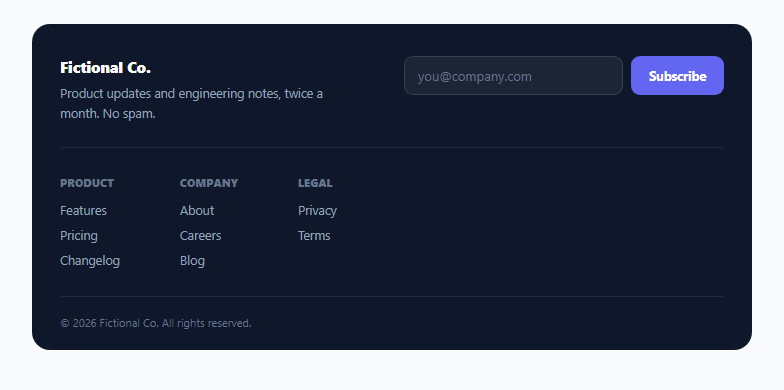
A footer newsletter form is one of the most common components on the web, and also one of the most frequently implemented as pure decoration — an input and a button with no actual validation behind them. This version implements the real behavior a signup form needs: format validation before submission, duplicate-subscription detection, and a genuine loading state around the (simulated) network request.
Validation runs before any request is attempted
The submit handler tests the trimmed email value against EMAIL_RE — a standard local-part@domain.tld pattern — *before* doing anything else. An invalid email never reaches the simulated subscribe call at all; it immediately gets an .invalid border style and an explicit error message, with focus returned to the input so the user can correct it right away without hunting for what went wrong.
Duplicate prevention uses a real Set, checked case-insensitively
Every successfully subscribed email is added to a Set (subscribed), keyed by its lowercased form — subscribed.add(email.toLowerCase()). Before accepting a new submission, the handler checks subscribed.has(email.toLowerCase()) first, so Person@Example.com and person@example.com are correctly treated as the same address rather than allowing a technically-different-cased duplicate through. A Set gives O(1) lookup regardless of how many emails have been collected in the session, rather than scanning an array on every submission.
The submit button reflects a real in-flight request, not an instant fake success
fakeSubscribe() returns a Promise that resolves after a randomized delay (600–1000ms), and the button is disabled with its text changed to "Subscribing…" for that entire duration — modeling a genuine network round-trip rather than resolving instantly, which is what most decorative newsletter forms actually do (or don't even bother simulating at all).
Clearing the error state as the user starts fixing it
A separate input listener removes the .invalid class and clears the error message the moment the user starts typing again, rather than leaving the red error styling in place until the next submit attempt — a small but meaningful detail that keeps the form feeling responsive to correction rather than punitive.
Why this matters even for "just a footer form"
A newsletter signup is often a visitor's very last interaction with a page before leaving — a form that silently accepts garbage input, or gives no feedback about whether a submission actually worked, either fails silently (bad data reaching whatever backend is behind it) or leaves the visitor uncertain whether anything happened at all. Real validation and real submission feedback cost little extra code and meaningfully improve both outcomes.
Build with AI
Build, Understand, Optimize, and Extend It With AI
Ask an AI assistant to explain why case-insensitive duplicate detection matters for email addresses specifically, and to discuss what additional server-side validation (beyond this client-side format check) a real newsletter signup would still need, such as double opt-in confirmation. It's also worth asking for a version that also checks for common typo domains (like "gmial.com") and suggests a correction, or one that integrates with a specific newsletter provider's API (Mailchimp, ConvertKit, etc.) using their real endpoint contract.
Prompt to recreate it
Copy this into your AI assistant of choice to build the effect from scratch, or as a jumping-off point for your own variant:
Build a site footer with an embedded newsletter signup form in HTML, CSS and vanilla JavaScript, with real client-side validation and duplicate prevention — no external libraries.

Requirements:
- A footer with a newsletter signup section (email input plus subscribe button) alongside a standard multi-column link footer (e.g. Product, Company, Legal columns) and a copyright line.
- On submit, validate the entered email against a proper email-format regular expression before doing anything else; if invalid, prevent submission, show a clear inline error message, apply an error style to the input, and move keyboard focus to it — do not attempt any request for an invalid email.
- Track successfully subscribed emails in a case-insensitive way (e.g. using a Set of lowercased addresses) and detect and reject a duplicate resubmission of an already-subscribed email with a distinct message, without re-submitting.
- Simulate an async subscribe request using a Promise that resolves after a randomized realistic delay; while it's pending, disable the submit button and change its text to reflect the in-flight state, then restore it and show a success message (including the subscribed email) once it resolves, clearing the input.
- Automatically clear any error styling and error message as soon as the user starts typing again after a failed validation attempt.
- Use an accessible live region for the status message so both errors and success confirmations are announced to screen reader users.
Want to tighten it up first? Run this prompt through the AI Prompt Studio to score it across 8 quality dimensions, catch anti-patterns, and tune the wording for Claude, ChatGPT, or Gemini before you paste it in.
Step by step
How to Use
- 1Try submitting an invalid emailThe input gets a red border and an inline error message, with focus returned to it — no request is attempted.
- 2Submit a valid emailThe button shows "Subscribing…" for a moment (simulating a real request), then confirms success and clears the field.
- 3Submit the same email againThe form detects the duplicate (case-insensitively) and shows a distinct "already subscribed" message without re-submitting.
- 4Replace fakeSubscribe with a real API callSwap the setTimeout simulation for an actual fetch() call to your newsletter provider's API, keeping the same async/await structure.
- 5Adjust the footer columns and copyEdit the .nl-cols links and .nl-copy text in the HTML panel to match your own site's footer content.
Real-world uses
Common Use Cases
Got questions?
Frequently Asked Questions
Yes — the submitted value is tested against an email-format regular expression before the simulated subscribe request is even called; an invalid email is rejected immediately client-side with no request attempted at all.
Every successfully subscribed email is stored in a Set, keyed by its lowercased form. Before accepting a new submission, the handler checks whether that lowercased email already exists in the Set, so different capitalizations of the same address are correctly treated as duplicates.
The simulated subscribe function resolves after a randomized 600–1000ms delay, modeling a genuine network request round-trip, and the button is disabled with updated text for that entire duration — giving accurate feedback rather than an instant fake confirmation.
An input event listener removes the error styling and clears the error message as soon as the user begins editing the field again, rather than leaving the red error state in place until the next submit attempt.
No — it's an in-memory Set that only persists for the current page session, purely to demonstrate duplicate detection in this demo. A real implementation would check for duplicates against your actual email service provider's subscriber list server-side.
Yes — the message element has role="status" aria-live="polite", so both validation errors and success confirmations are announced automatically without requiring the user to navigate to find them.