You Might Also Like
Learn Coding Visually
Learn to code with interactive, live-preview playgrounds — HTML, CSS, JavaScript, React & more.
 HTML Playground42 lessons · Click-based · Live preview
 CSS PlaygroundLearn CSS with a live editor
 JavaScript Playground60 lessons · DOM · Async · Canvas
 React PlaygroundLearn React with a live code editor
 GSAP PlaygroundLearn GSAP animation interactively
 SVG Playground44 lessons · shapes · paths · animation
 SCSS Playground45 lessons · Sass modules · tokens
 Tailwind PlaygroundLearn Tailwind CSS with a live editor
 Bootstrap 5 Playground50 lessons · live preview
Multi-Stage Loading Checklist — Sequenced Step-by-Step Loader
Multi-Stage Loading Checklist · Loaders · Plain HTML, CSS & JS · Live preview
What's included
Features
About this UI Snippet
Multi-Stage Loading Checklist — A Sequenced, Text-Based Setup Tracker
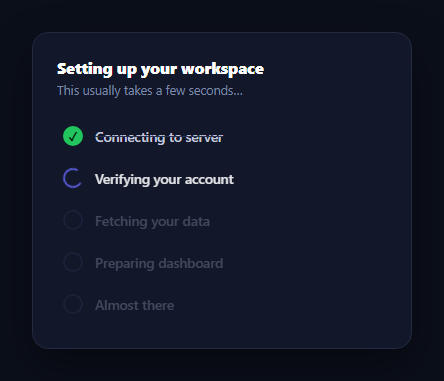
Most loaders show a single spinner and leave the user guessing what's actually happening. A multi-stage checklist instead names each real step of a setup process — "Connecting to server", "Verifying your account", "Fetching your data" — and completes them one at a time in front of the user, so waiting feels like watching real progress rather than staring at an opaque spin. This snippet builds that pattern in plain HTML, CSS, and vanilla JavaScript, with the sequencing driven by real, staggered setTimeout calls rather than a CSS animation that fakes the timing.
A list, not a circle or a bar
Unlike a circular step tracker such as progress circle steps, which shows abstract numbered nodes, this pattern is a literal vertical checklist of labelled tasks — closer to what a CLI installer or a CI pipeline log shows. Each .cl-item renders its own icon and text, and only the active and completed items are fully opaque; upcoming steps sit dimmed at 40% opacity so the eye is drawn to what's happening right now.
Three icon states from one element
The icon is a single 20px circle whose appearance is entirely class-driven: idle is a muted ring, active adds a spinning border with one transparent edge (the classic CSS spinner trick, borrowed conceptually from a much larger loading overlay spinner but shrunk to list-item scale), and done fills the circle green with a ::after checkmark. No icon library or SVG is needed — every state is CSS.
Real sequencing, not synchronized CSS delays
The core of this snippet is runChecklist(), which walks a DURATIONS array of different times per step and schedules two setTimeout calls per item: one to mark it active once every prior step's duration has elapsed, and one to mark it done after its own duration passes. Because the durations are irregular (900ms, 1300ms, 1100ms…) rather than one repeating interval, the checklist advances at a pace that reads as genuine work being tracked, not a looping animation. In a real app you would swap these fixed timeouts for actual completion signals — resolve each promise, fire each item's "done" state from its corresponding async call.
A finished, replayable state
Once the last item completes, the subtitle updates to a completion message and a Replay button appears, letting you re-trigger the entire sequence from a clean state — useful for demoing the effect repeatedly, and a direct model for a "session expired, reconnecting…" re-run in production.
Wiring it to real async work
Replace each step's timeout with the promise or callback that actually represents that step: call markDone(i) inside a .then() for step "Connecting to server" fed by your actual connection check, and so on. The active/done class toggling and CSS stay identical — only the trigger source changes. Pair it with a loading overlay for the surrounding page chrome or an ai thinking loader for a single-stage AI wait.
Build with AI
Build, Understand, Optimize, and Extend It With AI
Paste this snippet's HTML, CSS, and JS into an AI coding assistant like Claude and ask it to trace exactly how runChecklist schedules two setTimeout calls per item — one to flip on is-active once every earlier step's duration has elapsed, one to flip on is-done after its own duration — and why using irregular per-step durations rather than one repeating interval is what makes the sequence read as real progress instead of a looping animation. It's worth a design check too: ask whether dimming upcoming steps to 40% opacity is the right amount of visual hierarchy, or whether the active step's spinner should also get a subtle background highlight. For extending it, ask for a version that adds an error state mid-sequence with a per-step retry action, wires each step to a real fetch or promise instead of a timer, or persists progress across a page reload so a long setup can resume where it left off. Treat the code less like a finished artifact and more like a starting point for a conversation.
Prompt to recreate it
Copy this into your AI assistant of choice to build the effect from scratch, or as a jumping-off point for your own variant:
Build a "multi-stage loading checklist" in plain HTML, CSS, and JavaScript — a literal list of named setup steps that complete one at a time via real timers, not decorative CSS.

Requirements:
- A vertical list of at least five list items, each with a circular status icon and a text label describing a real setup step (e.g. "Connecting to server", "Verifying your account", "Fetching your data").
- Each item must support three distinct states driven purely by CSS classes on the icon: an idle/upcoming muted ring state, an active state showing a CSS-only spinning border (no SVG or image), and a done state showing a filled circle with a checkmark rendered via a pseudo-element.
- Upcoming (not yet reached) items must be visually de-emphasized (e.g. reduced opacity) so the current and completed steps stand out.
- Drive the sequencing with a JavaScript array of different duration values per step (not one uniform repeating interval), and for each step schedule one timeout that marks it active once all prior steps' durations have elapsed, and a second timeout that marks it done after that step's own duration passes — so steps visibly complete one after another at realistic, non-uniform intervals, never all at once.
- When the final step completes, update a subtitle/status message to a completion state and reveal a "Replay" button that resets every item's classes and re-runs the entire sequence from the beginning.
- Structure the code so a real implementation could replace each step's timeout with an actual promise resolution or callback from a real async operation, without changing the class-toggling logic.
Want to tighten it up first? Run this prompt through the AI Prompt Studio to score it across 8 quality dimensions, catch anti-patterns, and tune the wording for Claude, ChatGPT, or Gemini before you paste it in.
Step by step
How to Use
- 1Paste HTML, CSS, and JSA five-step checklist renders and begins running automatically.
- 2Watch the stages advanceEach step spins while active, then turns into a green checkmark, one at a time.
- 3Reach the endThe subtitle updates and a Replay button appears.
- 4Click ReplayThe whole sequence resets and runs again from the first step.
- 5Edit the durationsChange the DURATIONS array to match your real steps' typical timing.
- 6Wire real async workReplace each step's timeout with the promise or event that represents it.
Real-world uses
Common Use Cases
Got questions?
Frequently Asked Questions
Progress circle steps shows abstract numbered nodes connected by a line, suited to a wizard the user navigates. This checklist is a literal vertical list of named tasks that complete on their own, unattended, suited to a setup or loading sequence the user simply watches rather than steps through manually.
runChecklist walks a DURATIONS array and schedules two setTimeout calls per step: one that marks it active once every prior duration has elapsed, and one that marks it done after its own duration passes. Because the durations differ per step, the sequence advances irregularly, the way real setup tasks actually would, rather than ticking on one uniform interval.
Replace each step's timeout with the actual promise or event it represents — call the function that adds is-active when a request starts and the one that adds is-done in its .then() or callback. Keep the same class toggling; only the trigger source changes from a timer to a real completion signal.
Add an is-error class alongside is-active and is-done (the CSS already includes a red error icon state) and switch a step to it instead of is-done when its underlying operation rejects. You can then show a retry action, similar in spirit to the loading state with retry on error pattern, scoped to just that one step.
Hold the current step index (or a per-step status map) in state and derive each item's class from it, exactly like runChecklist. Trigger transitions from real async effects instead of setTimeout — an effect per step, or a reducer driven by your actual setup calls. The CSS icon states port unchanged.