Source Code
<div class="demo">
  <div class="debug-toolbar">
    <button class="debug-toggle" id="debugToggle">Show tab order</button>
    <span class="debug-hint">Numbers appear in real DOM tab order, including a deliberately mis-ordered tabindex to demonstrate the problem this tool catches.</span>
  </div>

  <form class="sample-form" id="sampleForm">
    <div class="f-row">
      <label for="fFirst">First name</label>
      <input id="fFirst" type="text" tabindex="0" />
    </div>
    <div class="f-row">
      <label for="fLast">Last name</label>
      <input id="fLast" type="text" tabindex="3" />
    </div>
    <div class="f-row">
      <label for="fEmail">Email</label>
      <input id="fEmail" type="email" tabindex="2" />
    </div>
    <div class="f-row">
      <label for="fCountry">Country</label>
      <select id="fCountry" tabindex="0"><option>United States</option><option>Canada</option></select>
    </div>
    <div class="f-actions">
      <button type="button" class="btn ghost" tabindex="0">Cancel</button>
      <button type="submit" class="btn primary" tabindex="0">Submit</button>
    </div>
  </form>
</div>
* { box-sizing: border-box; margin: 0; padding: 0; }
body { font-family: system-ui, sans-serif; background: #f8fafc; display: flex; align-items: center; justify-content: center; min-height: 100vh; padding: 24px; }
.demo { width: 380px; max-width: 100%; display: flex; flex-direction: column; gap: 14px; }
.debug-toolbar { display: flex; flex-direction: column; gap: 6px; }
.debug-toggle { align-self: flex-start; padding: 8px 16px; border: none; border-radius: 9px; background: #4f46e5; color: #fff; font-size: 12.5px; font-weight: 700; cursor: pointer; font-family: inherit; }
.debug-toggle:hover { background: #4338ca; }
.debug-toggle.active { background: #0f172a; }
.debug-hint { font-size: 11px; color: #94a3b8; line-height: 1.5; }
.sample-form { background: #fff; border: 1px solid #e2e8f0; border-radius: 16px; padding: 20px; display: flex; flex-direction: column; gap: 12px; position: relative; }
.f-row { display: flex; flex-direction: column; gap: 5px; position: relative; }
.f-row label { font-size: 12px; font-weight: 700; color: #334155; }
.f-row input, .f-row select { padding: 9px 11px; border: 1.5px solid #e2e8f0; border-radius: 9px; font-size: 13px; font-family: inherit; }
.f-actions { display: flex; gap: 10px; margin-top: 4px; position: relative; }
.btn { flex: 1; border: none; padding: 10px; border-radius: 9px; font-size: 13px; font-weight: 700; cursor: pointer; font-family: inherit; position: relative; }
.btn.ghost { background: #f1f5f9; color: #334155; }
.btn.primary { background: #4f46e5; color: #fff; }
/* The numbered badge is positioned relative to each focusable element's own
containing block, so it stays visually pinned to the control it labels
regardless of the form's own layout. */
.focus-order-badge { position: absolute; top: -9px; left: -9px; width: 20px; height: 20px; border-radius: 50%; background: #ef4444; color: #fff; font-size: 10.5px; font-weight: 800; display: flex; align-items: center; justify-content: center; z-index: 30; box-shadow: 0 2px 6px rgba(239,68,68,0.4); pointer-events: none; }
.focus-order-badge.sequential { background: #10b981; box-shadow: 0 2px 6px rgba(16,185,129,0.4); }const toggleBtn = document.getElementById('debugToggle');
const form = document.getElementById('sampleForm');
const FOCUSABLE_SELECTOR = 'a[href], button:not([disabled]), input:not([disabled]), select:not([disabled]), textarea:not([disabled]), [tabindex]';
let active = false;
let badges = [];
// The actual keyboard tab order is NOT simply "document order" whenever any
// positive tabindex is present — elements with a positive tabindex are
// visited first, in ascending numeric order, BEFORE any tabindex="0" or
// tabindex-less element, which are then visited in plain document order.
// This function reconstructs that real order rather than assuming DOM order.
function computeRealTabOrder() {
const elements = Array.from(form.querySelectorAll(FOCUSABLE_SELECTOR));
const withPositiveTabindex = elements
.filter((el) => parseInt(el.getAttribute('tabindex') || '0', 10) > 0)
.sort((a, b) => parseInt(a.getAttribute('tabindex'), 10) - parseInt(b.getAttribute('tabindex'), 10));
const documentOrder = elements.filter((el) => parseInt(el.getAttribute('tabindex') || '0', 10) <= 0);
return [...withPositiveTabindex, ...documentOrder];
}
function showOverlay() {
const order = computeRealTabOrder();
const domOrder = Array.from(form.querySelectorAll(FOCUSABLE_SELECTOR));
order.forEach((el, index) => {
const badge = document.createElement('span');
badge.className = 'focus-order-badge';
badge.textContent = String(index + 1);
// Green badge means this element's real tab-order position matches its
// plain DOM position — red means a positive tabindex has pulled it out
// of sequence, which is exactly the kind of surprising, hard-to-spot
// ordering bug this tool exists to surface visually.
const domIndex = domOrder.indexOf(el);
if (domIndex === index) badge.classList.add('sequential');
const container = el.closest('.f-row') || el.parentElement;
container.style.position = container.style.position || 'relative';
container.appendChild(badge);
badges.push(badge);
});
}
function hideOverlay() {
badges.forEach((b) => b.remove());
badges = [];
}
toggleBtn.addEventListener('click', () => {
active = !active;
toggleBtn.classList.toggle('active', active);
toggleBtn.textContent = active ? 'Hide tab order' : 'Show tab order';
if (active) showOverlay(); else hideOverlay();
});Learn Coding Visually
Learn to code with interactive, live-preview playgrounds — HTML, CSS, JavaScript, React & more.
 HTML Playground42 lessons · Click-based · Live preview
 CSS PlaygroundLearn CSS with a live editor
 JavaScript Playground60 lessons · DOM · Async · Canvas
 React PlaygroundLearn React with a live code editor
 GSAP PlaygroundLearn GSAP animation interactively
 SVG Playground44 lessons · shapes · paths · animation
 SCSS Playground45 lessons · Sass modules · tokens
 Tailwind PlaygroundLearn Tailwind CSS with a live editor
 Bootstrap 5 Playground50 lessons · live preview
Keyboard Focus Order Debugger — Visual Overlay Showing the REAL Tab Order
Keyboard Focus Order Debugger — Numbered Tab-Order Overlay · Dashboards · Plain HTML, CSS & JS · Live preview
What's included
Features
About this UI Snippet
Focus Order Debugger — Visualizing the Tab Order Browsers Actually Use
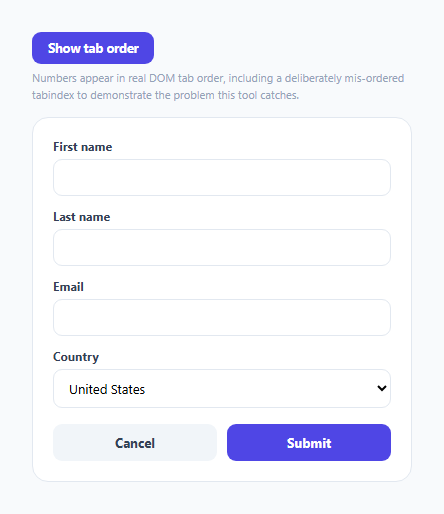
A form's visual layout and its keyboard tab order are *usually* the same sequence, but not always — and the moment they diverge, keyboard users experience a genuinely disorienting bug that's nearly invisible to a developer testing only with a mouse. This snippet builds a small diagnostic overlay that computes and numbers the browser's *actual* tab order, not an assumption based on how the markup is written top to bottom.
The tab order algorithm most developers get wrong
The browser's real keyboard tab order isn't simply "DOM document order." Any element with a positive tabindex value (tabindex="1", tabindex="2", etc.) is visited *first*, in ascending numeric order — before *any* element with tabindex="0" or no tabindex attribute at all, which are then visited in plain document order among themselves. computeRealTabOrder() reproduces this exact two-phase algorithm: it filters out and sorts every positive-tabindex element numerically first, then appends every remaining element in its natural document order — which is the actual spec-defined behavior, not a simplification of it.
Why the demo form deliberately includes a "wrong" tabindex
The last name field in the sample form has tabindex="3" while the email field below it has tabindex="2" — meaning a keyboard user tabbing through the form actually lands on email *before* last name, even though last name appears visually first. This is exactly the kind of bug that's easy to introduce accidentally (often from copy-pasted markup, or tabindex values added defensively without a full audit) and is invisible unless someone is specifically testing with a keyboard.
Red versus green badges — comparing the two orderings directly
For every focusable element, the code compares its position in the *real* computed tab order against its position in *plain DOM order* — if they match, the badge renders green ("this element's tab position matches where it visually and structurally sits"); if they differ, it renders red ("a positive tabindex has pulled this element out of its natural sequence"). This turns an abstract ordering bug into an immediately obvious visual signal, without a developer needing to manually trace through tabindex values by hand.
Badges are positioned per-element, not as one absolute overlay
Rather than computing one absolute-positioned layer that has to track every element's coordinates and stay in sync during resize or reflow, each numbered badge is appended directly into its target element's own containing .f-row (with position: relative ensured on that container), positioned with a small negative offset. This means the badges inherit the form's own natural layout and reflow behavior for free — no manual coordinate tracking or resize-listener bookkeeping required.
Build with AI
Build, Understand, Optimize, and Extend It With AI
Ask an AI assistant to walk through the browser's actual two-phase tab-order algorithm in detail — why positive tabindex values are visited first and in what order — and to explain why this makes positive tabindex values broadly discouraged in accessibility best practices. It's also worth asking for a version that also flags elements that are focusable but visually hidden (a separate, equally real accessibility bug), or one that overlays the whole page rather than a single container, dynamically re-scanning as the DOM changes.
Prompt to recreate it
Copy this into your AI assistant of choice to build the effect from scratch, or as a jumping-off point for your own variant:
Build a keyboard focus-order debugging overlay in HTML, CSS, and vanilla JavaScript — no external library.

Requirements:
- A sample form with at least five focusable elements (inputs, a select, and buttons), where at least one element has an explicit positive tabindex value that is deliberately out of sequence relative to where it appears in the markup, specifically to demonstrate the bug this tool should catch.
- A toggle button that, when activated, computes the ACTUAL browser keyboard tab order — correctly implementing the real two-phase algorithm: every element with a positive tabindex value visited first in ascending numeric order, followed by every tabindex="0" or tabindex-less element in plain document order — rather than assuming tab order simply matches document order.
- Render a small numbered badge on every focusable element showing its position in that real computed tab order.
- For each element, separately compare its position in the real tab order against its position in plain DOM order, and give badges a distinctly different color (e.g. red vs. green) depending on whether those two positions match or differ, so a developer can immediately spot which specific elements have been pulled out of natural sequence by a tabindex value.
- Position each badge relative to its own target element's layout (not as one separately-tracked absolute overlay), so it stays correctly placed without needing manual coordinate tracking.
- Toggling the debugger off must fully remove every badge it created, leaving no leftover DOM elements behind.
Want to tighten it up first? Run this prompt through the AI Prompt Studio to score it across 8 quality dimensions, catch anti-patterns, and tune the wording for Claude, ChatGPT, or Gemini before you paste it in.
Step by step
How to Use
- 1Click "Show tab order"Numbered badges appear on every focusable element in the form, reflecting the browser's actual keyboard tab sequence — not just their visual top-to-bottom order.
- 2Look for red badgesA red badge means that element's real tab-order position differs from its plain DOM position — usually caused by a positive tabindex value pulling it out of sequence.
- 3Tab through the form manually to confirmClick the first field, then press Tab repeatedly — the order you land on fields in matches exactly the numbers shown by the overlay.
- 4Fix a flagged elementRemove its explicit positive tabindex (or set it to "0") so it participates in natural document order instead of being artificially reordered.
- 5Click "Hide tab order"Removes all badges cleanly, since each one was tracked in an array specifically so it could be fully cleaned up later.
Real-world uses
Common Use Cases
Got questions?
Frequently Asked Questions
No — any element with a positive tabindex value is visited first, in ascending numeric order, before any tabindex="0" or tabindex-less element (which are then visited in plain document order). This two-phase algorithm is exactly what computeRealTabOrder() reproduces, rather than assuming DOM order is always correct.
It's deliberately included to demonstrate the bug this tool is designed to catch — the last name field (tabindex="3") appears visually before the email field (tabindex="2"), but a keyboard user actually tabs to email first, which the red badge on last name makes immediately visible.
It means that element's position in the real, browser-computed tab order differs from its position in plain document order — almost always because a positive tabindex value has pulled it earlier or later than where it naturally sits in the markup.
Remove its positive tabindex attribute entirely, or change it to tabindex="0" — either lets the element participate in natural document-order tabbing instead of being artificially prioritized ahead of (or pushed behind) elements around it.
Appending each badge directly into its target's own container lets it inherit that container's natural layout and reflow automatically — no need to track element coordinates manually or recompute positions on window resize, which a single absolute-overlay approach would require.
Yes — FOCUSABLE_SELECTOR matches any standard focusable element (links, buttons, inputs, selects, textareas, and anything with an explicit tabindex), so the same logic works on any container, not just a <form>.