You Might Also Like
Learn Coding Visually
Learn to code with interactive, live-preview playgrounds — HTML, CSS, JavaScript, React & more.
 HTML Playground42 lessons · Click-based · Live preview
 CSS PlaygroundLearn CSS with a live editor
 JavaScript Playground60 lessons · DOM · Async · Canvas
 React PlaygroundLearn React with a live code editor
 GSAP PlaygroundLearn GSAP animation interactively
 SVG Playground44 lessons · shapes · paths · animation
 SCSS Playground45 lessons · Sass modules · tokens
 Tailwind PlaygroundLearn Tailwind CSS with a live editor
 Bootstrap 5 Playground50 lessons · live preview
Hotel Room Type Picker — Free Radio-Card Selector With Total
Hotel Room Type Picker · Cards · Plain HTML, CSS & JS · Live preview
What's included
Features
About this UI Snippet
Hotel Room Type Picker — Radio Cards With a Live Nightly Total
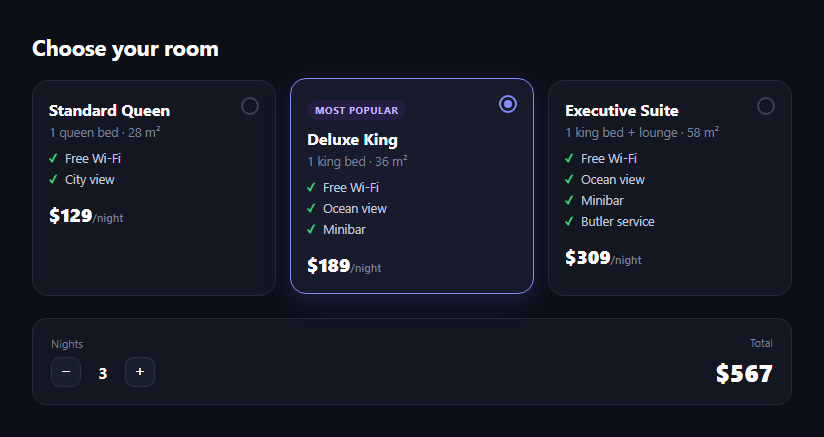
The hotel room type picker is the card-based room selector booking sites use in place of a plain dropdown — Standard, Deluxe, Suite, each showing its bed configuration, size, amenities, and price per night, with the whole card clickable and a nights stepper that recalculates a running total live. This snippet builds it in plain HTML, CSS, and JavaScript.
Radio inputs disguised as cards
Each card is a <label> wrapping a visually hidden <input type="radio"> and a styled .hrp-card-inner. Because the input and its sibling div share a parent label, clicking anywhere on the card toggles the radio, and the input:checked + .hrp-card-inner sibling selector drives the entire selected look — border color, background tint, lift, and a filled radio dot — with zero JavaScript for the visual state.
Real radiogroup semantics
The cards keep native <input type="radio" name="hrpRoom"> elements grouped by name, wrapped in a role="radiogroup" container. That means keyboard users get free arrow-key navigation between options and screen readers announce them as a proper radio group — the styling is a skin over standard form semantics, not a replacement for them.
Price per room, on the input itself
Each radio input carries a data-price attribute holding that room's nightly rate. The total calculation reads whichever input is currently :checked and multiplies its data-price by the nights count — so adding a fourth room tier is just adding another labeled card with its own data-price, no JS changes required.
A nights stepper wired to the same total
Two buttons increment and decrement a nights counter, clamped between 1 and 14, disabling at each bound. Both the radio change event and the stepper buttons call the same updateTotal() function, so switching rooms or nights always keeps the total in sync from a single source of truth.
A popular-choice badge
The Deluxe card carries a small "Most popular" badge — a common booking-site nudge — built as plain inline markup rather than a script-driven recommendation, easy to move to whichever card should be highlighted.
Customizing it
Add a taxes-and-fees line, a "sold out" disabled state for a room type, or swap the stepper for a date-range picker that derives nights automatically. Pair it with a property listing card, checkout form, or radio card group for other selection patterns.
Build with AI
Build, Understand, Optimize, and Extend It With AI
Rather than reverse-engineering the selection styling on your own, paste this snippet's HTML, CSS, and JS into an AI coding assistant like Claude and ask it to explain how wrapping a hidden radio input and a styled div in the same label, combined with the input:checked + .hrp-card-inner sibling selector, produces a fully clickable, accessible card without any JavaScript for the visual state. It's also useful for extending the pattern — ask it to add a "sold out" disabled room card, replace the nights stepper with a check-in/check-out date range that derives nights automatically, or add a taxes-and-fees breakdown beneath the total. Use it to adapt the component to your booking flow rather than shipping the demo data as-is.
Prompt to recreate it
Copy this into your AI assistant of choice to build the effect from scratch, or as a jumping-off point for your own variant:
Build a "hotel room type picker" in plain HTML, CSS, and JavaScript with no external dependencies.

Requirements:
- Three room-type cards (e.g. Standard, Deluxe, Suite), each built as a label wrapping a visually hidden native radio input (all sharing the same name, grouped in a container with role="radiogroup") plus a styled card body — so clicking anywhere on the card selects it and keyboard/screen-reader radio semantics keep working.
- Each card shows a room name, a short bed/size description, a short amenities checklist, and a price per night. Give one card a small "most popular" badge.
- A checked-state style driven purely by a CSS sibling selector (input:checked + .card-body) that changes the border color, adds a subtle background tint and lift, and fills in a custom radio dot — no JavaScript toggling classes for the visual state.
- Store each room's nightly price as a data-price attribute directly on its radio input.
- Below the cards, a nights stepper (decrement/increment buttons) clamped between 1 and 14 nights, and a total display.
- A single updateTotal() function that reads whichever radio is currently checked, multiplies its data-price by the current nights count, and updates both the nights display and total display — call it from both the radios' change event and the stepper buttons so everything stays in sync from one source of truth.
- Disable the stepper buttons at the min/max bounds.
Want to tighten it up first? Run this prompt through the AI Prompt Studio to score it across 8 quality dimensions, catch anti-patterns, and tune the wording for Claude, ChatGPT, or Gemini before you paste it in.
Step by step
How to Use
- 1Paste HTML, CSS, and JSThree room cards and a nights/total summary render.
- 2Click a cardThe whole card is clickable and shows the checked state.
- 3Use the nights stepper+/- buttons clamp between 1 and 14 nights.
- 4Watch the total updatePrice × nights recalculates on every change.
- 5Add a room tierCopy a card, adjust amenities and data-price.
- 6Wire real booking dataRead the checked radio's value on submit.
Real-world uses
Common Use Cases
Got questions?
Frequently Asked Questions
Each card is a label element wrapping a visually hidden radio input and the styled card body. Because a label toggles its wrapped input on click anywhere inside it, the whole card area is effectively the click target, and the input:checked + .hrp-card-inner sibling selector applies the selected styling automatically.
Yes. The underlying inputs are real type="radio" elements sharing a name, grouped in a container with role="radiogroup", so arrow-key navigation and screen reader announcements work exactly as they would for a native radio group — the card look is a CSS skin, not a custom-built widget.
Each radio input carries a data-price attribute. updateTotal() finds the currently :checked input in the group, reads its data-price, multiplies by the nights counter, and writes the result to the total display. Both the stepper buttons and the radios' change event call this same function.
Copy one .hrp-card label block, change its input's value and data-price, and update the name, description, and amenities list. No JavaScript changes are needed since the total logic reads whichever input is checked generically.
Yes — compute nights as the difference in days between a check-in and check-out date from a date picker, then call updateTotal() (or inline the same multiplication) whenever the date range changes instead of the +/- buttons.