Source Code
<section class="ldi-hero">
  <span class="ldi-eyebrow">See it work before you sign up</span>
  <h1 class="ldi-h1">Clean URLs,<br>generated as you type</h1>
  <p class="ldi-sub">Type a post title below and watch the SEO-friendly slug build itself in real time — the exact logic that runs on every post you publish.</p>

  <div class="ldi-demo">
    <label class="ldi-label" for="ldiInput">Post title</label>
    <input type="text" id="ldiInput" class="ldi-input" placeholder="e.g. 10 Tips for a Faster Morning Routine" maxlength="90" autocomplete="off">

    <div class="ldi-out">
      <span class="ldi-out-label">yoursite.com/blog/</span>
      <span class="ldi-out-slug" id="ldiSlug">your-post-title</span>
    </div>

    <div class="ldi-meta">
      <span id="ldiCount">0 / 90 characters</span>
      <button type="button" class="ldi-copy" id="ldiCopy">Copy slug</button>
    </div>
  </div>

  <a href="#" class="ldi-cta">Start writing for free</a>
</section>*{box-sizing:border-box;margin:0;padding:0}
body{font-family:system-ui,-apple-system,sans-serif;background:#0d1117;color:#e6edf3}
.ldi-hero{min-height:100vh;display:flex;flex-direction:column;align-items:center;justify-content:center;text-align:center;gap:14px;padding:24px}
.ldi-eyebrow{font-size:12px;font-weight:700;letter-spacing:.08em;text-transform:uppercase;color:#79c0ff}
.ldi-h1{font-size:clamp(30px,5vw,50px);font-weight:800;line-height:1.14;letter-spacing:-.02em}
.ldi-sub{font-size:15px;color:#8b949e;line-height:1.7;max-width:480px;margin-bottom:10px}
.ldi-demo{width:100%;max-width:480px;background:#161b22;border:1px solid #30363d;border-radius:16px;padding:22px;text-align:left;box-shadow:0 24px 60px rgba(0,0,0,.4)}
.ldi-label{display:block;font-size:11.5px;font-weight:700;color:#8b949e;text-transform:uppercase;letter-spacing:.05em;margin-bottom:8px}
.ldi-input{width:100%;background:#0d1117;border:1px solid #30363d;border-radius:9px;padding:11px 13px;color:#e6edf3;font-size:14.5px;font-family:inherit;outline:none;transition:border-color .15s}
.ldi-input:focus{border-color:#58a6ff}
.ldi-out{display:flex;align-items:baseline;gap:2px;margin-top:16px;padding:12px 13px;background:#0d1117;border:1px dashed #30363d;border-radius:9px;font-size:13.5px;font-family:'SFMono-Regular',Consolas,monospace;overflow-x:auto;white-space:nowrap}
.ldi-out-label{color:#6e7681}
.ldi-out-slug{color:#7ee787;font-weight:700}
.ldi-meta{display:flex;align-items:center;justify-content:space-between;margin-top:12px}
.ldi-meta span{font-size:12px;color:#6e7681}
.ldi-copy{background:#21262d;color:#e6edf3;border:1px solid #30363d;border-radius:7px;padding:6px 13px;font-size:12.5px;font-weight:600;cursor:pointer;font-family:inherit;transition:background .15s}
.ldi-copy:hover{background:#30363d}
.ldi-copy.copied{background:#238636;border-color:#2ea043;color:#fff}
.ldi-cta{margin-top:22px;background:#238636;color:#fff;font-weight:700;font-size:15px;padding:12px 28px;border-radius:9px;text-decoration:none;box-shadow:0 8px 24px rgba(35,134,54,.32);transition:transform .15s}
.ldi-cta:hover{transform:translateY(-2px)}// A real, deterministic slug transform — not a canned animation. Typing runs the exact
// slugify logic a CMS would run on save: lowercase, strip diacritics/punctuation, collapse
// whitespace and repeated hyphens, trim to a max length.
var input = document.getElementById('ldiInput');
var slugEl = document.getElementById('ldiSlug');
var countEl = document.getElementById('ldiCount');
var copyBtn = document.getElementById('ldiCopy');
var MAX_LEN = 90;
function slugify(text) {
return text
.normalize('NFD').replace(/[\u0300-\u036f]/g, '')
.toLowerCase()
.trim()
.replace(/[^a-z0-9\s-]/g, '')
.replace(/\s+/g, '-')
.replace(/-+/g, '-')
.replace(/^-|-$/g, '');
}
function update() {
var raw = input.value;
countEl.textContent = raw.length + ' / ' + MAX_LEN + ' characters';
var slug = slugify(raw);
slugEl.textContent = slug.length ? slug : 'your-post-title';
}
input.addEventListener('input', update);
copyBtn.addEventListener('click', function () {
var text = slugEl.textContent;
if (!text) return;
var finish = function () {
copyBtn.textContent = 'Copied!';
copyBtn.classList.add('copied');
window.setTimeout(function () {
copyBtn.textContent = 'Copy slug';
copyBtn.classList.remove('copied');
}, 1400);
};
if (navigator.clipboard && navigator.clipboard.writeText) {
navigator.clipboard.writeText(text).then(finish).catch(finish);
} else {
finish();
}
});
update();Learn Coding Visually
Learn to code with interactive, live-preview playgrounds — HTML, CSS, JavaScript, React & more.
 HTML Playground42 lessons · Click-based · Live preview
 CSS PlaygroundLearn CSS with a live editor
 JavaScript Playground60 lessons · DOM · Async · Canvas
 React PlaygroundLearn React with a live code editor
 GSAP PlaygroundLearn GSAP animation interactively
 SVG Playground44 lessons · shapes · paths · animation
 SCSS Playground45 lessons · Sass modules · tokens
 Tailwind PlaygroundLearn Tailwind CSS with a live editor
 Bootstrap 5 Playground50 lessons · live preview
Hero with Live Slug Generator — Free HTML CSS JS Snippet
Hero with Live Slug Generator Demo · Heroes · Plain HTML, CSS & JS · Live preview
What's included
Features
About this UI Snippet
Hero with Live Slug Generator Demo — A Hero You Can Actually Use
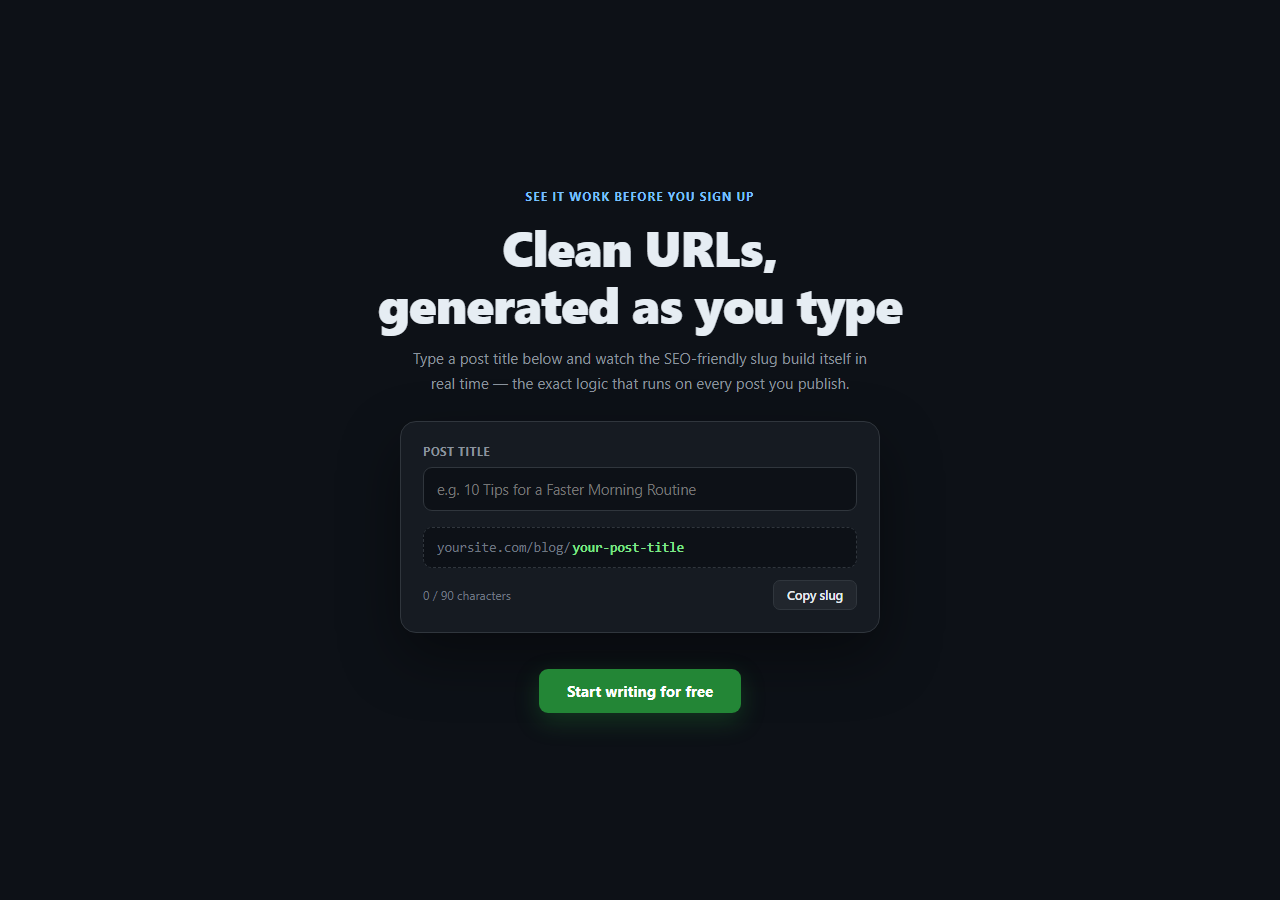
Most heroes ask a visitor to take the product's usefulness on faith — a headline claims speed or simplicity, and the visitor has to sign up to find out if that's true. This hero instead embeds a small, fully working piece of the product directly in the fold: type a blog post title, and a real slugify function runs on every keystroke to build the exact URL slug that would be saved. There is no fake typing animation and no canned example rotating on a timer — the output is a genuine, deterministic transform of whatever the visitor types.
The slugify function, explained
slugify(text) runs six real transformation steps in sequence: normalize('NFD') decomposes accented characters into a base letter plus a combining diacritical mark, and the following replace(/[\u0300-\u036f]/g, '') strips those diacritical marks — so "Café" becomes "cafe" rather than being dropped or mangled. toLowerCase() and trim() normalize case and outer whitespace. replace(/[^a-z0-9\s-]/g, '') removes anything that isn't a lowercase letter, digit, whitespace, or hyphen — punctuation, emoji, and symbols all disappear. replace(/\s+/g, '-') turns any run of whitespace into a single hyphen, and replace(/-+/g, '-') collapses any resulting run of multiple hyphens (which happens when the title itself contained a hyphen next to a space) into one. A final replace(/^-|-$/g, '') trims a leading or trailing hyphen that can appear if the title started or ended with punctuation.
Why this exact sequence, not a shortcut regex
A single regex like replace(/[^a-z0-9]+/g, '-') looks tempting but silently breaks on accented input — "Café" would produce "caf-" (the é gets stripped as a non-ASCII character, leaving a dangling hyphen) instead of the correct "cafe". Running normalize('NFD') and stripping combining marks *before* the character-class filter is what makes accented titles produce clean, readable slugs instead of a mangled one.
Live output, not deferred to submit
The input event fires update() on every keystroke, which recomputes the slug and rewrites both the character counter and the slug display immediately. There is no debounce — slugify() is cheap enough (a handful of regex passes over a short string) to run on every keystroke without any perceptible lag, so the visitor sees the transform happen character-by-character as they type, which is the entire point of the demo.
The copy-to-clipboard button
Clicking "Copy slug" calls navigator.clipboard.writeText() when available, with a fallback that still shows the "Copied!" confirmation state even in environments where the Clipboard API is unavailable or blocked (some sandboxed iframes, for instance) — the button never silently does nothing. The confirmation state reverts after 1.4 seconds via setTimeout.
Why an empty input still shows a value
When raw is empty, slugify('') returns an empty string, and rather than showing a blank output box (which looks broken), update() falls back to displaying the placeholder text your-post-title so the demo always shows *something* meaningful, guiding the visitor toward typing.
Adapting this pattern to a different product
The structure — an input, a live-updating output panel styled to look like a real result, a character counter, and a copy action — generalizes well beyond slugs: a password-strength meter, a Markdown-to-HTML live preview, a regex tester, or a currency formatter could all sit in the same hero shape. Swap slugify() for whatever transform your product actually performs, and the rest of the layout, event wiring, and copy-button logic carries over unchanged.
Build with AI
Build, Understand, Optimize, and Extend It With AI
Rather than guessing at edge cases in string-transform logic, paste this snippet's HTML, CSS, and JS into an AI coding assistant like Claude and ask it to explain exactly why normalize('NFD') is called before the character-filtering regex, and what specific inputs (try accented letters, emoji, or multiple consecutive spaces and hyphens) would produce a broken slug if that ordering were reversed or the normalization step were removed. The same assistant is excellent for adapting this "live working demo" hero pattern to a completely different product — ask it to swap the slugify transform for a password-strength scorer, a Markdown-to-HTML live preview, or a regex tester, while keeping the same input/output/copy-button wiring. It can also help you add debounced validation feedback (like flagging a slug that's already taken) or convert the vanilla event listener into a controlled React input with the transform computed in a useMemo. Treat the code less like a finished artifact and more like a starting point for a conversation.
Prompt to recreate it
Copy this into your AI assistant of choice to build the effect from scratch, or as a jumping-off point for your own variant:
Build a hero section in plain HTML, CSS, and vanilla JavaScript centered on a small, fully working live demo — a text input where typing a blog post title generates a real, correct URL slug beneath it as the visitor types, using no library and no fake or pre-scripted animation.

Requirements:
- A headline, subheading, and a demo panel styled to look like a real product UI (not obviously marketing decoration) containing a labeled text input and an output area showing the generated slug with a mock domain prefix.
- Write a real slugify(text) function that: normalizes the string to strip accented characters down to their base letters correctly (so "Café" becomes "cafe", not "caf" or "caf-"), lowercases it, removes any character that isn't a lowercase letter, digit, space, or hyphen, collapses runs of whitespace into single hyphens, collapses runs of multiple hyphens into one, and trims a leading or trailing hyphen.
- The output must update on every keystroke via the input event with no debounce, since the transform is cheap — include a comment explaining why debouncing is unnecessary here.
- Show a live character counter next to the input tracking against a maximum length shared with the input's maxlength attribute.
- Add a "Copy slug" button that copies the current generated slug to the clipboard using the async Clipboard API when available, with a fallback path so the button still shows a "Copied!" confirmation even if the Clipboard API call fails or is unavailable, and have the confirmation revert to the original label after roughly 1.5 seconds.
- When the input is empty, the output area should show a sensible placeholder slug rather than appearing blank or broken.
Want to tighten it up first? Run this prompt through the AI Prompt Studio to score it across 8 quality dimensions, catch anti-patterns, and tune the wording for Claude, ChatGPT, or Gemini before you paste it in.
Step by step
How to Use
- 1Type into the inputThe slug output beneath updates on every keystroke using a real slugify function — no canned demo text.
- 2Try accented or punctuated inputType something like "Café: A Cozy Guide!" to see diacritics stripped and punctuation removed correctly.
- 3Click "Copy slug"Copies the current generated slug to the clipboard and shows a temporary confirmation state.
- 4Adapt slugify() to your productReplace the transform function in the JS panel with your own logic (password strength, Markdown preview, etc.) — the input/output wiring stays the same.
- 5Change the max lengthEdit the MAX_LEN constant and the input's maxlength attribute together.
- 6Export in your formatClick "HTML" for a standalone file, "JSX" for a React component, or "Tailwind" for a React + Tailwind version.
Real-world uses
Common Use Cases
Got questions?
Frequently Asked Questions
It is a real, deterministic JavaScript function. Every keystroke fires the input event, which calls slugify() on the current input value and writes the result to the output element — there is no pre-recorded sequence or timer-driven fake typing.
Unicode NFD (Normalization Form Decomposed) splits an accented character like \u00e9 into a base letter e plus a separate combining accent mark. Stripping combining marks (the \u0300-\u036f range) after this decomposition turns "Café" into "cafe" correctly. Filtering with a plain [^a-z0-9] regex on the original, non-decomposed string would instead delete the accented character entirely, leaving "caf" with a dangling hyphen.
slugify() only runs a handful of regex passes over a short string (a blog title is rarely more than 90 characters), which completes in a fraction of a millisecond — far below any perceptible lag threshold. Debouncing would only add a false delay to a demo whose entire purpose is showing the transform happen live.
The copy handler checks for navigator.clipboard.writeText before calling it. If it is unavailable or the promise rejects (common in some sandboxed iframe contexts), the code still calls the same finish() function that shows the "Copied!" confirmation state, so the button never appears to silently fail even where the actual clipboard write could not occur.
Replace the slugify() function body with whatever transform your product performs, and update the output panel labels and placeholder text to match. The input listener, character counter, and copy-to-clipboard wiring do not need to change — they operate on whatever string the transform function returns.
An empty output box next to an empty input looks like the demo is broken rather than simply unused. update() checks if the computed slug has zero length and falls back to a placeholder string, so the panel always shows a plausible example, nudging the visitor to start typing.