Learn Coding Visually
Learn to code with interactive, live-preview playgrounds — HTML, CSS, JavaScript, React & more.
 HTML Playground42 lessons · Click-based · Live preview
 CSS PlaygroundLearn CSS with a live editor
 JavaScript Playground60 lessons · DOM · Async · Canvas
 React PlaygroundLearn React with a live code editor
 GSAP PlaygroundLearn GSAP animation interactively
 SVG Playground44 lessons · shapes · paths · animation
 SCSS Playground45 lessons · Sass modules · tokens
 Tailwind PlaygroundLearn Tailwind CSS with a live editor
 Bootstrap 5 Playground50 lessons · live preview
Product Launch Countdown Hero — Free HTML CSS JS Snippet
Product Launch Countdown Hero · Heroes · Plain HTML, CSS & JS · Live preview
What's included
Features
About this UI Snippet
Product Launch Countdown Hero — Live Timer with a Real Zero-State Transition
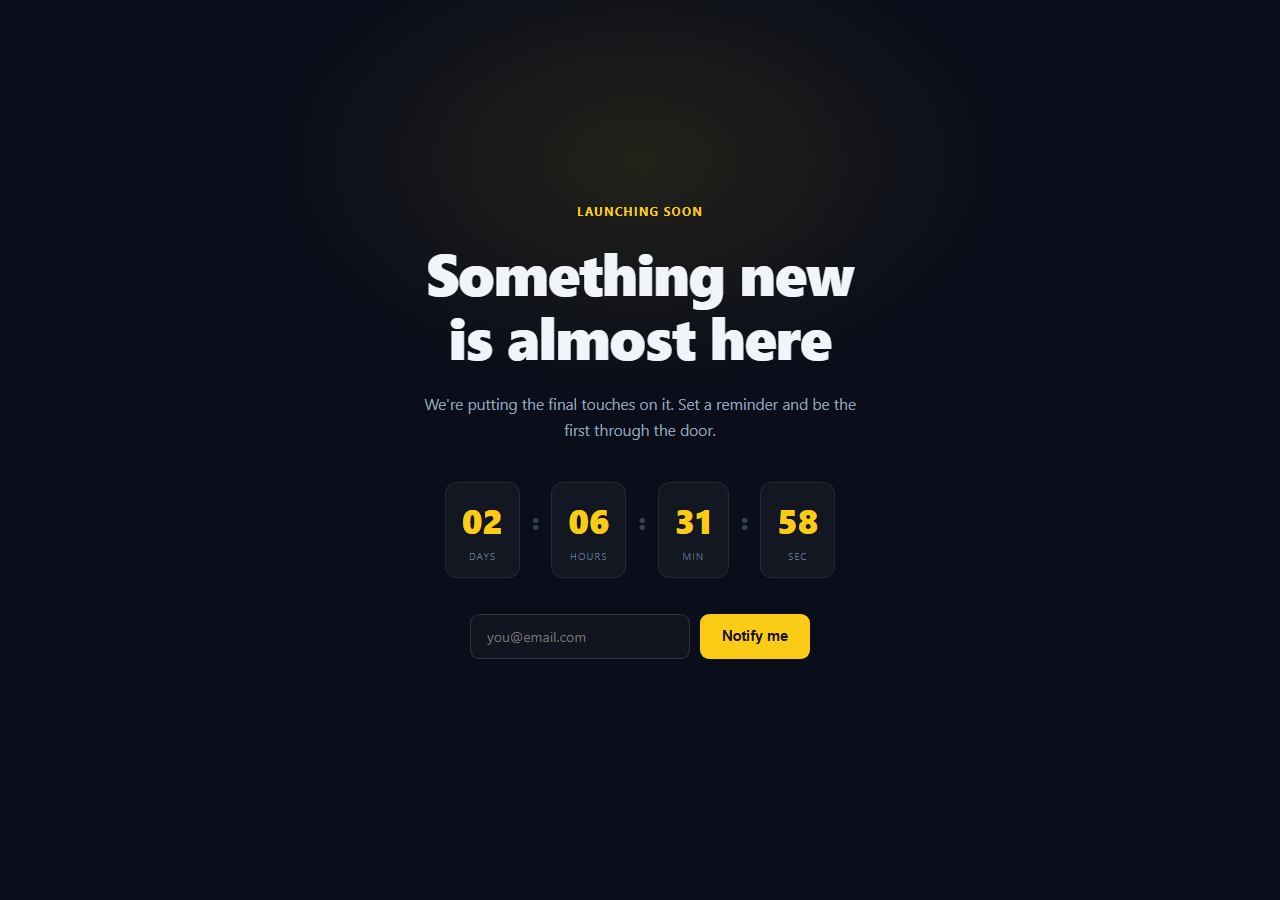
A launch countdown is only convincing if the numbers are actually counting toward something. This snippet computes days/hours/minutes/seconds from a real target timestamp on every tick, and — the part most countdown snippets skip — genuinely transitions the whole hero into a "we're live" state the moment the countdown reaches zero, rather than freezing at 00:00:00:00 forever.
Counting from a real target, not decrementing a number
LAUNCH_AT is a timestamp (Date.now() plus an offset for this demo — swap it for a fixed launch date in production). Every second, tick() recomputes remaining = LAUNCH_AT - Date.now() from scratch and derives each unit from that fresh value with integer division and modulo. This matters: a countdown that just decrements a stored seconds variable by one each tick drifts out of sync if the tab is backgrounded or the interval is throttled — recomputing from the real clock every tick means the display is always correct the instant it runs, even after a long pause.
A genuine zero-state transition
Once remaining <= 0, goLive() fires exactly once (guarded by the isLive flag so it can't re-trigger), clears the interval, swaps the eyebrow label, headline, subheading, and button text, and adds a .clh-live class that hides the timer and re-colors the UI from amber to green via CSS. This is the detail that separates a real countdown from a decorative one: the page's whole story changes on schedule, without a reload.
Padded, tabular-width digits
Each unit is zero-padded with padStart(2, '0') and rendered with font-variant-numeric: tabular-nums, so digits don't shift the layout width as they change — "09" and "10" occupy the same visual space, which matters for a number that updates every second right next to body copy.
A functioning notify form, live and post-launch
The email form validates with a regex on submit and shows a real confirmation message — and because the confirmation text checks the same isLive flag, the copy correctly differs before and after launch ("we'll email you at launch" vs. "redirecting shortly") without needing two separate forms.
Customizing it
Replace LAUNCH_AT with a fixed new Date('2026-09-01T09:00:00Z').getTime(), wire the notify form to a real waitlist API, and adjust the goLive() copy and .clh-live CSS to your brand's launch messaging. Pair it with countdown timer or circular countdown for a non-hero countdown, or coming soon hero for a lighter pre-launch layout.
Build with AI
Build, Understand, Optimize, and Extend It With AI
Instead of trusting a countdown snippet at face value, paste this snippet's HTML, CSS, and JS into an AI coding assistant like Claude and ask it to explain exactly why recomputing remaining = LAUNCH_AT - Date.now() on every tick avoids the drift problem a naive decrement-by-one-second counter has, especially across a backgrounded browser tab where setInterval gets throttled. The same assistant can help you verify the zero-state logic — ask it to trace through what happens if goLive() were called twice, and why the isLive guard prevents that. It's also useful for extending the pattern: ask it to persist the launch state in localStorage so a returning visitor who missed the live transition sees the correct state on reload, add a per-unit flip animation when a digit changes, or wire the notify form to a real backend with loading and duplicate-email states. Treat the code less like a finished artifact and more like a starting point for a conversation.
Prompt to recreate it
Copy this into your AI assistant of choice to build the effect from scratch, or as a jumping-off point for your own variant:
Build a product launch countdown hero in plain HTML, CSS, and vanilla JavaScript (no library, no CDN) that transitions to a live state when the countdown ends.

Requirements:
- A hero with an eyebrow label, headline, subheading, a four-unit countdown display (days/hours/minutes/seconds, each zero-padded to two digits with tabular number styling so digit width never shifts), and an email notify form with a submit button.
- Set a fixed target timestamp constant and, on an interval running once per second, recompute the remaining time as target-minus-current-time from scratch every tick (do not decrement a stored counter by one each second) — derive days/hours/minutes/seconds from that fresh remaining-milliseconds value using integer division and modulo.
- When the remaining time reaches zero or below, transition the hero into a genuine "live" state exactly once (guard against re-triggering): stop the interval, hide the countdown display, swap the eyebrow/headline/subheading/button text to launch-day copy, and apply a different accent color via a CSS class toggle.
- The email form should validate the input against a basic email-shape regex on submit, prevent default navigation, and show an inline confirmation message whose wording differs depending on whether the countdown has already reached the live state or not.
- Use Date.now() as the time source throughout so the countdown is always correct relative to the real clock, including after the tab has been backgrounded and interval ticks were skipped or throttled.
Want to tighten it up first? Run this prompt through the AI Prompt Studio to score it across 8 quality dimensions, catch anti-patterns, and tune the wording for Claude, ChatGPT, or Gemini before you paste it in.
Step by step
How to Use
- 1Paste HTML, CSS, and JSThe countdown starts immediately, ticking down from the demo target.
- 2Watch the seconds updateEach unit recomputes from Date.now() every second — a real live timer.
- 3Set a real launch dateReplace LAUNCH_AT with new Date('2026-09-01T09:00:00Z').getTime().
- 4Test the live transitionTemporarily set LAUNCH_AT to a few seconds in the future to see goLive() fire.
- 5Submit the notify formValidated inline; the confirmation message differs before/after launch.
- 6Wire a real waitlist APIReplace the confirmation branch with a fetch() call to your backend.
Real-world uses
Common Use Cases
Got questions?
Frequently Asked Questions
No — tick() recomputes remaining as LAUNCH_AT minus the current Date.now() from scratch on every call, rather than decrementing a stored counter by one each second. Even if setInterval is throttled while the tab is backgrounded and several ticks are skipped, the next tick that does run calculates the correct remaining time from the real clock, so the display self-corrects instead of drifting.
Once remaining is 0 or less and the isLive flag hasn't been set yet, goLive() runs exactly once: it clears the interval, sets isLive to true (preventing re-entry), swaps the eyebrow label, headline, subheading, and button text to launch-day copy, and adds a clh-live class that hides the timer and switches the accent color from amber to green via CSS.
Replace the LAUNCH_AT line with a fixed timestamp, e.g. const LAUNCH_AT = new Date('2026-09-01T09:00:00Z').getTime(); — using an ISO string with an explicit timezone offset (Z for UTC) avoids ambiguity about which timezone the countdown targets.
Yes. The submit handler checks the same isLive flag the countdown itself uses, so the confirmation message reads "we'll email you at launch" before the countdown ends and "redirecting shortly" after — one shared source of truth drives both the timer display and the form copy.
Store LAUNCH_AT as a constant (or prop), and run the tick logic inside a mount effect with setInterval, clearing it in the cleanup function. Keep isLive and the four unit values in component state so re-renders reflect them, and call the equivalent of goLive() as a state update rather than direct DOM manipulation once remaining reaches zero.