Source Code
<div class="demo">
  <div class="pipeline-card">
    <div class="pipeline-head">
      <span class="pipeline-title">deploy-web-app #482</span>
      <span class="pipeline-branch">main @ 7f3a2c1</span>
    </div>

    <div class="pipeline-track" id="pipelineTrack">
      <div class="stage" data-stage="build">
        <div class="stage-node"><span class="stage-icon"></span></div>
        <span class="stage-label">Build</span>
      </div>
      <div class="stage-connector"></div>
      <div class="stage" data-stage="test">
        <div class="stage-node"><span class="stage-icon"></span></div>
        <span class="stage-label">Test</span>
      </div>
      <div class="stage-connector"></div>
      <div class="stage" data-stage="staging">
        <div class="stage-node"><span class="stage-icon"></span></div>
        <span class="stage-label">Staging</span>
      </div>
      <div class="stage-connector"></div>
      <div class="stage" data-stage="prod">
        <div class="stage-node"><span class="stage-icon"></span></div>
        <span class="stage-label">Production</span>
      </div>
    </div>

    <div class="pipeline-detail" id="pipelineDetail" role="status" aria-live="polite">Click "Run pipeline" to start a deployment.</div>

    <button class="run-btn" id="runBtn">Run pipeline</button>
  </div>
</div>
* { box-sizing: border-box; margin: 0; padding: 0; }
body { font-family: system-ui, sans-serif; background: #f8fafc; display: flex; align-items: center; justify-content: center; min-height: 100vh; padding: 24px; }
.pipeline-card { width: 420px; max-width: 100%; background: #fff; border: 1px solid #e2e8f0; border-radius: 16px; padding: 22px; display: flex; flex-direction: column; gap: 18px; }
.pipeline-head { display: flex; flex-direction: column; gap: 2px; }
.pipeline-title { font-size: 13.5px; font-weight: 800; color: #111827; font-family: ui-monospace, monospace; }
.pipeline-branch { font-size: 11px; color: #94a3b8; font-weight: 600; font-family: ui-monospace, monospace; }
.pipeline-track { display: flex; align-items: center; }
.stage { display: flex; flex-direction: column; align-items: center; gap: 8px; flex-shrink: 0; }
.stage-node { width: 32px; height: 32px; border-radius: 50%; background: #f1f5f9; border: 2px solid #e2e8f0; display: flex; align-items: center; justify-content: center; transition: background 0.25s, border-color 0.25s; }
.stage-label { font-size: 10.5px; font-weight: 700; color: #94a3b8; transition: color 0.25s; }
.stage-connector { flex: 1; height: 2px; background: #e2e8f0; margin: 0 2px 22px; transition: background 0.25s; }
.stage-icon { width: 8px; height: 8px; border-radius: 50%; background: #cbd5e1; transition: background 0.2s; }
.stage.running .stage-node { border-color: #6366f1; background: #eef2ff; }
.stage.running .stage-icon { background: #6366f1; animation: pulse 1s ease infinite; }
.stage.running .stage-label { color: #4338ca; }
@keyframes pulse { 0%,100% { opacity: 1; transform: scale(1); } 50% { opacity: 0.5; transform: scale(0.7); } }
.stage.done .stage-node { border-color: #22c55e; background: #22c55e; }
.stage.done .stage-icon { background: none; width: 14px; height: 10px; border-radius: 0; }
.stage.done .stage-icon::before { content: ''; display: block; width: 14px; height: 10px; background: url("data:image/svg+xml,%3Csvg xmlns='http://www.w3.org/2000/svg' viewBox='0 0 24 24' fill='none' stroke='white' stroke-width='4' stroke-linecap='round' stroke-linejoin='round'%3E%3Cpath d='M20 6 9 17l-5-5'/%3E%3C/svg%3E") center/contain no-repeat; }
.stage.done .stage-label { color: #15803d; }
.stage.done + .stage-connector { background: #22c55e; }
.stage.failed .stage-node { border-color: #ef4444; background: #fee2e2; }
.stage.failed .stage-icon { background: #ef4444; }
.stage.failed .stage-label { color: #b91c1c; }
.pipeline-detail { font-size: 12px; color: #64748b; font-weight: 600; background: #f8fafc; border-radius: 10px; padding: 10px 13px; min-height: 16px; }
.pipeline-detail.error { color: #b91c1c; background: #fef2f2; }
.pipeline-detail.success { color: #15803d; background: #f0fdf4; }
.run-btn { background: #4f46e5; color: #fff; border: none; padding: 11px; border-radius: 10px; font-size: 13px; font-weight: 700; cursor: pointer; font-family: inherit; }
.run-btn:hover:not(:disabled) { background: #4338ca; }
.run-btn:disabled { opacity: 0.5; cursor: not-allowed; }const track = document.getElementById('pipelineTrack');
const detail = document.getElementById('pipelineDetail');
const runBtn = document.getElementById('runBtn');
const stages = Array.from(track.querySelectorAll('.stage'));
const STAGE_DURATIONS = { build: 1000, test: 1400, staging: 900, prod: 1100 };
const STAGE_LABELS = { build: 'Build', test: 'Test', staging: 'Staging', prod: 'Production' };
function resetStages() {
stages.forEach((s) => s.classList.remove('running', 'done', 'failed'));
detail.className = 'pipeline-detail';
}
function wait(ms) {
return new Promise((resolve) => setTimeout(resolve, ms));
}
async function runPipeline() {
runBtn.disabled = true;
resetStages();
for (const stageEl of stages) {
const stageName = stageEl.dataset.stage;
stageEl.classList.add('running');
detail.textContent = `Running ${STAGE_LABELS[stageName]}…`;
await wait(STAGE_DURATIONS[stageName]);
// Each stage has its own independent failure chance — a later stage
// (like Production) failing is just as real a scenario as an early one.
const failed = Math.random() < 0.18;
stageEl.classList.remove('running');
if (failed) {
stageEl.classList.add('failed');
detail.textContent = `${STAGE_LABELS[stageName]} failed — pipeline stopped.`;
detail.classList.add('error');
runBtn.disabled = false;
runBtn.textContent = 'Retry pipeline';
return; // stop the pipeline; later stages never run after a failure
}
stageEl.classList.add('done');
}
detail.textContent = 'Deployment successful — all stages passed.';
detail.classList.add('success');
runBtn.disabled = false;
runBtn.textContent = 'Run again';
}
runBtn.addEventListener('click', runPipeline);Learn Coding Visually
Learn to code with interactive, live-preview playgrounds — HTML, CSS, JavaScript, React & more.
 HTML Playground42 lessons · Click-based · Live preview
 CSS PlaygroundLearn CSS with a live editor
 JavaScript Playground60 lessons · DOM · Async · Canvas
 React PlaygroundLearn React with a live code editor
 GSAP PlaygroundLearn GSAP animation interactively
 SVG Playground44 lessons · shapes · paths · animation
 SCSS Playground45 lessons · Sass modules · tokens
 Tailwind PlaygroundLearn Tailwind CSS with a live editor
 Bootstrap 5 Playground50 lessons · live preview
Deployment Pipeline Stage Tracker — Sequential CI/CD Stage Visualization with Real Halt-on-Failure
Deployment Pipeline Stage Tracker · Dashboards · Plain HTML, CSS & JS · Live preview
What's included
Features
About this UI Snippet
Deployment Pipeline Stage Tracker — Sequential Execution That Actually Halts on Failure
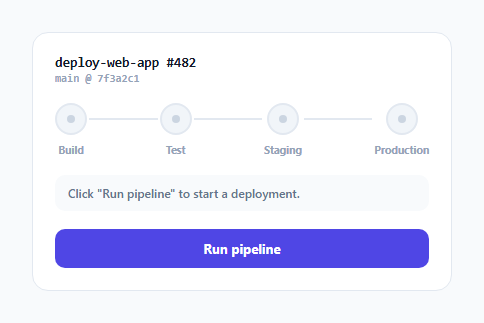
A pipeline visualization is only trustworthy if it behaves like a real pipeline — later stages must never appear to run after an earlier one has failed. This widget implements that correctly: an async/await loop walks through each stage strictly in order, and a failure at any point stops the loop entirely, leaving every subsequent stage in its untouched, not-yet-run visual state.
A real sequential loop, not four independent animations
runPipeline() is a single async function with a for...of loop over the stages array, await-ing each stage's simulated duration before moving to the next iteration. This is a genuinely sequential execution model — stage 2 (test) only begins after stage 1 (build) has fully finished and been evaluated, mirroring how a real CI/CD pipeline actually runs stages one after another rather than kicking off several visual animations in parallel that merely *look* sequential through staggered CSS delays.
A failure genuinely stops execution, via a real return
Each stage's outcome is checked with an independent Math.random() < 0.18 roll — including for the *final* Production stage, deliberately, since a late-stage failure is a completely realistic scenario worth modeling. When a stage fails, the function calls return immediately after updating that stage's visual state and the status message — this is a genuine early exit from the for...of loop, which means the loop's remaining iterations (the subsequent stages) never execute their own stageEl.classList.add('running') line at all. Those later stages are left in whatever state they started in (their default, un-run appearance), correctly representing "this stage never got the chance to run" rather than any kind of skipped-but-attempted state.
Three distinct, unambiguous visual states per stage
Each .stage node can be running (pulsing dot, indigo border), done (solid green with a checkmark), failed (red), or none of these (its default untouched appearance) — and CSS handles all the styling differences through simple class-presence selectors, with the connecting line between two stages also picking up a green color once the stage *before* it (via the .stage.done + .stage-connector sibling selector) has completed, visually reinforcing forward progress along the track.
Retry starts genuinely fresh, not from the failed stage
Clicking "Retry pipeline" calls runPipeline() again from the top, and resetStages() explicitly clears every stage's running/done/failed classes before the loop restarts — so a retry always re-runs the entire pipeline from Build onward, matching how most real CI/CD systems handle a full pipeline retry rather than attempting to resume mid-pipeline from the point of failure.
Build with AI
Build, Understand, Optimize, and Extend It With AI
Ask an AI assistant to explain exactly why an async function with a for...of loop and await guarantees genuinely sequential execution here, compared to an approach using setTimeout calls with staggered delays that might merely look sequential but could actually race. It's also worth asking for a version that supports a manual "skip stage" or "retry from failed stage" action instead of always restarting the whole pipeline, or one that shows a running duration timer next to the currently active stage.
Prompt to recreate it
Copy this into your AI assistant of choice to build the effect from scratch, or as a jumping-off point for your own variant:
Build a deployment pipeline stage tracker dashboard widget in HTML, CSS and vanilla JavaScript that visualizes a CI/CD pipeline running through several sequential stages, correctly halting if any stage fails — no external libraries.

Requirements:
- A horizontal track of at least four connected stages (e.g. Build, Test, Staging, Production), each shown as a node with a label, connected by lines between consecutive stages.
- Implement the pipeline run as a single async function using a for...of loop with await, so each stage's simulated work must genuinely complete before the next stage begins — not a set of independently-timed animations that merely appear sequential.
- Give every stage, including the very last one, its own independent randomized chance of failure (not just the earlier stages) using something like Math.random() against a threshold.
- If a stage fails, immediately halt the entire pipeline via a real early exit from the loop, leaving every subsequent stage in its default, never-run visual state — do not mark later stages as skipped, attempted, or run them in any way after a failure.
- Give each stage three distinct, clearly differentiated visual states: currently running (with a pulsing or animated indicator), successfully completed (a checkmark, distinct color), and failed (a distinct error color) — plus its default not-yet-started appearance.
- Provide a "Run pipeline" button that starts a run, disables itself while a run is in progress, and offers a "Retry" action after failure or "Run again" after success that fully restarts the pipeline sequence from the first stage. Use an accessible live region to announce the current stage and final outcome.
Want to tighten it up first? Run this prompt through the AI Prompt Studio to score it across 8 quality dimensions, catch anti-patterns, and tune the wording for Claude, ChatGPT, or Gemini before you paste it in.
Step by step
How to Use
- 1Click "Run pipeline" and watch it play outEach stage runs strictly in order; roughly an 18% chance per stage means you'll see both full-success and halted-on-failure outcomes.
- 2Watch a failure specificallyNotice that any stage after the one that failed remains untouched — the pipeline genuinely stops, it doesn't skip ahead.
- 3Adjust stage durationsChange the values in the STAGE_DURATIONS object to make specific stages run faster or slower in the simulation.
- 4Adjust the failure rateChange the 0.18 probability in runPipeline() to make failures more or less common during testing.
- 5Add a new stageAdd a new .stage element with a unique data-stage value plus a connector, and add matching entries to STAGE_DURATIONS and STAGE_LABELS.
Real-world uses
Common Use Cases
Got questions?
Frequently Asked Questions
It genuinely runs in order — a single async function awaits each stage's simulated duration inside a for...of loop before the next iteration begins, so stage 2 literally cannot start executing until stage 1's await has resolved and been evaluated, not just visually staggered CSS animations that merely appear sequential.
They never run at all — a failure triggers an immediate return from inside the loop, which exits the function entirely before any later iteration's stageEl.classList.add('running') line executes, so subsequent stages remain in their default, untouched visual state rather than being marked as skipped or attempted.
Any stage, including the final one, has its own independent Math.random() < 0.18 check — there's no special-casing that makes the last stage always succeed, since a late-stage failure is a completely realistic real-world scenario worth representing.
It calls runPipeline() again, which starts by calling resetStages() to clear every stage's running/done/failed classes back to their defaults, then re-runs the entire sequential loop from the very first stage — a full pipeline restart, not a resume from the point of failure.
Replace the wait() call and the randomized failure check inside the loop with actual polling of your CI/CD provider's API for that stage's real status, awaiting until it reports a terminal (success/failure) state before moving to the next stage in the loop.
Yes — the detail text region has role="status" aria-live="polite" and is updated with a plain-language description ("Running Test…", "Build failed — pipeline stopped.", etc.) at every stage transition, so the pipeline's progress and outcome are announced without requiring the user to visually track the stage nodes.