You Might Also Like
Learn Coding Visually
Learn to code with interactive, live-preview playgrounds — HTML, CSS, JavaScript, React & more.
 HTML Playground42 lessons · Click-based · Live preview
 CSS PlaygroundLearn CSS with a live editor
 JavaScript Playground60 lessons · DOM · Async · Canvas
 React PlaygroundLearn React with a live code editor
 GSAP PlaygroundLearn GSAP animation interactively
 SVG Playground44 lessons · shapes · paths · animation
 SCSS Playground45 lessons · Sass modules · tokens
 Tailwind PlaygroundLearn Tailwind CSS with a live editor
 Bootstrap 5 Playground50 lessons · live preview
CSS text-wrap: balance & pretty Live Demo — Free Snippet
CSS text-wrap: balance Demo · Layouts · Plain HTML, CSS & JS · Live preview
What's included
Features
About this UI Snippet
CSS text-wrap: balance and text-wrap: pretty — Native Typographic Line Breaking Explained
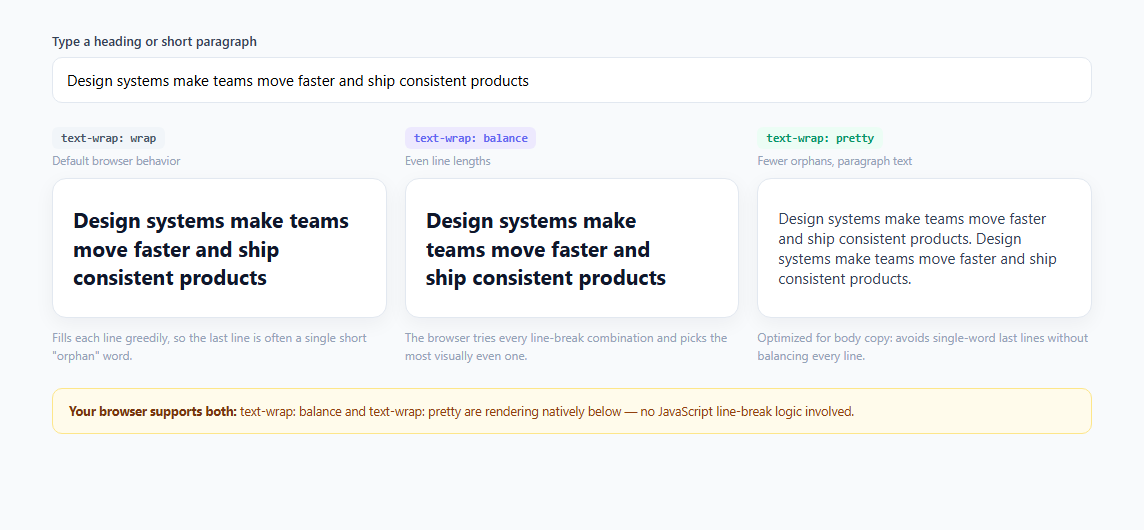
Ragged headlines have been a persistent design annoyance for as long as CSS has existed: a two- or three-line heading wraps greedily, filling each line to its maximum width before spilling the leftover words onto a final line — sometimes a single short "orphan" word sitting awkwardly by itself. Designers have historically fought this with manual <br> tags, JavaScript libraries like Shopify's balance-text, or by adjusting copy length until it "looked right." The CSS Text Module Level 4 property text-wrap finally solves this natively with two new values, balance and pretty, alongside the existing default, wrap.
How `text-wrap: wrap` behaves (the default)
Without any text-wrap declaration, browsers use a greedy line-breaking algorithm: text fills each line as full as possible before wrapping to the next, only breaking when a word would overflow the container width. This is fast to compute — the browser makes one pass — but it has no awareness of how the *last* line looks. A three-word overflow onto its own line, or a heading that reads "Design systems make teams move / faster" with an awkward break, is a common visual defect this algorithm produces.
How `text-wrap: balance` works technically
text-wrap: balance instructs the browser to compute multiple candidate line-break arrangements and select the one where line lengths are most evenly distributed, rather than the greedy first-fit. This is measurably more expensive to compute — which is exactly why the spec restricts it to blocks of a limited size, roughly four to six lines depending on the implementation, called the "balance limit." Beyond that limit, browsers silently fall back to normal greedy wrapping to avoid the performance cost of balancing large amounts of text. This makes balance ideal for headings, pull quotes, card titles, and button labels, but explicitly the wrong tool for multi-paragraph body copy.
How `text-wrap: pretty` differs
text-wrap: pretty uses a different, cheaper heuristic: rather than balancing every line's length, it specifically looks ahead to avoid orphans — a lone short word stranded on the final line — and other common typographic defects, without the computational cost of fully balancing the whole block. Because it's lighter weight than balance, pretty has no meaningful line-count limit and is designed to be used on body paragraphs, article text, and other longer-form content where full balancing would be too expensive or unnecessary.
Why this matters for 2025/2026 UI work
Before native text-wrap values, achieving balanced headlines required either shipping a JavaScript library that measures rendered text and injects <br> tags (causing layout thrashing and a flash of unbalanced text before the script runs), or manually hand-tuning breakpoints per viewport width — both fragile approaches that break the moment copy changes. text-wrap: balance and pretty move this entirely into the rendering engine: zero JavaScript, zero layout shift, and the balance recalculates automatically on every resize, font change, or content update, which is essential for CMS-driven or user-generated headings where you can't predict the exact text length in advance.
Browser support and the fallback strategy
text-wrap: balance shipped in Chrome 114, Safari 17.5, and Firefox 121; text-wrap: pretty is newer and, as of early 2026, has solid Chrome/Edge support with Safari and Firefox catching up. Because unsupported browsers simply ignore an unrecognized value and fall back to standard wrap behavior — never throwing an error or breaking layout — these properties are entirely safe to ship today as a progressive enhancement. This demo uses CSS.supports('text-wrap', 'balance') in JavaScript purely to report support status to the viewer; the CSS itself needs no @supports guard because the fallback is automatically graceful.
Build with AI
Build, Understand, Optimize, and Extend It With AI
Paste this snippet into an AI coding assistant like Claude and ask it to explain exactly why text-wrap: balance is capped at a small number of lines while text-wrap: pretty is not, and what that implies for choosing between them on a real page. You could also ask it to add a fourth comparison column showing text-wrap: stable (useful for editable text where you don't want line breaks to shift while typing), or to explain how CSS.supports() differs from an @supports at-rule and why this demo uses the JavaScript API instead of a CSS media query for its support banner. It's also worth asking the assistant to demonstrate how balance behaves once you feed it six or more lines of text, since that boundary case isn't obvious from a quick read of the CSS alone.
Prompt to recreate it
Copy this into your AI assistant of choice to build the effect from scratch, or as a jumping-off point for your own variant:
Build a live comparison demo of the CSS text-wrap property values wrap, balance, and pretty in plain HTML, CSS, and JavaScript.

Requirements:
- A single text input at the top whose value drives three side-by-side sample blocks simultaneously, updating on every keystroke via an input event listener (no debounce needed).
- Three columns, each labeled with a small code-style badge naming the exact text-wrap value being demonstrated: wrap (the default/greedy baseline), balance, and pretty.
- The balance column should use a heading-sized, bold sample; the pretty column should use a smaller, paragraph-styled sample with the input text repeated so it reads as multi-sentence body copy long enough to show pretty's orphan-avoidance behavior distinctly from balance.
- Each column needs a short caption underneath explaining in one sentence how that specific line-breaking algorithm behaves differently from the others.
- A status banner that uses the CSS.supports('text-wrap', 'balance') and CSS.supports('text-wrap', 'pretty') JavaScript API (not just visual inspection) to detect and report, in plain language, exactly which of the two newer values the visitor's current browser actually supports.
- No JavaScript should ever compute or inject manual line breaks — all line-breaking logic must come from the native CSS text-wrap property so unsupported browsers gracefully fall back to normal wrap with no broken behavior.
- A responsive grid layout so the three columns stack cleanly on narrow viewports.
Want to tighten it up first? Run this prompt through the AI Prompt Studio to score it across 8 quality dimensions, catch anti-patterns, and tune the wording for Claude, ChatGPT, or Gemini before you paste it in.
Step by step
How to Use
- 1Type your own headingEdit the text in the input field at the top. All three sample columns (wrap, balance, pretty) update live via a single input event listener, letting you compare how the same exact string breaks under each algorithm at the current container width.
- 2Resize your browser windowBecause text-wrap: balance recalculates the optimal break points on every layout pass, shrinking or widening the window will re-balance the heading in the middle column in real time — try it with a long heading to see the line count and break points shift.
- 3Compare orphan words in the first columnThe left "text-wrap: wrap" column uses default greedy wrapping — with certain input lengths you'll see a lone short word stranded on its own final line, which is exactly the visual defect balance and pretty are designed to eliminate.
- 4Check the pretty column with longer textThe third column applies text-wrap: pretty to paragraph-style text (the heading repeated twice to simulate body copy). Unlike balance, pretty avoids orphans without fully balancing every line, making it appropriate for longer text where balance's line-count limit would otherwise silently disable it.
- 5Read the live support bannerThe amber banner beneath the columns runs CSS.supports("text-wrap", "balance") and CSS.supports("text-wrap", "pretty") in JavaScript and reports which values your current browser actually applies, so you understand whether what you're seeing is the real effect or the automatic fallback.
- 6Apply it to your own headingsAdd text-wrap: balance directly to any h1-h6 selector in your stylesheet — there is no markup change required, no JavaScript, and no wrapper element needed. For body paragraphs use text-wrap: pretty instead, since balance is capped at a small number of lines by design.
Real-world uses
Common Use Cases
:has() selectors or container queries as examples of the platform absorbing what used to require a dependency.Got questions?
Frequently Asked Questions
balance computes every candidate line-break arrangement and picks the one with the most even line lengths, but the spec caps this to roughly 4-6 lines for performance reasons — beyond that it silently falls back to normal wrap. pretty uses a cheaper heuristic focused specifically on avoiding a lone orphan word on the final line, without fully balancing every line, and has no meaningful line-count limit, making it the correct choice for longer paragraph text.
No. It is a single CSS declaration, text-wrap: balance, applied directly to the text-containing element. There is no wrapper element, no measurement script, and no risk of a flash of unbalanced text before JavaScript runs, unlike legacy solutions such as Shopify's balance-text.js library which had to measure rendered text and inject manual line breaks.
Unsupported browsers simply ignore the unrecognized value and fall back to the default text-wrap: wrap greedy algorithm — there is no error, no broken layout, and no invalid CSS warning that affects other rules. This makes it completely safe to ship today as a progressive enhancement with no @supports guard required in the CSS itself.
Balancing requires evaluating multiple possible line-break combinations to find the most even one, which is computationally more expensive than the single-pass greedy algorithm used by default. To avoid a performance cliff on long text blocks, browser implementations cap balance to roughly 4-6 lines (the exact number is implementation-defined) and automatically revert to normal wrapping beyond that limit.
Yes — they are typically used on different elements for different purposes: balance on short headings, titles, and pull quotes (a handful of lines), and pretty on longer paragraph or article body text. Applying balance to a long paragraph is not an error, but its line-count cap means it will effectively behave like normal wrap once the text exceeds a few lines, so pretty is the more appropriate choice for that use case.