You Might Also Like
Learn Coding Visually
Learn to code with interactive, live-preview playgrounds — HTML, CSS, JavaScript, React & more.
 HTML Playground42 lessons · Click-based · Live preview
 CSS PlaygroundLearn CSS with a live editor
 JavaScript Playground60 lessons · DOM · Async · Canvas
 React PlaygroundLearn React with a live code editor
 GSAP PlaygroundLearn GSAP animation interactively
 SVG Playground44 lessons · shapes · paths · animation
 SCSS Playground45 lessons · Sass modules · tokens
 Tailwind PlaygroundLearn Tailwind CSS with a live editor
 Bootstrap 5 Playground50 lessons · live preview
Scroll Chapter Sidebar Story — Free Sticky-Nav Scrollytelling Layout (No Library)
Scroll Chapter Sidebar Story · Scroll · Plain HTML, CSS & JS · Live preview
What's included
Features
About this UI Snippet
Scroll Chapter Sidebar Story — A Sticky Chapter Nav That Tracks Reading Position
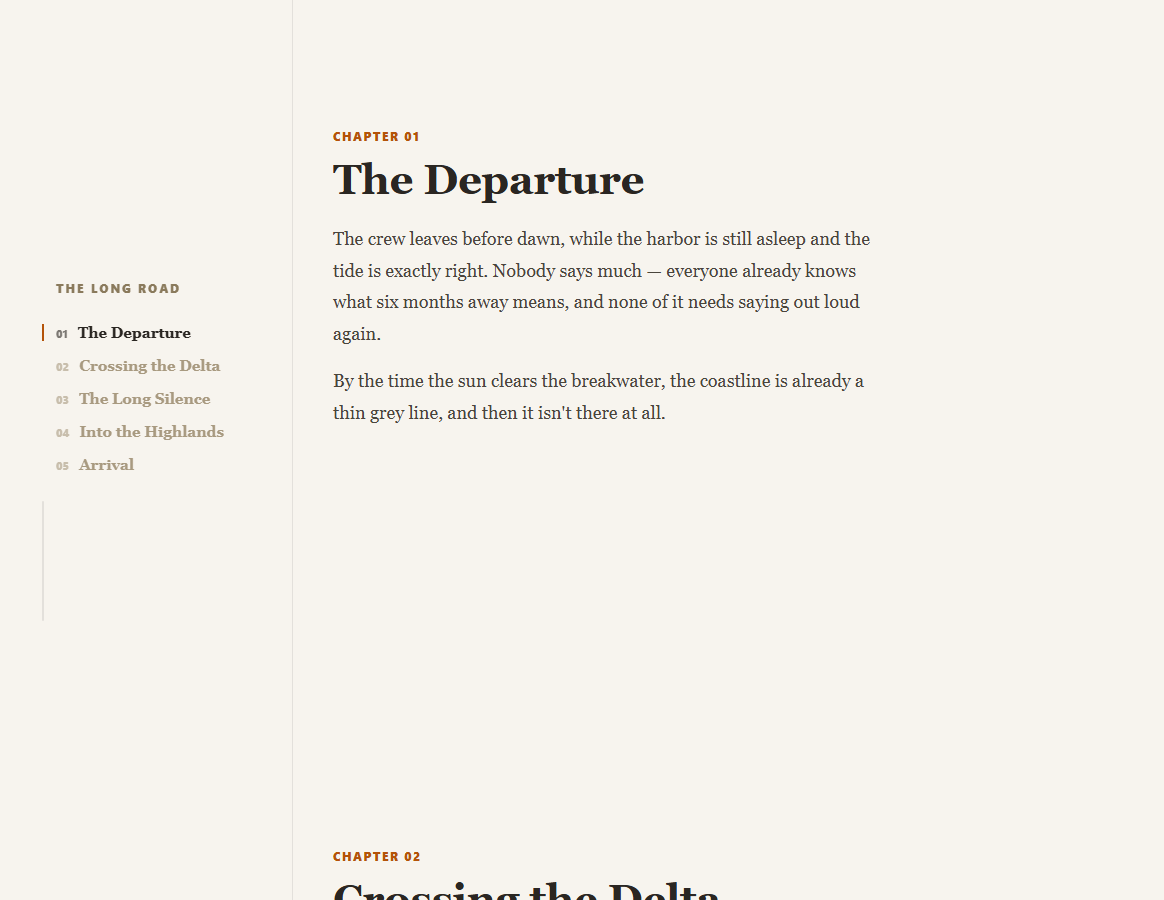
Long-form narrative journalism — expedition write-ups, deep-dive features, book-style microsites — needs a different scaffold than a short scrollytelling stunt: a persistent way to see where you are in a much longer piece. This snippet builds that scaffold with a sticky sidebar chapter list, a native IntersectionObserver to track reading position, and a thin progress rail — no animation library required.
The sidebar is sticky, not fixed
.css-sidebar-inner uses position: sticky; top: 0; height: 100vh inside a full-height sidebar column, so it stays pinned in the viewport for as long as the reader is inside .css-main's grid row, then naturally scrolls away with the rest of the page once the article ends — simpler than a position: fixed sidebar, which would need manual show/hide logic to avoid floating over the intro and outro of the page.
A middle-band observer decides the active chapter, not scroll math
Rather than computing which chapter's scroll offset the current window.scrollY falls within — brittle math that breaks the moment chapter heights vary — a single IntersectionObserver with rootMargin: '-45% 0px -45% 0px' watches every .css-chapter section directly. Only the chapter genuinely centered in the vertical middle of the viewport is ever considered "current," so the sidebar highlight always matches where a reader's eyes actually are, regardless of how long any individual chapter's text runs.
Two separate progress signals, on purpose
The active-chapter highlight and the thin progress rail track two different things deliberately: the highlight answers "which chapter am I reading," computed from intersection state, while the rail answers "how far through the entire piece am I," computed from a plain window.scrollY ratio against total scrollable height. A reader deep in a long chapter four sees both — chapter four highlighted, and the rail two-thirds full — which a single combined indicator couldn't express as clearly.
Click-to-scroll without a hash jump
Sidebar links intercept their click with preventDefault() and call scrollIntoView({ behavior: 'smooth' }) directly on the target chapter, rather than letting the browser perform its native anchor jump. This keeps the URL free of a changing #chapter-n hash and avoids the native jump firing the IntersectionObserver in an unpredictable order relative to the smooth-scroll animation.
Customizing it
Add a sixth .css-chapter and matching sidebar link with the same data-chapter id — the observer, click handler, and progress rail all work against the live DOM with no fixed chapter count anywhere. On narrow viewports the sidebar hides entirely rather than cramming into a mobile layout, letting the piece read as a plain long-form article. Pair with a scroll reading time estimate at the top, or a scroll spy nav for a shorter, single-page variant of the same active-link idea.
Build with AI
Build, Understand, Optimize, and Extend It With AI
Paste this snippet's HTML, CSS, and JS into an AI coding assistant like Claude and ask it to explain why the active-chapter detection uses a middle-band IntersectionObserver rather than comparing window.scrollY against each chapter's offsetTop, and why the layout keeps the chapter highlight and the overall progress rail as two separate, independently computed signals instead of merging them into one indicator. The same assistant can help extend the pattern — ask it to add nested sub-chapter anchors within a single long chapter, persist reading position in localStorage so a returning reader resumes where they left off, or animate the progress rail's fill with a subtle easing instead of the current linear transition. Treat the code as a working, dependency-free base for your own long-form scrollytelling layout.
Prompt to recreate it
Copy this into your AI assistant of choice to build the effect from scratch, or as a jumping-off point for your own variant:
Build a "scroll chapter sidebar story" long-form layout in plain HTML, CSS, and JavaScript using only the native IntersectionObserver API — no external library, no GSAP, no bundler.

Requirements:
- A two-column CSS grid layout: a narrow left sidebar containing a brand label, a vertical list of chapter navigation links (each with a two-digit chapter number and title, and a data attribute matching a chapter section's id), and a thin vertical progress rail; and a wide right column containing several long-form chapter sections, each with a tag label, heading, and multiple paragraphs of readable body text.
- Make the sidebar's inner content sticky (position: sticky, top: 0, height: 100vh) so it stays pinned in the viewport only while the reader is scrolling through the chapters column, and naturally scrolls away once the content ends — not position: fixed.
- Use a single IntersectionObserver with a rootMargin set to large negative top and bottom percentages (such as -45% on each side) watching every chapter section, so that only the chapter section currently occupying the vertical middle band of the viewport is ever marked "active," and toggle an active CSS class on the matching sidebar link accordingly.
- Separately, compute an overall reading-progress percentage from the ratio of the current window scroll position to the total scrollable height of the page, updated on scroll and resize, and use it to set the height (or width, for a horizontal variant) of a distinct progress-rail fill element — keep this progress calculation completely independent from the chapter-highlight logic.
- Make each sidebar chapter link, on click, prevent the default anchor jump and instead call scrollIntoView with smooth behavior on the corresponding chapter section, so the page's URL never gains a changing hash fragment.
- Hide the sidebar entirely below a reasonable tablet breakpoint (such as 820px) so the layout gracefully degrades to a plain single-column long-form article on narrow viewports, without breaking the observer or progress logic for the remaining content.
Want to tighten it up first? Run this prompt through the AI Prompt Studio to score it across 8 quality dimensions, catch anti-patterns, and tune the wording for Claude, ChatGPT, or Gemini before you paste it in.
Step by step
How to Use
- 1Paste the HTML, CSS, and JSNo CDN scripts needed — everything runs on native browser APIs.
- 2Scroll through the chaptersThe sidebar link for whatever chapter is centered on screen highlights automatically.
- 3Watch the thin progress railIt fills based on total scroll progress through the whole piece.
- 4Click a sidebar chapter linkSmooth-scrolls straight to that chapter with no hash jump in the URL.
- 5Resize to a narrow viewportThe sidebar hides and the piece reads as a plain single-column article.
- 6Add more chaptersAdd a .css-chapter section plus a matching nav link with the same data-chapter id.
Real-world uses
Common Use Cases
Got questions?
Frequently Asked Questions
A single IntersectionObserver watches every .css-chapter section with a rootMargin of '-45% 0px -45% 0px', which shrinks its effective detection zone down to a thin horizontal band across the vertical middle of the viewport. Only the chapter section that is genuinely intersecting that middle band is treated as active, so the sidebar highlight always reflects whichever chapter the reader's eyes are actually on, even when chapters vary a lot in length.
They answer two different questions. The chapter highlight, driven by the IntersectionObserver, answers "which chapter is the reader currently in." The thin progress rail is computed separately from window.scrollY divided by total scrollable height, and answers "how far through the entire piece has the reader gotten." A reader midway through a long chapter three would see chapter three highlighted while the rail shows something like 55% — information a single combined indicator couldn't convey as clearly.
position: sticky keeps the sidebar pinned only while its parent grid column (the height of the whole .css-main article) is scrolling past — it naturally stops being sticky and scrolls away once the article ends, with zero JavaScript. A fixed sidebar would stay pinned indefinitely regardless of scroll position, requiring extra show/hide logic to prevent it from floating over content before or after the article, which sticky avoids entirely.
The click handler calls e.preventDefault() and then target.scrollIntoView({ behavior: 'smooth' }) directly, rather than letting the browser perform its native, instant anchor jump. This keeps the page's URL free of a changing #chapter-n hash on every click, and avoids a timing conflict where a native jump could fire the IntersectionObserver's callback in an order that doesn't match the smooth-scroll animation still in progress.
Create the IntersectionObserver and the scroll/resize listeners for the progress rail inside a mount effect (useEffect, onMounted, or ngAfterViewInit) after the chapter sections have rendered, and store the active chapter id in component state rather than toggling DOM classes directly. Disconnect the observer and remove the scroll/resize listeners in the cleanup function to avoid duplicate observers accumulating across re-renders or route changes.