You Might Also Like
Learn Coding Visually
Learn to code with interactive, live-preview playgrounds — HTML, CSS, JavaScript, React & more.
 HTML Playground42 lessons · Click-based · Live preview
 CSS PlaygroundLearn CSS with a live editor
 JavaScript Playground60 lessons · DOM · Async · Canvas
 React PlaygroundLearn React with a live code editor
 GSAP PlaygroundLearn GSAP animation interactively
 SVG Playground44 lessons · shapes · paths · animation
 SCSS Playground45 lessons · Sass modules · tokens
 Tailwind PlaygroundLearn Tailwind CSS with a live editor
 Bootstrap 5 Playground50 lessons · live preview
Scroll-Scrubbed GLB Walk Cycle — Free GSAP ScrollTrigger + Three.js Skeletal Animation
Scroll-Scrubbed GLB Walk Cycle · Scroll · Plain HTML, CSS & JS · Live preview
What's included
Features
About this UI Snippet
Scroll-Scrubbed GLB Walk Cycle — Real Skeletal Animation Driven by Scroll
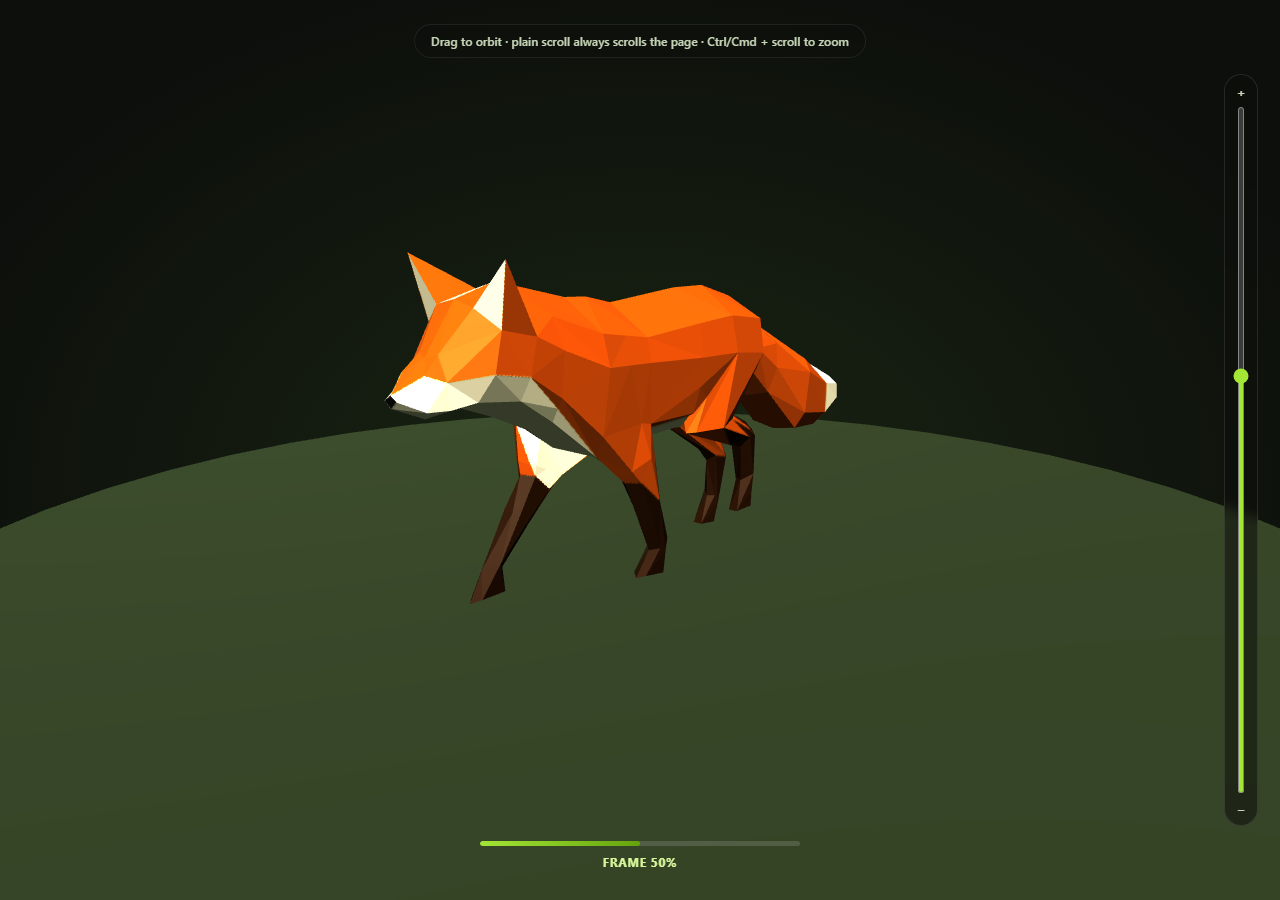
Most "scroll-controls-a-3D-model" demos rotate a static mesh. This one goes a step further: it loads a real glTF model with an embedded, artist-authored skeletal walk-cycle animation, and scrubs that actual animation clip — bones and all — directly from scroll position, frame by frame, forward and backward, while a visitor can still freely orbit the camera by dragging at any moment.
A real AnimationClip, not a fake one
The loaded Fox sample asset ships three baked animation clips (Survey, Walk, Run) as part of the .glb file itself. The snippet picks whichever clip's name matches /walk/i, falling back to the first available clip if the asset's naming ever changes, and builds a THREE.AnimationMixer around it with mixer.clipAction(clip).play(). The action is deliberately left unpaused: Three.js's internal pose evaluation skips a paused action even when it's driven by setTime(), not just its own per-frame advance — and since the render loop below never calls mixer.update(delta), there's no automatic playback to guard against pausing in the first place.
`mixer.setTime()` is the whole trick
A normal Three.js animation loop calls mixer.update(delta) every frame, advancing playback at real-world speed. This snippet never does that. Instead, ScrollTrigger's onUpdate calls mixer.setTime(progress * clipDuration) — setting the mixer to an exact point inside the clip's own duration, computed straight from scroll progress. Scroll down and the fox walks forward, one bone-pose at a time; scroll back up and the exact same walk cycle plays in reverse, because setTime doesn't care about direction or elapsed real time, only the value you give it.
Object-space animation, camera-space orbiting — no coordination needed
Scroll only ever touches the mixer's internal clip time. OrbitControls only ever touches the camera's position. Neither system reads or writes anything the other owns, so — exactly like the turntable rotation version of this idea — there's no flag, no pause-on-drag handler, no handoff logic required at all. Drag the canvas mid-scroll and the walk cycle keeps scrubbing exactly as scroll dictates, from whatever new angle you chose.
A named, honest fallback if the model fails
If GLTFLoader can't fetch the .glb (offline, CDN outage, blocked request), the real error is logged to the console and a simple placeholder cone stands in, so the scene never silently renders empty. The HUD progress bar and frame-percentage label still work regardless, since they read directly off scroll progress rather than off the model.
Zoom is opt-in, not a hijacked scroll wheel
OrbitControls' built-in wheel-zoom is deliberately turned off (controls.enableZoom = false) — left on, it calls preventDefault() on every wheel event over the canvas, silently swallowing the page scroll this whole demo depends on. Zoom is reimplemented as two explicit, opt-in gestures instead: a vertical slider next to the canvas, and Ctrl/Cmd + scroll wheel (the same convention embedded Google Maps and most map widgets use). Both call the same setZoomDistance() helper, which clamps to controls.minDistance/maxDistance and keeps the slider in sync no matter which input triggered the change.
Customizing it
Swap in any .glb with a baked AnimationClip — the /walk/i clip-name matcher and the mixer.setTime scrubbing logic work unchanged for any skeletal or morph-target animation. Pair it with scroll GLB camera flythrough for the checkpoint-touring variant of this same GLB-plus-scroll family, or scroll-scrubbed GLB turntable for the simplest version.
Build with AI
Build, Understand, Optimize, and Extend It With AI
Paste this snippet's HTML, CSS, and JS into an AI coding assistant like Claude and ask it to walk through exactly how mixer.setTime() turns a normal auto-playing skeletal animation into a scroll-scrubbable one, and why that specific technique means no coordination code is needed between the scroll-driven animation and the independently-dragged OrbitControls camera. It's also a good jumping-off point for extending the demo — ask it to blend between two different clips (e.g. Walk and Run) based on scroll velocity, add footstep-triggered particle effects at specific points in the clip's timeline, or sync a second scroll-driven camera path on top of the existing animation scrubbing. Use the conversation to build real intuition for AnimationMixer and clip-time control before applying the same setTime() scrubbing pattern to your own animated glTF assets.
Prompt to recreate it
Copy this into your AI assistant of choice to build the effect from scratch, or as a jumping-off point for your own variant:
Build a "scroll-scrubbed skeletal animation" demo in plain HTML, CSS, and JavaScript using Three.js (core, GLTFLoader, OrbitControls, and AnimationMixer, all loaded from a CDN with no bundler) plus GSAP with its ScrollTrigger plugin.

Requirements:
- A pinned full-viewport Three.js scene (GSAP ScrollTrigger pin: true) with an intro section before it and an outro section after, lit with a warm key light and a cooler fill light, plus a simple ground plane for grounding.
- Load a real .glb model using THREE.GLTFLoader from a genuine, freely-licensed, CDN-hosted glTF binary that ships an embedded skeletal AnimationClip with real, readable motion (e.g. a walk cycle) — do not fabricate the animation in code, and do not substitute a primitive geometry for the model.
- Build a THREE.AnimationMixer around the loaded model, select an appropriate animation clip from gltf.animations (matching by name if multiple clips exist, with a safe fallback to the first clip if no name match is found), and start the action with .play() — leave it unpaused, since the render loop will never call mixer.update(delta) and playback will be driven entirely by explicit setTime() calls instead.
- Using ScrollTrigger's scrub option, map the 0-1 scroll progress directly onto the animation clip's own duration and call the mixer's setTime() method every scroll update so the animation scrubs frame-by-frame with scroll position — scrolling down plays the clip forward, scrolling back up plays the exact same clip in reverse, entirely driven by setTime rather than by delta-based playback.
- Set up OrbitControls on the camera with damping enabled so a visitor can click-and-drag the canvas to freely orbit the camera at any time, completely independently of the scroll-driven animation scrubbing — do not add any pause-while-dragging or conflict-resolution logic between the two, since the animation only ever touches the mixer's clip time and OrbitControls only ever touches the camera, so no coordination is actually needed.
- Display a small progress bar or percentage label showing how far through the clip the current scroll position has scrubbed, driven from the same scroll progress value used for the animation.
- Handle the GLTFLoader's error callback by logging the real error and substituting a simple placeholder mesh so the scene is never blank if the model fails to load, and handle the case where the loaded model has no animations at all without throwing.
Want to tighten it up first? Run this prompt through the AI Prompt Studio to score it across 8 quality dimensions, catch anti-patterns, and tune the wording for Claude, ChatGPT, or Gemini before you paste it in.
Step by step
How to Use
- 1Add all five CDN scriptsthree.min.js, GLTFLoader.js, OrbitControls.js, gsap, and ScrollTrigger.
- 2Paste HTML, CSS, and JSThe fox loads standing at frame 0 of its walk cycle.
- 3Scroll into the pinned sectionThe walk cycle plays forward, frame by frame, tied to scroll position.
- 4Scroll back upThe exact same clip scrubs backward, since setTime is direction-agnostic.
- 5Drag on the canvas at any pointThe camera orbits freely and independently — the walk cycle keeps scrubbing normally.
- 6Use the slider or Ctrl/Cmd + scroll to zoomPlain scroll always advances the page; zoom is a separate, opt-in gesture.
- 7Swap in your own animated .glbUpdate MODEL_URL and adjust the clip-name matcher if needed.
Real-world uses
Common Use Cases
Got questions?
Frequently Asked Questions
Rotating a model only ever changes one transform property (rotation.y). Scrubbing a real AnimationClip means setting the exact playback time of a baked, multi-bone skeletal animation via mixer.setTime() — the fox's legs, tail, and body all pose correctly for that exact instant in the walk cycle, forward or backward, because the animation data itself (not a simple formula) defines the pose at every point in time.
Because here scroll only ever writes to the AnimationMixer's clip time, and OrbitControls only ever writes to the camera's position — two completely separate objects, so there's nothing for the two systems to fight over. The camera-flythrough snippet needs explicit pause-on-drag logic specifically because scroll and OrbitControls both want to control the same camera.position property there. Zoom follows the same discipline: OrbitControls' own wheel-zoom is turned off so a plain scroll always advances the page, and zooming is reimplemented as an explicit slider plus Ctrl/Cmd + scroll.
update(delta) advances animation playback at real-world speed, independent of scroll — useful for a normal looping animation, but not for scrubbing. setTime(t) jumps the mixer directly to an exact point in the clip, which is what lets scroll progress map onto animation progress one-to-one, including playing the clip backward when scrolling up.
The code checks gltf.animations.length before building a mixer at all, so a model with no animations simply renders statically with no errors. If animations exist but none match /walk/i, it falls back to gltf.animations[0] — the first available clip — rather than failing, so the demo keeps working even if the asset's clip names ever change.
Set up the renderer, scene, GLTFLoader call, AnimationMixer, and ScrollTrigger inside a mount effect, keeping the mixer, action, and clipDuration in refs so the onUpdate callback can reach current values. Call controls.dispose(), renderer.dispose(), and the ScrollTrigger instance's .kill() in the cleanup function; the mixer itself needs no explicit disposal beyond letting it be garbage-collected.