You Might Also Like
Learn Coding Visually
Learn to code with interactive, live-preview playgrounds — HTML, CSS, JavaScript, React & more.
 HTML Playground42 lessons · Click-based · Live preview
 CSS PlaygroundLearn CSS with a live editor
 JavaScript Playground60 lessons · DOM · Async · Canvas
 React PlaygroundLearn React with a live code editor
 GSAP PlaygroundLearn GSAP animation interactively
 SVG Playground44 lessons · shapes · paths · animation
 SCSS Playground45 lessons · Sass modules · tokens
 Tailwind PlaygroundLearn Tailwind CSS with a live editor
 Bootstrap 5 Playground50 lessons · live preview
Scroll-Scrubbed GLB Turntable — Free GSAP ScrollTrigger + Three.js glTF Snippet
Scroll-Scrubbed GLB Turntable · Scroll · Plain HTML, CSS & JS · Live preview
What's included
Features
About this UI Snippet
Scroll-Scrubbed GLB Turntable — A Real glTF Model, Spun by Scroll, Orbitable by Hand
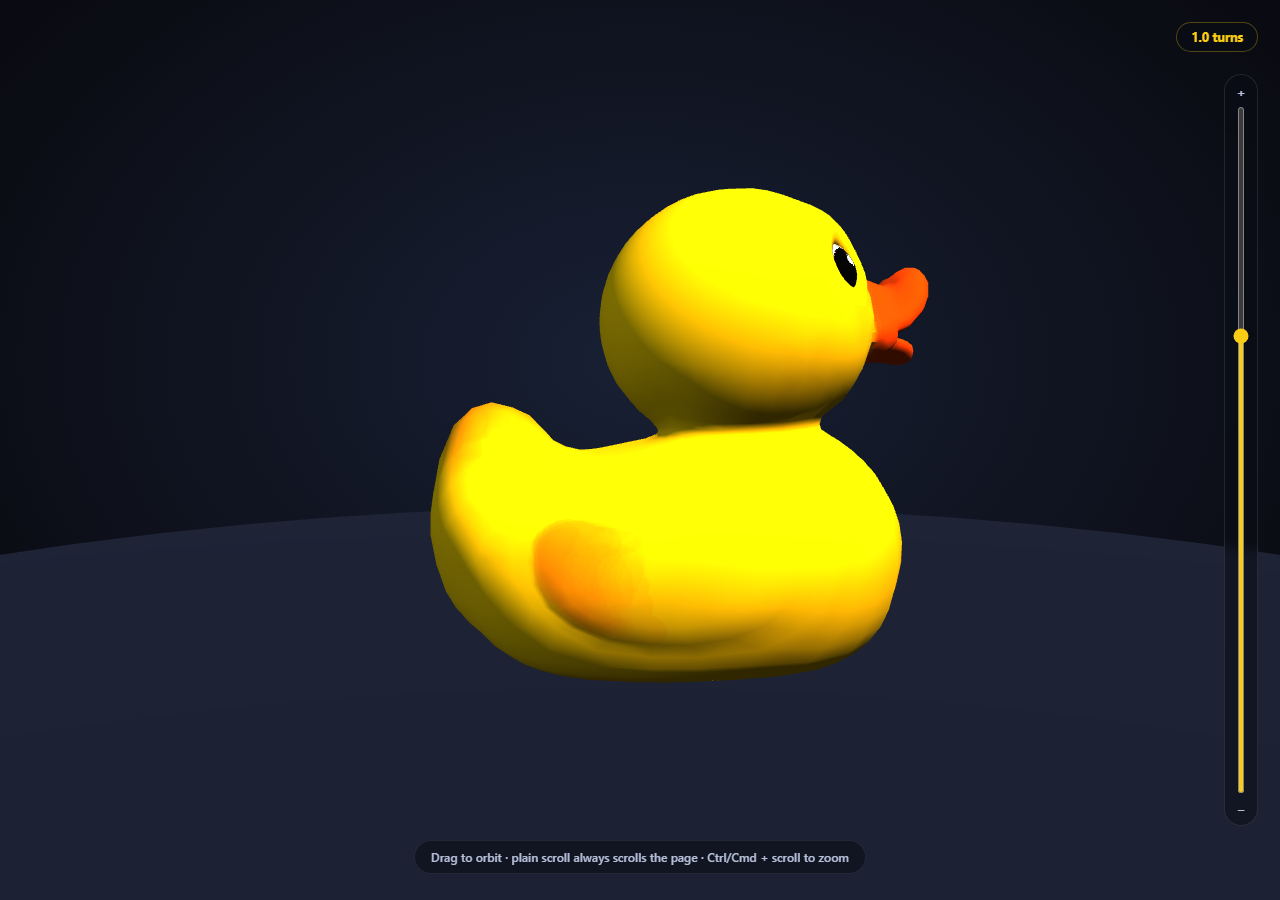
Most "3D on scroll" demos either fake the model with a primitive shape or lock the camera so tightly to the scroll animation that a visitor can't actually look at the thing from their own angle. This snippet does neither: it loads a genuine .glb file with Three.js's GLTFLoader, spins that model's own rotation directly from scroll position via GSAP ScrollTrigger's scrub, and keeps full OrbitControls dragging active the entire time — so scrolling and manually orbiting the camera both work, simultaneously, without a single line of conflict-resolution code.
Two independent transforms, not one shared one
The trick that makes drag-to-orbit and scroll-to-spin coexist for free is that they never touch the same property. OrbitControls moves the camera around a fixed target point — that's camera-space. The scroll handler sets duck.rotation.y directly on the model — that's object-space. A visitor dragging the canvas is orbiting the camera around the duck; scrolling is spinning the duck itself. Both are true simultaneously, and because they're different transforms on different objects, there's nothing to arbitrate — no "pause auto-rotate while dragging" logic needed at all, unlike patterns where scroll and drag would fight over the same camera position.
A real glTF binary, not a placeholder mesh
new THREE.GLTFLoader().load(MODEL_URL, ...) fetches Khronos' own official sample-asset Duck model — a real .glb binary containing mesh geometry, UVs, and a baked texture — from its GitHub repository via the jsdelivr CDN, no asset hosting of your own required. The load is async: the duck variable starts null, and the ScrollTrigger's onUpdate callback checks for that before touching .rotation, so scrolling before the model finishes loading never throws.
Scrubbed, not animated on a timer
ScrollTrigger's onUpdate receives a progress value from 0 to 1 representing exactly how far through the pinned scroll range the user currently is, and duck.rotation.y is set to progress * Math.PI * 2 * TOTAL_TURNS — a direct, reversible function of scroll position. There's no requestAnimationFrame tween running on its own clock; scroll back up by one pixel and the model rotates back by the exact corresponding fraction of a turn.
A named, honest fallback if the CDN model fails
The loader's third argument is an error callback. If the .glb genuinely fails to fetch (a blocked network, an offline preview), the snippet logs the real error and swaps in a plain sphere so the scene is never a silent empty void — the same shape-matched-fallback discipline used throughout this library for anything that depends on an external resource.
Zoom is opt-in, not a hijacked scroll wheel
OrbitControls' built-in wheel-zoom is deliberately turned off (controls.enableZoom = false) — left on, it calls preventDefault() on every wheel event over the canvas, silently swallowing the page scroll this whole demo depends on. Zoom is reimplemented as two explicit, opt-in gestures instead: a vertical slider next to the canvas, and Ctrl/Cmd + scroll wheel (the same convention embedded Google Maps and most map widgets use). Both call the same setZoomDistance() helper, which clamps to controls.minDistance/maxDistance and keeps the slider's position in sync no matter which input triggered the change.
Customizing it
Swap MODEL_URL for any other Khronos sample-asset `.glb` or your own hosted model, change TOTAL_TURNS for a faster or slower spin, or combine this pattern with scroll reveal grid for a longer scroll narrative. Pair it conceptually with three product viewer, which uses the same OrbitControls setup on a procedural (non-glTF) shape.
Build with AI
Build, Understand, Optimize, and Extend It With AI
Paste this snippet's HTML, CSS, and JS into an AI coding assistant like Claude and ask it to explain exactly why setting the model's rotation.y directly from ScrollTrigger's progress value produces motion that scrubs correctly in both directions, and why OrbitControls dragging and the scroll-driven spin never need explicit conflict-resolution code (hint: they act on different transforms — camera-space versus object-space). It's also useful for extending the demo — ask it to drive a second property (like scale or a material's emissive intensity) from the same scroll progress, add scroll-triggered checkpoints that pause the spin at specific named angles, or swap in a model with its own baked animation clip and scrub that instead of a simple Y rotation. Use the conversation to build real intuition for scroll-scrubbed 3D before adapting the technique to your own glTF model.
Prompt to recreate it
Copy this into your AI assistant of choice to build the effect from scratch, or as a jumping-off point for your own variant:
Build a "scroll-scrubbed GLB turntable" in plain HTML, CSS, and JavaScript using Three.js (core, GLTFLoader, and OrbitControls, all loaded from a CDN with no bundler) plus GSAP with its ScrollTrigger plugin.

Requirements:
- A pinned full-viewport Three.js scene (GSAP ScrollTrigger pin: true) with an intro section before it and an outro section after, studio-lit with at least a key and fill directional light plus a simple ground/grounding element.
- Load a real .glb model using THREE.GLTFLoader pointed at a genuine, freely-licensed, CDN-hosted glTF binary URL (e.g. one of Khronos' official glTF-Sample-Assets models) — do not substitute a Three.js primitive geometry standing in for "a model."
- Set up OrbitControls on the camera with damping enabled, so the user can click-and-drag the canvas at any time to orbit the camera and inspect the model from any angle — this must work continuously, not be disabled during the scroll-driven animation.
- Use ScrollTrigger's scrub option (not a plain trigger/timer) so that a progress value from 0 to 1 is available every frame the pinned section is being scrolled through, and set the loaded model's own rotation.y directly from that progress value multiplied by 2*PI times some number of full turns — the rotation must be a pure, reversible function of scroll position, not a one-shot animation.
- Ensure the scroll-driven model rotation and the OrbitControls camera-drag orbiting can both be used at the same time with zero explicit conflict-resolution code, by making sure they modify different transforms (the model's own rotation versus the camera's position/orbit) rather than fighting over the same property.
- Handle the model still being asynchronously in-flight when scroll events first fire (don't throw if the mesh hasn't loaded yet), and handle the GLTFLoader's error callback by logging the real error and substituting a simple placeholder mesh so the scene is never blank if the model fails to load.
- Display a small live label showing the current rotation progress (e.g. "1.3 turns") derived from the same scroll progress value.
Want to tighten it up first? Run this prompt through the AI Prompt Studio to score it across 8 quality dimensions, catch anti-patterns, and tune the wording for Claude, ChatGPT, or Gemini before you paste it in.
Step by step
How to Use
- 1Add all five CDN scriptsthree.min.js, GLTFLoader.js, OrbitControls.js, gsap, and ScrollTrigger — in that order.
- 2Paste HTML, CSS, and JSThe duck model loads and appears facing forward, unrotated.
- 3Scroll into the pinned sectionThe duck spins on its own Y axis in direct proportion to scroll position.
- 4Drag on the canvas at any pointThe camera orbits freely — scroll-driven spin keeps working underneath.
- 5Use the slider or Ctrl/Cmd + scroll to zoomPlain scroll always advances the page; zoom is a separate, opt-in gesture.
- 6Scroll back upThe duck's rotation reverses exactly, since it's a pure function of progress.
- 7Swap the model URLPoint MODEL_URL at any other .glb to spin a different object.
Real-world uses
Common Use Cases
Got questions?
Frequently Asked Questions
They act on two completely different transforms. OrbitControls repositions the camera around a fixed target — camera-space. The scroll handler sets the model's own rotation.y directly — object-space. Since a visitor's drag and the scroll handler never write to the same property, there is nothing to arbitrate: both simply happen, simultaneously, all the time. Zoom follows the same discipline: OrbitControls' own wheel-zoom is turned off so a plain scroll always advances the page, and zooming is reimplemented as an explicit slider plus Ctrl/Cmd + scroll.
A real one — THREE.GLTFLoader fetches and parses an actual .glb binary (Khronos' official sample-asset Duck model) containing real mesh geometry, UV coordinates, and a baked texture, the same file widely used across Three.js GLTFLoader tutorials and demos.
The loader's error callback logs the real failure to the console and swaps in a plain sphere mesh, so the scene never renders as a silent empty void. This mirrors the honest-fallback pattern used throughout this snippet library for anything depending on an external resource.
Setting rotation directly from ScrollTrigger's progress value (0 to 1) makes the spin a pure, reversible function of scroll position — scrolling back up by any amount rotates the model back by the exact corresponding fraction of a turn. A timer-based animation would only ever play forward and couldn't scrub.
Set up the renderer, scene, GLTFLoader call, and ScrollTrigger inside a mount effect, storing the loaded model and controls in refs so the onUpdate callback can reach them. Call controls.dispose(), renderer.dispose(), and the ScrollTrigger instance's .kill() in the cleanup function to release the WebGL context and remove the pin/scroll listeners on unmount.