You Might Also Like
Learn Coding Visually
Learn to code with interactive, live-preview playgrounds — HTML, CSS, JavaScript, React & more.
 HTML Playground42 lessons · Click-based · Live preview
 CSS PlaygroundLearn CSS with a live editor
 JavaScript Playground60 lessons · DOM · Async · Canvas
 React PlaygroundLearn React with a live code editor
 GSAP PlaygroundLearn GSAP animation interactively
 SVG Playground44 lessons · shapes · paths · animation
 SCSS Playground45 lessons · Sass modules · tokens
 Tailwind PlaygroundLearn Tailwind CSS with a live editor
 Bootstrap 5 Playground50 lessons · live preview
Loan EMI Calculator — Free HTML CSS JS EMI Formula Snippet
Loan EMI Calculator · Forms · Plain HTML, CSS & JS · Live preview
What's included
Features
About this UI Snippet
Loan EMI Calculator — HTML, CSS & JavaScript Amortization Snippet
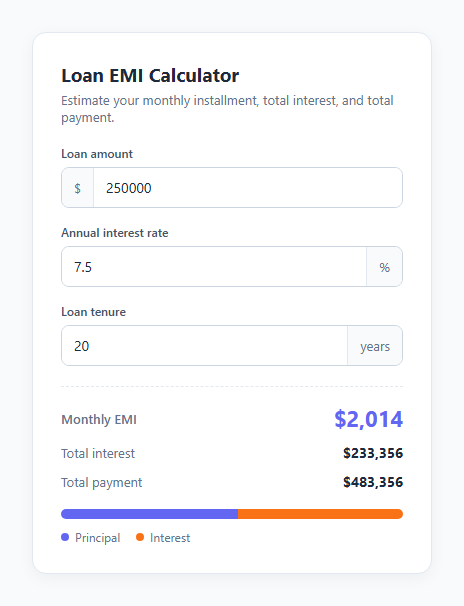
An EMI (Equated Monthly Installment) is the fixed amount a borrower pays every month toward a loan until it's fully repaid — the standard structure for mortgages, auto loans, and personal loans. Every EMI calculator on the web, no matter how polished, comes down to the same amortization formula applied to three inputs: principal, interest rate, and tenure.
This snippet implements that formula in plain HTML, CSS, and vanilla JavaScript, with live recalculation on every keystroke and a two-color bar visualizing the principal-versus-interest split.
The EMI formula
The standard formula is:
EMI = [P × r × (1 + r)^n] / [(1 + r)^n − 1]
where P is the principal, r is the *monthly* interest rate (the annual rate divided by 12 and by 100 to convert from a percentage), and n is the total number of monthly installments (years × 12). The JavaScript computes factor = Math.pow(1 + monthlyRate, months) once and reuses it in both the numerator and denominator, which is exactly the (1 + r)^n term in the formula above.
Handling the zero-interest edge case
If the interest rate is 0, the formula's denominator (1 + r)^n − 1 becomes 0, which would throw a division-by-zero error. The code checks for monthlyRate === 0 first and falls back to simple division — principal / months — since a zero-interest loan is just the principal spread evenly across the term with no formula needed.
Deriving total interest and total payment
Once EMI is known, totalPayment = emi × months gives the sum of every installment, and totalInterest = totalPayment − principal gives the portion of that total which is pure interest rather than principal repayment. These two numbers are what most borrowers actually care about — the EMI tells you the monthly burden, but total interest tells you the true cost of borrowing.
The principal/interest bar
The visual bar underneath the results is two flex children whose widths are set from principal / totalPayment and its complement, so the bar always sums to 100% regardless of the numbers involved — a longer tenure or higher rate visibly shifts more of the bar toward the orange interest segment.
Live recalculation
Every input has oninput="calculateEmi()", so the results and bar update on every keystroke rather than requiring a submit button — appropriate for a calculator where users expect to see the impact of adjusting a number immediately.
Build with AI
Build, Understand, Optimize, and Extend It With AI
Give this snippet's HTML, CSS, and JS to an AI coding assistant like Claude and ask it to derive the EMI formula from first principles — showing how the present-value-of-an-annuity equation reduces to the exact JavaScript expression used here — so you understand why the monthly rate and number of payments both need to be derived from the annual rate and the number of years before plugging into Math.pow. It's also a good snippet to extend with the assistant's help: ask it to add a full month-by-month amortization table showing the principal/interest split for every single payment, to add input validation that clamps unreasonable values (negative rates, zero-length tenures), or to add a prepayment calculator that shows how an extra lump-sum payment shortens the loan term.
Prompt to recreate it
Copy this into your AI assistant of choice to build the effect from scratch, or as a jumping-off point for your own variant:
Build a loan EMI (Equated Monthly Installment) calculator in plain HTML, CSS, and JavaScript — no framework, no finance library.

Requirements:
- Three number inputs: loan principal, annual interest rate as a percentage, and loan tenure in years, each updating results live on every keystroke via the input event (no submit button).
- Implement the exact standard amortization formula EMI = [P × r × (1 + r)^n] / [(1 + r)^n − 1], where r is the monthly interest rate (annual rate divided by 12 and by 100) and n is the total number of monthly payments (years × 12).
- Explicitly handle the case where the interest rate is 0 with a simple division fallback (principal divided by number of months), since the standard formula divides by zero in that case.
- Display three results: the computed monthly EMI, the total interest paid over the full loan term, and the total amount paid (principal plus interest).
- Render a two-segment horizontal bar showing the proportion of total payment that is principal versus interest, with widths computed as percentages that always sum to 100%, updating live alongside the numeric results.
- Format all currency values with thousands separators for readability, and isolate all the math inside a single, clearly named calculation function that could be unit tested independently of the DOM.
Want to tighten it up first? Run this prompt through the AI Prompt Studio to score it across 8 quality dimensions, catch anti-patterns, and tune the wording for Claude, ChatGPT, or Gemini before you paste it in.
Step by step
How to Use
- 1Load the snippetClick "Loan EMI Calculator" in the sidebar Library tab. The preview loads with example values already calculated.
- 2Change the inputsAdjust the loan amount, interest rate, or tenure in the preview and watch the EMI, total interest, and total payment update instantly.
- 3Check the principal/interest splitWatch the two-color bar shift as you increase the tenure or rate — a longer loan pushes more of the total toward interest.
- 4Adjust the currency formatIn the JS panel, edit the formatCurrency function to use a different locale or currency symbol via toLocaleString options.
- 5Add monthly tenure inputIn the HTML panel, add a months field alongside years and update the months calculation in calculateEmi() to sum years × 12 plus the extra months.
- 6Export in your formatClick "HTML" for a standalone file, "JSX" for React, or "Tailwind" for React + Tailwind CSS.
Real-world uses
Common Use Cases
Got questions?
Frequently Asked Questions
The standard EMI amortization formula: EMI = [P × r × (1 + r)^n] / [(1 + r)^n − 1], where P is the principal, r is the monthly interest rate (annual rate ÷ 12 ÷ 100), and n is the total number of monthly payments (years × 12).
When the interest rate is 0, the formula's denominator (1 + r)^n − 1 evaluates to 0, which would cause a division-by-zero error. The code detects this case and falls back to simple division: principal divided evenly across the number of months.
Total interest equals total payment minus the original principal. Total payment is the EMI multiplied by the total number of months, so total interest represents everything paid beyond the amount originally borrowed.
Yes. Add a second number input for extra months, and change the months calculation to years * 12 + extraMonths before it feeds into the EMI formula — no other logic needs to change.
Edit the formatCurrency function's toLocaleString call — pass a different locale string (like "en-IN" or "de-DE") and/or wrap the number with Intl.NumberFormat and a currency style option for full localized currency formatting.
No — this calculates the pure amortization EMI based on principal, rate, and tenure only. Real-world monthly payments may include property tax escrow, insurance, or origination fees that this snippet does not model.
Each input uses the oninput event, which fires on every keystroke, so calculateEmi() reruns and updates the results immediately. This matches user expectations for a lightweight calculator tool.
Yes. Loop from month 1 to n, and on each iteration compute that month's interest portion as the remaining balance times the monthly rate, subtract the rest of the EMI from the balance as principal repaid, and store each row — this snippet only shows the totals, not the full schedule.