You Might Also Like
Learn Coding Visually
Learn to code with interactive, live-preview playgrounds — HTML, CSS, JavaScript, React & more.
 HTML Playground42 lessons · Click-based · Live preview
 CSS PlaygroundLearn CSS with a live editor
 JavaScript Playground60 lessons · DOM · Async · Canvas
 React PlaygroundLearn React with a live code editor
 GSAP PlaygroundLearn GSAP animation interactively
 SVG Playground44 lessons · shapes · paths · animation
 SCSS Playground45 lessons · Sass modules · tokens
 Tailwind PlaygroundLearn Tailwind CSS with a live editor
 Bootstrap 5 Playground50 lessons · live preview
Recipient Chip Input (To: Field) — Free HTML CSS JS Snippet
Recipient Chip Input (To: Field) · Forms · Plain HTML, CSS & JS · Live preview
What's included
Features
About this UI Snippet
Recipient Chip Input — Email-Validated Chips with Multi-Paste Support
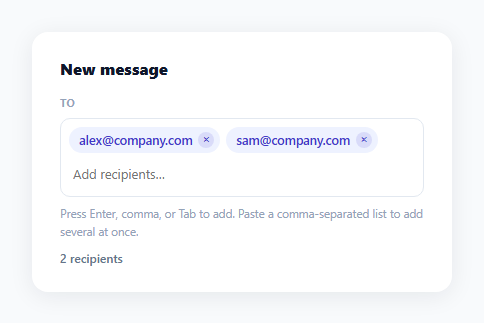
Email clients turn a plain text field into a row of chips the moment you commit an address — this snippet reproduces that exact interaction, including per-chip email validation and pasting several comma-separated addresses at once, all in vanilla JavaScript.
Per-chip validation, not just field-level
Every address is tested against EMAIL_RE = /^[^\s@]+@[^\s@]+\.[^\s@]+$/ the moment its chip is created, and an invalid match adds the rci-invalid class instead of the default styling — turning the chip red rather than silently accepting or rejecting the whole field. This gives immediate, localized feedback: a user pasting five addresses where one is malformed sees exactly which one needs fixing, not a generic field-level error.
Three commit triggers, one shared function
Enter, comma, and Tab all call the same commitInput() function, and Tab's default behavior (moving focus to the next form field) is prevented with e.preventDefault() when there's pending text to commit — so tabbing out of the field always chips the in-progress text first rather than discarding it, matching what users expect from a real "To:" field.
Splitting a paste into multiple chips
The paste handler checks text.indexOf(',') !== -1 before intervening — if the pasted content has no comma, the default paste behavior runs normally (just placing text in the input for further editing), but a comma-separated paste is caught, split, and each piece becomes its own chip immediately: text.split(',').forEach(part => addChip(part)). This is what makes pasting a whole address list from an email client or spreadsheet "just work."
Backspace-to-remove-last-chip
When Backspace is pressed on an empty input (e.key === 'Backspace' && !input.value), the last chip in the field is removed — the same convention used by every major email client's recipient field, letting a user quickly undo the most recent entry without reaching for the mouse.
Click-to-focus on empty space
Clicking anywhere in the field container that isn't a chip or the input itself still focuses the input (if (e.target === field) input.focus()), so the whole field reads as one clickable target even though it's really a flex container of separate chip and input elements.
Customizing it
Swap EMAIL_RE for a stricter or more permissive validation pattern, wire an autocomplete dropdown into the input's keyup handler for suggesting known contacts, or add a max-recipients limit that disables further chip creation.
Build with AI
Build, Understand, Optimize, and Extend It With AI
You don't have to work out the multi-trigger commit logic by hand. Paste this snippet's HTML, CSS, and JS into an AI coding assistant like Claude and ask it to explain why Enter, comma, and Tab all funnel through one commitInput() function instead of three separate handlers, and how the paste handler decides whether to let the browser's default paste behavior run versus intercepting it to split a comma-separated list into individual chips. The same assistant can help optimize it too — ask whether validating each chip's email format on every keystroke versus only on commit is worth the tradeoff for a very long recipient list. It's also useful for extending the field: ask it to add duplicate-email detection that highlights a chip already in the list, wire in a contacts autocomplete dropdown, or add separate To/Cc/Bcc rows sharing the same chip component. Treat the code less like a finished artifact and more like a starting point for a conversation.
Prompt to recreate it
Copy this into your AI assistant of choice to build the effect from scratch, or as a jumping-off point for your own variant:
Build a "recipient chip input" (a Gmail-style "To:" field) in plain HTML, CSS, and JavaScript with no tagging library.

Requirements:
- A field container that visually looks like a single bordered input but actually holds a row of chip elements followed by a real text input, with the whole container gaining a focus ring when the inner input is focused (using :focus-within).
- Typed text turns into a chip when the user presses Enter, comma, or Tab (preventing Tab's default focus-move behavior only when there is pending text to commit), clearing the input afterward.
- Each created chip must be validated against a basic email-format regular expression independently, applying a distinct "invalid" visual style (e.g. red instead of the default blue) to any chip whose text does not look like a valid email address, without blocking the other valid chips from being added.
- Pasting text containing a comma must be intercepted so that each comma-separated piece becomes its own separate chip immediately, rather than pasting the raw comma-separated string into the input as one block of text.
- Pressing Backspace while the text input is empty removes the most recently added chip.
- Each chip includes a small remove button that deletes just that chip and returns focus to the text input.
- A live count label below the field that updates automatically to reflect the current number of chips, and clicking any empty space inside the field container (not on a chip) focuses the text input.
Want to tighten it up first? Run this prompt through the AI Prompt Studio to score it across 8 quality dimensions, catch anti-patterns, and tune the wording for Claude, ChatGPT, or Gemini before you paste it in.
Step by step
How to Use
- 1Paste HTML, CSS, and JSTwo sample recipient chips render already committed in the "To:" field.
- 2Type an address and press EnterA new chip appears; valid emails render normally, malformed ones render in red.
- 3Paste a comma-separated listTry pasting "a@x.com, b@x.com, c@x.com" — each address becomes its own chip immediately.
- 4Press Backspace on an empty inputThe most recently added chip is removed, matching real email client behavior.
- 5Click a chip's × buttonRemoves just that recipient and refocuses the input.
- 6Adjust validationEdit the EMAIL_RE regular expression in the JS to match a stricter or more permissive email format.
Real-world uses
Common Use Cases
Got questions?
Frequently Asked Questions
Three keydown cases call the shared commitInput() function: pressing Enter, pressing comma, or pressing Tab while there's text in the field. All three funnel through the same function so the chip-creation logic, including validation and clearing the input, only needs to exist in one place.
Each pasted address gets its own chip and its own independent validation check against EMAIL_RE. Valid addresses render as normal blue chips; invalid ones render in red with the rci-invalid class, so you can see and fix exactly which entries are malformed without losing the valid ones.
The keydown handler calls e.preventDefault() on Tab only when there's pending text in the input. This intercepts Tab's default browser behavior (moving to the next focusable element) just long enough to commit that text as a chip first — matching the expectation that unsaved recipient text shouldn't silently disappear when you tab away.
In addChip(), before creating the new chip element, check field.querySelectorAll('.rci-chip').length against your maximum. If the limit is reached, return early without adding the chip and optionally show a warning message near the field.
Add an input event listener that reads the current partial text, filters your contacts array for matches, and renders a small dropdown of suggestions positioned below the field. Selecting a suggestion would call addChip() directly with the chosen contact's email, then clear the input the same way commitInput() does.