You Might Also Like
Learn Coding Visually
Learn to code with interactive, live-preview playgrounds — HTML, CSS, JavaScript, React & more.
 HTML Playground42 lessons · Click-based · Live preview
 CSS PlaygroundLearn CSS with a live editor
 JavaScript Playground60 lessons · DOM · Async · Canvas
 React PlaygroundLearn React with a live code editor
 GSAP PlaygroundLearn GSAP animation interactively
 SVG Playground44 lessons · shapes · paths · animation
 SCSS Playground45 lessons · Sass modules · tokens
 Tailwind PlaygroundLearn Tailwind CSS with a live editor
 Bootstrap 5 Playground50 lessons · live preview
Resend OTP Cooldown Timer — Free HTML CSS JS Verification Snippet
Resend OTP Cooldown Timer · Forms · Plain HTML, CSS & JS · Live preview
What's included
Features
About this UI Snippet
Resend OTP Cooldown Timer — setInterval-Driven Rate Limiting UI
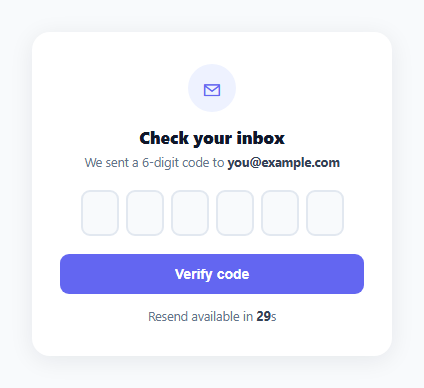
Every OTP verification screen needs a way to request a new code, but an unrestricted "resend" button invites accidental spam-clicking and makes it trivial to hammer an SMS or email provider's API. This snippet pairs a standard 6-digit OTP input with a visible cooldown timer that keeps the resend action disabled and counting down for 30 seconds before swapping it for a clickable link.
One countdown function, called twice
startCountdown() resets remaining to DURATION, shows the countdown text, hides the resend link, and starts a setInterval that decrements remaining and updates secondsEl.textContent once per second. The same function runs both on initial page load and again every time the user clicks resend — there's no duplicated timer logic between the "first send" and "resend" cases.
Swapping UI state instead of just disabling a button
Rather than a resend button that's merely disabled with grayed-out styling, the countdown text itself replaces the button entirely (countdownEl.hidden = false / resendBtn.hidden = true) — showing exactly how many seconds remain is more informative than a disabled control with no explanation, and it removes any temptation to keep clicking a dead button.
Clearing the previous interval before starting a new one
clearInterval(timerId) runs at the top of startCountdown() before the new setInterval is created. Without this, clicking resend while an old interval was somehow still running (or calling the function twice in quick succession) would stack multiple intervals decrementing remaining simultaneously, causing the countdown to run too fast.
Resend clears and refocuses the OTP boxes
Clicking resend doesn't just restart the timer — it also clears every input's value and filled class and moves focus back to the first box, matching the mental model that a new code invalidates whatever was previously typed, and puts the cursor exactly where the user needs to start typing the new code.
Independent verify feedback
The verify button's handler is entirely separate from the countdown — it just checks whether all six boxes are filled and shows a success or error status message, styled with inline color/background changes so the same statusEl element can represent both outcomes without two separate DOM nodes.
Customizing it
Change DURATION to match your provider's actual rate limit, replace the resend click handler's placeholder with a real API call, or add a maximum resend attempt counter that permanently disables the action after N tries.
Build with AI
Build, Understand, Optimize, and Extend It With AI
You don't have to work out the interval bookkeeping by hand. Paste this snippet's HTML, CSS, and JS into an AI coding assistant like Claude and ask it to explain why clearInterval() runs before every new setInterval call in startCountdown(), and how reusing the same function for the initial send and every resend avoids duplicated countdown logic. The same assistant can help optimize it too — ask whether the countdown should persist across a page reload using a stored end timestamp instead of resetting from DURATION every time. It's also useful for extending the flow: ask it to add a maximum resend attempt limit, persist the cooldown in localStorage, or add a shake animation when verification fails. Treat the code less like a finished artifact and more like a starting point for a conversation.
Prompt to recreate it
Copy this into your AI assistant of choice to build the effect from scratch, or as a jumping-off point for your own variant:
Build a "resend OTP cooldown timer" paired with a 6-digit code input in plain HTML, CSS, and JavaScript with no library.

Requirements:
- A row of six single-character numeric inputs with the standard OTP behavior: auto-advance focus to the next box after a digit is typed, backspace moves focus to the previous box when the current box is already empty, and non-digit characters are stripped.
- A countdown area that starts immediately on page load showing "Resend available in Ns" where N counts down once per second from a configurable duration constant, using setInterval.
- Once the countdown reaches zero, hide the countdown text and reveal a clickable "Resend code" link in its place.
- Clicking resend must: clear every OTP box's value and visual filled state, move focus back to the first box, briefly show a "new code sent" confirmation message that auto-dismisses after a couple of seconds, and restart the same countdown function from the full duration.
- The countdown-starting function must clear any previous interval before starting a new one, so that clicking resend never results in two intervals running simultaneously and the countdown speeding up.
- A separate "Verify" button that checks whether all six boxes are filled and shows a success or error status message accordingly, independent of the resend/countdown logic.
Want to tighten it up first? Run this prompt through the AI Prompt Studio to score it across 8 quality dimensions, catch anti-patterns, and tune the wording for Claude, ChatGPT, or Gemini before you paste it in.
Step by step
How to Use
- 1Paste HTML, CSS, and JSThe OTP input renders with a 30-second "Resend available in 30s" countdown already running.
- 2Watch the countdownThe number ticks down once per second until it reaches zero.
- 3Click Resend codeOnce the countdown ends, a clickable "Resend code" link appears in its place.
- 4Trigger a resendClicking it clears the OTP boxes, refocuses the first one, shows a confirmation message, and restarts the 30-second countdown.
- 5Change the durationIn the JS, edit the DURATION constant to match your SMS or email provider's actual rate limit.
- 6Wire up real APIsReplace the resend handler's placeholder logic with a fetch() call to your backend's resend endpoint, and connect verify() to your verification API.
Real-world uses
Common Use Cases
Got questions?
Frequently Asked Questions
A disabled button with no explanation leaves users guessing why they can't click it or how long to wait. Showing "Resend available in 24s" and ticking it down gives a clear, specific reason and expectation, which reduces frustration and repeated clicking attempts.
Without clearing any existing interval first, calling startCountdown() a second time (for example from a resend click) would create a second setInterval running alongside the first, causing remaining to decrement twice per second and the countdown to finish in half the expected time.
Edit the DURATION constant near the top of the JS. It's used both to reset remaining at the start of every countdown and doesn't need to be changed anywhere else — the display and interval logic both read from the same variable.
Inside the resend button's click handler, replace or supplement the input-clearing logic with a fetch() POST to your resend endpoint. Only call startCountdown() again once that request succeeds, and show an error status instead if it fails, so the timer doesn't restart on a failed send.
As written, the countdown is purely in-memory and resets to the full duration on page reload. For a persistent cooldown across reloads, store the countdown's end timestamp in localStorage or sessionStorage and compute remaining as the difference from Date.now() when the page loads.