Source Code
<section class="kdp-hero">
  <div class="kdp-copy">
    <span class="kdp-eyebrow">Project management, reimagined</span>
    <h1 class="kdp-h1">Drag it. Drop it.<br>Watch it ship.</h1>
    <p class="kdp-sub">This isn't a screenshot — drag any card between columns below. That's the real board your team will use.</p>
    <a href="#" class="kdp-cta">Start your board free</a>
  </div>

  <div class="kdp-board" id="kdpBoard">
    <div class="kdp-col" data-col="todo">
      <div class="kdp-col-head"><span>To Do</span><b class="kdp-count">3</b></div>
      <div class="kdp-col-body" data-drop>
        <div class="kdp-card" draggable="true"><span class="kdp-tag kdp-tag-purple">Design</span>Landing page hero mockup</div>
        <div class="kdp-card" draggable="true"><span class="kdp-tag kdp-tag-blue">Dev</span>Set up staging environment</div>
        <div class="kdp-card" draggable="true"><span class="kdp-tag kdp-tag-green">Content</span>Write launch email copy</div>
      </div>
    </div>
    <div class="kdp-col" data-col="progress">
      <div class="kdp-col-head"><span>In Progress</span><b class="kdp-count">2</b></div>
      <div class="kdp-col-body" data-drop>
        <div class="kdp-card" draggable="true"><span class="kdp-tag kdp-tag-blue">Dev</span>API rate limiting middleware</div>
        <div class="kdp-card" draggable="true"><span class="kdp-tag kdp-tag-purple">Design</span>Onboarding flow wireframes</div>
      </div>
    </div>
    <div class="kdp-col" data-col="done">
      <div class="kdp-col-head"><span>Done</span><b class="kdp-count">2</b></div>
      <div class="kdp-col-body" data-drop>
        <div class="kdp-card" draggable="true"><span class="kdp-tag kdp-tag-green">Content</span>Pricing page copy review</div>
        <div class="kdp-card" draggable="true"><span class="kdp-tag kdp-tag-blue">Dev</span>Fix Safari flexbox bug</div>
      </div>
    </div>
  </div>
</section>*{box-sizing:border-box;margin:0;padding:0}
body{font-family:system-ui,-apple-system,sans-serif;background:#0f1117;color:#f1f2f8}
.kdp-hero{min-height:100vh;display:flex;flex-direction:column;align-items:center;justify-content:center;gap:44px;padding:72px 20px}
.kdp-copy{text-align:center;max-width:600px;display:flex;flex-direction:column;align-items:center;gap:14px}
.kdp-eyebrow{font-size:12px;font-weight:700;letter-spacing:.08em;text-transform:uppercase;color:#a78bfa}
.kdp-h1{font-size:clamp(28px,4.8vw,48px);font-weight:800;line-height:1.12;letter-spacing:-.02em}
.kdp-sub{font-size:15.5px;color:#9498b3;line-height:1.65;max-width:480px}
.kdp-cta{margin-top:4px;background:#a78bfa;color:#1c1330;font-weight:700;font-size:15px;padding:12px 26px;border-radius:9px;text-decoration:none;transition:transform .15s}
.kdp-cta:hover{transform:translateY(-2px)}
.kdp-board{width:min(880px,96vw);display:grid;grid-template-columns:repeat(3,1fr);gap:14px}
.kdp-col{background:#171923;border:1px solid rgba(255,255,255,.07);border-radius:14px;padding:12px;display:flex;flex-direction:column;gap:10px;min-height:220px}
.kdp-col-head{display:flex;align-items:center;justify-content:space-between;padding:4px 6px;font-size:12.5px;font-weight:700;color:#c3c6de}
.kdp-count{background:rgba(255,255,255,.08);color:#9498b3;font-size:11px;padding:2px 7px;border-radius:99px}
.kdp-col-body{display:flex;flex-direction:column;gap:8px;min-height:60px;border-radius:10px;transition:background .15s}
.kdp-col-body.kdp-over{background:rgba(167,139,250,.09);outline:1.5px dashed rgba(167,139,250,.5)}
.kdp-card{background:#20222f;border:1px solid rgba(255,255,255,.06);border-radius:10px;padding:11px 12px;font-size:13px;font-weight:600;color:#e4e5f2;line-height:1.4;cursor:grab;display:flex;flex-direction:column;gap:7px;transition:transform .12s,box-shadow .12s,opacity .12s}
.kdp-card:active{cursor:grabbing}
.kdp-card.kdp-dragging{opacity:.4}
.kdp-card:hover{transform:translateY(-1px);box-shadow:0 8px 18px rgba(0,0,0,.35)}
.kdp-tag{align-self:flex-start;font-size:10px;font-weight:800;padding:3px 8px;border-radius:6px;text-transform:uppercase;letter-spacing:.03em}
.kdp-tag-purple{background:rgba(167,139,250,.16);color:#c4b5fd}
.kdp-tag-blue{background:rgba(96,165,250,.16);color:#93c5fd}
.kdp-tag-green{background:rgba(74,222,128,.16);color:#86efac}
@media(max-width:720px){.kdp-board{grid-template-columns:1fr}}// A genuinely working HTML5 drag-and-drop kanban board: cards can be dragged
// between any of the three columns, and each column's count badge updates live.
var cards = document.querySelectorAll('.kdp-card');
var dropZones = document.querySelectorAll('[data-drop]');
var draggedCard = null;
cards.forEach(function (card) {
card.addEventListener('dragstart', function () {
draggedCard = card;
card.classList.add('kdp-dragging');
});
card.addEventListener('dragend', function () {
card.classList.remove('kdp-dragging');
draggedCard = null;
updateCounts();
});
});
dropZones.forEach(function (zone) {
zone.addEventListener('dragover', function (e) {
e.preventDefault(); // required to allow a drop to fire at all
zone.classList.add('kdp-over');
// Reorder live: figure out which card in this zone we're hovering above
// and insert the dragged card before it, so dropping lands exactly where
// the cursor is rather than always at the end of the column.
var afterElement = getDragAfterElement(zone, e.clientY);
if (!draggedCard) return;
if (afterElement == null) {
zone.appendChild(draggedCard);
} else {
zone.insertBefore(draggedCard, afterElement);
}
});
zone.addEventListener('dragleave', function (e) {
if (e.target === zone) zone.classList.remove('kdp-over');
});
zone.addEventListener('drop', function (e) {
e.preventDefault();
zone.classList.remove('kdp-over');
updateCounts();
});
});
function getDragAfterElement(container, y) {
var draggableCards = Array.prototype.slice.call(
container.querySelectorAll('.kdp-card:not(.kdp-dragging)')
);
return draggableCards.reduce(function (closest, child) {
var box = child.getBoundingClientRect();
var offset = y - box.top - box.height / 2;
if (offset < 0 && offset > closest.offset) {
return { offset: offset, element: child };
}
return closest;
}, { offset: Number.NEGATIVE_INFINITY, element: null }).element;
}
function updateCounts() {
document.querySelectorAll('.kdp-col').forEach(function (col) {
var count = col.querySelectorAll('.kdp-card').length;
col.querySelector('.kdp-count').textContent = count;
});
}Learn Coding Visually
Learn to code with interactive, live-preview playgrounds — HTML, CSS, JavaScript, React & more.
 HTML Playground42 lessons · Click-based · Live preview
 CSS PlaygroundLearn CSS with a live editor
 JavaScript Playground60 lessons · DOM · Async · Canvas
 React PlaygroundLearn React with a live code editor
 GSAP PlaygroundLearn GSAP animation interactively
 SVG Playground44 lessons · shapes · paths · animation
 SCSS Playground45 lessons · Sass modules · tokens
 Tailwind PlaygroundLearn Tailwind CSS with a live editor
 Bootstrap 5 Playground50 lessons · live preview
Hero with Draggable Kanban Board Preview — Free HTML CSS JS Snippet
Hero with Draggable Kanban Board Preview · Heroes · Plain HTML, CSS & JS · Live preview
What's included
Features
About this UI Snippet
Hero Section with Draggable Kanban Board — Real HTML5 Drag and Drop, Not a Screenshot
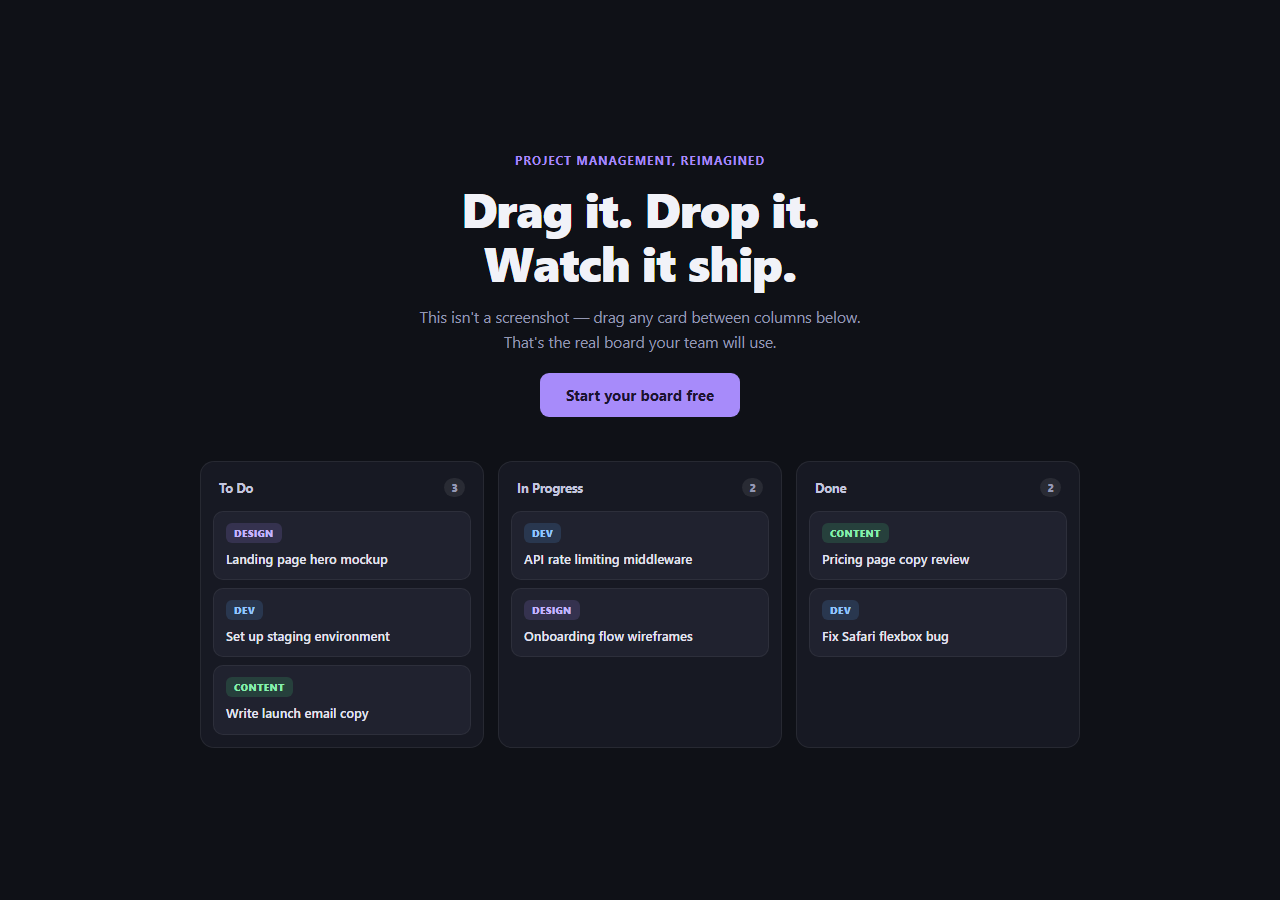
Project-management and productivity tools almost always show a static screenshot of their board in the hero. This snippet swaps the screenshot for the real thing: a three-column kanban board built with the native HTML5 Drag and Drop API, where every card can actually be picked up and dropped into any column, and the column count badges update live.
Native drag events, no library
Each .kdp-card has draggable="true", and the whole interaction runs on five native events: dragstart (mark the card being moved and dim it), dragover (fired continuously while hovering a drop zone — calling e.preventDefault() here is what actually permits a drop to happen at all, since browsers block drops by default), dragleave, drop, and dragend. No sortable library, no polyfill — just the browser's built-in drag API wired directly to DOM manipulation.
Live reordering while dragging, not just on drop
Rather than waiting for the drop event to move the card, the dragover handler itself calls getDragAfterElement() on every fired event (which is frequent — dozens of times per second while the mouse moves) and immediately repositions the dragged card in the DOM. That's why the other cards visibly shuffle out of the way *as you drag*, not just once you release the mouse — the drop itself only needs to clean up styling, because the card is already sitting in its correct final position by the time it fires.
How `getDragAfterElement` decides where to insert
It collects every card in the target column except the one currently being dragged, then for each candidate computes offset = cursorY - cardTop - cardHeight / 2 — the vertical distance from the cursor to that card's vertical center. Only negative offsets (cursor above the card's center) are considered, and among those, reduce() keeps the one closest to zero — i.e., the first card whose center the cursor has passed. Insert-before that card; if no card qualifies (cursor is below every card), afterElement stays null and the dragged card is appended at the column's end.
Cross-column moves are just DOM moves
Because insertBefore/appendChild work across any parent, dropping a card into a *different* column is exactly the same code path as reordering within the same column — there's no separate "is this a cross-column drop" branch. The dragged element simply becomes a child of whichever [data-drop] zone it was released over.
Keeping column counts honest
updateCounts() runs on both dragend and drop, re-querying .kdp-card inside each .kdp-col and writing the fresh count into that column's badge — it never increments or decrements a stored number, so it can never drift out of sync with what's actually rendered.
Customizing it
Add more columns by copying a .kdp-col block (the drag logic queries all [data-drop] zones generically, no per-column code needed), or swap the demo task cards for your own product's real board data. Pair it with kanban board for a full-page, non-hero version of the same interaction pattern.
Build with AI
Build, Understand, Optimize, and Extend It With AI
Rather than reverse-engineering how the cards reposition mid-drag, paste this snippet's HTML, CSS, and JS into an AI coding assistant like Claude and ask it to explain exactly how getDragAfterElement() uses the cursor's Y position and each card's bounding-box midpoint to decide an insertion point, and why that logic runs inside dragover rather than waiting for the drop event. The same assistant can help you extend it — ask it to persist the board's state to localStorage so refreshing the page doesn't reset the demo, add touch-based drag support for mobile using pointer events since native HTML5 drag-and-drop has patchy touch support, or add a card-count limit per column with a visual warning when a column gets too full. It's also useful for hardening the interaction: ask whether a MutationObserver or ARIA live region should announce card moves for screen reader users, since native drag-and-drop is not keyboard accessible by default. Treat the code less like a finished artifact and more like a starting point for a conversation.
Prompt to recreate it
Copy this into your AI assistant of choice to build the effect from scratch, or as a jumping-off point for your own variant:
Build a hero section in plain HTML, CSS, and vanilla JavaScript containing a real, working three-column kanban board — no drag-and-drop library, using only the native HTML5 Drag and Drop API.

Requirements:
- A hero headline and subheading above a board with three columns (e.g. To Do, In Progress, Done), each with a header showing the column name and a live count badge, and each pre-populated with a few realistic draggable task cards (each card has a small colored category tag and a short task title).
- Every card must have draggable="true" and support being picked up and dropped into any of the three columns using dragstart, dragover, drop, and dragend events — remember to call preventDefault() in the dragover handler, since browsers block drops by default without it.
- While a card is being dragged over a column (before it's released), the other cards in that column must visually shift to show where the dragged card would land if dropped at the current cursor position — calculated by comparing the cursor's vertical position to the midpoint of each other card in that column, not just snapping into place only after the drop.
- After any drop, each column's count badge must be recalculated from the actual number of cards currently present in that column's DOM, never from a manually incremented counter that could drift out of sync.
- Give the currently-dragged card a dimmed/reduced-opacity visual state, and give the currently-hovered drop zone a highlighted outline or background so the interaction is clear at a glance.
- Keep the whole thing responsive, collapsing the three columns to a single stacked column on narrow viewports.
Want to tighten it up first? Run this prompt through the AI Prompt Studio to score it across 8 quality dimensions, catch anti-patterns, and tune the wording for Claude, ChatGPT, or Gemini before you paste it in.
Step by step
How to Use
- 1Drag any cardClick and hold a card, then drag it — other cards shift live to show where it will land.
- 2Drop it in another columnRelease over To Do, In Progress, or Done — the card moves and both column counts update.
- 3Reorder within a columnDrag a card up or down inside its own column to change its position.
- 4Watch the count badgesEach column header's number badge reflects the actual live card count, recalculated on every drop.
- 5Add your own columns or cardsCopy a .kdp-col block or a .kdp-card element — no JavaScript changes needed, selectors are generic.
- 6Export in your formatClick "HTML" for a standalone file, "JSX" for a React component, or "Tailwind" for a React + Tailwind version.
Real-world uses
Common Use Cases
Got questions?
Frequently Asked Questions
No — it uses only the browser's native HTML5 Drag and Drop API (draggable="true" plus the dragstart, dragover, dragleave, drop, and dragend events). There is no external dependency or CDN script.
Browsers block drop events on an element by default — calling preventDefault() inside the dragover handler is what explicitly tells the browser this element is a valid drop target, which is required before a drop event will ever fire on it.
The dragover handler (which fires continuously while hovering a drop zone) calls getDragAfterElement() and immediately moves the dragged card in the DOM to its computed position on every event, not just once on drop. That is why other cards visibly shift out of the way in real time as you drag, and why the drop handler itself barely has to do anything beyond cleanup.
For every other card in the target column, it computes the vertical distance from the cursor to that card's center (cursorY minus the card's top minus half its height). It only considers cards whose center is below the cursor (a negative offset) and picks the one with the offset closest to zero — meaning the first card the cursor has passed going downward — then inserts the dragged card immediately before it. If the cursor is below every card, it appends to the end instead.
updateCounts() runs after every dragend and drop, and for each column it re-queries how many .kdp-card elements are currently inside it and writes that number into the badge. It never manually increments or decrements a stored count, so the badge can never drift out of sync with the actual cards present.
Copy an entire .kdp-col block (including its .kdp-col-head and .kdp-col-body with the data-drop attribute) and add it to .kdp-board. No JavaScript changes are required — both the drag logic and updateCounts() query generically for all [data-drop] zones and .kdp-col elements.