You Might Also Like
Learn Coding Visually
Learn to code with interactive, live-preview playgrounds — HTML, CSS, JavaScript, React & more.
 HTML Playground42 lessons · Click-based · Live preview
 CSS PlaygroundLearn CSS with a live editor
 JavaScript Playground60 lessons · DOM · Async · Canvas
 React PlaygroundLearn React with a live code editor
 GSAP PlaygroundLearn GSAP animation interactively
 SVG Playground44 lessons · shapes · paths · animation
 SCSS Playground45 lessons · Sass modules · tokens
 Tailwind PlaygroundLearn Tailwind CSS with a live editor
 Bootstrap 5 Playground50 lessons · live preview
CSS Anchor-Positioned Tooltip Menu — Free Native Anchor Positioning Demo
CSS Anchor-Positioned Tooltip Menu · Navigation · Plain HTML, CSS & JS · Live preview
What's included
Features
About this UI Snippet
CSS Anchor-Positioned Tooltip Menu — Positioning a Popover With Pure CSS
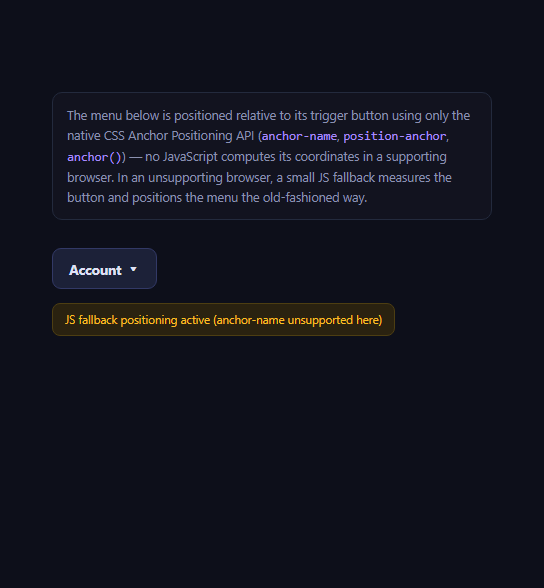
Every dropdown, tooltip, and popover library on the web has historically needed JavaScript to compute where the floating element should sit relative to its trigger — measuring the trigger's getBoundingClientRect(), accounting for scroll and viewport edges, and repositioning on every resize. The CSS Anchor Positioning API changes that for browsers that support it: an element can be tied to another element's edges directly in CSS, with the browser recalculating position on scroll, resize, and layout changes automatically.
The three pieces: anchor-name, position-anchor, anchor()
The trigger button declares anchor-name: --account-anchor, a custom-ident that names it as an anchor other elements can reference. The menu then sets position-anchor: --account-anchor to link itself to that specific anchor, and uses the anchor() function inside its top/left values — top: anchor(--account-anchor bottom) reads the anchor's bottom edge directly, and left: anchor(--account-anchor left) reads its left edge — so the menu's position is expressed declaratively against the button's real, live layout box, not a JS-computed snapshot.
Paired with the Popover API
This menu also uses the native popover attribute and popovertarget (see the native popover API demo for that piece in isolation) for the actual show/hide and light-dismiss behavior — clicking outside or pressing Escape closes it natively, with zero JS event listeners for that part. Anchor positioning and the Popover API are separate specs that happen to compose extremely well together: popover handles *whether* the menu is visible, anchor positioning handles *where* it sits.
Honest support status
Anchor Positioning is genuinely new and, as of 2026, Chromium-only: full support landed in Chrome and Edge 125 in 2024, but Firefox and Safari have not shipped it yet, both still tracking the specification. This is not a "safe everywhere with a vendor prefix" situation — it's an active, ongoing rollout. This snippet feature-detects with CSS.supports('anchor-name: --a') in JavaScript and, when unsupported, falls back to a small manual positioning routine using getBoundingClientRect(), re-run on open, resize, and scroll — the exact JS logic that anchor positioning exists to eventually make unnecessary.
Why bother with anchor positioning if you still need a JS fallback today
Even with a required fallback in 2026, the CSS-only path is worth adopting incrementally: browsers that support it get automatically correct positioning through scroll, resize, and dynamic content changes with no listeners at all, which is strictly less code running and fewer edge cases than a fully JS-driven solution — while the fallback guarantees nothing breaks elsewhere. As support broadens, the fallback branch simply stops running, and you can eventually delete it. Pair this with the native dialog showcase or the anchor positioning menu for more of this same emerging pattern.
Build with AI
Build, Understand, Optimize, and Extend It With AI
Paste this snippet's HTML, CSS, and JS into an AI coding assistant like Claude and ask it to walk through exactly how anchor(--account-anchor bottom) resolves to a real pixel position and why that stays correct through scroll and resize without any JavaScript recalculation — that mental model is the key thing to internalize before relying on this API elsewhere. It's also a good prompt for auditing whether a floating-UI-style JS dependency in your own project could be replaced, at least for its supported-browser path, by native anchor positioning with this exact fallback pattern layered underneath. You could ask it to extend the demo with anchor(--account-anchor bottom, --account-anchor left) style flip logic for when the menu would overflow the viewport, or to add position-try-fallbacks for automatic edge avoidance, another part of this same emerging spec. Treat this as a living reference for browser support, since Firefox and Safari's timelines here can change.
Prompt to recreate it
Copy this into your AI assistant of choice to build the effect from scratch, or as a jumping-off point for your own variant:
Build a dropdown menu positioned relative to its trigger button using the native CSS Anchor Positioning API, with a JavaScript fallback for browsers that don't support it.

Requirements:
- A trigger button with anchor-name: --some-name set in CSS, marking it as a named anchor.
- A menu element that uses the HTML Popover API (the popover attribute and popovertarget on the trigger) for its show/hide and light-dismiss behavior — clicking outside or pressing Escape should close it natively, with no custom JS listeners for that part.
- Inside an @supports (anchor-name: --a) block, position the menu using position-anchor tied to the trigger's anchor name, and use the anchor() CSS function (e.g. top: anchor(--some-name bottom); left: anchor(--some-name left)) to place it directly below the trigger — no JavaScript should compute this position in a supporting browser.
- Feature-detect support in JavaScript with CSS.supports('anchor-name: --a'). If unsupported, show a small visible indicator confirming the fallback is active, and implement a manual positioning function using getBoundingClientRect() on the trigger that runs when the menu opens and again on window resize/scroll while it remains open.
- Give the menu proper accessible semantics: role="menu" on the list, role="menuitem" on each item, and aria-haspopup="menu" on the trigger button.
- Include a short, honest note in the UI or comments that CSS Anchor Positioning is, as of 2026, supported in Chromium browsers (Chrome/Edge) but not yet in Firefox or Safari.
Want to tighten it up first? Run this prompt through the AI Prompt Studio to score it across 8 quality dimensions, catch anti-patterns, and tune the wording for Claude, ChatGPT, or Gemini before you paste it in.
Step by step
How to Use
- 1Click "Account"The menu opens via the native Popover API, positioned just below the button.
- 2Check for the fallback badgeIn a browser without Anchor Positioning support, a yellow badge confirms JS fallback positioning is active.
- 3Resize or scroll while it is openIn a supporting browser, CSS repositions it automatically; in the fallback, a resize/scroll listener recalculates it.
- 4Press Escape or click outsideThe popover light-dismisses natively, independent of the positioning method.
- 5Inspect anchor-name and anchor()See how top/left read the button's live edges directly in CSS.
- 6Swap the anchor edgeChange anchor(--account-anchor bottom) to top/right/left to reposition the menu.
Real-world uses
Common Use Cases
Got questions?
Frequently Asked Questions
anchor-name assigns a custom-ident (a name you choose, prefixed with --) to an element, marking it as something other elements can position themselves relative to. It doesn't move or style the element itself — it only makes its layout box available as a named reference for the anchor() function elsewhere in the stylesheet.
The menu sets position-anchor: --account-anchor to link itself to that specific named anchor, then uses the anchor() function inside its top and left values, e.g. top: anchor(--account-anchor bottom), which reads the anchor element's real, live bottom edge directly in CSS. The browser keeps this position correct through scroll and layout changes without any JavaScript recalculating it.
As of 2026, it is Chromium-only: Chrome and Edge shipped full support starting from version 125 in 2024. Firefox and Safari have not shipped the Anchor Positioning API yet, both still tracking the specification, so any production use needs a genuine fallback rather than assuming universal support.
It checks CSS.supports('anchor-name: --a') once on load. If that returns false, it shows a visible fallback badge and switches to a getBoundingClientRect()-based positioning routine, re-run whenever the menu opens, the window resizes, or the page scrolls while the menu is open — the same recalculation triggers native anchor positioning would otherwise handle for free.
No — they are separate CSS/HTML specifications that happen to compose very well together. The Popover API (broadly supported in current browsers) handles whether an element is shown, hidden, and dismissed by clicking outside or pressing Escape; Anchor Positioning handles where a positioned element sits relative to another element. This snippet uses both, but you can use either independently.