Source Code
<div class="container py-5" style="max-width: 640px;">
  <h1 class="bsfaq-title text-center">Frequently asked questions</h1>
  <div class="bsfaq-search mb-4">
    <svg width="14" height="14" viewBox="0 0 24 24" fill="none" stroke="currentColor" stroke-width="2.5" stroke-linecap="round" stroke-linejoin="round"><circle cx="11" cy="11" r="8"/><line x1="21" y1="21" x2="16.65" y2="16.65"/></svg>
    <input type="text" class="form-control" id="bsfaqSearch" placeholder="Search questions…" autocomplete="off">
  </div>
  <p class="text-muted small text-center mb-3" id="bsfaqCount">6 of 6 questions shown</p>

  <div class="accordion" id="bsfaqAccordion">
    <div class="accordion-item bsfaq-item" data-q="does this work on a free plan">
      <h2 class="accordion-header">
        <button class="accordion-button" type="button" data-bs-toggle="collapse" data-bs-target="#bsfaq1">Does this work on the free plan?</button>
      </h2>
      <div id="bsfaq1" class="accordion-collapse collapse show" data-bs-parent="#bsfaqAccordion">
        <div class="accordion-body">Yes — every core feature is available on the free plan with no time limit. Paid plans add higher usage limits and priority support.</div>
      </div>
    </div>
    <div class="accordion-item bsfaq-item" data-q="can i cancel anytime billing">
      <h2 class="accordion-header">
        <button class="accordion-button collapsed" type="button" data-bs-toggle="collapse" data-bs-target="#bsfaq2">Can I cancel anytime?</button>
      </h2>
      <div id="bsfaq2" class="accordion-collapse collapse" data-bs-parent="#bsfaqAccordion">
        <div class="accordion-body">Yes, from your billing settings with no cancellation fee. You'll keep access through the end of your current billing period.</div>
      </div>
    </div>
    <div class="accordion-item bsfaq-item" data-q="do you offer refunds money back">
      <h2 class="accordion-header">
        <button class="accordion-button collapsed" type="button" data-bs-toggle="collapse" data-bs-target="#bsfaq3">Do you offer refunds?</button>
      </h2>
      <div id="bsfaq3" class="accordion-collapse collapse" data-bs-parent="#bsfaqAccordion">
        <div class="accordion-body">We offer a full refund within 14 days of your first payment, no questions asked. Contact support to request one.</div>
      </div>
    </div>
    <div class="accordion-item bsfaq-item" data-q="is my data secure encrypted">
      <h2 class="accordion-header">
        <button class="accordion-button collapsed" type="button" data-bs-toggle="collapse" data-bs-target="#bsfaq4">Is my data secure?</button>
      </h2>
      <div id="bsfaq4" class="accordion-collapse collapse" data-bs-parent="#bsfaqAccordion">
        <div class="accordion-body">All data is encrypted in transit and at rest. We undergo an annual third-party security audit and never sell customer data.</div>
      </div>
    </div>
    <div class="accordion-item bsfaq-item" data-q="can i invite my team members">
      <h2 class="accordion-header">
        <button class="accordion-button collapsed" type="button" data-bs-toggle="collapse" data-bs-target="#bsfaq5">Can I invite my team?</button>
      </h2>
      <div id="bsfaq5" class="accordion-collapse collapse" data-bs-parent="#bsfaqAccordion">
        <div class="accordion-body">Yes — Pro and Team plans support unlimited team members, with role-based permissions to control who can edit or just view.</div>
      </div>
    </div>
    <div class="accordion-item bsfaq-item" data-q="do you have an api integrations">
      <h2 class="accordion-header">
        <button class="accordion-button collapsed" type="button" data-bs-toggle="collapse" data-bs-target="#bsfaq6">Do you have an API?</button>
      </h2>
      <div id="bsfaq6" class="accordion-collapse collapse" data-bs-parent="#bsfaqAccordion">
        <div class="accordion-body">Yes, a full REST API is available on all plans, with higher rate limits on Pro and Team. See our docs for authentication and endpoints.</div>
      </div>
    </div>
  </div>
  <p class="text-center text-muted small mt-4 d-none" id="bsfaqEmpty">No questions match your search.</p>
</div>
body { background: #fff; }
.bsfaq-title { font-weight: 800; letter-spacing: -0.02em; margin-bottom: 20px; }
.bsfaq-search {
position: relative;
max-width: 360px;
margin: 0 auto;
}
.bsfaq-search svg {
position: absolute;
left: 12px;
top: 50%;
transform: translateY(-50%);
color: #9ca3af;
pointer-events: none;
}
.bsfaq-search input { padding-left: 34px; }
.accordion-button:not(.collapsed) {
background: #eef0ff;
color: #4338ca;
box-shadow: none;
}
.accordion-button:focus { box-shadow: 0 0 0 3px rgba(99,102,241,.25); }
.bsfaq-item { transition: opacity .15s, max-height .15s; }
.bsfaq-item.bsfaq-hidden { display: none; }const searchInput = document.getElementById('bsfaqSearch');
const items = document.querySelectorAll('.bsfaq-item');
const countEl = document.getElementById('bsfaqCount');
const emptyEl = document.getElementById('bsfaqEmpty');
const TOTAL = items.length;
searchInput.addEventListener('input', () => {
const q = searchInput.value.trim().toLowerCase();
let visible = 0;
items.forEach(item => {
const isMatch = !q || item.dataset.q.includes(q);
item.classList.toggle('bsfaq-hidden', !isMatch);
if (isMatch) visible++;
});
countEl.textContent = visible + ' of ' + TOTAL + ' questions shown';
emptyEl.classList.toggle('d-none', visible > 0);
});Learn Coding Visually
Learn to code with interactive, live-preview playgrounds — HTML, CSS, JavaScript, React & more.
 HTML Playground42 lessons · Click-based · Live preview
 CSS PlaygroundLearn CSS with a live editor
 JavaScript Playground60 lessons · DOM · Async · Canvas
 React PlaygroundLearn React with a live code editor
 GSAP PlaygroundLearn GSAP animation interactively
 SVG Playground44 lessons · shapes · paths · animation
 SCSS Playground45 lessons · Sass modules · tokens
 Tailwind PlaygroundLearn Tailwind CSS with a live editor
 Bootstrap 5 Playground50 lessons · live preview
Bootstrap Accordion FAQ with Live Search — Free Snippet
Bootstrap Accordion FAQ with Live Search · Navigation · Plain HTML, CSS & JS · Live preview
What's included
Features
About this UI Snippet
Bootstrap Accordion FAQ with Live Search — HTML, CSS & JavaScript
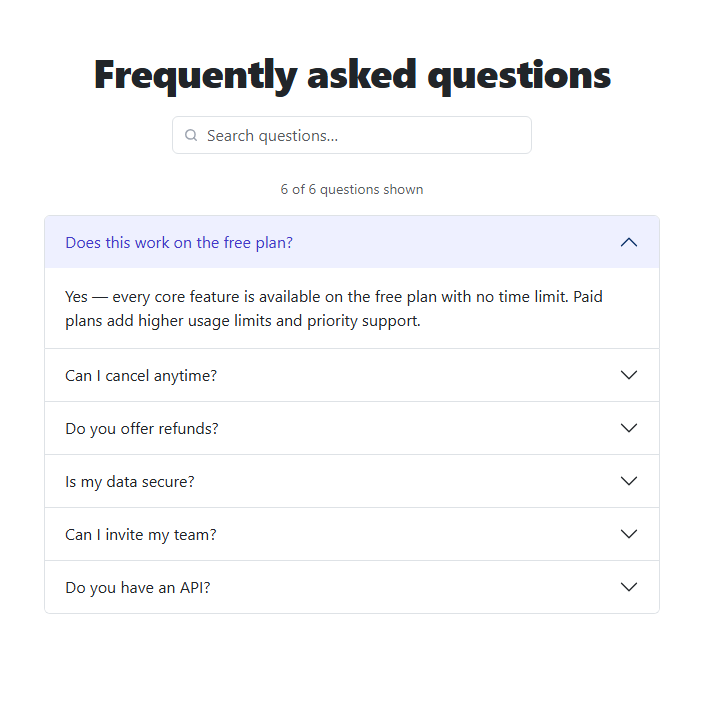
An FAQ section with more than five or six questions starts to feel like a wall of text a visitor has to scroll and scan through manually. This snippet solves that by pairing real Bootstrap 5.3's actual .accordion component — the genuine collapse behavior, data-bs-toggle="collapse" wiring, and single-open-at-a-time data-bs-parent grouping — with a live search box that filters questions as you type.
Searching more than just the visible question text
Each .bsfaq-item carries a data-q attribute holding a lowercase string of relevant keywords — not just the visible question text, but likely search terms a visitor might actually type (the "Can I cancel anytime?" question's data-q also includes "billing", for instance). The search input's input listener lowercases the typed query and checks it against data-q with a plain includes(), so a search for "billing" surfaces the cancellation question even though the word "billing" never appears in its visible heading.
A running count and an honest empty state
Above the accordion, a small counter reads "N of 6 questions shown," recalculated on every keystroke by counting how many items remain visible after filtering. If a search matches nothing, the accordion is simply empty — which reads as a possible bug rather than "no results" — so a dedicated "No questions match your search" message is shown in that case instead, toggled by the same visible-count check.
Why filtering doesn't fight the accordion's collapse state
Filtering only ever adds or removes a .bsfaq-hidden class (display: none) on whole .accordion-item elements — it never touches any item's open/closed collapse/show state. That separation means searching, clearing the search, and reopening a previously-expanded answer all behave exactly as you'd expect, because the search logic and Bootstrap's own accordion state are two entirely independent concerns that never interfere with each other.
Build with AI
Build, Understand, Optimize, and Extend It With AI
Hand this snippet's HTML, CSS, and JS to an AI coding assistant like Claude and ask it to highlight the matching search term within each visible question (wrapping the matched substring in a <mark> tag), or to add category filter chips above the accordion (e.g. Billing, Security, Team) that combine with the text search using AND logic. It's also a good exercise to ask the assistant to fetch the FAQ data from a JSON file or API instead of hardcoded HTML, rendering the accordion items dynamically while keeping the same search and count behavior.
Prompt to recreate it
Copy this into your AI assistant of choice to build the effect from scratch, or as a jumping-off point for your own variant:
Build a Bootstrap 5.3 accordion FAQ section with a live search filter, using the real Bootstrap CDN framework (bootstrap.min.css and bootstrap.bundle.min.js), not custom CSS made to resemble Bootstrap.

Requirements:
- At least six FAQ items using Bootstrap's real accordion component (data-bs-toggle="collapse", data-bs-parent for single-open-at-a-time behavior) — do not reimplement the expand/collapse behavior with custom JavaScript.
- A search input above the accordion. On every keystroke, filter the visible accordion items by comparing the lowercased query against a hidden per-item keyword string (a data attribute) that may include relevant terms beyond the item's visible question text — not just a substring match against the displayed heading.
- Filtering must only show/hide whole accordion items via a CSS class (not display:none applied inconsistently, and never by touching Bootstrap's own collapse/show classes) so an already-open, still-matching answer stays open through a search.
- A counter above the accordion showing "N of TOTAL questions shown", recalculated on every keystroke from the actual number of currently visible items.
- A dedicated "No questions match your search" message that appears only when the search matches zero items, and disappears again once at least one item matches.
Want to tighten it up first? Run this prompt through the AI Prompt Studio to score it across 8 quality dimensions, catch anti-patterns, and tune the wording for Claude, ChatGPT, or Gemini before you paste it in.
Step by step
How to Use
- 1Load the snippetClick "Bootstrap Accordion FAQ with Live Search" in the sidebar Library tab. The preview loads with the first question already open and a "6 of 6" count.
- 2Search a visible wordType "refund" — only the matching question stays visible, and the count updates to "1 of 6 questions shown".
- 3Search a hidden keywordClear the box and type "billing" instead — the cancellation question still appears, even though "billing" isn't in its visible heading, because it's part of that item's hidden keyword data.
- 4Search something that matches nothingType "pineapple" — every question hides and a "No questions match your search" message appears.
- 5Clear the searchEmpty the search box — all six questions return, and the count resets to "6 of 6".
- 6Add your own questionCopy an .accordion-item block in the HTML panel, give it a unique id and matching data-bs-target, and set its data-q to relevant keywords.
Real-world uses
Common Use Cases
Got questions?
Frequently Asked Questions
Real Bootstrap 5.3 — it uses the actual .accordion component with data-bs-toggle="collapse" and data-bs-parent for the single-open-at-a-time behavior, loaded from the genuine Bootstrap CDN.
Each accordion item has a data-q attribute holding a string of relevant search keywords, which can include synonyms or related terms beyond the visible question text. The search checks the typed query against this hidden data-q value, not just what's displayed.
No — filtering only shows or hides whole accordion items via a CSS class; it never touches Bootstrap's own collapse/show state. An open answer that still matches the search stays open exactly as it was.
Copy an existing .accordion-item block, give its button and collapse div a unique, matching id/data-bs-target pair (not reused from another item), and set a relevant data-q string. It participates in search and the counter automatically.
Every accordion item hides, and a dedicated "No questions match your search" message appears in its place — the same visible-count check that drives the "N of 6" counter also toggles this empty-state message.
Yes — extend each item's data-q string to include keywords from its answer body as well, or change the search check to also read the accordion-body's own textContent in addition to data-q.