You Might Also Like
Learn Coding Visually
Learn to code with interactive, live-preview playgrounds — HTML, CSS, JavaScript, React & more.
 HTML Playground42 lessons · Click-based · Live preview
 CSS PlaygroundLearn CSS with a live editor
 JavaScript Playground60 lessons · DOM · Async · Canvas
 React PlaygroundLearn React with a live code editor
 GSAP PlaygroundLearn GSAP animation interactively
 SVG Playground44 lessons · shapes · paths · animation
 SCSS Playground45 lessons · Sass modules · tokens
 Tailwind PlaygroundLearn Tailwind CSS with a live editor
 Bootstrap 5 Playground50 lessons · live preview
Anime.js SVG Shape Morph — Free Blob Path Morphing Snippet
Anime.js SVG Shape Morph · Animations · Plain HTML, CSS & JS · Live preview
What's included
Features
About this UI Snippet
Anime.js SVG Shape Morph — Looping Blob Morphs via the d Attribute Timeline
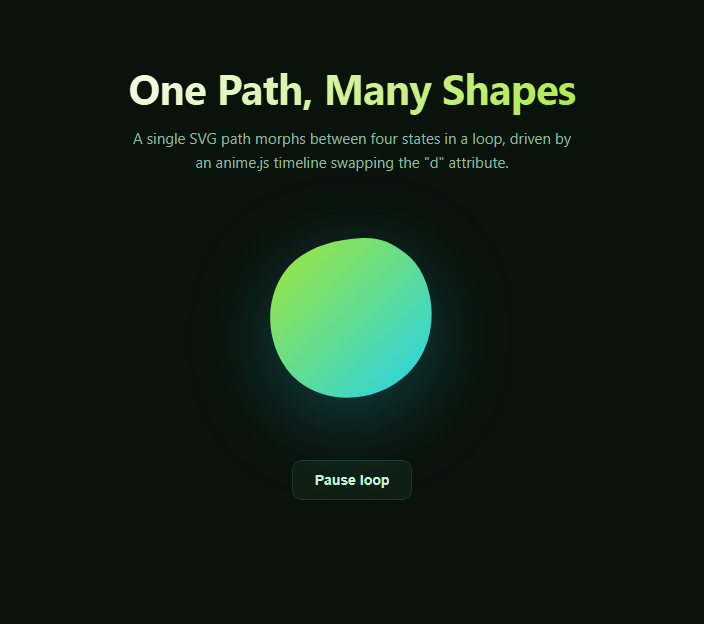
Morphing one SVG shape smoothly into another is a deceptively hard problem — a naive crossfade just overlaps two static shapes, it doesn't actually transform one outline into the next. anime.js solves this by animating an SVG path's d attribute directly: given two path strings with the same number of coordinate points, it interpolates each point's position frame by frame, producing a genuine shape transformation rather than a fade.
Why the point count has to match
All four shapes in this snippet's shapes array are built from the same cubic-bezier blob generator pattern, each with exactly the same number of C (curve) commands and coordinate pairs. anime.js's d attribute interpolation works by matching up corresponding points between the "from" and "to" path strings positionally — if one shape had a different number of points than the next, there would be no clean one-to-one mapping and the morph would look broken or jump discontinuously rather than flow.
A timeline instead of a single animation
Rather than one anime({...}) call, this snippet uses anime.timeline({ loop: true, direction: 'alternate' }) and adds one step per remaining shape via timeline.add({ d: [{ value: d }] }, '+=400'). Each .add() call queues the next morph target, and the '+=400' offset inserts a short hold before starting the next morph, so the blob doesn't immediately flow from one shape into the next with zero pause. Because the timeline loops with direction: 'alternate', it plays forward through all four shapes and then reverses back through them, rather than jumping from the last shape back to the first.
Interpolating path data, not just simple values
Most anime.js usage animates numeric CSS properties or transforms — this snippet demonstrates a less common but powerful capability: passing a raw SVG path string as the value for the d property. anime.js parses both the current and target path data, extracts their numeric coordinates, and tweens those numbers directly, then reconstructs a valid path string at every animation frame. This is meaningfully different from, and more capable than, CSS transitions, which cannot animate the d attribute at all.
Play/pause control
The timeline object returned by anime.timeline() exposes .play() and .pause() methods directly, which this snippet wires to a button — because the whole four-shape loop lives on one timeline instance, pausing and resuming affects the entire sequence at whatever point it's currently morphing through, rather than needing to track state per shape.
Customizing it
Add more shapes to the array (keeping the point count consistent), adjust duration or the '+=400' hold time, swap easeInOutQuad for a different easing curve, or drive the morph from a button click or scroll trigger instead of an automatic loop. Pair this with Liquid Blob for a complementary blob effect, or a Confetti Button for a playful interaction nearby.
Build with AI
Build, Understand, Optimize, and Extend It With AI
You don't have to work out SVG path interpolation math by hand. Paste this snippet's HTML, CSS, and JS into an AI coding assistant like Claude and ask it to explain exactly how anime.js matches up coordinates between two path strings with the same point count to produce a smooth d attribute morph, and why direction: alternate matters for avoiding an abrupt jump-cut at the end of each loop cycle. The same assistant can help you extend the effect — asking it to add a fifth shape to the sequence while keeping every path's point count consistent (a common source of bugs when hand-editing blob paths), trigger a one-shot morph from a button click instead of an automatic loop, or generate new blob path variations programmatically using a small polar-coordinate blob generator function. It's also useful for pacing: ask whether the current 1400ms duration and 400ms hold feel right, or whether easing should vary per shape rather than being fixed across the whole timeline. Treat the code less like a finished artifact and more like a starting point for a conversation.
Prompt to recreate it
Copy this into your AI assistant of choice to build the effect from scratch, or as a jumping-off point for your own variant:
Build a looping SVG shape-morphing animation in plain HTML, CSS, and JavaScript using the anime.js library loaded from a CDN — the morph must animate the SVG path's actual "d" attribute coordinates, not a crossfade between two overlapping static shapes.

Requirements:
- An inline SVG containing a single <path> element filled with a gradient, whose "d" attribute defines a smooth, closed blob-like shape built from cubic-bezier curve commands.
- Define at least four different blob path strings as an array, each one built with exactly the same number of curve commands and coordinate points as the others, so anime.js can interpolate corresponding coordinates directly between any two of them.
- Use anime.timeline() (not a single anime() call) with loop: true and direction: 'alternate', then use the timeline's .add() method to queue a morph to each subsequent shape in the array in turn, targeting the path's "d" property with the next shape's path string as the value.
- Insert a short relative time offset (for example '+=400') between each queued step so the blob briefly holds its current shape before starting the next morph, rather than flowing continuously with no pause.
- Add a button that toggles between calling the timeline's .play() and .pause() methods, updating its own label to reflect the current state, so the entire morph sequence can be paused and resumed at whatever shape it's currently transitioning through.
- Style the SVG with a gradient fill and a subtle drop-shadow glow so the morphing shape reads as a polished decorative element rather than a bare debug shape.
Want to tighten it up first? Run this prompt through the AI Prompt Studio to score it across 8 quality dimensions, catch anti-patterns, and tune the wording for Claude, ChatGPT, or Gemini before you paste it in.
Step by step
How to Use
- 1Add the anime.js CDN scriptInclude anime.min.js from the CDN panel.
- 2Paste HTML, CSS, and JSA gradient SVG blob and a pause button render.
- 3Watch the blob morphIt cycles smoothly through four distinct path shapes.
- 4Click Pause loopThe timeline pauses mid-morph; click again to resume.
- 5Add a new shapeAppend another path string with the same point count to shapes.
- 6Adjust timingChange duration or the '+=400' hold offset for a different pace.
Real-world uses
Common Use Cases
Got questions?
Frequently Asked Questions
anime.js interpolates a path's d attribute by matching each numeric coordinate in the current path string to the corresponding coordinate at the same position in the target path string, then tweening those numbers directly. If the two path strings have different structures or point counts, there's no clean correspondence between them, and the morph will look distorted, jump abruptly, or fail to interpolate smoothly at all.
It's a relative time offset telling anime.js to start this step 400 milliseconds after the previous step in the timeline finished, rather than immediately chaining into it. Without it, the blob would flow continuously from one shape directly into the next with no pause; with it, each shape holds briefly before the next morph begins.
With loop: true alone, the timeline would play through all queued steps and then jump straight back to the very first frame to repeat — which for four different shapes would mean an abrupt cut back to the starting shape at the end of each cycle. direction: alternate makes the timeline play forward through the sequence and then play backward through the same sequence, so the blob morphs through the shapes and then smoothly morphs back through them in reverse.
Yes — instead of anime.timeline({ loop: true, ... }), create a single anime({ targets: path, d: [{ value: nextShape }], duration: 800 }) call inside a click event listener, and cycle an index variable through your shapes array each time the button is clicked. This trades the automatic loop for an explicit one-shot morph per interaction.
Install the animejs npm package (or keep the CDN script), import anime, and construct the timeline inside a mount effect (useEffect, onMounted, or ngAfterViewInit) targeting a ref to the SVG path element rather than getElementById. Call timeline.pause() in the effect's cleanup function to stop the loop cleanly if the component unmounts while it's still running.