
Learn Coding Visually
Learn to code with interactive, live-preview playgrounds — HTML, CSS, JavaScript, React & more.
 HTML Playground42 lessons · Click-based · Live preview
 CSS PlaygroundLearn CSS with a live editor
 JavaScript Playground60 lessons · DOM · Async · Canvas
 React PlaygroundLearn React with a live code editor
 GSAP PlaygroundLearn GSAP animation interactively
 SVG Playground44 lessons · shapes · paths · animation
 SCSS Playground45 lessons · Sass modules · tokens
 Tailwind PlaygroundLearn Tailwind CSS with a live editor
 Bootstrap 5 Playground50 lessons · live preview
Share-URL State Sync — Filters Encoded into a Copyable, Reproducible Link
Share-URL State Sync — Filters Encoded into a Copyable Link · Misc · Plain HTML, CSS & JS · Live preview
What's included
Features
About this UI Snippet
Share-URL State Sync — Making a Filtered View a Real, Reproducible Link
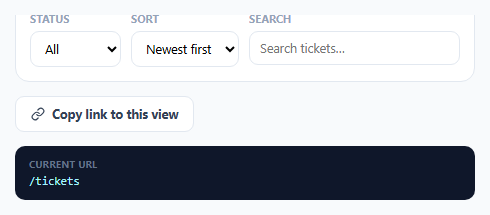
A filter bar that only lives in local component state has a real limitation: there's no way to *share* a specific filtered view with a teammate, bookmark it, or reload the page without losing it. This snippet encodes the filter state directly into the URL's query string, so the current view — status filter, sort order, and search text — is always represented by a real, copyable, reproducible link.
One declarative mapping drives both reading and writing
FIELDS is a single array pairing each filter control with its query parameter name and default value — and it's the *only* place that mapping is defined. Both buildUrlFromState() (reading the UI to produce a URL) and applyStateFromUrl() (reading a URL to populate the UI) iterate over this same array. This is deliberate: if the UI-to-URL and URL-to-UI logic were written as two independently maintained functions, a parameter name typo or a default-value mismatch in just one of them could silently break the round-trip in one direction while appearing to work fine in the other.
Only non-default values appear in the URL
buildUrlFromState() explicitly skips adding a query parameter when a filter's current value matches its declared default — so leaving the sort order at "Newest first" (the default) doesn't add &sort=newest to the URL. This keeps shared links short and readable, and specifically means a link only encodes what was *deliberately changed* from the default view, rather than a verbose dump of every filter's value regardless of whether it's meaningful.
Restoring on load makes shared links actually work
applyStateFromUrl() runs once immediately on page load, reading window.location.search and setting every filter control to match — including resetting any control whose parameter is *absent* from the URL back to its default value. This second half is what makes the round-trip correct: without explicitly resetting absent parameters, a link with only ?status=open (sort and search omitted, because they were at their defaults when shared) could incorrectly retain whatever sort/search values happened to already be in the form, rather than correctly restoring their true default state.
Copying uses the real Clipboard API, with a visible fallback
copyLinkBtn's click handler calls navigator.clipboard.writeText() inside a try/catch — the Clipboard API can be unavailable or blocked in some embedded/sandboxed contexts (like this snippet's own preview iframe). If it fails, the button still gives visual confirmation feedback, and the full URL remains visible and manually selectable in the preview box below, so the feature degrades gracefully rather than silently failing with no way to get the link at all.
Build with AI
Build, Understand, Optimize, and Extend It With AI
Ask an AI assistant to explain why driving both the URL-to-UI and UI-to-URL sync from one single shared field mapping prevents a class of bugs that two independently maintained functions would risk, and to discuss the tradeoff between history.replaceState (silent sync) and history.pushState (creates a back-button-navigable entry) for this kind of continuous filter-URL syncing. It's also worth asking for a version that debounces the URL/history update while a user is actively typing in the search field, avoiding a new history entry (or clipboard-relevant state) for every keystroke.
Prompt to recreate it
Copy this into your AI assistant of choice to build the effect from scratch, or as a jumping-off point for your own variant:
Build a filter bar with URL state synchronization in HTML, CSS, and vanilla JavaScript — no external library, no actual routing needed (a plain preview of the resulting URL is sufficient).

Requirements:
- A filter bar with at least three controls: a status dropdown, a sort-order dropdown, and a text search input, each with a defined default value.
- Define a single declarative mapping between each filter control, its corresponding URL query parameter name, and its default value — this same mapping must be used both to build a URL from the current filter state and to restore filter state from a given URL, with no separately duplicated logic for either direction.
- When building the URL from the current filter state, only include a query parameter for a filter whose current value differs from its declared default — filters left at their default value must not appear in the generated URL at all.
- When restoring filter state from a URL (on page load, reading the current query string), any filter parameter present in the URL must set that control's value, and any filter parameter ABSENT from the URL must explicitly reset that control back to its default value, rather than leaving whatever value happened to already be present in the form.
- Show a live preview of the current shareable URL that updates immediately as any filter changes.
- Implement a "copy link" button using the Clipboard API to copy the full shareable URL, wrapped so that if the Clipboard API is unavailable or the copy fails, the button still shows a completion state and the URL remains visible for manual copying rather than silently failing with no fallback.
Want to tighten it up first? Run this prompt through the AI Prompt Studio to score it across 8 quality dimensions, catch anti-patterns, and tune the wording for Claude, ChatGPT, or Gemini before you paste it in.
Source Code
<div class="demo">
  <div class="filter-bar">
    <div class="filter-group">
      <label for="statusFilter">Status</label>
      <select id="statusFilter">
        <option value="">All</option>
        <option value="open">Open</option>
        <option value="closed">Closed</option>
        <option value="archived">Archived</option>
      </select>
    </div>
    <div class="filter-group">
      <label for="sortFilter">Sort</label>
      <select id="sortFilter">
        <option value="newest">Newest first</option>
        <option value="oldest">Oldest first</option>
        <option value="priority">Priority</option>
      </select>
    </div>
    <div class="filter-group grow">
      <label for="searchFilter">Search</label>
      <input type="text" id="searchFilter" placeholder="Search tickets…" />
    </div>
  </div>

  <button class="copy-link-btn" id="copyLinkBtn">
    <svg viewBox="0 0 24 24" width="14" height="14" fill="none" stroke="currentColor" stroke-width="2" stroke-linecap="round" stroke-linejoin="round"><path d="M10 13a5 5 0 0 0 7.54.54l3-3a5 5 0 0 0-7.07-7.07l-1.72 1.71"/><path d="M14 11a5 5 0 0 0-7.54-.54l-3 3a5 5 0 0 0 7.07 7.07l1.71-1.71"/></svg>
    Copy link to this view
  </button>

  <div class="url-preview">
    <span class="url-preview-label">Current URL</span>
    <code id="urlPreview">/tickets</code>
  </div>
</div>
* { box-sizing: border-box; margin: 0; padding: 0; }
body { font-family: system-ui, sans-serif; background: #f8fafc; display: flex; align-items: center; justify-content: center; min-height: 100vh; padding: 24px; }
.demo { width: 460px; max-width: 100%; display: flex; flex-direction: column; gap: 14px; }
.filter-bar { display: flex; gap: 10px; flex-wrap: wrap; background: #fff; border: 1px solid #e2e8f0; border-radius: 14px; padding: 14px; }
.filter-group { display: flex; flex-direction: column; gap: 5px; }
.filter-group.grow { flex: 1; min-width: 140px; }
.filter-group label { font-size: 10.5px; font-weight: 700; color: #94a3b8; text-transform: uppercase; letter-spacing: 0.3px; }
.filter-group select, .filter-group input { padding: 8px 10px; border: 1.5px solid #e2e8f0; border-radius: 9px; font-size: 12.5px; font-family: inherit; }
.filter-group select:focus-visible, .filter-group input:focus-visible { outline: none; border-color: #6366f1; box-shadow: 0 0 0 3px rgba(99,102,241,0.15); }
.copy-link-btn { align-self: flex-start; display: flex; align-items: center; gap: 7px; padding: 9px 15px; border: 1.5px solid #e2e8f0; background: #fff; border-radius: 9px; font-size: 12.5px; font-weight: 700; color: #334155; cursor: pointer; font-family: inherit; }
.copy-link-btn:hover { border-color: #6366f1; color: #4338ca; }
.copy-link-btn.copied { background: #ecfdf5; border-color: #10b981; color: #047857; }
.url-preview { background: #0f172a; border-radius: 10px; padding: 12px 14px; display: flex; flex-direction: column; gap: 4px; }
.url-preview-label { font-size: 9.5px; font-weight: 700; color: #64748b; text-transform: uppercase; letter-spacing: 0.4px; }
.url-preview code { font-size: 11.5px; color: #a5f3fc; font-family: 'SFMono-Regular', Consolas, monospace; word-break: break-all; }const statusFilter = document.getElementById('statusFilter');
const sortFilter = document.getElementById('sortFilter');
const searchFilter = document.getElementById('searchFilter');
const urlPreview = document.getElementById('urlPreview');
const copyLinkBtn = document.getElementById('copyLinkBtn');
// A single explicit mapping between filter state and query parameter names —
// every filter control reads and writes through this same map, so the URL
// and the UI can never drift out of sync with each other or with themselves.
const FIELDS = [
{ el: statusFilter, param: 'status', defaultValue: '' },
{ el: sortFilter, param: 'sort', defaultValue: 'newest' },
{ el: searchFilter, param: 'q', defaultValue: '' },
];
function buildUrlFromState() {
const params = new URLSearchParams();
FIELDS.forEach(({ el, param, defaultValue }) => {
// Only include a parameter in the URL when it differs from its default —
// this keeps the shareable link short and readable rather than always
// encoding every filter's value even when nothing meaningful was changed.
if (el.value && el.value !== defaultValue) {
params.set(param, el.value);
}
});
const query = params.toString();
return '/tickets' + (query ? '?' + query : '');
}
function updateUrlPreview() {
const url = buildUrlFromState();
urlPreview.textContent = url;
// In a real single-page app this is where history.replaceState (or
// pushState for a discrete navigation) would sync the browser's actual
// address bar — kept as a plain preview here since this snippet runs
// inside a sandboxed iframe where rewriting the real URL isn't meaningful.
}
function applyStateFromUrl(search) {
const params = new URLSearchParams(search);
FIELDS.forEach(({ el, param, defaultValue }) => {
el.value = params.has(param) ? params.get(param) : defaultValue;
});
updateUrlPreview();
}
FIELDS.forEach(({ el }) => {
el.addEventListener('input', updateUrlPreview);
el.addEventListener('change', updateUrlPreview);
});
copyLinkBtn.addEventListener('click', async () => {
const fullUrl = window.location.origin + buildUrlFromState();
try {
await navigator.clipboard.writeText(fullUrl);
} catch (err) {
/* clipboard API unavailable in this context — the URL is still visible
in the preview box below for manual copying */
}
const original = copyLinkBtn.innerHTML;
copyLinkBtn.classList.add('copied');
copyLinkBtn.textContent = 'Link copied!';
setTimeout(() => {
copyLinkBtn.classList.remove('copied');
copyLinkBtn.innerHTML = original;
}, 1600);
});
// On load, restore state from whatever query string is already present —
// this is what makes a previously copied/shared link actually reproduce the
// exact same filtered view when someone else opens it.
applyStateFromUrl(window.location.search);Step by step
How to Use
- 1Change any filterThe URL preview below updates live, showing exactly what query string would represent this filtered view.
- 2Notice defaults are omittedLeaving Sort at its default "Newest first" value doesn't add a sort parameter to the URL — only genuinely changed filters appear.
- 3Click "Copy link to this view"Copies the full shareable URL to the clipboard via the Clipboard API, with a visible confirmation regardless of whether the copy actually succeeded.
- 4Reload with a query string presentOn load, applyStateFromUrl() reads the current URL and sets every filter control to match — including resetting anything absent back to its default.
- 5Wire in real navigationReplace the plain preview update with history.replaceState/pushState calls to actually sync the browser's address bar in a real single-page app.
Real-world uses
Common Use Cases
Got questions?
Frequently Asked Questions
Using one declarative array for both directions (UI-to-URL and URL-to-UI) guarantees the two can never independently drift out of sync — a parameter name or default value only needs to be correct in one place, rather than kept consistent across two separately maintained pieces of logic.
buildUrlFromState() deliberately skips any filter whose current value matches its declared default, keeping shared links short and meaningful — a link only encodes what was actually changed from the default view, not a full dump of every filter regardless of relevance.
applyStateFromUrl() explicitly sets every filter control based on the URL — using the parameter's value if present, or resetting to that filter's default if the parameter is absent. This ensures the restored view exactly matches what was originally shared, rather than accidentally inheriting whatever values happened to already be in the form.
The copy attempt is wrapped in a try/catch, so a failure doesn't throw an error or break the button. The button still shows its "copied" confirmation state, and the full URL remains visible in the preview box for the user to manually select and copy instead.
Replace the plain urlPreview.textContent assignment inside updateUrlPreview() with a call to history.replaceState(null, "", url) (for continuous filter changes) or history.pushState() (if you want each change to be a separate back-button-navigable step) using the same buildUrlFromState() result.
Add a new entry to the FIELDS array with its element reference, query parameter name, and default value, and add the corresponding filter control to the markup — both buildUrlFromState() and applyStateFromUrl() already iterate the array generically and require no other changes.