Source Code
<section class="section">

  <!-- Main guarantee card -->
  <div class="guarantee-card">
    <div class="shield-wrap">
      <svg class="shield" viewBox="0 0 60 70" fill="none">
        <path d="M30 2L4 14v20c0 17 11.2 32.4 26 37 14.8-4.6 26-20 26-37V14L30 2z" fill="rgba(99,102,241,0.1)" stroke="#6366f1" stroke-width="2.5"/>
        <polyline points="18 36 27 45 42 28" stroke="#6366f1" stroke-width="3" stroke-linecap="round" stroke-linejoin="round"/>
      </svg>
      <div class="shield-days">30</div>
    </div>
    <div class="g-body">
      <h2 class="g-title">30-Day Money-Back Guarantee</h2>
      <p class="g-desc">Try us completely risk-free. If you are not 100% satisfied within the first 30 days, contact us and we will issue a full refund — no questions asked, no hassle, no fine print.</p>
      <div class="trust-chips">
        <div class="chip"><svg width="12" height="12" viewBox="0 0 24 24" fill="none" stroke="currentColor" stroke-width="2.5" stroke-linecap="round"><polyline points="20 6 9 17 4 12"/></svg>Full refund</div>
        <div class="chip"><svg width="12" height="12" viewBox="0 0 24 24" fill="none" stroke="currentColor" stroke-width="2.5" stroke-linecap="round"><polyline points="20 6 9 17 4 12"/></svg>No questions</div>
        <div class="chip"><svg width="12" height="12" viewBox="0 0 24 24" fill="none" stroke="currentColor" stroke-width="2.5" stroke-linecap="round"><polyline points="20 6 9 17 4 12"/></svg>Cancel anytime</div>
      </div>
    </div>
  </div>

  <!-- Trust badges row -->
  <div class="trust-row">
    <div class="trust-badge">
      <svg width="22" height="22" viewBox="0 0 24 24" fill="none" stroke="currentColor" stroke-width="1.8" stroke-linecap="round"><rect x="3" y="11" width="18" height="11" rx="2"/><path d="M7 11V7a5 5 0 0 1 10 0v4"/></svg>
      <div class="trust-text">
        <div class="trust-name">SSL Secure</div>
        <div class="trust-sub">256-bit encryption</div>
      </div>
    </div>
    <div class="trust-badge">
      <svg width="22" height="22" viewBox="0 0 24 24" fill="none" stroke="currentColor" stroke-width="1.8" stroke-linecap="round"><path d="M12 22s8-4 8-10V5l-8-3-8 3v7c0 6 8 10 8 10z"/></svg>
      <div class="trust-text">
        <div class="trust-name">SOC 2 Type II</div>
        <div class="trust-sub">Certified compliant</div>
      </div>
    </div>
    <div class="trust-badge">
      <svg width="22" height="22" viewBox="0 0 24 24" fill="none" stroke="currentColor" stroke-width="1.8" stroke-linecap="round"><path d="M17 21v-2a4 4 0 0 0-4-4H5a4 4 0 0 0-4 4v2"/><circle cx="9" cy="7" r="4"/><path d="M23 21v-2a4 4 0 0 0-3-3.87"/><path d="M16 3.13a4 4 0 0 1 0 7.75"/></svg>
      <div class="trust-text">
        <div class="trust-name">24/7 Support</div>
        <div class="trust-sub">Average reply: 2 hrs</div>
      </div>
    </div>
    <div class="trust-badge">
      <svg width="22" height="22" viewBox="0 0 24 24" fill="none" stroke="currentColor" stroke-width="1.8" stroke-linecap="round"><circle cx="12" cy="12" r="10"/><polyline points="12 6 12 12 16 14"/></svg>
      <div class="trust-text">
        <div class="trust-name">99.9% Uptime</div>
        <div class="trust-sub">SLA guaranteed</div>
      </div>
    </div>
  </div>

  <!-- Social proof -->
  <div class="reviews">
    <div class="reviews-head">What customers say about our guarantee</div>
    <div class="reviews-grid">
      <div class="review">
        <div class="stars">★★★★★</div>
        <p>"We tried it for two weeks, had a question, and the refund was processed within 2 hours. Didn't even need it — the product is excellent."</p>
        <div class="reviewer">Sarah M. · CTO, Orbital</div>
      </div>
      <div class="review">
        <p>"The 30-day guarantee removed every bit of hesitation. It's rare to find a company this confident in their product."</p>
        <div class="stars">★★★★★</div>
        <div class="reviewer">James K. · Head of Engineering, Nexus</div>
      </div>
      <div class="review">
        <p>"Actually tested the refund process for a different project. Fast, no questions. Ended up staying as a customer because the support was so good."</p>
        <div class="stars">★★★★★</div>
        <div class="reviewer">Priya D. · Founder, Pulse Labs</div>
      </div>
    </div>
  </div>
</section>
* { box-sizing: border-box; margin: 0; padding: 0; }
body { font-family: system-ui, sans-serif; background: #f8fafc; min-height: 100vh; padding: 40px 24px; }
.section { max-width: 760px; margin: 0 auto; display: flex; flex-direction: column; gap: 20px; }
/* Guarantee card */
.guarantee-card { background: #fff; border: 1.5px solid rgba(99,102,241,0.2); border-radius: 20px; padding: 32px; display: flex; gap: 28px; align-items: flex-start; box-shadow: 0 4px 24px rgba(99,102,241,0.06); }
@media (max-width:560px) { .guarantee-card { flex-direction: column; align-items: center; text-align: center; } }
.shield-wrap { position: relative; flex-shrink: 0; width: 80px; height: 80px; display: flex; align-items: center; justify-content: center; }
.shield { width: 80px; height: 80px; }
.shield-days { position: absolute; font-size: 22px; font-weight: 900; color: #6366f1; line-height: 1; }
.g-title { font-size: 20px; font-weight: 800; color: #0f172a; margin-bottom: 10px; }
.g-desc { font-size: 14px; color: #64748b; line-height: 1.75; margin-bottom: 16px; }
.trust-chips { display: flex; flex-wrap: wrap; gap: 8px; }
.chip { display: flex; align-items: center; gap: 5px; background: rgba(99,102,241,0.08); color: #4f46e5; font-size: 12px; font-weight: 700; padding: 5px 12px; border-radius: 20px; }
/* Trust badges */
.trust-row { display: grid; grid-template-columns: repeat(4,1fr); gap: 12px; }
@media (max-width:640px) { .trust-row { grid-template-columns: repeat(2,1fr); } }
.trust-badge { background: #fff; border: 1px solid #e2e8f0; border-radius: 12px; padding: 16px; display: flex; align-items: center; gap: 12px; transition: border-color 0.15s; }
.trust-badge:hover { border-color: #6366f1; }
.trust-badge svg { color: #6366f1; flex-shrink: 0; }
.trust-name { font-size: 13px; font-weight: 700; color: #0f172a; }
.trust-sub { font-size: 11px; color: #94a3b8; }
/* Reviews */
.reviews { background: #fff; border: 1px solid #e2e8f0; border-radius: 16px; padding: 24px; }
.reviews-head { font-size: 14px; font-weight: 700; color: #0f172a; margin-bottom: 16px; }
.reviews-grid { display: grid; grid-template-columns: repeat(3,1fr); gap: 14px; }
@media (max-width:640px) { .reviews-grid { grid-template-columns: 1fr; } }
.review { background: #f8fafc; border-radius: 10px; padding: 14px; display: flex; flex-direction: column; gap: 8px; }
.review p { font-size: 12px; color: #475569; line-height: 1.65; font-style: italic; flex: 1; }
.stars { color: #f59e0b; font-size: 13px; letter-spacing: 1px; }
.reviewer { font-size: 11px; font-weight: 600; color: #94a3b8; }Learn Coding Visually
Learn to code with interactive, live-preview playgrounds — HTML, CSS, JavaScript, React & more.
 HTML Playground42 lessons · Click-based · Live preview
 CSS PlaygroundLearn CSS with a live editor
 JavaScript Playground60 lessons · DOM · Async · Canvas
 React PlaygroundLearn React with a live code editor
 GSAP PlaygroundLearn GSAP animation interactively
 SVG Playground44 lessons · shapes · paths · animation
 SCSS Playground45 lessons · Sass modules · tokens
 Tailwind PlaygroundLearn Tailwind CSS with a live editor
 Bootstrap 5 Playground50 lessons · live preview
Money-Back Guarantee Section — Free HTML CSS Snippet
Money-Back Guarantee · Pricing · Plain HTML & CSS · Live preview
What's included
Features
About this UI Snippet
Money-Back Guarantee — Shield Badge, Trust Chips, Security Badges & Customer Reviews
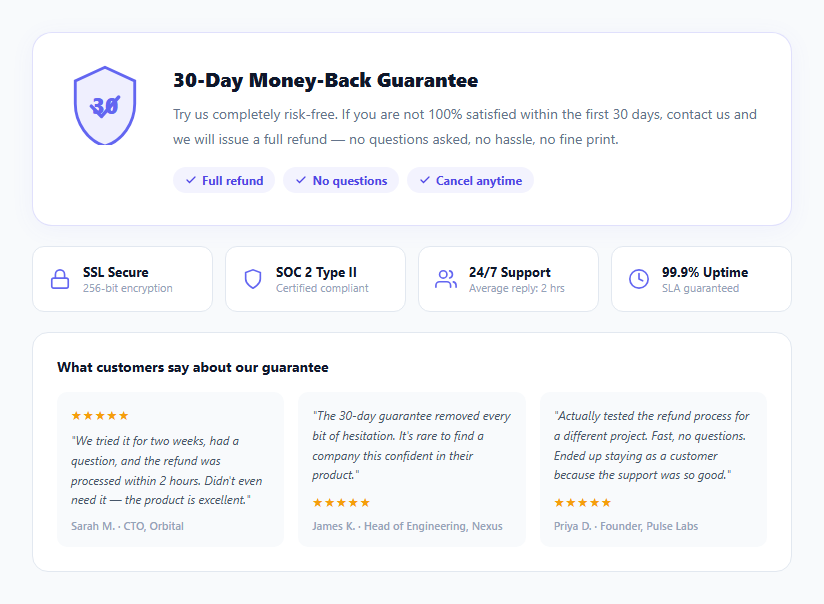
A money-back guarantee section is one of the highest-ROI additions to any pricing page. Research consistently shows that a visible, prominent refund guarantee reduces purchase anxiety and increases conversion — sometimes by 20–40% — because it transfers the perceived risk from buyer to seller. This snippet provides a complete pricing trust section: a shield SVG badge with the guarantee duration, a descriptive paragraph, trust chips, four trust badges (SSL, SOC 2, Support, Uptime), and three customer review cards.
The shield badge
The shield uses an inline SVG path that draws a classic security shield shape. The fill is a very light indigo tint and the stroke is the accent colour. A .shield-days div with position: absolute overlays the "30" number directly on the shield — communicating the guarantee length at a glance before reading any text.
Trust chips
Three pill-shaped chips ("Full refund", "No questions", "Cancel anytime") use indigo tinted backgrounds and check SVG icons. These chips compress the key guarantee points into scannable tokens — users can confirm the terms in under 2 seconds.
The four trust badges
SSL Secure, SOC 2 Type II, 24/7 Support, and 99.9% Uptime — four common purchase objections addressed in a 4-column grid. Each badge has an icon, a label, and a sub-label with the specific detail. The grid collapses to 2 columns on mobile.
Customer review cards
Three review quotes specifically about the guarantee — not general product praise — build trust at the exact point where a prospect is evaluating risk. Guarantee-specific reviews are more persuasive than generic five-star ratings because they address the specific question: "Will the refund process actually work?"
Placement on the pricing page
Place this section directly below the tier cards on your pricing page. The guarantee section catches users who are interested but hesitant, and converts them by removing the primary risk objection. The trust badges below the main guarantee card reinforce credibility on multiple dimensions.
Guarantee-specific reviews
The three review cards show customer quotes specifically about the guarantee and refund experience — not generic product praise. Guarantee-specific reviews address the exact question a prospect has at this section of the page: "Will they actually honour the refund?" Research consistently shows that testimonials about the guarantee experience convert hesitant buyers more effectively than general five-star reviews, because they prove the safety net works in practice. Use real customer quotes from refund confirmation emails or support tickets where possible.
Build with AI
Build, Understand, Optimize, and Extend It With AI
Since this section has zero JavaScript, the interesting mechanics are all in the markup and CSS — paste the HTML and CSS into an AI coding assistant like Claude and ask it to explain exactly how the .shield-days div is layered on top of the inline shield SVG path using absolute positioning, or why the guarantee card's border uses a low-opacity rgba indigo instead of a solid color. The same assistant is useful for optimizing it too, for example checking whether the four trust badges and three review cards could share one grid component instead of duplicating grid-template-columns rules, or whether the section's responsive breakpoints (4 to 2 columns, 3 to 1 column) line up with your actual pricing page's container width. It's also a fast way to extend the section: ask it to wire the shield's day count to a CMS field, add schema.org MerchantReturnPolicy markup automatically, or generate a condensed checkout-page variant with just the shield and two trust chips. Treat the code less like a finished artifact and more like a starting point for a conversation.
Prompt to recreate it
Copy this into your AI assistant of choice to build the effect from scratch, or as a jumping-off point for your own variant:
Build a pricing-page "money-back guarantee" trust section in plain HTML and CSS only — no JavaScript at all, since nothing in it needs to be interactive.

Requirements:
- A shield badge made from a single inline SVG path drawing a classic shield outline with a checkmark polyline inside it, with a semi-transparent tinted fill and a solid accent stroke; overlay the guarantee's day count (e.g. "30") as a separate absolutely-positioned element centered on top of the shield rather than baking the number into the SVG itself.
- Next to the shield, a heading, a descriptive paragraph, and a row of pill-shaped "trust chips" (e.g. "Full refund", "No questions", "Cancel anytime"), each with a small inline checkmark SVG icon and a tinted background matching the accent color.
- Below the main card, a responsive grid of trust badges (for example SSL security, compliance certification, support hours, uptime SLA), each with its own inline SVG icon, a bold label, and a smaller sub-label with a specific stat; the grid must collapse from four columns to two on narrow viewports using a media query.
- Below that, a labeled section of guarantee-specific customer review cards (star rating, an italicized quote specifically about the refund/guarantee experience, and a reviewer name/role) laid out in a responsive grid that collapses from three columns to one on narrow viewports.
- The entire section must render correctly with JavaScript completely disabled, and must be structured so it could be shipped as a static server-rendered component with no client-side hydration.
Want to tighten it up first? Run this prompt through the AI Prompt Studio to score it across 8 quality dimensions, catch anti-patterns, and tune the wording for Claude, ChatGPT, or Gemini before you paste it in.
Step by step
How to Use
- 1Update the guarantee periodChange "30" in the .shield-days div and "30-Day Money-Back Guarantee" in the h2 to your actual guarantee period (14, 30, or 60 days). Update the guarantee description paragraph to match your exact refund policy terms.
- 2Update the trust chipsEdit the three .chip texts to match your guarantee terms. Common options: "Full refund", "No credit card required", "Cancel anytime", "Data export included", "No lock-in contract".
- 3Update the trust badgesEdit the four .trust-badge .trust-name and .trust-sub texts to match your actual certifications and support stats. Remove badges for certifications you do not have. Add new badges for GDPR, HIPAA, ISO 27001, or other certifications you hold.
- 4Replace the review quotesEdit the three review .review p texts with real customer quotes about your guarantee or support quality. Update .reviewer with the real customer name, role, and company. Use initials or first names if the customer prefers anonymity.
- 5Add this below your pricing tier cardsThe guarantee section is most effective when placed immediately below the pricing cards, before the FAQ section. It catches hesitant buyers at the point of decision.
- 6Export in your formatClick "HTML" for a standalone file to paste after your pricing cards, "JSX" for a React server component, or "Tailwind" for a Tailwind CSS version.
Real-world uses
Common Use Cases
Got questions?
Frequently Asked Questions
The shield is an inline SVG path element that draws a classic security shield shape. The fill is a light indigo tint (rgba(99,102,241,0.1)) and the stroke is the accent colour. The "30" number is a .shield-days div with position: absolute and z-index: 1, overlaying the SVG. To change the guarantee period: update .shield-days textContent to your number (14, 60, 90), update the h2 heading, and update the description paragraph to reference the correct period.
Add a script type="application/ld+json" with Offer and hasMerchantReturnPolicy schema: {"@type":"MerchantReturnPolicy","applicableCountry":"US","returnPolicyCategory":"https://schema.org/MerchantReturnFiniteReturnWindow","merchantReturnDays":30,"returnFees":"https://schema.org/FreeReturn","returnMethod":"https://schema.org/ReturnByMail"}. Reference this from your Product schema's hasMerchantReturnPolicy property. This can enable Google Shopping rich results.
Yes — and the checkout page version often has a higher ROI. At checkout, the user has already decided they want the product and is in the final payment step. Showing the guarantee here reduces the last-moment hesitation ("what if this doesn't work after I pay?") that causes cart abandonment. Use a condensed version on the checkout page: just the shield badge, the guarantee period, and two trust chips. The full review section is better suited to the pricing page where users are earlier in their evaluation.
Yes. Since this snippet has no JavaScript, it can be a pure Server Component in Next.js App Router — no "use client" directive required. Export it as default function GuaranteeSection() and import it in your pricing page server component. Pass the guarantee period, trust badge data, and review quotes as props from getStaticProps or directly from your content source.