Learn Coding Visually
Learn to code with interactive, live-preview playgrounds — HTML, CSS, JavaScript, React & more.
 HTML Playground42 lessons · Click-based · Live preview
 CSS PlaygroundLearn CSS with a live editor
 JavaScript Playground60 lessons · DOM · Async · Canvas
 React PlaygroundLearn React with a live code editor
 GSAP PlaygroundLearn GSAP animation interactively
 SVG Playground44 lessons · shapes · paths · animation
 SCSS Playground45 lessons · Sass modules · tokens
 Tailwind PlaygroundLearn Tailwind CSS with a live editor
 Bootstrap 5 Playground50 lessons · live preview
Metronome & Tap Tempo Tool — Free HTML CSS JS Snippet
Metronome & Tap Tempo Tool · Misc · Plain HTML, CSS & JS · Live preview
What's included
Features
About this UI Snippet
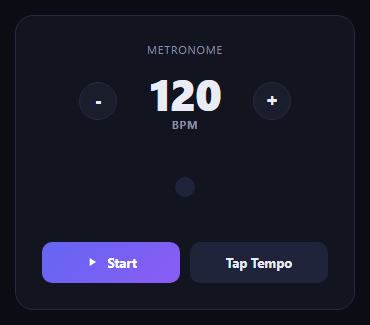
Metronome & Tap Tempo — Web Audio API Click Track with Accented Downbeat & Tap Tempo Detection
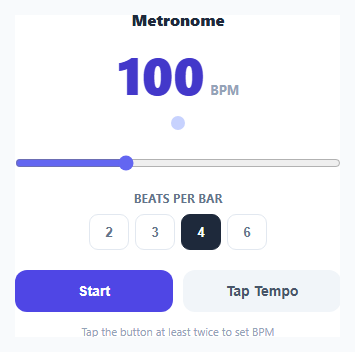
A metronome only has one job — keep exact, unwavering time — which makes it a good showcase for the Web Audio API's high-precision scheduling instead of relying on setInterval, whose timing drifts noticeably over a few minutes of continuous playback. This snippet generates real audible clicks using an oscillator and gain node, keeps a look-ahead schedule so beats never drift out of time even when the browser tab is busy, and includes a tap-tempo feature that measures your own tapping rhythm to set the BPM.
Why setInterval is the wrong tool for a metronome
JavaScript's setInterval and setTimeout are not guaranteed to fire at their exact requested time — they can be delayed by other work on the main thread, and small delays compound over hundreds of beats into audible drift. The Web Audio API's AudioContext.currentTime clock, by contrast, is sample-accurate and driven by the audio hardware itself. scheduler() uses the classic "look-ahead" pattern: every 25 milliseconds it checks whether the next beat's scheduled time falls within the next 100 milliseconds, and if so, schedules that beat's click with setTimeout using a precisely calculated delay based on nextNoteTime - ctx.currentTime. Because beats are scheduled slightly ahead of when they play rather than triggered exactly when the timer fires, small JavaScript timing jitter does not accumulate into audible tempo drift.
Synthesizing the click sound from scratch
Each click is a short sine-wave oscillator (osc.type = 'sine') burst rather than a pre-recorded audio file, which keeps the snippet fully self-contained with no asset to load. The gain envelope uses exponentialRampToValueAtTime to ramp the volume up in 2 milliseconds and back down to near-silence in 60 milliseconds, producing a short percussive "tick" rather than a sustained tone. The accented downbeat — the first beat of each bar — plays at a higher frequency (1400Hz vs 900Hz) and a louder peak gain, which is exactly how a physical metronome distinguishes beat one from the rest.
Time signature via a simple beat counter
beatsPerBar tracks how many beats make up one bar (2, 3, 4, or 6, covering common signatures like 2/4, 3/4, 4/4, and 6/8), and currentBeat cycles through 0 to beatsPerBar - 1 using the modulo operator after every scheduled beat. Beat 0 is always the accented downbeat, which is what makes switching between "4" and "3" during playback immediately change where the accent lands without needing to restart the metronome.
Tap tempo from raw click timestamps
The tap-tempo button records performance.now() on every click, discards any tap older than 2.5 seconds (so an old rhythm from a previous session does not pollute a new tapping attempt), and averages the intervals between consecutive taps once at least two taps are recorded. Math.round(60000 / avgMs) converts an average millisecond-per-beat interval into beats per minute, clamped to the metronome's supported 30-240 BPM range. This is the same technique used in professional DJ software and audio production tools for setting tempo by feel rather than by typing a number.
Visual pulse synced to the audio
A separate flashPulse() call runs on the same setTimeout as each audio click, briefly scaling and recoloring a dot — larger and amber-colored on the accented downbeat — so the beat is visible as well as audible, useful when practicing silently or in a noisy environment.
Build with AI
Build, Understand, Optimize, and Extend It With AI
Paste this snippet's JavaScript into an AI assistant like Claude and ask it to walk through exactly why the look-ahead scheduling pattern in scheduler() avoids the timing drift that a naive setInterval-based metronome would suffer from — it is a genuinely useful pattern for any web audio timing problem, not just metronomes. It is also a good base to extend: ask for a subdivision mode (eighth or sixteenth note clicks between main beats), a volume control for the click sound, or persisting the last-used BPM and time signature to localStorage between visits.
Prompt to recreate it
Copy this into your AI assistant of choice to build the effect from scratch, or as a jumping-off point for your own variant:
Build a metronome with tap tempo in plain HTML, CSS, and JavaScript, no libraries.

Requirements:
- Use the Web Audio API (AudioContext, OscillatorNode, GainNode) to synthesize short click sounds rather than playing a pre-recorded audio file, with a fast volume ramp up and down to produce a percussive tick.
- Implement look-ahead scheduling: rather than triggering each click exactly when a timer fires, run a scheduler function on a short repeating interval that checks a running "next note time" against the AudioContext's own high-precision clock, and schedules any upcoming beats slightly ahead of time so the timing does not drift even under JavaScript-side delays.
- A BPM range slider from roughly 30 to 240, with the current BPM shown numerically and used directly by the scheduler.
- A time signature selector (at least 2, 3, 4, and 6 beats per bar) where the first beat of every bar is audibly and visually accented (different pitch/volume, different visual color) compared to the other beats, and changing it mid-playback takes effect on the next beat.
- A Start/Stop button that begins and cleanly stops the scheduled click sequence.
- A Tap Tempo button that records the timestamp of each click using performance.now(), discards taps older than a couple of seconds so stale rhythms don't pollute a new attempt, and once at least two taps are recorded, computes the average interval between them and converts it into a BPM value that updates the slider and the active tempo.
- A visual pulse element that flashes in sync with each audio click, distinctly styled on the accented downbeat.
Want to tighten it up first? Run this prompt through the AI Prompt Studio to score it across 8 quality dimensions, catch anti-patterns, and tune the wording for Claude, ChatGPT, or Gemini before you paste it in.
Source Code
<div class="wrap">
  <h2>Metronome</h2>

  <div class="bpm-display">
    <span id="bpm-value">100</span>
    <span class="bpm-label">BPM</span>
  </div>

  <div class="pulse-row">
    <div class="pulse" id="pulse"></div>
  </div>

  <input type="range" id="bpm-slider" min="30" max="240" value="100" />

  <div class="beat-row">
    <label>Beats per bar</label>
    <div class="beat-select" id="beat-select">
      <button data-beats="2">2</button>
      <button data-beats="3">3</button>
      <button class="active" data-beats="4">4</button>
      <button data-beats="6">6</button>
    </div>
  </div>

  <div class="controls">
    <button id="play-btn" class="play-btn">Start</button>
    <button id="tap-btn" class="tap-btn">Tap Tempo</button>
  </div>

  <div class="hint" id="tap-hint">Tap the button at least twice to set BPM</div>
</div>
* { box-sizing: border-box; margin: 0; padding: 0; }
body { font-family: system-ui, -apple-system, sans-serif; background: #f8fafc; min-height: 100vh; display: flex; align-items: center; justify-content: center; padding: 28px 20px; }
.wrap { width: 100%; max-width: 380px; background: #fff; border: 1px solid #e2e8f0; border-radius: 18px; padding: 26px; text-align: center; }
h2 { font-size: 16px; font-weight: 800; color: #1e293b; margin-bottom: 18px; }
.bpm-display { display: flex; align-items: baseline; justify-content: center; gap: 6px; margin-bottom: 10px; }
#bpm-value { font-size: 52px; font-weight: 800; color: #4338ca; font-variant-numeric: tabular-nums; line-height: 1; }
.bpm-label { font-size: 13px; font-weight: 700; color: #94a3b8; }
.pulse-row { display: flex; justify-content: center; margin-bottom: 18px; height: 26px; align-items: center; }
.pulse { width: 14px; height: 14px; border-radius: 50%; background: #c7d2fe; transition: transform 0.06s, background 0.06s; }
.pulse.beat { background: #4f46e5; transform: scale(1.6); }
.pulse.beat.accent { background: #f59e0b; }
#bpm-slider { width: 100%; accent-color: #6366f1; margin-bottom: 20px; }
.beat-row { margin-bottom: 20px; }
.beat-row label { display: block; font-size: 11.5px; font-weight: 700; color: #64748b; text-transform: uppercase; letter-spacing: 0.03em; margin-bottom: 8px; }
.beat-select { display: flex; gap: 6px; justify-content: center; }
.beat-select button { width: 40px; height: 36px; border-radius: 9px; border: 1.5px solid #e2e8f0; background: #fff; font-weight: 700; color: #64748b; cursor: pointer; font-size: 13px; }
.beat-select button.active { background: #1e293b; border-color: #1e293b; color: #fff; }
.controls { display: flex; gap: 10px; margin-bottom: 12px; }
.controls button { flex: 1; padding: 13px; border-radius: 12px; border: none; font-weight: 700; font-size: 14px; cursor: pointer; }
.play-btn { background: #4f46e5; color: #fff; }
.play-btn.playing { background: #dc2626; }
.tap-btn { background: #f1f5f9; color: #475569; }
.tap-btn:active { background: #e2e8f0; }
.hint { font-size: 11px; color: #94a3b8; min-height: 14px; }const bpmValue = document.getElementById('bpm-value');
const bpmSlider = document.getElementById('bpm-slider');
const pulse = document.getElementById('pulse');
const playBtn = document.getElementById('play-btn');
const tapBtn = document.getElementById('tap-btn');
const beatButtons = document.querySelectorAll('.beat-select button');
const tapHint = document.getElementById('tap-hint');
let bpm = 100;
let beatsPerBar = 4;
let currentBeat = 0;
let playing = false;
let audioCtx = null;
let nextNoteTime = 0;
let timerId = null;
let tapTimes = [];
function ensureAudioContext() {
if (!audioCtx) {
const Ctx = window.AudioContext || window.webkitAudioContext;
audioCtx = new Ctx();
}
return audioCtx;
}
function playClick(accent) {
const ctx = ensureAudioContext();
const osc = ctx.createOscillator();
const gain = ctx.createGain();
osc.type = 'sine';
osc.frequency.value = accent ? 1400 : 900;
gain.gain.setValueAtTime(0.001, ctx.currentTime);
gain.gain.exponentialRampToValueAtTime(accent ? 0.35 : 0.22, ctx.currentTime + 0.002);
gain.gain.exponentialRampToValueAtTime(0.001, ctx.currentTime + 0.06);
osc.connect(gain);
gain.connect(ctx.destination);
osc.start(ctx.currentTime);
osc.stop(ctx.currentTime + 0.07);
}
function flashPulse(accent) {
pulse.classList.remove('beat', 'accent');
void pulse.offsetWidth;
pulse.classList.add('beat');
if (accent) pulse.classList.add('accent');
setTimeout(() => pulse.classList.remove('beat', 'accent'), 90);
}
function scheduler() {
const ctx = ensureAudioContext();
while (nextNoteTime < ctx.currentTime + 0.1) {
const accent = currentBeat === 0;
const delay = Math.max(0, (nextNoteTime - ctx.currentTime) * 1000);
setTimeout(() => { playClick(accent); flashPulse(accent); }, delay);
nextNoteTime += 60 / bpm;
currentBeat = (currentBeat + 1) % beatsPerBar;
}
timerId = setTimeout(scheduler, 25);
}
function start() {
const ctx = ensureAudioContext();
if (ctx.state === 'suspended') ctx.resume();
currentBeat = 0;
nextNoteTime = ctx.currentTime + 0.05;
scheduler();
playing = true;
playBtn.textContent = 'Stop';
playBtn.classList.add('playing');
}
function stop() {
clearTimeout(timerId);
playing = false;
playBtn.textContent = 'Start';
playBtn.classList.remove('playing');
pulse.classList.remove('beat', 'accent');
}
playBtn.addEventListener('click', () => {
if (playing) stop(); else start();
});
bpmSlider.addEventListener('input', () => {
bpm = parseInt(bpmSlider.value, 10);
bpmValue.textContent = bpm;
});
beatButtons.forEach(btn => {
btn.addEventListener('click', () => {
beatButtons.forEach(b => b.classList.remove('active'));
btn.classList.add('active');
beatsPerBar = parseInt(btn.dataset.beats, 10);
currentBeat = 0;
});
});
tapBtn.addEventListener('click', () => {
const now = performance.now();
tapTimes = tapTimes.filter(t => now - t < 2500);
tapTimes.push(now);
if (tapTimes.length >= 2) {
const intervals = [];
for (let i = 1; i < tapTimes.length; i++) intervals.push(tapTimes[i] - tapTimes[i - 1]);
const avgMs = intervals.reduce((a, b) => a + b, 0) / intervals.length;
const tappedBpm = Math.round(60000 / avgMs);
bpm = Math.min(240, Math.max(30, tappedBpm));
bpmSlider.value = bpm;
bpmValue.textContent = bpm;
tapHint.textContent = 'Tapped tempo: ' + bpm + ' BPM';
} else {
tapHint.textContent = 'Tap again to lock in the tempo...';
}
});
bpmValue.textContent = bpm;Step by step
How to Use
- 1Set your tempoDrag the BPM slider from 30 to 240, or use Tap Tempo below to set it by clicking along to a rhythm.
- 2Choose a time signatureClick 2, 3, 4, or 6 beats per bar — the first beat of each bar is accented with a higher-pitched click.
- 3Press StartThe metronome begins clicking immediately using precisely scheduled Web Audio API oscillator bursts.
- 4Use Tap TempoClick the Tap Tempo button at least twice in rhythm — the average interval between taps sets the BPM automatically.
- 5Watch the visual pulseA dot pulses in sync with every click, larger and amber on the downbeat, for practicing without sound.
- 6Export in your formatClick HTML for a standalone file, JSX for a React component, or Tailwind for a React + Tailwind version.
Real-world uses
Common Use Cases
Got questions?
Frequently Asked Questions
setInterval and setTimeout are not guaranteed to fire exactly on time, and small delays compound into audible drift over many beats. The Web Audio API exposes a sample-accurate clock via AudioContext.currentTime, and scheduling each click slightly ahead of when it should play (the look-ahead pattern) keeps timing precise regardless of small JavaScript-side jitter.
No. Each click is synthesized from scratch using an OscillatorNode (a sine wave) shaped by a GainNode envelope that ramps volume up and back down in under 70 milliseconds, producing a short percussive tick with no audio asset to load.
A currentBeat counter cycles from 0 up to one less than the selected beats-per-bar value. Whenever currentBeat is 0 (the first beat of the bar), the click plays at a higher frequency and greater volume, matching how physical metronomes distinguish the downbeat.
Every tap records a performance.now() timestamp. Once at least two taps are recorded, it averages the millisecond intervals between consecutive taps and converts that average into beats per minute with 60000 divided by the average interval, clamped to the 30-240 supported range.
Without a timeout, an old, unrelated rhythm from earlier taps would still be averaged into a brand new tapping attempt. Discarding stale taps ensures Tap Tempo always reflects your current, continuous tapping pattern.
Yes. Clicking a different beats-per-bar button updates beatsPerBar immediately and resets the beat counter, so the accent realigns to the new bar length on the very next beat without needing to stop and restart.