You Might Also Like
Learn Coding Visually
Learn to code with interactive, live-preview playgrounds — HTML, CSS, JavaScript, React & more.
 HTML Playground42 lessons · Click-based · Live preview
 CSS PlaygroundLearn CSS with a live editor
 JavaScript Playground60 lessons · DOM · Async · Canvas
 React PlaygroundLearn React with a live code editor
 GSAP PlaygroundLearn GSAP animation interactively
 SVG Playground44 lessons · shapes · paths · animation
 SCSS Playground45 lessons · Sass modules · tokens
 Tailwind PlaygroundLearn Tailwind CSS with a live editor
 Bootstrap 5 Playground50 lessons · live preview
Debounce vs Throttle Visualizer — Free JS Snippet
Debounce vs Throttle Visualizer · Forms · Plain HTML, CSS & JS · Live preview
What's included
Features
About this UI Snippet
Debounce vs Throttle Visualizer — Real Implementations Compared Side by Side on an Animated Timeline
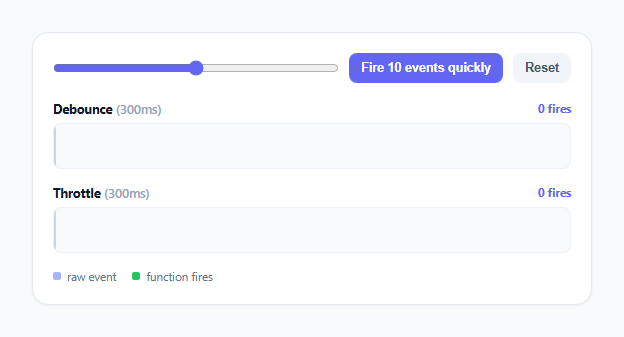
Debounce and throttle are the two most commonly confused timing functions in frontend JavaScript, and most explanations of the difference are purely verbal — "debounce waits for a pause, throttle limits the rate" — which is accurate but forgettable, because you never actually see the behaviors happen. This snippet feeds a single shared stream of rapid-fire events into two lanes at once, each wrapping the exact same raw event with a real, correct implementation of debounce or throttle, and plots every raw event as a small tick alongside a taller, differently colored mark for every actual function fire. Run the same burst through both lanes and the fire count difference — debounce firing once, throttle firing several times — becomes something you watch happen, not something you have to take on faith.
The debounce implementation, and why it has to clearTimeout on every call
debounce(fn, wait) closes over a single timer variable. Every time the returned wrapped function is called, it unconditionally calls clearTimeout(timer) before scheduling a new setTimeout. This is the entire mechanism: a rapid burst of ten calls 35ms apart never lets any of the first nine timers survive long enough to fire, because each new call cancels the previous pending timer before it can complete. Only once 300ms pass with *no new call arriving to cancel it* does the very last scheduled timer actually run. This is why the visualizer's debounce lane shows a cluster of raw ticks tightly packed together, followed by exactly one green fire mark sitting 300ms after the *last* tick in the cluster — not 300ms after the first.
The throttle implementation, and the trailing-edge detail most simplified versions skip
throttle(fn, wait) is more involved than debounce, and this is deliberate: a naive throttle that only checks "has enough time passed since the last fire" and otherwise does nothing will silently drop the final value of a burst if the burst ends mid-window. This implementation tracks lastFireTime and computes remaining = wait - (now - lastFireTime) on every call. If no time remains, it fires immediately (the "leading edge") and updates lastFireTime. If time does remain, instead of just discarding the call, it stores the latest args as pendingArgs and — only if no trailing timer is already scheduled — schedules one to fire exactly when the window ends (the "trailing edge"), using the *most recent* arguments captured by that point. This guarantees the throttled function always reflects the latest input by the time the window closes, rather than potentially firing with stale, outdated arguments from earlier in the burst.
Why the two lanes share one event source
Both lanes are driven by the exact same onRawEvent() function, called once per raw slider input event or once per tick of the "Fire 10 events quickly" burst. Every single raw event is passed to *both* debouncedFn() and throttledFn() in the same call. This matters for the comparison to be honest: if the two lanes were driven by separately generated random event streams, any difference in fire count could be attributed to different input rather than different timing behavior. By construction, both wrapped functions here see literally identical input, so the entire difference in how many times each one fires is attributable purely to the debounce-versus-throttle logic itself.
Plotting real elapsed time, not just counting events
Every mark's horizontal position is computed from xPercentForNow(), which measures real elapsed milliseconds since the timeline was last reset against a fixed LANE_MS window (6 seconds), not from a fixed per-event pixel spacing. This means the visual gap between the raw ticks in a burst and their eventual fire mark(s) is an honest representation of the actual 300ms wait — if you fire the burst slowly by hand instead of using the button, the ticks visibly spread further apart and the debounce fire mark visibly follows further behind the last one, exactly matching the real timing.
Why the fire count is the crux of the whole comparison
For a burst of ten rapid raw events, debounce ends the burst having fired its wrapped function exactly once — after the last event plus 300ms. Throttle, wrapping the identical burst, fires near the very start (leading edge) and, if the burst duration exceeds the 300ms window, potentially a second time at the trailing edge — always at least once, and typically more than debounce's single fire for the same input. That fire-count difference for identical input, plotted side by side with visibly different-colored taller marks, is the entire point of the snippet: it is not asserted in prose, it is counted and displayed live in each lane's header.
Build with AI
Build, Understand, Optimize, and Extend It With AI
Give this snippet's JS to an AI assistant like Claude and ask it to trace through why throttle() needs both a lastFireTime check and a separate pendingArgs/trailing timer, rather than just checking "has enough time passed" — the trailing-edge case is the detail most simplified explanations of throttle skip entirely, and seeing it implemented correctly is worth more than another verbal description. It's also worth asking how you'd implement a debounce variant with a maxWait option (guaranteeing a fire even under continuous, uninterrupted input, similar to lodash's implementation) and what that would add to the visualization. For extending the snippet: ask for a third lane showing raw, unthrottled/undebounced fires for full comparison, a live-adjustable WAIT slider so the timing window itself can be tuned interactively, or exporting the fire-time data as a downloadable timeline for a blog post or presentation.
Prompt to recreate it
Copy this into your AI assistant of choice to build the effect from scratch, or as a jumping-off point for your own variant:
Build a side-by-side visual comparison of debounce versus throttle in plain HTML, CSS, and JavaScript, no libraries, using real correct implementations of both.

Requirements:
- A single shared, fast-firing input source: a slider the user can drag, plus a "Fire 10 events quickly" button that simulates a rapid burst of events roughly 30-40ms apart, well inside a shared wait window.
- Implement a real, correct debounce(fn, wait) function: every call must clear any pending timer and reschedule a new one, so the wrapped function only actually fires once, after wait milliseconds have passed with no further calls arriving.
- Implement a real, correct throttle(fn, wait) function that fires immediately on the first call (leading edge) and at most once per wait-millisecond window after that — but must NOT silently drop the final call of a burst that ends mid-window; it must track the most recent call's arguments and fire once more at the trailing edge if a call was suppressed during the window.
- Feed the identical burst of raw events into both the debounced and throttled wrapped functions at the same time, so any difference in behavior is attributable purely to the algorithm, not to different input.
- Visualize both lanes as horizontal timelines: plot every raw incoming event as a small tick mark, and separately mark (in a different color and taller) exactly when each lane's wrapped function actually fires, with mark positions reflecting real elapsed time, not a fixed per-event spacing.
- Display a live numeric fire count per lane so the difference in how many times each function actually ran for the identical burst is explicit, not just visual.
- Debounce must visibly show a single fire happening only after the burst has fully stopped; throttle must visibly show more fires than debounce for the same burst, including a fire near the very start of the burst.
Want to tighten it up first? Run this prompt through the AI Prompt Studio to score it across 8 quality dimensions, catch anti-patterns, and tune the wording for Claude, ChatGPT, or Gemini before you paste it in.
Step by step
How to Use
- 1Drag the slider slowlyBoth lanes plot a light purple tick for every raw input event, spaced out in real time to match how quickly you actually moved the slider.
- 2Click "Fire 10 events quickly"Ten raw events fire about 35 milliseconds apart, well within the shared 300ms window, landing a tight cluster of ticks on both timelines at once.
- 3Watch the Debounce laneA single taller green "fire" mark appears roughly 300ms after the very last tick in the cluster — every earlier pending timer got cancelled by the next incoming event before it could run.
- 4Watch the Throttle lane at the same timeA green fire mark appears almost immediately at the start of the burst (the leading edge), and depending on how long the burst runs, a second fire mark appears at the trailing edge — visibly more fires than the debounce lane for the identical input.
- 5Compare the two "fires" counters in the lane headersThe numeric counters make the difference explicit: debounce typically reads 1 fire for a quick burst while throttle reads 2, proving the core distinction directly rather than just describing it.
- 6Click Reset and try a slow, spread-out drag instead of the burst buttonWith gaps longer than 300ms between events, debounce fires after every individual pause and throttle fires close to every event too — the two behaviors converge and look similar, which itself demonstrates that the difference only shows up under rapid, bursty input.
Real-world uses
Common Use Cases
Got questions?
Frequently Asked Questions
Debounce fires the wrapped function only once, a fixed delay after the last event in a burst — every new event cancels and reschedules the pending timer, so rapid-fire input keeps pushing the fire time later until the input actually stops. Throttle fires immediately on the first event and then at most once per fixed window afterward regardless of how many more events arrive, so a burst of events lasting longer than the window produces multiple fires. Feeding an identical burst into both (as this snippet does) makes the resulting fire-count difference directly observable rather than something you have to take on faith from a description.
A throttle that only fires on the leading edge would silently ignore the final state of a fast-moving input if the burst ends inside the wait window — for example, a slider dragged quickly to its final value could have that final value never actually get processed if the last raw event happened to land inside the throttled window. This implementation stores the most recent call's arguments as pendingArgs and schedules exactly one trailing-edge fire for when the window closes, guaranteeing the throttled function is eventually called with the latest input, not a stale mid-burst value.
For a burst of ten events fired within a single 300ms window, debounce collapses the entire burst into exactly one fire, 300ms after the last event. Throttle, wrapping the same events, fires once immediately when the burst starts and then, if the burst duration crosses the 300ms boundary, fires again at the trailing edge — meaning throttle will always produce at least as many fires as debounce for the same bursty input, and typically strictly more, which is exactly the difference the two lanes are built to make visible.
Yes, but they must be created once and persisted across renders rather than recreated on every render, or their internal timer/lastFireTime state resets constantly and the behavior breaks. In React, wrap the debounce/throttle call in useMemo or useRef so the same closure instance persists across re-renders, and clear any pending setTimeout inside a useEffect cleanup function on unmount. In Vue, create the wrapped function once outside the reactive setup (or in onMounted, stored in a non-reactive variable) and clear its timer in onUnmounted. In Angular, create it once in the component class (not inside a method that runs on every change detection cycle) and clear it in ngOnDestroy.
Change the WAIT constant at the top of the script — both debounce(fn, WAIT) and throttle(fn, WAIT) read from the same value, so the two lanes stay directly comparable at any window size. To test a different burst pattern, edit the interval passed to setInterval inside fireBurst() (currently 35ms between each of 10 events) — try spacing events further apart than WAIT to see debounce and throttle converge and fire similarly, which itself demonstrates that their difference only becomes dramatic under genuinely rapid, bursty input.