Learn Coding Visually
Learn to code with interactive, live-preview playgrounds — HTML, CSS, JavaScript, React & more.
 HTML Playground42 lessons · Click-based · Live preview
 CSS PlaygroundLearn CSS with a live editor
 JavaScript Playground60 lessons · DOM · Async · Canvas
 React PlaygroundLearn React with a live code editor
 GSAP PlaygroundLearn GSAP animation interactively
 SVG Playground44 lessons · shapes · paths · animation
 SCSS Playground45 lessons · Sass modules · tokens
 Tailwind PlaygroundLearn Tailwind CSS with a live editor
 Bootstrap 5 Playground50 lessons · live preview
Heading Underline Read Progress — Native CSS view-timeline
Heading Underline Fill (view-timeline) · Scroll · Plain HTML, CSS & JS · Live preview
What's included
Features
About this UI Snippet
Heading Underline Read Progress — animation-timeline: view() Bound to a Different Element
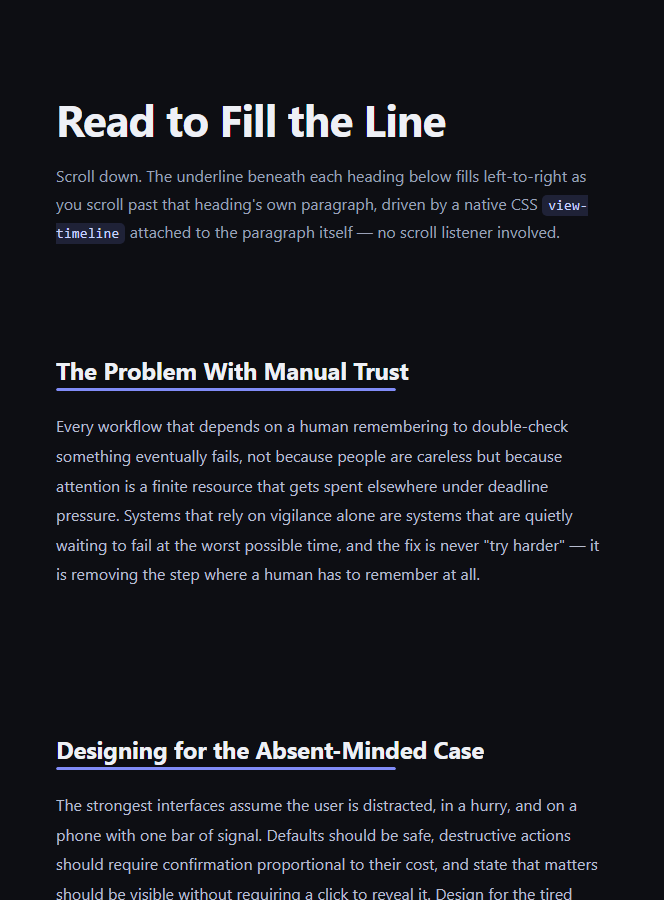
Most scroll-driven CSS demos bind an element's animation to its own view timeline — the element watches itself. This snippet shows the less commonly demonstrated but equally native pattern: a view timeline whose *source* is one element (a paragraph) driving an animation on a completely different element (a heading's underline bar), so the underline fills in step with how far the reader has scrolled through that specific block of text, not with the underline's own tiny transit through the viewport.
Splitting the timeline source from the animated element
view-timeline-name: --para-read and view-timeline-axis: block are declared on .hup-source, the <p> element — this makes the paragraph the *source* of a named timeline representing its own scroll-driven visibility, from first entering to fully exiting the viewport. The underline bar's ::after pseudo-element then references that exact same name via animation-timeline: --para-read, even though it is a sibling element, not the paragraph itself and not a descendant of it. CSS scroll-driven animations resolve a named timeline by searching up the accessible tree for the nearest element or ancestor exposing that name, which is what allows one element's scroll position to drive a completely different element's animation.
Why this is more honest than animating the underline's own timeline
If view-timeline-name were declared on the underline bar instead, the fill would track the underline's own two-pixel-tall transit through the viewport — which happens almost instantly, since it is a thin line, not a real "reading progress" signal. Sourcing the timeline from the full paragraph instead means the fill genuinely represents how much of that block of prose has scrolled past the reader, which is the actual semantic the effect is named for.
animation-range narrows it to the readable window
animation-range: cover 0% cover 85% completes the fill slightly before the paragraph's absolute last pixel leaves the viewport, so the underline reaches 100% right around when a reader has plausibly finished reading the passage rather than only at the exact geometric edge case of the last line scrolling out.
Comparing to a document-wide reading bar
CSS Scroll-Driven Progress Bar and Scroll Reading Time both represent progress through the *entire* document. This underline is deliberately scoped — three separate underlines in this demo each track their own paragraph independently, useful for structured content like a FAQ or a stepped explainer where "progress through this specific answer" matters more than "progress through the whole page."
Browser support
Chromium-based browsers (Chrome, Edge, Opera, Brave) support named view() timelines referenced across sibling elements today. Firefox and Safari support is still landing, so an @supports not (animation-timeline: view()) block shows every underline fully filled rather than stuck empty.
Customizing it
Move view-timeline-name onto a different, more meaningful element (a whole <section> instead of a single paragraph) to change what "read" means, swap scaleX for a width change to a percentage-based fill instead, or add a small percentage label using the same --para-read timeline for a numeric readout beside each underline. Pair it with a FAQ Search Accordion for a "how much of this answer have you read" cue on long answers.
Build with AI
Build, Understand, Optimize, and Extend It With AI
You don't have to puzzle out cross-element named timelines by hand. Paste this snippet's HTML, CSS, and JS into an AI coding assistant like Claude and ask it to explain exactly how animation-timeline: --para-read on the underline's ::after pseudo-element resolves to the view-timeline-name declared on a completely different, sibling <p> element, and why sourcing the timeline from the paragraph rather than the underline itself produces a more meaningful fill duration. The same assistant is useful for extending the effect: ask it to add a small numeric percentage label driven by the same named timeline, make the fill color shift from one hue to another as it completes, or move the timeline source up to a whole <section> so the underline represents a broader block of read content. Treat the code less like a finished artifact and more like a starting point for a conversation.
Prompt to recreate it
Copy this into your AI assistant of choice to build the effect from scratch, or as a jumping-off point for your own variant:
Build a heading with a thin underline bar beneath it that fills from left to right as the reader scrolls past a specific paragraph of body text below it — using only native CSS scroll-driven animations, where the view timeline's SOURCE element is the paragraph itself, not the underline bar. No JavaScript, no scroll event listeners.

Requirements:
- A heading, a thin underline bar element, and a paragraph of body text, in that visual order.
- The paragraph element must declare its own view-timeline-name and view-timeline-axis: block, making it the source of a named view timeline representing its own transit through the viewport.
- The underline bar (or a pseudo-element on it) must NOT declare its own view-timeline-name. Instead it must reference the paragraph's timeline by name via animation-timeline, proving that a named view timeline sourced on one element can drive an animation on a different, sibling element.
- The underline's fill animation must scale a colored overlay from 0 width to full width (for example via transform: scaleX()) as the paragraph's view timeline progresses.
- Use animation-range to complete the fill slightly before the paragraph's absolute last pixel exits the viewport (for example cover 0% cover 85%), so it reads as "finished reading" rather than only completing at the exact geometric edge.
- Repeat the heading/underline/paragraph pattern at least three times on the page, each with its own independent named timeline, to demonstrate that each underline tracks only its own paragraph.
- Add an @supports not (animation-timeline: view()) fallback that shows every underline fully filled by default, rather than stuck empty, in unsupported browsers.
- Keep any JavaScript limited to a CSS.supports('animation-timeline: view()') feature check — it must not drive or trigger the fill itself.
Want to tighten it up first? Run this prompt through the AI Prompt Studio to score it across 8 quality dimensions, catch anti-patterns, and tune the wording for Claude, ChatGPT, or Gemini before you paste it in.
Step by step
How to Use
- 1Paste the HTML, CSS, and JSThree headings, each with an underline and a paragraph, render immediately.
- 2Scroll past each paragraphWatch the underline beneath its heading fill left-to-right as you pass through that paragraph.
- 3Scroll back upEach underline empties again in reverse, since it is driven by a live view timeline.
- 4Change what counts as "read"Move view-timeline-name from .hup-source to a wrapping section to track a larger block of content instead.
- 5Adjust the completion pointTune animation-range: cover 0% cover 85% to make the fill finish earlier or later relative to the paragraph's exit.
- 6Export in your formatClick "HTML" for a standalone file, "JSX" for a React component, or "Tailwind" for a React + Tailwind version.
Real-world uses
Common Use Cases
Got questions?
Frequently Asked Questions
view-timeline-name declares a named timeline sourced from the element it is set on (the paragraph, here). Any other element can then bind to that exact name via animation-timeline, as long as it is within the accessible scope of the name — the browser resolves the named timeline the same way it would resolve a custom property, letting one element's scroll-driven visibility control a completely different element's animation.
The underline bar is only a few pixels tall, so its own transit through the viewport happens almost instantly and would make the fill snap nearly all at once rather than tracking genuine reading progress. Sourcing the timeline from the full paragraph instead means the fill duration matches how long that block of text actually takes to scroll past.
It completes the fill once the paragraph is 85% through its own cover range rather than the full 100%, so the underline reaches full width slightly before the very last pixel of the paragraph leaves the viewport — closer to when a reader has plausibly finished the passage than the exact geometric edge case.
Only its own paragraph. Each .hup-source paragraph declares its own view-timeline-name, so the three underlines in this demo are entirely independent — scrolling past the first paragraph does not affect the second or third underline's fill state at all.
The @supports not (animation-timeline: view()) block sets every underline's fill to transform: scaleX(1) with the animation removed, so Firefox and Safari users see every underline fully filled by default rather than stuck empty or animating incorrectly.
Yes. Move the view-timeline-name and view-timeline-axis declarations from the .hup-source paragraph onto a wrapping element such as the .hup-section, and the underline will then fill based on that larger block's scroll transit instead of just the one paragraph's.