FAQ Search Accordion — Searchable FAQ HTML CSS JS

FAQ Search Accordion · Layouts · Plain HTML, CSS & JS · Live preview

Share & Support

What's included

Features

Live search across Q and A
Filters on every keystroke against both question and answer text, so matches in answers surface too.
Match highlighting
Matched terms are wrapped in a yellow <mark> in both question and answer, showing exactly why each result matched.
XSS-safe highlighting
Answer text is HTML-escaped before the <mark> is inserted, so user queries can never inject markup.
Context-aware expand
Single-open accordion while browsing; auto-expand-all while searching, so you read answers without extra clicks.
Height-measurement-free animation
The grid-template-rows 0fr→1fr trick animates each answer to its true height with no JavaScript measurement.
Empty state
A clear "no questions match" message replaces a confusing blank list when search returns nothing.
Data-driven list
Questions render from a FAQS array — add or edit them with a one-line data change.
Keyboard-operable buttons
Each question is a real <button>, focusable and toggleable with Enter/Space, with a rotating chevron indicator.

About this UI Snippet

FAQ Search Accordion — Live-Filtered Questions with Match Highlighting
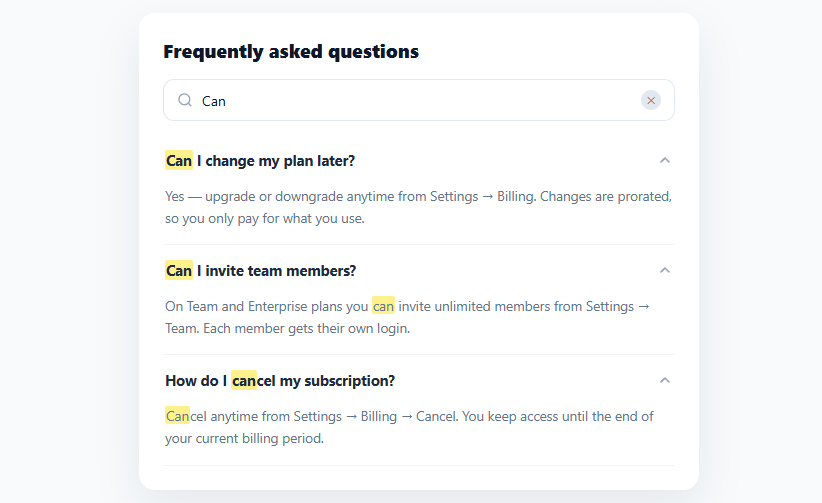
Screenshot of the FAQ Search Accordion snippet rendered live

A static FAQ list is fine with five questions, but past a dozen, visitors give up scanning and leave. Adding search turns a wall of questions into something people actually use — they type a keyword, see only the relevant answers with their term highlighted, and get unblocked. This snippet builds that searchable FAQ accordion in plain HTML, CSS, and vanilla JavaScript: live filtering across questions and answers, match highlighting, and smart expand behavior.

Search filters questions and answers

The search box filters on every keystroke against both the question *and* the answer text, so a query like "refund" finds the relevant entry even if the word only appears in the answer body, not the question title. Matching is case-insensitive and substring-based, which is what users expect from a help search. When nothing matches, an explicit empty state ("No questions match — try different keywords") appears instead of a confusing blank list.

Highlighting that shows why each result matched

Matched terms are wrapped in a <mark> and rendered with a yellow highlight, in both the question and the answer. This is the detail that makes search feel trustworthy — the user immediately sees *where* their term appears, so a result that matched on a single word in a long answer doesn't look like a mistake. The highlighting is built safely: answer text is HTML-escaped first (escapeHtml) before the <mark> is inserted, so user-typed queries can't inject markup — a subtle but important XSS guard whenever you build HTML from user input.

Search expands; browsing collapses

The expand behavior adapts to context. While browsing (no query), it's a classic single-open accordion — clicking a question expands it and collapses the others, keeping the list scannable. The moment you search, every matching result expands automatically so you can read all the candidate answers at once without extra clicks — because when you're searching, you want to see the answers, not hunt for the right one to open. Clearing the search returns to the collapsed accordion. This dual mode is what separates a thoughtful FAQ search from a list that just hides non-matches.

A reveal animation with no height measurement

Each answer uses the modern CSS grid trick to animate open: the wrapper transitions grid-template-rows from 0fr to 1fr with the inner content set to overflow: hidden; min-height: 0. This animates each answer to its exact natural height with zero JavaScript measurement — no max-height guessing that clips long answers or feels mistimed. It adapts perfectly whether an answer is one line or five.

Data-driven and accessible

The whole list renders from a FAQS array of { q, a } objects, so adding or editing questions is a data change. Each question is a real <button>, so it's keyboard-focusable and operable with Enter/Space, and the chevron rotates to indicate state. For a production build you'd add aria-expanded and aria-controls to fully wire the accordion semantics (covered in the FAQs), but the structure — buttons controlling associated answer regions — is correct from the start.

Step by step

How to Use

  1. 1
    Paste HTML, CSS, and JSA searchable FAQ card renders with eight questions in a collapsed accordion.
  2. 2
    Browse by clickingClick a question to expand its answer — opening one collapses the others, keeping the list scannable.
  3. 3
    Search for a keywordType in the search box — only matching questions show, every match expands, and the term is highlighted in yellow.
  4. 4
    See the empty stateSearch for something with no match to see the "No questions match" message instead of a blank list.
  5. 5
    Clear the searchClick the ✕ to clear the query and return to the collapsed browsing accordion.
  6. 6
    Edit the questionsAdd or change entries in the FAQS array ({ q, a }) — the list, search, and highlighting all update automatically.

Real-world uses

Common Use Cases

Help center and support pages
Make a large FAQ actually usable with search — pair with a helpful feedback widget to learn which answers land.
Pricing and product FAQs
Let prospects find billing, refund, or feature answers fast before they commit.
Documentation landing pages
Surface common questions with search above deeper docs, alongside a table of contents.
Onboarding and getting-started
Answer setup questions searchably so new users self-serve instead of opening tickets.
Event and webinar pages
Address logistics questions (timing, access, recording) in a searchable block.
Learning search + accordion patterns
A reference for live filtering, safe highlighting, and context-aware expand — compare with an accordion FAQ for the no-search version.

Got questions?

Frequently Asked Questions

Edit the FAQS array — each entry is a { q, a } object. The list renders from it, so adding, removing, or reordering questions needs no other changes, and search automatically covers the new content since it filters against the array text.

Because the highlight function builds HTML by inserting a <mark> around the matched substring, any raw HTML or a malicious query could otherwise be injected into the page. Escaping the text first (& < > → entities) and only then inserting the safe <mark> tag means user-typed search terms are treated as plain text — a small but essential XSS guard whenever you construct HTML from user input.

The two modes serve different intents. Browsing is exploratory, so a single-open accordion keeps the list short and scannable. Searching is goal-directed — the user wants the answer now — so showing all matching answers expanded saves a second click and lets them compare candidates at a glance. Adapting the behavior to intent is what makes the search feel helpful rather than mechanical.

Add aria-expanded to each question button (reflecting open state) and aria-controls pointing at its answer region's id, give each answer region a matching id and role="region" with aria-labelledby back to the button. The buttons are already keyboard-operable; these ARIA attributes let screen readers announce the expand/collapse state and associate each answer with its question.

In React, hold the query and open index in useState and derive the filtered, highlighted list with useMemo; in Vue, use ref()/computed(); in Angular, use a component field with a pipe or getter. The filter, escape, and highlight functions are plain JavaScript that port unchanged — only the per-keystroke re-render moves into the framework's reactivity.

FAQ Search Accordion — Export as HTML, React, Vue, Angular & Tailwind

HTML
<!DOCTYPE html>
<html lang="en">
<head>
  <meta charset="UTF-8" />
  <meta name="viewport" content="width=device-width, initial-scale=1.0" />
  <title>FAQ Search Accordion</title>
  <style>
    *{box-sizing:border-box;margin:0;padding:0}
    body{font-family:system-ui,-apple-system,sans-serif;background:#f8fafc;min-height:100vh;display:flex;align-items:flex-start;justify-content:center;padding:40px 24px}
    
    .fsa-card{background:#fff;border-radius:16px;padding:24px;width:100%;max-width:560px;box-shadow:0 18px 44px rgba(15,23,42,.08)}
    .fsa-card h3{font-size:19px;font-weight:800;color:#0f172a;margin-bottom:16px}
    
    .fsa-search{display:flex;align-items:center;gap:9px;border:1.5px solid #e2e8f0;border-radius:11px;padding:10px 13px;margin-bottom:14px;color:#94a3b8;transition:border-color .15s,box-shadow .15s}
    .fsa-search:focus-within{border-color:#6366f1;box-shadow:0 0 0 3px rgba(99,102,241,.12)}
    .fsa-search input{flex:1;border:none;outline:none;font-size:14px;font-family:inherit;color:#0f172a}
    .fsa-clear{border:none;background:#e2e8f0;color:#475569;width:20px;height:20px;border-radius:50%;font-size:10px;cursor:pointer;flex-shrink:0}
    
    .fsa-list{display:flex;flex-direction:column}
    .fsa-item{border-bottom:1px solid #f1f5f9}
    .fsa-q{width:100%;display:flex;align-items:center;justify-content:space-between;gap:12px;background:none;border:none;padding:15px 2px;font-size:14.5px;font-weight:700;color:#1e293b;cursor:pointer;text-align:left;font-family:inherit}
    .fsa-q mark{background:#fef08a;color:inherit;border-radius:2px;padding:0 1px}
    .fsa-chevron{flex-shrink:0;color:#94a3b8;transition:transform .25s}
    .fsa-item.open .fsa-chevron{transform:rotate(180deg)}
    .fsa-a-wrap{display:grid;grid-template-rows:0fr;transition:grid-template-rows .28s ease}
    .fsa-item.open .fsa-a-wrap{grid-template-rows:1fr}
    .fsa-a-inner{overflow:hidden;min-height:0}
    .fsa-a{font-size:13.5px;color:#64748b;line-height:1.6;padding:0 2px 16px}
    .fsa-a mark{background:#fef08a;color:inherit;border-radius:2px;padding:0 1px}
    
    .fsa-empty{text-align:center;padding:28px 0;font-size:14px;color:#94a3b8}
  </style>
</head>
<body>
  <div class="fsa-card">
    <h3>Frequently asked questions</h3>
    <div class="fsa-search">
      <svg width="16" height="16" viewBox="0 0 24 24" fill="none" stroke="currentColor" stroke-width="2"><circle cx="11" cy="11" r="8"/><path d="M21 21l-4.3-4.3"/></svg>
      <input type="text" id="fsaSearch" placeholder="Search questions…" autocomplete="off">
      <button type="button" class="fsa-clear" id="fsaClear" hidden aria-label="Clear">✕</button>
    </div>
  
    <div class="fsa-list" id="fsaList"></div>
    <p class="fsa-empty" id="fsaEmpty" hidden>No questions match — try different keywords.</p>
  </div>
  <script>
    var FAQS = [
      { q: 'How do I reset my password?', a: 'Click "Forgot password" on the sign-in page and enter your email. We\'ll send a reset link that stays valid for one hour.' },
      { q: 'Can I change my plan later?', a: 'Yes — upgrade or downgrade anytime from Settings → Billing. Changes are prorated, so you only pay for what you use.' },
      { q: 'Do you offer refunds?', a: 'We offer a 30-day money-back guarantee on all annual plans. Contact support and we\'ll process it within 5 business days.' },
      { q: 'How do I export my data?', a: 'Go to Settings → Data and click Export. You\'ll get a downloadable archive of everything in JSON and CSV formats.' },
      { q: 'Is my data encrypted?', a: 'All data is encrypted in transit with TLS and at rest with AES-256. We never sell or share your data with third parties.' },
      { q: 'Can I invite team members?', a: 'On Team and Enterprise plans you can invite unlimited members from Settings → Team. Each member gets their own login.' },
      { q: 'What payment methods do you accept?', a: 'We accept all major credit cards, PayPal, and (on annual Enterprise plans) bank transfer and invoicing.' },
      { q: 'How do I cancel my subscription?', a: 'Cancel anytime from Settings → Billing → Cancel. You keep access until the end of your current billing period.' },
    ];
    
    var listEl = document.getElementById('fsaList');
    var searchEl = document.getElementById('fsaSearch');
    var clearBtn = document.getElementById('fsaClear');
    var emptyEl = document.getElementById('fsaEmpty');
    var openIndex = -1;
    
    function escapeHtml(s) {
      return s.replace(/&/g, '&amp;').replace(/</g, '&lt;').replace(/>/g, '&gt;');
    }
    function mark(text, q) {
      var safe = escapeHtml(text);
      if (!q) return safe;
      var i = safe.toLowerCase().indexOf(q.toLowerCase());
      if (i < 0) return safe;
      return safe.slice(0, i) + '<mark>' + safe.slice(i, i + q.length) + '</mark>' + safe.slice(i + q.length);
    }
    
    function render(query) {
      var q = (query || '').trim();
      var matches = FAQS.filter(function (f) {
        return !q || (f.q + ' ' + f.a).toLowerCase().indexOf(q.toLowerCase()) !== -1;
      });
      emptyEl.hidden = matches.length > 0;
      listEl.innerHTML = matches.map(function (f, i) {
        var open = q ? true : i === openIndex;     // expand all while searching
        return '<div class="fsa-item' + (open ? ' open' : '') + '" data-i="' + i + '">' +
          '<button type="button" class="fsa-q"><span>' + mark(f.q, q) + '</span>' +
            '<svg class="fsa-chevron" width="16" height="16" viewBox="0 0 24 24" fill="none" stroke="currentColor" stroke-width="2.4" stroke-linecap="round" stroke-linejoin="round"><polyline points="6 9 12 15 18 9"/></svg>' +
          '</button>' +
          '<div class="fsa-a-wrap"><div class="fsa-a-inner"><div class="fsa-a">' + mark(f.a, q) + '</div></div></div>' +
        '</div>';
      }).join('');
    }
    
    listEl.addEventListener('click', function (e) {
      var btn = e.target.closest('.fsa-q');
      if (!btn || searchEl.value.trim()) return;     // while searching, items stay expanded
      var item = btn.closest('.fsa-item');
      var i = +item.dataset.i;
      openIndex = item.classList.contains('open') ? -1 : i;
      render('');
    });
    
    searchEl.addEventListener('input', function () {
      clearBtn.hidden = !this.value;
      render(this.value);
    });
    clearBtn.addEventListener('click', function () {
      searchEl.value = '';
      clearBtn.hidden = true;
      openIndex = -1;
      render('');
      searchEl.focus();
    });
    
    render('');
  </script>
</body>
</html>
Tailwind
<!DOCTYPE html>
<html lang="en">
<head>
  <meta charset="UTF-8" />
  <meta name="viewport" content="width=device-width, initial-scale=1.0" />
  <title>FAQ Search Accordion</title>
  <!-- Tailwind CSS v3+ — arbitrary value classes (e.g. bg-[#0f172a]) are valid -->
  <script src="https://cdn.tailwindcss.com"></script>
  <style>
    * {
      box-sizing:border-box;margin:0;padding:0
    }

    body {
      font-family:system-ui,-apple-system,sans-serif;background:#f8fafc;min-height:100vh;display:flex;align-items:flex-start;justify-content:center;padding:40px 24px
    }

    .fsa-card h3 {
      font-size:19px;font-weight:800;color:#0f172a;margin-bottom:16px
    }

    .fsa-search input {
      flex:1;border:none;outline:none;font-size:14px;font-family:inherit;color:#0f172a
    }

    .fsa-item {
      border-bottom:1px solid #f1f5f9
    }

    .fsa-q {
      width:100%;display:flex;align-items:center;justify-content:space-between;gap:12px;background:none;border:none;padding:15px 2px;font-size:14.5px;font-weight:700;color:#1e293b;cursor:pointer;text-align:left;font-family:inherit
    }

    .fsa-q mark {
      background:#fef08a;color:inherit;border-radius:2px;padding:0 1px
    }

    .fsa-chevron {
      flex-shrink:0;color:#94a3b8;transition:transform .25s
    }

    .fsa-item.open .fsa-chevron {
      transform:rotate(180deg)
    }

    .fsa-a-wrap {
      display:grid;grid-template-rows:0fr;transition:grid-template-rows .28s ease
    }

    .fsa-item.open .fsa-a-wrap {
      grid-template-rows:1fr
    }

    .fsa-a-inner {
      overflow:hidden;min-height:0
    }

    .fsa-a {
      font-size:13.5px;color:#64748b;line-height:1.6;padding:0 2px 16px
    }

    .fsa-a mark {
      background:#fef08a;color:inherit;border-radius:2px;padding:0 1px
    }
  </style>
</head>
<body>
  <div class="fsa-card bg-[#fff] rounded-2xl p-6 w-full max-w-[560px] shadow-[0_18px_44px_rgba(15,23,42,.08)]">
    <h3>Frequently asked questions</h3>
    <div class="fsa-search flex items-center gap-[9px] border rounded-[11px] py-2.5 px-[13px] mb-3.5 text-[#94a3b8] [transition:border-color_.15s,box-shadow_.15s]">
      <svg width="16" height="16" viewBox="0 0 24 24" fill="none" stroke="currentColor" stroke-width="2"><circle cx="11" cy="11" r="8"/><path d="M21 21l-4.3-4.3"/></svg>
      <input type="text" id="fsaSearch" placeholder="Search questions…" autocomplete="off">
      <button type="button" class="border-0 bg-[#e2e8f0] text-[#475569] w-5 h-5 rounded-full text-xs cursor-pointer shrink-0" id="fsaClear" hidden aria-label="Clear">✕</button>
    </div>
  
    <div class="flex flex-col" id="fsaList"></div>
    <p class="text-center py-7 px-0 text-sm text-[#94a3b8]" id="fsaEmpty" hidden>No questions match — try different keywords.</p>
  </div>
  <script>
    var FAQS = [
      { q: 'How do I reset my password?', a: 'Click "Forgot password" on the sign-in page and enter your email. We\'ll send a reset link that stays valid for one hour.' },
      { q: 'Can I change my plan later?', a: 'Yes — upgrade or downgrade anytime from Settings → Billing. Changes are prorated, so you only pay for what you use.' },
      { q: 'Do you offer refunds?', a: 'We offer a 30-day money-back guarantee on all annual plans. Contact support and we\'ll process it within 5 business days.' },
      { q: 'How do I export my data?', a: 'Go to Settings → Data and click Export. You\'ll get a downloadable archive of everything in JSON and CSV formats.' },
      { q: 'Is my data encrypted?', a: 'All data is encrypted in transit with TLS and at rest with AES-256. We never sell or share your data with third parties.' },
      { q: 'Can I invite team members?', a: 'On Team and Enterprise plans you can invite unlimited members from Settings → Team. Each member gets their own login.' },
      { q: 'What payment methods do you accept?', a: 'We accept all major credit cards, PayPal, and (on annual Enterprise plans) bank transfer and invoicing.' },
      { q: 'How do I cancel my subscription?', a: 'Cancel anytime from Settings → Billing → Cancel. You keep access until the end of your current billing period.' },
    ];
    
    var listEl = document.getElementById('fsaList');
    var searchEl = document.getElementById('fsaSearch');
    var clearBtn = document.getElementById('fsaClear');
    var emptyEl = document.getElementById('fsaEmpty');
    var openIndex = -1;
    
    function escapeHtml(s) {
      return s.replace(/&/g, '&amp;').replace(/</g, '&lt;').replace(/>/g, '&gt;');
    }
    function mark(text, q) {
      var safe = escapeHtml(text);
      if (!q) return safe;
      var i = safe.toLowerCase().indexOf(q.toLowerCase());
      if (i < 0) return safe;
      return safe.slice(0, i) + '<mark>' + safe.slice(i, i + q.length) + '</mark>' + safe.slice(i + q.length);
    }
    
    function render(query) {
      var q = (query || '').trim();
      var matches = FAQS.filter(function (f) {
        return !q || (f.q + ' ' + f.a).toLowerCase().indexOf(q.toLowerCase()) !== -1;
      });
      emptyEl.hidden = matches.length > 0;
      listEl.innerHTML = matches.map(function (f, i) {
        var open = q ? true : i === openIndex;     // expand all while searching
        return '<div class="fsa-item' + (open ? ' open' : '') + '" data-i="' + i + '">' +
          '<button type="button" class="fsa-q"><span>' + mark(f.q, q) + '</span>' +
            '<svg class="fsa-chevron" width="16" height="16" viewBox="0 0 24 24" fill="none" stroke="currentColor" stroke-width="2.4" stroke-linecap="round" stroke-linejoin="round"><polyline points="6 9 12 15 18 9"/></svg>' +
          '</button>' +
          '<div class="fsa-a-wrap"><div class="fsa-a-inner"><div class="fsa-a">' + mark(f.a, q) + '</div></div></div>' +
        '</div>';
      }).join('');
    }
    
    listEl.addEventListener('click', function (e) {
      var btn = e.target.closest('.fsa-q');
      if (!btn || searchEl.value.trim()) return;     // while searching, items stay expanded
      var item = btn.closest('.fsa-item');
      var i = +item.dataset.i;
      openIndex = item.classList.contains('open') ? -1 : i;
      render('');
    });
    
    searchEl.addEventListener('input', function () {
      clearBtn.hidden = !this.value;
      render(this.value);
    });
    clearBtn.addEventListener('click', function () {
      searchEl.value = '';
      clearBtn.hidden = true;
      openIndex = -1;
      render('');
      searchEl.focus();
    });
    
    render('');
  </script>
</body>
</html>
React
import React, { useEffect } from 'react';

// CSS — optionally move to FAQSearchAccordion.module.css
const css = `
*{box-sizing:border-box;margin:0;padding:0}
body{font-family:system-ui,-apple-system,sans-serif;background:#f8fafc;min-height:100vh;display:flex;align-items:flex-start;justify-content:center;padding:40px 24px}

.fsa-card{background:#fff;border-radius:16px;padding:24px;width:100%;max-width:560px;box-shadow:0 18px 44px rgba(15,23,42,.08)}
.fsa-card h3{font-size:19px;font-weight:800;color:#0f172a;margin-bottom:16px}

.fsa-search{display:flex;align-items:center;gap:9px;border:1.5px solid #e2e8f0;border-radius:11px;padding:10px 13px;margin-bottom:14px;color:#94a3b8;transition:border-color .15s,box-shadow .15s}
.fsa-search:focus-within{border-color:#6366f1;box-shadow:0 0 0 3px rgba(99,102,241,.12)}
.fsa-search input{flex:1;border:none;outline:none;font-size:14px;font-family:inherit;color:#0f172a}
.fsa-clear{border:none;background:#e2e8f0;color:#475569;width:20px;height:20px;border-radius:50%;font-size:10px;cursor:pointer;flex-shrink:0}

.fsa-list{display:flex;flex-direction:column}
.fsa-item{border-bottom:1px solid #f1f5f9}
.fsa-q{width:100%;display:flex;align-items:center;justify-content:space-between;gap:12px;background:none;border:none;padding:15px 2px;font-size:14.5px;font-weight:700;color:#1e293b;cursor:pointer;text-align:left;font-family:inherit}
.fsa-q mark{background:#fef08a;color:inherit;border-radius:2px;padding:0 1px}
.fsa-chevron{flex-shrink:0;color:#94a3b8;transition:transform .25s}
.fsa-item.open .fsa-chevron{transform:rotate(180deg)}
.fsa-a-wrap{display:grid;grid-template-rows:0fr;transition:grid-template-rows .28s ease}
.fsa-item.open .fsa-a-wrap{grid-template-rows:1fr}
.fsa-a-inner{overflow:hidden;min-height:0}
.fsa-a{font-size:13.5px;color:#64748b;line-height:1.6;padding:0 2px 16px}
.fsa-a mark{background:#fef08a;color:inherit;border-radius:2px;padding:0 1px}

.fsa-empty{text-align:center;padding:28px 0;font-size:14px;color:#94a3b8}
`;

export default function FAQSearchAccordion() {
  // Auto-generated escape hatch: the original snippet's vanilla JS runs once
  // after mount and queries the rendered DOM. For idiomatic React, lift this
  // into state + handlers.
  useEffect(() => {
    const _listeners = [];
    const _originalAddEventListener = EventTarget.prototype.addEventListener;
    EventTarget.prototype.addEventListener = function(type, listener, options) {
      _listeners.push({ target: this, type, listener, options });
      return _originalAddEventListener.call(this, type, listener, options);
    };
    var FAQS = [
      { q: 'How do I reset my password?', a: 'Click "Forgot password" on the sign-in page and enter your email. We\'ll send a reset link that stays valid for one hour.' },
      { q: 'Can I change my plan later?', a: 'Yes — upgrade or downgrade anytime from Settings → Billing. Changes are prorated, so you only pay for what you use.' },
      { q: 'Do you offer refunds?', a: 'We offer a 30-day money-back guarantee on all annual plans. Contact support and we\'ll process it within 5 business days.' },
      { q: 'How do I export my data?', a: 'Go to Settings → Data and click Export. You\'ll get a downloadable archive of everything in JSON and CSV formats.' },
      { q: 'Is my data encrypted?', a: 'All data is encrypted in transit with TLS and at rest with AES-256. We never sell or share your data with third parties.' },
      { q: 'Can I invite team members?', a: 'On Team and Enterprise plans you can invite unlimited members from Settings → Team. Each member gets their own login.' },
      { q: 'What payment methods do you accept?', a: 'We accept all major credit cards, PayPal, and (on annual Enterprise plans) bank transfer and invoicing.' },
      { q: 'How do I cancel my subscription?', a: 'Cancel anytime from Settings → Billing → Cancel. You keep access until the end of your current billing period.' },
    ];
    
    var listEl = document.getElementById('fsaList');
    var searchEl = document.getElementById('fsaSearch');
    var clearBtn = document.getElementById('fsaClear');
    var emptyEl = document.getElementById('fsaEmpty');
    var openIndex = -1;
    
    function escapeHtml(s) {
      return s.replace(/&/g, '&amp;').replace(/</g, '&lt;').replace(/>/g, '&gt;');
    }
    function mark(text, q) {
      var safe = escapeHtml(text);
      if (!q) return safe;
      var i = safe.toLowerCase().indexOf(q.toLowerCase());
      if (i < 0) return safe;
      return safe.slice(0, i) + '<mark>' + safe.slice(i, i + q.length) + '</mark>' + safe.slice(i + q.length);
    }
    
    function render(query) {
      var q = (query || '').trim();
      var matches = FAQS.filter(function (f) {
        return !q || (f.q + ' ' + f.a).toLowerCase().indexOf(q.toLowerCase()) !== -1;
      });
      emptyEl.hidden = matches.length > 0;
      listEl.innerHTML = matches.map(function (f, i) {
        var open = q ? true : i === openIndex;     // expand all while searching
        return '<div class="fsa-item' + (open ? ' open' : '') + '" data-i="' + i + '">' +
          '<button type="button" class="fsa-q"><span>' + mark(f.q, q) + '</span>' +
            '<svg class="fsa-chevron" width="16" height="16" viewBox="0 0 24 24" fill="none" stroke="currentColor" stroke-width="2.4" stroke-linecap="round" stroke-linejoin="round"><polyline points="6 9 12 15 18 9"/></svg>' +
          '</button>' +
          '<div class="fsa-a-wrap"><div class="fsa-a-inner"><div class="fsa-a">' + mark(f.a, q) + '</div></div></div>' +
        '</div>';
      }).join('');
    }
    
    listEl.addEventListener('click', function (e) {
      var btn = e.target.closest('.fsa-q');
      if (!btn || searchEl.value.trim()) return;     // while searching, items stay expanded
      var item = btn.closest('.fsa-item');
      var i = +item.dataset.i;
      openIndex = item.classList.contains('open') ? -1 : i;
      render('');
    });
    
    searchEl.addEventListener('input', function () {
      clearBtn.hidden = !this.value;
      render(this.value);
    });
    clearBtn.addEventListener('click', function () {
      searchEl.value = '';
      clearBtn.hidden = true;
      openIndex = -1;
      render('');
      searchEl.focus();
    });
    
    render('');
    // Cleanup: restore addEventListener and remove all listeners
    return () => {
      EventTarget.prototype.addEventListener = _originalAddEventListener;
      for (const { target, type, listener, options } of _listeners) {
        target.removeEventListener(type, listener, options);
      }
    };
  }, []);

  return (
    <>
      <style>{css}</style>
      <div className="fsa-card">
        <h3>Frequently asked questions</h3>
        <div className="fsa-search">
          <svg width="16" height="16" viewBox="0 0 24 24" fill="none" stroke="currentColor" strokeWidth="2"><circle cx="11" cy="11" r="8"/><path d="M21 21l-4.3-4.3"/></svg>
          <input type="text" id="fsaSearch" placeholder="Search questions…" autocomplete="off" />
          <button type="button" className="fsa-clear" id="fsaClear" hidden aria-label="Clear">✕</button>
        </div>
      
        <div className="fsa-list" id="fsaList"></div>
        <p className="fsa-empty" id="fsaEmpty" hidden>No questions match — try different keywords.</p>
      </div>
    </>
  );
}
React + Tailwind
import React, { useEffect } from 'react';
// Requires Tailwind CSS v3+ — https://tailwindcss.com/docs/installation
// Arbitrary value classes (e.g. bg-[#0f172a]) are valid Tailwind v3+

export default function FAQSearchAccordion() {
  // Auto-generated escape hatch: the original snippet's vanilla JS runs once
  // after mount and queries the rendered DOM. For idiomatic React, lift this
  // into state + handlers.
  useEffect(() => {
    const _listeners = [];
    const _originalAddEventListener = EventTarget.prototype.addEventListener;
    EventTarget.prototype.addEventListener = function(type, listener, options) {
      _listeners.push({ target: this, type, listener, options });
      return _originalAddEventListener.call(this, type, listener, options);
    };
    var FAQS = [
      { q: 'How do I reset my password?', a: 'Click "Forgot password" on the sign-in page and enter your email. We\'ll send a reset link that stays valid for one hour.' },
      { q: 'Can I change my plan later?', a: 'Yes — upgrade or downgrade anytime from Settings → Billing. Changes are prorated, so you only pay for what you use.' },
      { q: 'Do you offer refunds?', a: 'We offer a 30-day money-back guarantee on all annual plans. Contact support and we\'ll process it within 5 business days.' },
      { q: 'How do I export my data?', a: 'Go to Settings → Data and click Export. You\'ll get a downloadable archive of everything in JSON and CSV formats.' },
      { q: 'Is my data encrypted?', a: 'All data is encrypted in transit with TLS and at rest with AES-256. We never sell or share your data with third parties.' },
      { q: 'Can I invite team members?', a: 'On Team and Enterprise plans you can invite unlimited members from Settings → Team. Each member gets their own login.' },
      { q: 'What payment methods do you accept?', a: 'We accept all major credit cards, PayPal, and (on annual Enterprise plans) bank transfer and invoicing.' },
      { q: 'How do I cancel my subscription?', a: 'Cancel anytime from Settings → Billing → Cancel. You keep access until the end of your current billing period.' },
    ];
    
    var listEl = document.getElementById('fsaList');
    var searchEl = document.getElementById('fsaSearch');
    var clearBtn = document.getElementById('fsaClear');
    var emptyEl = document.getElementById('fsaEmpty');
    var openIndex = -1;
    
    function escapeHtml(s) {
      return s.replace(/&/g, '&amp;').replace(/</g, '&lt;').replace(/>/g, '&gt;');
    }
    function mark(text, q) {
      var safe = escapeHtml(text);
      if (!q) return safe;
      var i = safe.toLowerCase().indexOf(q.toLowerCase());
      if (i < 0) return safe;
      return safe.slice(0, i) + '<mark>' + safe.slice(i, i + q.length) + '</mark>' + safe.slice(i + q.length);
    }
    
    function render(query) {
      var q = (query || '').trim();
      var matches = FAQS.filter(function (f) {
        return !q || (f.q + ' ' + f.a).toLowerCase().indexOf(q.toLowerCase()) !== -1;
      });
      emptyEl.hidden = matches.length > 0;
      listEl.innerHTML = matches.map(function (f, i) {
        var open = q ? true : i === openIndex;     // expand all while searching
        return '<div class="fsa-item' + (open ? ' open' : '') + '" data-i="' + i + '">' +
          '<button type="button" class="fsa-q"><span>' + mark(f.q, q) + '</span>' +
            '<svg class="fsa-chevron" width="16" height="16" viewBox="0 0 24 24" fill="none" stroke="currentColor" stroke-width="2.4" stroke-linecap="round" stroke-linejoin="round"><polyline points="6 9 12 15 18 9"/></svg>' +
          '</button>' +
          '<div class="fsa-a-wrap"><div class="fsa-a-inner"><div class="fsa-a">' + mark(f.a, q) + '</div></div></div>' +
        '</div>';
      }).join('');
    }
    
    listEl.addEventListener('click', function (e) {
      var btn = e.target.closest('.fsa-q');
      if (!btn || searchEl.value.trim()) return;     // while searching, items stay expanded
      var item = btn.closest('.fsa-item');
      var i = +item.dataset.i;
      openIndex = item.classList.contains('open') ? -1 : i;
      render('');
    });
    
    searchEl.addEventListener('input', function () {
      clearBtn.hidden = !this.value;
      render(this.value);
    });
    clearBtn.addEventListener('click', function () {
      searchEl.value = '';
      clearBtn.hidden = true;
      openIndex = -1;
      render('');
      searchEl.focus();
    });
    
    render('');
    // Cleanup: restore addEventListener and remove all listeners
    return () => {
      EventTarget.prototype.addEventListener = _originalAddEventListener;
      for (const { target, type, listener, options } of _listeners) {
        target.removeEventListener(type, listener, options);
      }
    };
  }, []);

  return (
    <>
      <style>{`
* {
  box-sizing:border-box;margin:0;padding:0
}

body {
  font-family:system-ui,-apple-system,sans-serif;background:#f8fafc;min-height:100vh;display:flex;align-items:flex-start;justify-content:center;padding:40px 24px
}

.fsa-card h3 {
  font-size:19px;font-weight:800;color:#0f172a;margin-bottom:16px
}

.fsa-search input {
  flex:1;border:none;outline:none;font-size:14px;font-family:inherit;color:#0f172a
}

.fsa-item {
  border-bottom:1px solid #f1f5f9
}

.fsa-q {
  width:100%;display:flex;align-items:center;justify-content:space-between;gap:12px;background:none;border:none;padding:15px 2px;font-size:14.5px;font-weight:700;color:#1e293b;cursor:pointer;text-align:left;font-family:inherit
}

.fsa-q mark {
  background:#fef08a;color:inherit;border-radius:2px;padding:0 1px
}

.fsa-chevron {
  flex-shrink:0;color:#94a3b8;transition:transform .25s
}

.fsa-item.open .fsa-chevron {
  transform:rotate(180deg)
}

.fsa-a-wrap {
  display:grid;grid-template-rows:0fr;transition:grid-template-rows .28s ease
}

.fsa-item.open .fsa-a-wrap {
  grid-template-rows:1fr
}

.fsa-a-inner {
  overflow:hidden;min-height:0
}

.fsa-a {
  font-size:13.5px;color:#64748b;line-height:1.6;padding:0 2px 16px
}

.fsa-a mark {
  background:#fef08a;color:inherit;border-radius:2px;padding:0 1px
}
      `}</style>
      <div className="fsa-card bg-[#fff] rounded-2xl p-6 w-full max-w-[560px] shadow-[0_18px_44px_rgba(15,23,42,.08)]">
        <h3>Frequently asked questions</h3>
        <div className="fsa-search flex items-center gap-[9px] border rounded-[11px] py-2.5 px-[13px] mb-3.5 text-[#94a3b8] [transition:border-color_.15s,box-shadow_.15s]">
          <svg width="16" height="16" viewBox="0 0 24 24" fill="none" stroke="currentColor" strokeWidth="2"><circle cx="11" cy="11" r="8"/><path d="M21 21l-4.3-4.3"/></svg>
          <input type="text" id="fsaSearch" placeholder="Search questions…" autocomplete="off" />
          <button type="button" className="border-0 bg-[#e2e8f0] text-[#475569] w-5 h-5 rounded-full text-xs cursor-pointer shrink-0" id="fsaClear" hidden aria-label="Clear">✕</button>
        </div>
      
        <div className="flex flex-col" id="fsaList"></div>
        <p className="text-center py-7 px-0 text-sm text-[#94a3b8]" id="fsaEmpty" hidden>No questions match — try different keywords.</p>
      </div>
    </>
  );
}
Vue
<template>
  <div class="fsa-card">
    <h3>Frequently asked questions</h3>
    <div class="fsa-search">
      <svg width="16" height="16" viewBox="0 0 24 24" fill="none" stroke="currentColor" stroke-width="2"><circle cx="11" cy="11" r="8"/><path d="M21 21l-4.3-4.3"/></svg>
      <input type="text" id="fsaSearch" placeholder="Search questions…" autocomplete="off">
      <button type="button" class="fsa-clear" id="fsaClear" hidden aria-label="Clear">✕</button>
    </div>
  
    <div class="fsa-list" id="fsaList"></div>
    <p class="fsa-empty" id="fsaEmpty" hidden>No questions match — try different keywords.</p>
  </div>
</template>

<script setup>
import { onMounted } from 'vue';

var FAQS = [
  { q: 'How do I reset my password?', a: 'Click "Forgot password" on the sign-in page and enter your email. We\'ll send a reset link that stays valid for one hour.' },
  { q: 'Can I change my plan later?', a: 'Yes — upgrade or downgrade anytime from Settings → Billing. Changes are prorated, so you only pay for what you use.' },
  { q: 'Do you offer refunds?', a: 'We offer a 30-day money-back guarantee on all annual plans. Contact support and we\'ll process it within 5 business days.' },
  { q: 'How do I export my data?', a: 'Go to Settings → Data and click Export. You\'ll get a downloadable archive of everything in JSON and CSV formats.' },
  { q: 'Is my data encrypted?', a: 'All data is encrypted in transit with TLS and at rest with AES-256. We never sell or share your data with third parties.' },
  { q: 'Can I invite team members?', a: 'On Team and Enterprise plans you can invite unlimited members from Settings → Team. Each member gets their own login.' },
  { q: 'What payment methods do you accept?', a: 'We accept all major credit cards, PayPal, and (on annual Enterprise plans) bank transfer and invoicing.' },
  { q: 'How do I cancel my subscription?', a: 'Cancel anytime from Settings → Billing → Cancel. You keep access until the end of your current billing period.' },
];
let listEl;
let searchEl;
let clearBtn;
let emptyEl;
var openIndex = -1;
function escapeHtml(s) {
  return s.replace(/&/g, '&amp;').replace(/</g, '&lt;').replace(/>/g, '&gt;');
}
function mark(text, q) {
  var safe = escapeHtml(text);
  if (!q) return safe;
  var i = safe.toLowerCase().indexOf(q.toLowerCase());
  if (i < 0) return safe;
  return safe.slice(0, i) + '<mark>' + safe.slice(i, i + q.length) + '</mark>' + safe.slice(i + q.length);
}
function render(query) {
  var q = (query || '').trim();
  var matches = FAQS.filter(function (f) {
    return !q || (f.q + ' ' + f.a).toLowerCase().indexOf(q.toLowerCase()) !== -1;
  });
  emptyEl.hidden = matches.length > 0;
  listEl.innerHTML = matches.map(function (f, i) {
    var open = q ? true : i === openIndex;     // expand all while searching
    return '<div class="fsa-item' + (open ? ' open' : '') + '" data-i="' + i + '">' +
      '<button type="button" class="fsa-q"><span>' + mark(f.q, q) + '</span>' +
        '<svg class="fsa-chevron" width="16" height="16" viewBox="0 0 24 24" fill="none" stroke="currentColor" stroke-width="2.4" stroke-linecap="round" stroke-linejoin="round"><polyline points="6 9 12 15 18 9"/></svg>' +
      '</button>' +
      '<div class="fsa-a-wrap"><div class="fsa-a-inner"><div class="fsa-a">' + mark(f.a, q) + '</div></div></div>' +
    '</div>';
  }).join('');
}

onMounted(() => {
  listEl = document.getElementById('fsaList');
  searchEl = document.getElementById('fsaSearch');
  clearBtn = document.getElementById('fsaClear');
  emptyEl = document.getElementById('fsaEmpty');
  listEl.addEventListener('click', function (e) {
    var btn = e.target.closest('.fsa-q');
    if (!btn || searchEl.value.trim()) return;     // while searching, items stay expanded
    var item = btn.closest('.fsa-item');
    var i = +item.dataset.i;
    openIndex = item.classList.contains('open') ? -1 : i;
    render('');
  });
  searchEl.addEventListener('input', function () {
    clearBtn.hidden = !this.value;
    render(this.value);
  });
  clearBtn.addEventListener('click', function () {
    searchEl.value = '';
    clearBtn.hidden = true;
    openIndex = -1;
    render('');
    searchEl.focus();
  });
  render('');
});
</script>

<style scoped>
*{box-sizing:border-box;margin:0;padding:0}
body{font-family:system-ui,-apple-system,sans-serif;background:#f8fafc;min-height:100vh;display:flex;align-items:flex-start;justify-content:center;padding:40px 24px}

.fsa-card{background:#fff;border-radius:16px;padding:24px;width:100%;max-width:560px;box-shadow:0 18px 44px rgba(15,23,42,.08)}
.fsa-card h3{font-size:19px;font-weight:800;color:#0f172a;margin-bottom:16px}

.fsa-search{display:flex;align-items:center;gap:9px;border:1.5px solid #e2e8f0;border-radius:11px;padding:10px 13px;margin-bottom:14px;color:#94a3b8;transition:border-color .15s,box-shadow .15s}
.fsa-search:focus-within{border-color:#6366f1;box-shadow:0 0 0 3px rgba(99,102,241,.12)}
.fsa-search input{flex:1;border:none;outline:none;font-size:14px;font-family:inherit;color:#0f172a}
.fsa-clear{border:none;background:#e2e8f0;color:#475569;width:20px;height:20px;border-radius:50%;font-size:10px;cursor:pointer;flex-shrink:0}

.fsa-list{display:flex;flex-direction:column}
.fsa-item{border-bottom:1px solid #f1f5f9}
.fsa-q{width:100%;display:flex;align-items:center;justify-content:space-between;gap:12px;background:none;border:none;padding:15px 2px;font-size:14.5px;font-weight:700;color:#1e293b;cursor:pointer;text-align:left;font-family:inherit}
.fsa-q mark{background:#fef08a;color:inherit;border-radius:2px;padding:0 1px}
.fsa-chevron{flex-shrink:0;color:#94a3b8;transition:transform .25s}
.fsa-item.open .fsa-chevron{transform:rotate(180deg)}
.fsa-a-wrap{display:grid;grid-template-rows:0fr;transition:grid-template-rows .28s ease}
.fsa-item.open .fsa-a-wrap{grid-template-rows:1fr}
.fsa-a-inner{overflow:hidden;min-height:0}
.fsa-a{font-size:13.5px;color:#64748b;line-height:1.6;padding:0 2px 16px}
.fsa-a mark{background:#fef08a;color:inherit;border-radius:2px;padding:0 1px}

.fsa-empty{text-align:center;padding:28px 0;font-size:14px;color:#94a3b8}
</style>
Angular
// @ts-nocheck
// Note: vanilla JS DOM manipulation is preserved as-is inside ngAfterViewInit().
// For idiomatic Angular, replace document.getElementById() with @ViewChild() refs
// and move state into component properties with two-way binding.
import { Component, AfterViewInit, ViewEncapsulation } from '@angular/core';
import { CommonModule } from '@angular/common';

@Component({
  selector: 'app-f-a-q-search-accordion',
  standalone: true,
  imports: [CommonModule],
  encapsulation: ViewEncapsulation.None,
  template: `
    <div class="fsa-card">
      <h3>Frequently asked questions</h3>
      <div class="fsa-search">
        <svg width="16" height="16" viewBox="0 0 24 24" fill="none" stroke="currentColor" stroke-width="2"><circle cx="11" cy="11" r="8"/><path d="M21 21l-4.3-4.3"/></svg>
        <input type="text" id="fsaSearch" placeholder="Search questions…" autocomplete="off">
        <button type="button" class="fsa-clear" id="fsaClear" hidden aria-label="Clear">✕</button>
      </div>
    
      <div class="fsa-list" id="fsaList"></div>
      <p class="fsa-empty" id="fsaEmpty" hidden>No questions match — try different keywords.</p>
    </div>
  `,
  styles: [`
    *{box-sizing:border-box;margin:0;padding:0}
    body{font-family:system-ui,-apple-system,sans-serif;background:#f8fafc;min-height:100vh;display:flex;align-items:flex-start;justify-content:center;padding:40px 24px}
    
    .fsa-card{background:#fff;border-radius:16px;padding:24px;width:100%;max-width:560px;box-shadow:0 18px 44px rgba(15,23,42,.08)}
    .fsa-card h3{font-size:19px;font-weight:800;color:#0f172a;margin-bottom:16px}
    
    .fsa-search{display:flex;align-items:center;gap:9px;border:1.5px solid #e2e8f0;border-radius:11px;padding:10px 13px;margin-bottom:14px;color:#94a3b8;transition:border-color .15s,box-shadow .15s}
    .fsa-search:focus-within{border-color:#6366f1;box-shadow:0 0 0 3px rgba(99,102,241,.12)}
    .fsa-search input{flex:1;border:none;outline:none;font-size:14px;font-family:inherit;color:#0f172a}
    .fsa-clear{border:none;background:#e2e8f0;color:#475569;width:20px;height:20px;border-radius:50%;font-size:10px;cursor:pointer;flex-shrink:0}
    
    .fsa-list{display:flex;flex-direction:column}
    .fsa-item{border-bottom:1px solid #f1f5f9}
    .fsa-q{width:100%;display:flex;align-items:center;justify-content:space-between;gap:12px;background:none;border:none;padding:15px 2px;font-size:14.5px;font-weight:700;color:#1e293b;cursor:pointer;text-align:left;font-family:inherit}
    .fsa-q mark{background:#fef08a;color:inherit;border-radius:2px;padding:0 1px}
    .fsa-chevron{flex-shrink:0;color:#94a3b8;transition:transform .25s}
    .fsa-item.open .fsa-chevron{transform:rotate(180deg)}
    .fsa-a-wrap{display:grid;grid-template-rows:0fr;transition:grid-template-rows .28s ease}
    .fsa-item.open .fsa-a-wrap{grid-template-rows:1fr}
    .fsa-a-inner{overflow:hidden;min-height:0}
    .fsa-a{font-size:13.5px;color:#64748b;line-height:1.6;padding:0 2px 16px}
    .fsa-a mark{background:#fef08a;color:inherit;border-radius:2px;padding:0 1px}
    
    .fsa-empty{text-align:center;padding:28px 0;font-size:14px;color:#94a3b8}
  `]
})
export class FAQSearchAccordionComponent implements AfterViewInit {
  ngAfterViewInit(): void {
    var FAQS = [
      { q: 'How do I reset my password?', a: 'Click "Forgot password" on the sign-in page and enter your email. We\'ll send a reset link that stays valid for one hour.' },
      { q: 'Can I change my plan later?', a: 'Yes — upgrade or downgrade anytime from Settings → Billing. Changes are prorated, so you only pay for what you use.' },
      { q: 'Do you offer refunds?', a: 'We offer a 30-day money-back guarantee on all annual plans. Contact support and we\'ll process it within 5 business days.' },
      { q: 'How do I export my data?', a: 'Go to Settings → Data and click Export. You\'ll get a downloadable archive of everything in JSON and CSV formats.' },
      { q: 'Is my data encrypted?', a: 'All data is encrypted in transit with TLS and at rest with AES-256. We never sell or share your data with third parties.' },
      { q: 'Can I invite team members?', a: 'On Team and Enterprise plans you can invite unlimited members from Settings → Team. Each member gets their own login.' },
      { q: 'What payment methods do you accept?', a: 'We accept all major credit cards, PayPal, and (on annual Enterprise plans) bank transfer and invoicing.' },
      { q: 'How do I cancel my subscription?', a: 'Cancel anytime from Settings → Billing → Cancel. You keep access until the end of your current billing period.' },
    ];
    
    var listEl = document.getElementById('fsaList');
    var searchEl = document.getElementById('fsaSearch');
    var clearBtn = document.getElementById('fsaClear');
    var emptyEl = document.getElementById('fsaEmpty');
    var openIndex = -1;
    
    function escapeHtml(s) {
      return s.replace(/&/g, '&amp;').replace(/</g, '&lt;').replace(/>/g, '&gt;');
    }
    function mark(text, q) {
      var safe = escapeHtml(text);
      if (!q) return safe;
      var i = safe.toLowerCase().indexOf(q.toLowerCase());
      if (i < 0) return safe;
      return safe.slice(0, i) + '<mark>' + safe.slice(i, i + q.length) + '</mark>' + safe.slice(i + q.length);
    }
    
    function render(query) {
      var q = (query || '').trim();
      var matches = FAQS.filter(function (f) {
        return !q || (f.q + ' ' + f.a).toLowerCase().indexOf(q.toLowerCase()) !== -1;
      });
      emptyEl.hidden = matches.length > 0;
      listEl.innerHTML = matches.map(function (f, i) {
        var open = q ? true : i === openIndex;     // expand all while searching
        return '<div class="fsa-item' + (open ? ' open' : '') + '" data-i="' + i + '">' +
          '<button type="button" class="fsa-q"><span>' + mark(f.q, q) + '</span>' +
            '<svg class="fsa-chevron" width="16" height="16" viewBox="0 0 24 24" fill="none" stroke="currentColor" stroke-width="2.4" stroke-linecap="round" stroke-linejoin="round"><polyline points="6 9 12 15 18 9"/></svg>' +
          '</button>' +
          '<div class="fsa-a-wrap"><div class="fsa-a-inner"><div class="fsa-a">' + mark(f.a, q) + '</div></div></div>' +
        '</div>';
      }).join('');
    }
    
    listEl.addEventListener('click', function (e) {
      var btn = e.target.closest('.fsa-q');
      if (!btn || searchEl.value.trim()) return;     // while searching, items stay expanded
      var item = btn.closest('.fsa-item');
      var i = +item.dataset.i;
      openIndex = item.classList.contains('open') ? -1 : i;
      render('');
    });
    
    searchEl.addEventListener('input', function () {
      clearBtn.hidden = !this.value;
      render(this.value);
    });
    clearBtn.addEventListener('click', function () {
      searchEl.value = '';
      clearBtn.hidden = true;
      openIndex = -1;
      render('');
      searchEl.focus();
    });
    
    render('');

    // Bind inline-handler functions to the component so the template can call them
    Object.assign(this, { escapeHtml, mark, render });
  }
}