Learn Coding Visually
Learn to code with interactive, live-preview playgrounds — HTML, CSS, JavaScript, React & more.
 HTML Playground42 lessons · Click-based · Live preview
 CSS PlaygroundLearn CSS with a live editor
 JavaScript Playground60 lessons · DOM · Async · Canvas
 React PlaygroundLearn React with a live code editor
 GSAP PlaygroundLearn GSAP animation interactively
 SVG Playground44 lessons · shapes · paths · animation
 SCSS Playground45 lessons · Sass modules · tokens
 Tailwind PlaygroundLearn Tailwind CSS with a live editor
 Bootstrap 5 Playground50 lessons · live preview
Direction-Aware Grid Reveal on Scroll — IntersectionObserver
Direction-Aware Grid Reveal (IntersectionObserver) · Scroll · Plain HTML, CSS & JS · Live preview
What's included
Features
About this UI Snippet
Direction-Aware Grid Reveal — Per-Card Slide Direction via IntersectionObserver
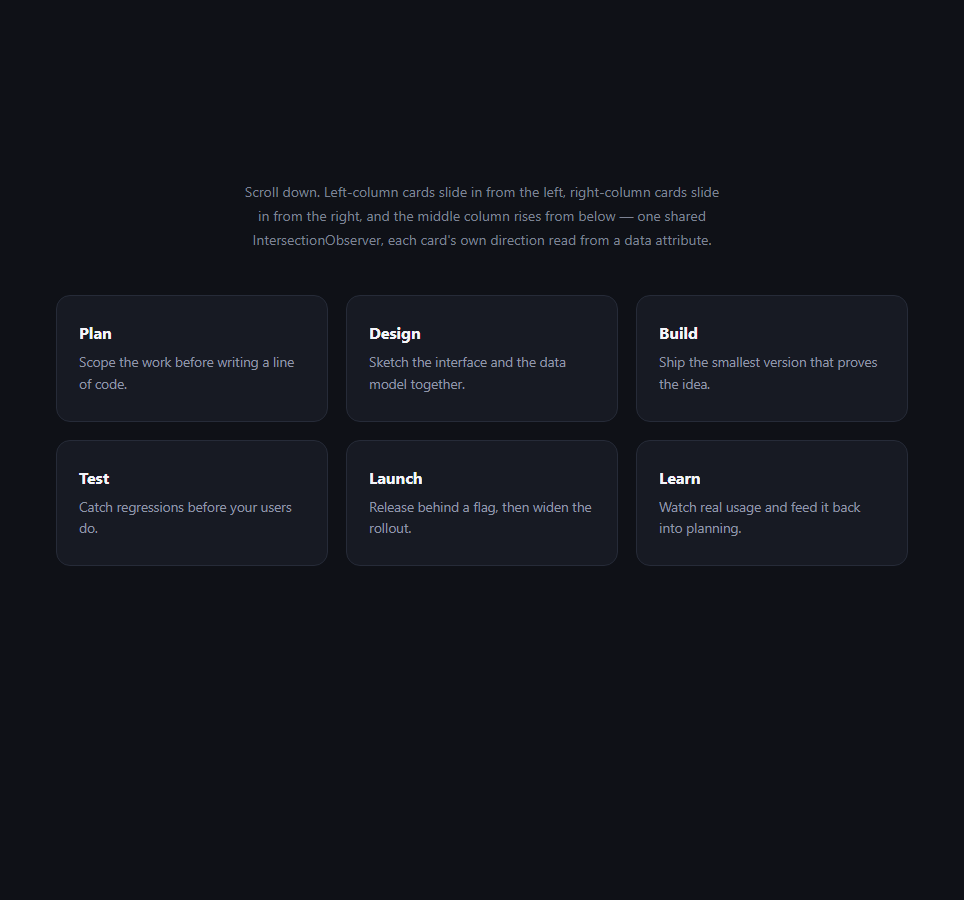
The standard scroll reveal — every element fading up from the same fixed offset, as in Reveal on Scroll — reads as slightly mechanical once a grid has more than a handful of items, because every card performs an identical motion. This variant keeps the same underlying single-observer pattern but lets each card declare its own entrance direction through a plain data-from attribute, so a three-column grid can have its left column slide in from the left, its right column slide in from the right, and its middle column simply rise from below — motion that visually converges toward the grid's center rather than marching uniformly in one direction.
Direction as data, not as a hardcoded class per card
Each .dgr-card carries data-from="left", data-from="right", or data-from="up". The CSS then keys off that attribute directly — .dgr-card[data-from="left"] { transform: translateX(-40px) } and so on — so the JavaScript never needs to know or branch on direction at all; it only ever toggles a single .dgr-visible class, and the attribute selector supplies the starting offset. This keeps the observer callback identical to a plain single-direction reveal while giving markup-level control over per-card motion.
A row-based stagger computed from DOM position, not a hardcoded delay
Rather than hand-authoring a transition-delay inline style on every card (as in the simplest reveal-on-scroll pattern), the delay here is computed at trigger time: Array.from(el.parentElement.children).indexOf(el) % 3 * 90 finds the card's index among its siblings, takes it modulo 3 (the column count), and multiplies by 90ms. This staggers cards left-to-right within whichever row is currently entering the viewport, without needing to know in advance how many rows the grid will end up having — add or remove cards and the stagger still lines up correctly by column position.
Why setTimeout instead of a CSS transition-delay per card
Because the stagger delay is computed dynamically from DOM position rather than known in advance, applying it via el.style.transitionDelay before adding .dgr-visible would work equally well — this snippet uses setTimeout to defer adding the class instead, which is a small implementation choice with an equivalent visual result; either approach avoids hardcoding delay values into the markup.
rootMargin shifts the trigger point earlier
{ threshold: 0.2, rootMargin: '0px 0px -60px 0px' } shrinks the observer's effective viewport by 60px from the bottom, so cards must scroll slightly further up before they're considered "intersecting" — this avoids the reveal firing the instant a card's top pixel touches the very bottom edge of the screen, which can look premature on tall viewports.
Respecting prefers-reduced-motion
The reduced-motion check happens once up front and, when true, both zeroes the computed stagger delay and lets a prefers-reduced-motion media query in the CSS strip the transform entirely (!important overriding the direction-specific starting offsets) — cards still fade in via opacity, but never slide, for users who have asked for reduced motion.
Customizing it
Add a fourth direction like data-from="down" with its own attribute selector and starting transform, change the % 3 in the stagger calculation to match a different column count, or swap translate for a scale-based entrance per card. Pair it with a Bento Grid or Feature Cards layout for a more dynamic feature showcase entrance.
Build with AI
Build, Understand, Optimize, and Extend It With AI
You don't have to work out the attribute-driven CSS or the column-stagger math by hand. Paste this snippet's HTML, CSS, and JS into an AI coding assistant like Claude and ask it to explain exactly how the data-from attribute selector pattern lets one shared IntersectionObserver callback drive multiple different entrance directions without branching in JavaScript, and how the modulo-based stagger calculation stays correct as cards are added or removed from the grid. The same assistant is useful for extending the effect: ask it to add a diagonal entrance direction combining both translateX and translateY, make the stagger delay scale with the grid's actual computed column count via getComputedStyle instead of a hardcoded % 3, or add a subtle rotation to each card's entrance alongside the slide. Treat the code less like a finished artifact and more like a starting point for a conversation.
Prompt to recreate it
Copy this into your AI assistant of choice to build the effect from scratch, or as a jumping-off point for your own variant:
Build a grid of cards where each card slides in from a different direction depending on its position — left-column cards from the left, right-column cards from the right, middle-column cards from below — using the IntersectionObserver API with a single shared observer. No animation library, no scroll event listeners.

Requirements:
- A CSS grid of cards, each carrying a data-from attribute set to "left", "right", or "up" depending on which column it belongs to.
- CSS attribute selectors (for example .card[data-from="left"]) must supply each direction's own starting transform (translateX for left/right, translateY for up) and starting opacity: 0, with a single shared "visible" class that resets transform to none and opacity to 1 on any card regardless of its direction.
- Create exactly one IntersectionObserver instance (not one per card), observing every card via a single querySelectorAll loop, with a threshold around 0.2 and a negative bottom rootMargin (for example "0px 0px -60px 0px") so the reveal triggers slightly before a card reaches the very bottom edge of the viewport.
- When a card intersects, compute a stagger delay from its index among its sibling cards modulo the grid's column count, multiplied by a small delay-per-column value (for example 90ms), and use that delay (via setTimeout or an equivalent) before adding the "visible" class — so cards in the same row reveal in a left-to-right sequence rather than all at once.
- Call unobserve on each card immediately once it starts revealing, so every card animates in exactly once and never repeats on subsequent scroll back-and-forth.
- Check prefers-reduced-motion via window.matchMedia once; if reduced motion is requested, skip the stagger delay and ensure a CSS media query removes all transform-based motion (opacity fade only) for those users.
Want to tighten it up first? Run this prompt through the AI Prompt Studio to score it across 8 quality dimensions, catch anti-patterns, and tune the wording for Claude, ChatGPT, or Gemini before you paste it in.
Step by step
How to Use
- 1Scroll the grid into viewLeft-column cards slide from the left, right-column cards from the right, middle cards rise from below.
- 2Add a new cardCopy a .dgr-card block and set data-from to left, right, or up depending on its grid column.
- 3Add a new directionIn the CSS panel, add .dgr-card[data-from="down"] { transform: translateY(-28px); } for a fourth direction.
- 4Match the stagger to your column countIn the JS panel, change the % 3 in the delay calculation to your grid's actual column count.
- 5Tune the trigger pointAdjust rootMargin: '0px 0px -60px 0px' to make cards reveal earlier or later relative to the viewport edge.
- 6Export in your formatClick "HTML" for a standalone file, "JSX" for a React component, or "Tailwind" for a React + Tailwind version.
Real-world uses
Common Use Cases
Got questions?
Frequently Asked Questions
Each .dgr-card element carries a data-from attribute set to left, right, or up. CSS attribute selectors like .dgr-card[data-from="left"] apply the matching starting transform, so the JavaScript observer callback never needs to check or branch on direction — it only ever toggles one shared .dgr-visible class regardless of which direction a given card uses.
The delay is computed at reveal time from the card's position among its siblings: Array.from(el.parentElement.children).indexOf(el) % 3 * 90 finds its index, takes it modulo the column count (3), and multiplies by 90 milliseconds. This staggers cards left-to-right within whichever row is currently entering view, and continues to work correctly if cards are added or removed.
Because the delay value is computed dynamically at trigger time from DOM position rather than known in advance, deferring the class toggle with setTimeout achieves the same staggered visual result as setting el.style.transitionDelay would — this snippet simply picks setTimeout as the more direct way to express "wait, then reveal."
rootMargin: "0px 0px -60px 0px" shrinks the observer's effective viewport by 60px from the bottom edge, so a card must scroll up slightly further before intersection is reported. This avoids the reveal firing the instant a card's top pixel barely touches the very bottom of the screen, which tends to look premature.
The script checks window.matchMedia once and zeroes the computed stagger delay if reduced motion is requested. Separately, a CSS media query strips the transform property entirely with !important, so cards still fade in via opacity but never perform any sliding motion for users who have asked for reduced motion.
Yes. Add a new data-from value (for example "down") and a matching CSS attribute selector rule with its own starting transform, such as .dgr-card[data-from="down"] { transform: translateY(-28px); } — no JavaScript changes are needed since the observer logic is direction-agnostic.