Learn Coding Visually
Learn to code with interactive, live-preview playgrounds — HTML, CSS, JavaScript, React & more.
 HTML Playground42 lessons · Click-based · Live preview
 CSS PlaygroundLearn CSS with a live editor
 JavaScript Playground60 lessons · DOM · Async · Canvas
 React PlaygroundLearn React with a live code editor
 GSAP PlaygroundLearn GSAP animation interactively
 SVG Playground44 lessons · shapes · paths · animation
 SCSS Playground45 lessons · Sass modules · tokens
 Tailwind PlaygroundLearn Tailwind CSS with a live editor
 Bootstrap 5 Playground50 lessons · live preview
Base64 & URL-Safe Encoder/Decoder — Free HTML CSS JS Snippet
Base64 & URL-Safe Encoder/Decoder · Dev · Plain HTML, CSS & JS · Live preview
What's included
Features
About this UI Snippet
Base64 Playground — UTF-8 Safe Encode/Decode, URL-Safe Variant & File-to-Data-URI
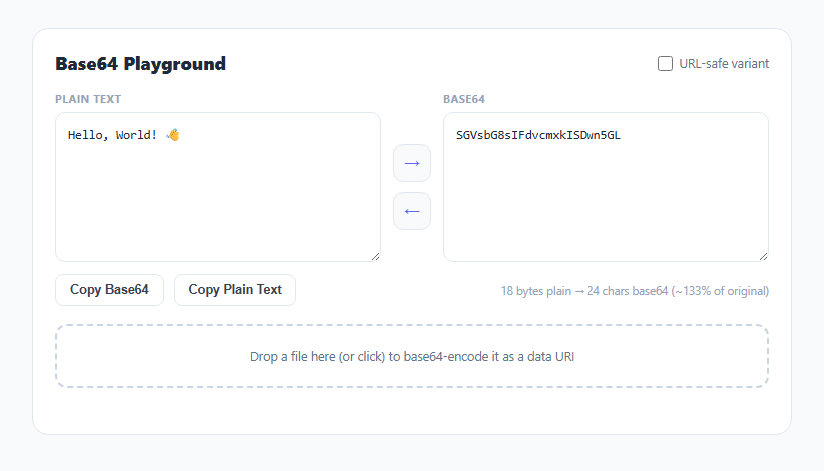
Base64 turns arbitrary binary data into a text string using only 64 printable characters, which is why it shows up everywhere text-only channels need to carry binary payloads: embedding images as data URIs in CSS, putting a token in a URL query parameter, or attaching a small file to a JSON API request. This snippet is a two-way playground: type or paste text on either side and convert it, or drop a file to see its full base64 data URI.
Why `btoa()` alone breaks on unicode text
The browser's native btoa() function only understands strings where every character code point fits in a single byte (Latin1). Call btoa('👋') directly and it throws InvalidCharacterError, because an emoji is a multi-byte UTF-8 sequence. utf8ToB64() works around this correctly: it first runs the input through TextEncoder().encode() to get the actual UTF-8 byte sequence as a Uint8Array, converts each byte to its character code with String.fromCharCode, concatenates that into a Latin1-safe binary string, and only then calls btoa() on the result. Decoding reverses the same three steps: atob() back to a binary string, rebuild the Uint8Array, and run it through TextDecoder('utf-8'). Skipping this byte-array round trip is the single most common bug in hand-rolled base64 tools — try the emoji in the default input and toggle back and forth to see it survive intact.
The URL-safe variant is a different alphabet, not different data
Standard base64 uses + and / in its 64-character alphabet, both of which have reserved meaning inside a URL (+ often means "space", / is a path separator). RFC 4648 §5 defines a URL-safe variant that substitutes - for + and _ for /, and conventionally strips the trailing = padding since it can always be reconstructed from the string length. The urlsafe-toggle checkbox calls toUrlSafe() (a simple character substitution plus a padding-stripping regex) on encode, and fromUrlSafe() (reverse substitution plus re-padding to a multiple of four) before decode. This is exactly what JWTs, many OAuth flows, and short-link services use under the hood — see also the JWT decoder for a real-world consumer of URL-safe base64.
Live byte-size comparison
updateSize() measures the actual UTF-8 byte length of the plain text via TextEncoder().encode(...).length (not .length on the string, which counts UTF-16 code units and would misreport multi-byte characters) and compares it against the base64 output's character count. Base64 always expands data by roughly 33% because it packs 3 bytes of input into 4 output characters — seeing that ratio update live for your own input makes the "base64 costs about 4/3 the size" rule concrete instead of abstract.
File-to-data-URI via FileReader
The drop zone accepts a dragged or clicked-and-browsed file and reads it with FileReader.readAsDataURL(), which the browser natively encodes as a data:<mime-type>;base64,<data> string — the exact syntax you'd paste into an <img src>, a CSS background-image, or embed inline in HTML/CSS to avoid an extra network request for a small icon or font.
Build with AI
Build, Understand, Optimize, and Extend It With AI
Hand this snippet's JavaScript to an AI coding assistant like Claude and ask it to explain precisely why btoa() needs the TextEncoder round trip to handle unicode safely — it's a subtlety that catches most hand-written base64 utilities. It's also a good jumping-off point for extensions: ask for a hex-output mode alongside base64, a "detect and pretty-print if the decoded result is JSON" feature, or base64 encoding of an image with a live thumbnail preview next to the data URI text.
Prompt to recreate it
Copy this into your AI assistant of choice to build the effect from scratch, or as a jumping-off point for your own variant:
Build a two-way base64 encoder/decoder playground in plain HTML, CSS, and JavaScript, no libraries.

Requirements:
- Two textareas, one for plain text and one for base64, with buttons to encode (plain to base64) and decode (base64 to plain) in either direction.
- Text encoding must be UTF-8 safe: use TextEncoder to get real UTF-8 bytes before calling btoa(), and TextDecoder after atob() when decoding, so multi-byte characters like emoji round-trip correctly instead of throwing InvalidCharacterError.
- Add a checkbox toggle for the URL-safe base64 variant (RFC 4648 section 5): when enabled, encoding must substitute - for + and _ for / and strip trailing = padding, and decoding must reverse both transformations including re-adding padding to a multiple of four characters before calling atob().
- Show a live comparison of the plain text's exact UTF-8 byte length versus the base64 output's character length, updating as the user types.
- Include a drag-and-drop (and click-to-browse) file input that reads the dropped file with FileReader.readAsDataURL() and displays the resulting full data: URI string.
- Show a clear inline error message (not an uncaught exception) if the user pastes invalid base64 into the decode side.
- Include copy-to-clipboard buttons for both the plain text and base64 values.
Want to tighten it up first? Run this prompt through the AI Prompt Studio to score it across 8 quality dimensions, catch anti-patterns, and tune the wording for Claude, ChatGPT, or Gemini before you paste it in.
Step by step
How to Use
- 1Type or paste text on the leftClick the → arrow (or it happens automatically for the default text) to base64-encode it into the right panel.
- 2Paste base64 on the rightClick the ← arrow to decode it back into readable text on the left. Invalid base64 shows an inline error instead of throwing.
- 3Toggle URL-safe variantCheck the box to swap + and / for - and _ and strip padding — the format used by JWTs, OAuth state parameters, and short URLs.
- 4Watch the size comparisonThe note below the buttons shows the exact byte count of your plain text versus the character count of the base64 output, updating live.
- 5Copy either valueUse "Copy Base64" or "Copy Plain Text" to grab the current value of either panel to your clipboard.
- 6Drop a file for a data URIDrag a file onto the dashed zone (or click to browse) to see its full data:mime/type;base64,... string, ready to paste into an <img> src or CSS.
Real-world uses
Common Use Cases
Got questions?
Frequently Asked Questions
btoa() only accepts strings where every character fits in one byte (Latin1). Emoji and many non-Latin characters are multi-byte UTF-8 sequences, so btoa() throws InvalidCharacterError on them directly. This tool first encodes the string to actual UTF-8 bytes with TextEncoder, converts each byte to a Latin1-safe character, and only then calls btoa() — the standard workaround for unicode-safe base64 in the browser.
Standard base64's alphabet includes + and /, both of which have reserved meaning inside a URL. The URL-safe variant (RFC 4648 section 5) substitutes - for + and _ for /, and conventionally omits the trailing = padding characters since they can be reconstructed from the string length alone. JWTs and many OAuth flows use this variant.
Base64 encodes every 3 bytes of input as 4 output characters, so the encoded size is always about 4/3 (roughly 33% larger) of the original byte count, regardless of what the data contains. The size-note line shows this ratio for whatever you've typed.
It reads the dropped or selected file with the browser's FileReader.readAsDataURL() method, which natively produces a data:<mime-type>;base64,<encoded-data> string — the exact format usable directly as an <img> src or a CSS background-image value.
No. Every operation uses only browser built-ins (btoa, atob, TextEncoder, TextDecoder, FileReader) running locally in the page. Nothing is uploaded or transmitted, which makes it safe to test with real tokens or private file contents.