Learn Coding Visually
Learn to code with interactive, live-preview playgrounds — HTML, CSS, JavaScript, React & more.
 HTML Playground42 lessons · Click-based · Live preview
 CSS PlaygroundLearn CSS with a live editor
 JavaScript Playground60 lessons · DOM · Async · Canvas
 React PlaygroundLearn React with a live code editor
 GSAP PlaygroundLearn GSAP animation interactively
 SVG Playground44 lessons · shapes · paths · animation
 SCSS Playground45 lessons · Sass modules · tokens
 Tailwind PlaygroundLearn Tailwind CSS with a live editor
 Bootstrap 5 Playground50 lessons · live preview
Unix Timestamp Converter — Free HTML CSS JS Snippet
Unix Timestamp Converter · Dev · Plain HTML, CSS & JS · Live preview
What's included
Features
About this UI Snippet
Unix Timestamp Converter — Bidirectional Epoch-to-Date Conversion with Relative Time via Intl.RelativeTimeFormat
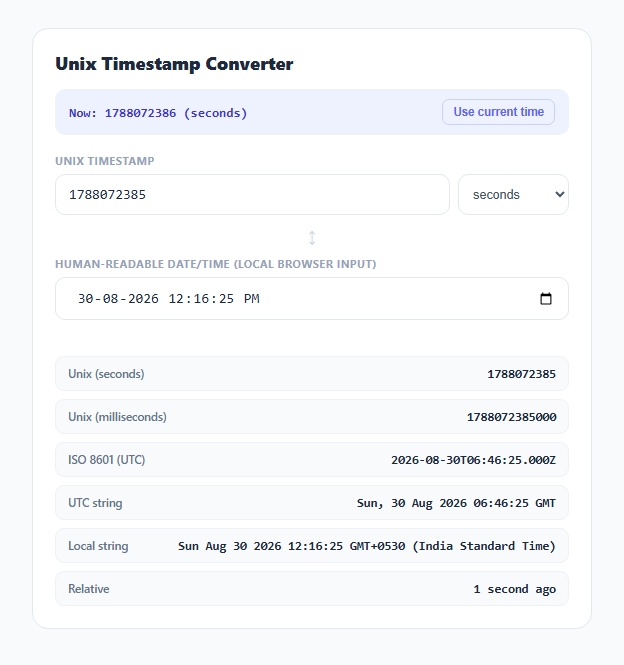
A Unix timestamp counts seconds (or, in many JavaScript APIs, milliseconds) since 00:00:00 UTC on January 1, 1970 — the "epoch." It's the backbone of how most systems store and compare points in time internally, but it's meaningless to read at a glance, which is why converting a log line's or a JWT's exp claim's timestamp into an actual date is one of the most common small tasks a developer does in a day.
Seconds versus milliseconds — the single most common bug
JavaScript's own Date object and Date.now() work in milliseconds, but the Unix timestamp standard (and most backend languages' native epoch functions) work in seconds. Mixing the two up produces a date either 1970-ish (treating a seconds value as milliseconds gives a date near the epoch) or thousands of years in the future (treating a milliseconds value as seconds). This converter makes the unit an explicit, visible choice via the unit-select dropdown rather than guessing — fromTimestamp() multiplies by 1000 only when seconds is selected, so the ambiguity that causes this bug in real code is impossible to hide here.
Two-way binding without a feedback loop
The timestamp field and the browser-native datetime-local input both update the *other* field on input, which risks an infinite update loop if implemented naively (input A changes, updates B, which fires B's input handler, which updates A, forever). This snippet avoids that by keeping each direction as a fully separate function — fromTimestamp() parses the numeric field and writes into dateInput.value via imperative assignment (which does not fire a synthetic input event in real browsers), and fromDate() does the reverse. Each field's own listener only ever triggers a write to the *other* field, never back to itself, which is what keeps the pair in sync without recursion.
Relative time via the built-in Intl API
Rather than hand-writing "3 hours ago" / "in 2 days" string logic — which inevitably accumulates edge cases around pluralization and unit boundaries — relativeTime() uses Intl.RelativeTimeFormat, a standard built into every modern browser specifically for this. It walks a list of unit thresholds from year down to second, picks the largest unit where the elapsed time is at least one full unit, and hands the rounded value to rtf.format(value, unit), which handles the "ago" vs. "in" phrasing, pluralization, and locale formatting automatically based on the sign of value.
Six simultaneous output formats
Once a valid date is established from either input, renderResults() derives six representations from the same underlying Date object: raw seconds, raw milliseconds, toISOString() (always UTC, the format most APIs expect in request bodies), toUTCString() (the RFC 7231 format used in HTTP headers like Date and Expires), toString() (formatted in the browser's local timezone, useful for sanity-checking what a timestamp means to the person actually looking at the page), and the Intl.RelativeTimeFormat relative string. Seeing all six side by side from one input is deliberately the point — it eliminates having to convert a value five separate times to check it against five different systems' expected formats.
Build with AI
Build, Understand, Optimize, and Extend It With AI
Give this snippet's JavaScript to an AI assistant like Claude and ask it to explain exactly why the two-way binding between the timestamp field and the datetime-local field doesn't create an infinite update loop — the answer hinges on how programmatic .value assignment differs from user-driven input events, and it's a pattern worth understanding for any bidirectional form sync. It's also easy to extend: ask for a timezone-selector dropdown so the "Local string" output can show a timezone other than the browser's own, a batch mode that converts a pasted list of timestamps at once, or a countdown display for a future timestamp.
Prompt to recreate it
Copy this into your AI assistant of choice to build the effect from scratch, or as a jumping-off point for your own variant:
Build a bidirectional Unix timestamp converter in plain HTML, CSS, and JavaScript, no libraries.

Requirements:
- A text input for a numeric Unix timestamp, with a dropdown to explicitly choose whether it represents seconds or milliseconds since the epoch (do not guess the unit from the magnitude of the number).
- A native <input type="datetime-local"> field that stays in sync with the timestamp field in both directions: editing the timestamp updates the date picker, and editing the date picker updates the timestamp, without creating an infinite update loop between the two.
- Derive and display simultaneously from the current value: the epoch value in both seconds and milliseconds, an ISO 8601 UTC string, an RFC-style UTC string (like the HTTP Date header format), the browser's local-timezone string representation, and a human-readable relative time string (e.g. "3 hours ago" or "in 2 days") generated using the built-in Intl.RelativeTimeFormat API rather than hand-written string logic.
- Add a "Use current time" button that populates both the timestamp and date fields with the current moment.
- Show a live banner with the current Unix timestamp in seconds, updating once per second.
- Validate numeric input and out-of-range dates with a clear inline error message rather than displaying "Invalid Date" or NaN anywhere in the UI.
Want to tighten it up first? Run this prompt through the AI Prompt Studio to score it across 8 quality dimensions, catch anti-patterns, and tune the wording for Claude, ChatGPT, or Gemini before you paste it in.
Step by step
How to Use
- 1Paste a Unix timestampType or paste a numeric epoch value into the timestamp field, and choose whether it's in seconds or milliseconds using the dropdown.
- 2Or pick a date and time directlyUse the datetime-local field to select a date/time using your browser's native picker — the timestamp field updates automatically to match.
- 3Click "Use current time"Instantly loads the current moment into both fields as a quick starting point or sanity check.
- 4Read all six derived formatsSeconds, milliseconds, ISO 8601 UTC, RFC UTC string, local time string, and a human relative phrase like "3 hours ago" all update together.
- 5Switch the unit dropdownToggling between seconds and milliseconds reinterprets whatever numeric value is currently in the timestamp field.
- 6Watch the live "Now" tickerThe banner at the top shows the current Unix timestamp in seconds, updating every second, as a quick reference for "what time is it right now" in epoch form.
Real-world uses
Common Use Cases
Got questions?
Frequently Asked Questions
Both count elapsed time since the Unix epoch (00:00:00 UTC, January 1 1970), but seconds-based timestamps are the traditional Unix/POSIX standard used by most backend languages, while JavaScript's Date.now() and new Date() work in milliseconds. Treating a seconds value as milliseconds (or vice versa) produces a date off by a factor of 1000, which is why this tool makes the unit an explicit dropdown rather than guessing.
Intl.RelativeTimeFormat is a standard, built-in browser API specifically designed for this: it correctly handles singular/plural phrasing, locale-appropriate wording, and the "ago" versus "in" distinction based on whether the value is negative or positive, without any hand-written string-concatenation logic that would need constant edge-case patching.
Each input field has its own event listener that only writes into the other field, never back into itself. Programmatically setting an input's .value property in JavaScript does not fire that same element's own input event, so there's no risk of the two fields triggering each other repeatedly.
toISOString() and toUTCString() always output UTC regardless of the browser's configured timezone — this is required for ISO 8601 and is the convention for the UTCString/RFC 7231 HTTP date format. The "Local string" row uses toString(), which formats the same underlying moment in the browser's own local timezone, useful for sanity-checking what a timestamp means to the person actually viewing the page.
Extremely large or invalid numeric values that JavaScript's Date constructor cannot represent produce an "Invalid Date" internally, which the tool detects with isNaN(date.getTime()) and reports as an out-of-range error instead of silently displaying garbage output.