You Might Also Like
Learn Coding Visually
Learn to code with interactive, live-preview playgrounds — HTML, CSS, JavaScript, React & more.
 HTML Playground42 lessons · Click-based · Live preview
 CSS PlaygroundLearn CSS with a live editor
 JavaScript Playground60 lessons · DOM · Async · Canvas
 React PlaygroundLearn React with a live code editor
 GSAP PlaygroundLearn GSAP animation interactively
 SVG Playground44 lessons · shapes · paths · animation
 SCSS Playground45 lessons · Sass modules · tokens
 Tailwind PlaygroundLearn Tailwind CSS with a live editor
 Bootstrap 5 Playground50 lessons · live preview
Token Bucket Rate Limiter Visualizer — Free JS Snippet
Token Bucket Rate Limiter Visualizer · Dashboards · Plain HTML, CSS & JS · Live preview
What's included
Features
About this UI Snippet
Token Bucket Rate Limiter Visualizer — Animated Refill Rate, Capacity Draining & Burst Tolerance Demo in Vanilla JS
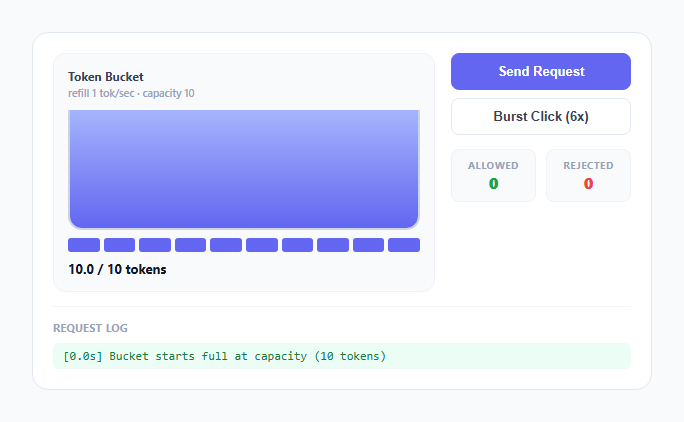
Rate limiting is usually described in one sentence ("limit users to N requests per second") that hides the actual design decision every API gateway has to make: what happens to a client that sends 10 requests in the first 100 milliseconds of a fresh minute, then goes quiet? A naive fixed-window counter either blocks that burst outright or, worse, lets it double up at a window boundary. The token bucket algorithm — used by AWS API Gateway, Stripe's API, and most CDN edge limiters — handles it differently, and this snippet implements the real mechanics rather than a stylized approximation of them.
The refill loop: continuous time, not discrete ticks
The bucket does not refill in visible per-second jumps. tick(now) runs on requestAnimationFrame and computes elapsed = (now - lastTick) / 1000 on every single frame, then adds elapsed * REFILL_RATE to the tokens float, capped at CAPACITY with Math.min. Because this happens roughly 60 times a second, refilling is visually continuous — the bucket-fill bar's height and the fractional pip both creep upward smoothly rather than snapping in whole-token jumps. This matters for accuracy: real token bucket implementations (including the ones behind AWS and Stripe's limiters) also track tokens as a continuous value internally and only ever check "is there at least 1.0 available" at request time, not at refill time.
Capacity and the two discrete visualizations of the same number
tokens is a single float between 0 and CAPACITY (10 in this demo). It is rendered two ways simultaneously: a liquid bucket-fill div whose height is set to tokens / CAPACITY * 100% for a smooth analog read, and a row of 10 .pip elements where pips below Math.floor(tokens) are fully lit, the pip at exactly Math.floor(tokens) shows the fractional remainder as a partial CSS gradient fill via a --fill custom property, and pips above that are empty. Both views are driven from the exact same tokens variable on every animation frame, so they never disagree with each other or with the numeric token-count readout.
Consuming a token: the actual rate-limit check
sendRequest() is the entire rate-limit decision, and it is two lines: if (tokens >= 1) { tokens -= 1; ...allow... } else { ...reject... }. There is no separate request-counting window, no timestamp bucket, no sliding array of recent request times — the single tokens float is simultaneously the rate limiter's entire state. A green flash on the bucket panel and a log entry confirm an allowed request; a red flash and a distinct log entry confirm a rejection, with both counted in the Allowed/Rejected stat tiles so the outcome is never just a color you have to trust.
Why burst tolerance is the actual point, demonstrated with real math
The Burst Click button fires 6 sendRequest() calls 110ms apart — well within the same second, so almost no natural refill happens between them. Starting from a full bucket of 10 tokens, all 6 succeed instantly, because the bucket had capacity sitting banked from before the burst even started. This is the core behavior a fixed-window counter cannot replicate cleanly: a client that has been idle is allowed to spend its saved-up capacity all at once, up to CAPACITY, without being throttled mid-burst. Click Burst Click again immediately afterward with only 4 tokens left banked (10 minus the 6 just spent, still recovering at 1/sec) and watch some of the second burst get rejected — the system is not "10 requests per second" in the way a naive counter would enforce it, it is "spend up to 10 banked tokens instantly, then settle into a steady 1-per-second replenishment rate," which is exactly the guarantee real APIs advertise as their both burst allowance and sustained rate limit in the same sentence.
Why not a fixed-window counter instead
A fixed-window limiter resets a request counter to zero every fixed interval (e.g. every 1000ms) and rejects once the counter hits the limit within that window. Its failure mode is the classic "boundary burst": a client can send the full limit at the very end of one window and the full limit again at the very start of the next, delivering 2x the intended rate in a short span straddling the boundary, something the continuously-draining, continuously-refilling token bucket in this snippet structurally cannot do, because there is no window edge for two bursts to stack across.
Build with AI
Build, Understand, Optimize, and Extend It With AI
Give this snippet's JavaScript to an AI assistant like Claude and ask it to walk through exactly why a boundary burst can happen in a fixed-window counter but structurally cannot happen here, using the elapsed-time refill math as the explanation. Good extensions to ask for: a second bucket panel running a fixed-window counter side by side for a direct visual comparison, a queued-instead-of-dropped mode for rejected requests, or a slider to live-adjust the refill rate and capacity and watch the burst behavior change in real time.
Prompt to recreate it
Copy this into your AI assistant of choice to build the effect from scratch, or as a jumping-off point for your own variant:
Build an animated token bucket rate limiter visualizer in plain HTML, CSS, and JavaScript, no libraries or frameworks.

Requirements:
- A bucket UI showing a continuously refilling liquid fill level plus a row of discrete capacity pips, both driven from one shared float token count that refills over real elapsed time using requestAnimationFrame (not a stepped setInterval tick), capped at a fixed maximum capacity.
- A "Send Request" button that, if at least 1 token is available, subtracts one token, flashes the bucket panel green, and logs a timestamped "allowed" entry with the tokens remaining; if no token is available, flashes red and logs a "rejected" entry instead, without touching the token count.
- A "burst click" button that fires several requests in rapid succession (spaced roughly 100ms apart) so a user can see that, starting from a full or nearly-full bucket, a burst of requests succeeds all at once up to the bucket's capacity, then throttles to the steady refill rate if fired again before enough time has passed to recover.
- Running counters for total allowed and total rejected requests, updated live, plus a scrolling timestamped log of every individual request decision.
- Make the refill rate and bucket capacity named constants near the top of the script so they are easy to change, and ensure the token count is a float internally (so fractional refill progress is visible) even though the consume check only requires a whole token.
Want to tighten it up first? Run this prompt through the AI Prompt Studio to score it across 8 quality dimensions, catch anti-patterns, and tune the wording for Claude, ChatGPT, or Gemini before you paste it in.
Step by step
How to Use
- 1Watch the bucket sit full at 10 tokens on loadThe liquid fill bar is at 100% and all 10 pips below it are lit indigo — the log confirms the bucket starts full at capacity.
- 2Click Send Request a few times in a rowEach click drains exactly one token: the fill bar drops slightly, one pip empties, the panel flashes green, and a log entry confirms the request was allowed with the remaining token count.
- 3Click Burst Click (6x)Six requests fire 110ms apart. Because the bucket started full, all six succeed almost instantly — this is burst tolerance: banked capacity can be spent all at once.
- 4Immediately click Burst Click againWith only a few tokens recovered so far, some of this second burst gets rejected — the panel flashes red and the log shows "bucket empty, refilling at 1/sec" for the calls that missed.
- 5Stop clicking and watch the bucket refill on its ownThe fill bar and pips creep back upward continuously, gaining roughly one full token every second, driven by a requestAnimationFrame loop rather than a stepped timer.
- 6Compare the Allowed and Rejected countersThe running totals make the burst-then-throttle pattern concrete: a fixed-window counter would either reject the whole burst upfront or, at a window boundary, allow double the intended rate — neither of which happens here.
Real-world uses
Common Use Cases
Got questions?
Frequently Asked Questions
Yes, with one important change: the requestAnimationFrame refill loop must be started and stopped inside the framework's lifecycle, not at module load time. In React, start it in a useEffect with an empty dependency array, store the frame id in a ref, and call cancelAnimationFrame(ref.current) in the cleanup function so the loop stops on unmount. In Vue, start it in onMounted and cancel it in onUnmounted the same way. In Angular, start it in ngAfterViewInit and cancel it in ngOnDestroy. The setTimeout chain used by burst() should also be tracked in an array and cleared on unmount if a burst might still be in flight when the component is removed, otherwise it will try to update state on an unmounted component.
Because real traffic is rarely perfectly smooth — a client might legitimately need to send several requests at once (e.g. loading a page with 6 API calls) and then stay quiet for a while. Token bucket lets a client "save up" unused capacity, up to the bucket's capacity, and spend it all at once without being throttled mid-burst, then falls back to the steady refill rate once that banked capacity runs out. This is why API providers describe their limits as both a burst number and a sustained rate, not just one number.
A fixed-window counter resets a request count to zero every fixed interval and blocks once the count hits the limit within that window. Its known failure mode is a boundary burst: a client can send the full limit right at the end of one window and the full limit again right at the start of the next, delivering roughly double the intended rate across the boundary. Token bucket has no window edges to straddle, because tokens refill continuously rather than resetting in a lump at fixed instants, which this snippet's frame-by-frame refill loop demonstrates directly.
REFILL_RATE and CAPACITY are both plain constants at the top of the script. Raising CAPACITY increases how large a burst the bucket can absorb before throttling kicks in; raising REFILL_RATE increases the sustained long-run rate the bucket settles into once a burst has drained it. Setting CAPACITY to 1 effectively turns the limiter into a strict one-request-at-a-time-with-a-cooldown model, which is a useful way to demonstrate the opposite extreme from a generous burst allowance.
Refilling happens continuously based on real elapsed time (fractions of a second between animation frames), so the bucket needs to represent partial tokens, like 3.4 out of 10, to refill smoothly rather than in visible per-second jumps. The >= 1 check in sendRequest() only cares whether at least one whole token is available, so fractional tokens accumulate correctly toward the next whole token without ever being spendable early.