Learn Coding Visually
Learn to code with interactive, live-preview playgrounds — HTML, CSS, JavaScript, React & more.
 HTML Playground42 lessons · Click-based · Live preview
 CSS PlaygroundLearn CSS with a live editor
 JavaScript Playground60 lessons · DOM · Async · Canvas
 React PlaygroundLearn React with a live code editor
 GSAP PlaygroundLearn GSAP animation interactively
 SVG Playground44 lessons · shapes · paths · animation
 SCSS Playground45 lessons · Sass modules · tokens
 Tailwind PlaygroundLearn Tailwind CSS with a live editor
 Bootstrap 5 Playground50 lessons · live preview
Drag to Reorder Table Rows — HTML5 Drag and Drop Table
Drag to Reorder Table Rows · Tables · Plain HTML, CSS & JS · Live preview
What's included
Features
About this UI Snippet
Drag to Reorder Table Rows — Real HTML5 Drag Events With a Drop Indicator
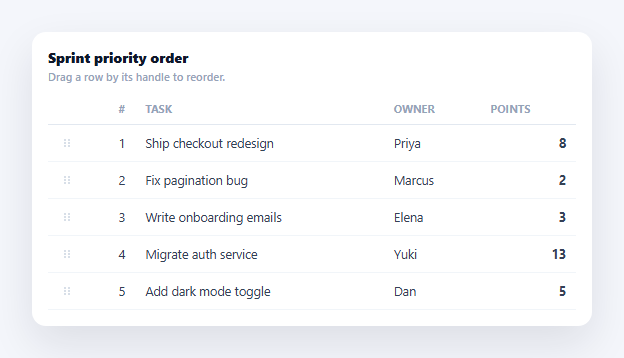
Ordered lists — a sprint backlog, a priority queue, a playlist — are far easier to reorganize by dragging a row where it belongs than by editing a rank number in a text field. This snippet implements genuine HTML5 drag-and-drop for table rows: real draggable="true" elements, dragstart/dragover/drop handlers, and a live drop-indicator line that shows exactly where the row will land before you release the mouse — not a fake reorder that just swaps two rows on click.
Native drag events, not mouse-position simulation
Every <tr> is marked draggable="true". On dragstart, the handler records which row index is being dragged (dragIndex), adds a .dragging class that fades the row to signal it's lifted, and calls e.dataTransfer.setData(...) — required by the drag-and-drop spec for some browsers to permit the drag at all, even though this implementation tracks the source index in a JS variable rather than reading it back out of dataTransfer.
dragover must call preventDefault, or drop never fires
By default, browsers don't allow dropping onto arbitrary elements — a drop event only fires on a target if its dragover handler called e.preventDefault(). This is the single most common HTML5 drag-and-drop bug: skip that line and the whole interaction silently does nothing. Here, every dragover on the tbody prevents the default and sets dropEffect = 'move' so the cursor shows the correct move icon.
A drop-indicator line computed from real cursor position
Rather than just highlighting the whole row you're hovering, dragover computes the cursor's vertical position relative to the hovered row's getBoundingClientRect() — if the cursor is in the top half, the indicator line is inserted above that row; in the bottom half, below it. This is a genuine positional calculation on every dragover event, not a static highlight, and it's what makes the drop location obvious before you let go.
Correct index math on drop
The trickiest part of any row-reorder is getting the final index right when the dragged row itself is removed from the array before being reinserted — removing an earlier row shifts every later index down by one. The drop handler splices the dragged item out first, then decrements insertAt by one if the target position was after the original position, before splicing it back in at the corrected index — the standard off-by-one trap in drag-reorder logic, handled explicitly here rather than by luck.
A real array as the source of truth
The whole table re-renders from the ITEMS array after every successful drop, so the DOM never drifts out of sync with the underlying order — dragging doesn't directly move DOM nodes around, it reorders the array and lets render() rebuild the table, keeping row numbering and any derived values consistent.
Customizing it
Persist the new order to a backend on drop, add multi-row drag selection, or combine with a column drag reorder for both axes. Compare with an editable table for inline field edits alongside reordering.
Build with AI
Build, Understand, Optimize, and Extend It With AI
Rather than working through the drag mechanics from scratch, paste this snippet's HTML, CSS, and JS into an AI coding assistant like Claude and ask it to explain exactly why the dragover handler must call e.preventDefault() for the drop event to ever fire, and walk through why the drop handler decrements insertAt only when the target position comes after the dragged item's original position — what would visibly go wrong for a drag that moves a row down the list if that adjustment were removed. The same assistant can help you extend it — ask it to add keyboard-accessible reordering (e.g. Alt+ArrowUp/ArrowDown to move the focused row) as a fallback for users who can't use drag-and-drop, persist the new order to a backend on drop, or support touch devices using the Pointer Events API instead of native HTML5 drag events, which have notoriously weak mobile support. Treat the code less like a finished artifact and more like a starting point for a conversation.
Prompt to recreate it
Copy this into your AI assistant of choice to build the effect from scratch, or as a jumping-off point for your own variant:
Build a table with drag-to-reorder rows in plain HTML, CSS, and JavaScript using real HTML5 drag-and-drop — no library, no mouse-position simulation standing in for actual drag events.

Requirements:
- Mark every table row draggable="true" and include a visible drag-handle icon in the first cell of each row as the drag affordance.
- On dragstart, record which row (by its data index) is being dragged in a JavaScript variable, and add a class to that row that visually fades it to indicate it has been lifted; call dataTransfer.setData with something (even just the index as a string) since some browsers require data to be set for the drag to proceed.
- On dragover for the row body, call e.preventDefault() unconditionally — the drop event will not fire at all without this — and compute, from the cursor's Y position relative to the currently hovered row's bounding rect (getBoundingClientRect), whether the cursor is in the top half or bottom half of that row.
- Based on that top-half/bottom-half calculation, insert (or move) a thin visual drop-indicator line either immediately above or immediately below the hovered row, updating it live as the drag moves over different rows, so the user can see exactly where the row will land before releasing.
- On drop, call preventDefault, remove the drop-indicator line, compute the correct final insertion index accounting for the fact that removing the dragged row from the array first shifts the index of every subsequent row down by one (decrement the target insertion index by one when it is after the dragged row's original position), then splice the dragged item out of the underlying data array and back in at the corrected index.
- Re-render the entire table body from the reordered data array after every drop (rather than manually moving DOM nodes), so a live row-number column recalculates correctly and the DOM never drifts out of sync with the array order.
- Handle dragend by removing the fade class and the drop-indicator line even if the drag was cancelled (e.g. dropped outside any valid target or the Escape key was pressed), so the UI never gets stuck showing a dragging state.
Want to tighten it up first? Run this prompt through the AI Prompt Studio to score it across 8 quality dimensions, catch anti-patterns, and tune the wording for Claude, ChatGPT, or Gemini before you paste it in.
Step by step
How to Use
- 1Paste HTML, CSS, and JSA five-row task list renders with a drag handle in the first column of each row.
- 2Press and drag a rowGrab the handle (or the row) — it fades to signal it's lifted, and the cursor becomes a grab icon.
- 3Watch the drop-indicator lineAs you drag over other rows, a blue line shows exactly above or below which row the drop will land.
- 4Release to dropThe row moves to its new position; the # column renumbers to reflect the new order.
- 5Drag to the very top or bottomDropping above the first row or below the last row places it at either end correctly.
- 6Swap in your own dataReplace the ITEMS array — render() and the drag handlers work for any row count.
Real-world uses
Common Use Cases
Got questions?
Frequently Asked Questions
The HTML5 drag-and-drop spec treats every element as a non-drop-target by default. Calling e.preventDefault() inside the dragover handler is the explicit signal that this element accepts the drop; skip it and the browser silently rejects the drop attempt, so the drop event handler never runs no matter how the drag ends.
Because removing the dragged row shifts the index of every row that came after it down by one. If you inserted at the raw target index without accounting for that shift, dropping a row just below its own original position would land it one slot further than intended. Decrementing insertAt when the target was after the original position corrects for this off-by-one.
In the drop handler, after ITEMS.splice(insertAt, 0, moved) and before or after render(), send the updated ITEMS array (or just the moved item's id and new index) to your backend with a fetch call, so the reordering survives a page reload rather than only existing in memory.
Native HTML5 drag events are unreliable on touch screens. For touch, implement the same drop-indicator and index-shift logic driven by touchstart/touchmove/touchend and pointer coordinates instead of the dragstart/dragover/drop events, or use the Pointer Events API (pointerdown/pointermove/pointerup) which unifies mouse and touch and can replace HTML5 DnD entirely if mobile support matters.
Keep ITEMS in component state and the same dragstart/dragover/drop handlers, but instead of mutating the array in place and calling render(), call your state setter with the new array (e.g. setItems(next) in React) after computing it with the same splice logic — the drag-position math and off-by-one correction are plain JavaScript and port unchanged.