Learn Coding Visually
Learn to code with interactive, live-preview playgrounds — HTML, CSS, JavaScript, React & more.
 HTML Playground42 lessons · Click-based · Live preview
 CSS PlaygroundLearn CSS with a live editor
 JavaScript Playground60 lessons · DOM · Async · Canvas
 React PlaygroundLearn React with a live code editor
 GSAP PlaygroundLearn GSAP animation interactively
 SVG Playground44 lessons · shapes · paths · animation
 SCSS Playground45 lessons · Sass modules · tokens
 Tailwind PlaygroundLearn Tailwind CSS with a live editor
 Bootstrap 5 Playground50 lessons · live preview
Drag to Reorder Table Columns — HTML5 Header Drag and Drop
Drag to Reorder Table Columns · Tables · Plain HTML, CSS & JS · Live preview
What's included
Features
About this UI Snippet
Drag to Reorder Table Columns — Header Drag Reshuffles Every Row
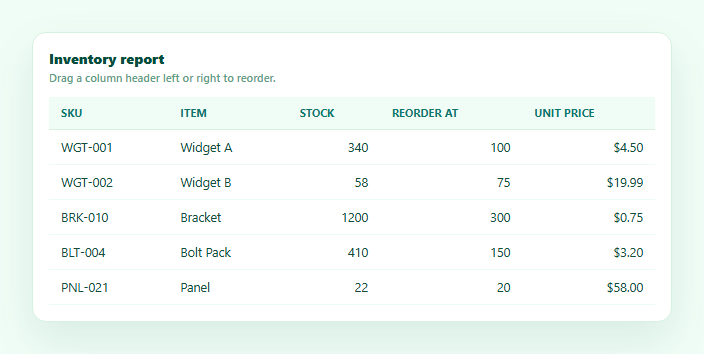
Row reordering and column reordering solve different problems — this is the column axis: dragging a header left or right to change which order columns display in, with every row's cells following along automatically. This snippet implements it with genuine HTML5 drag-and-drop on the <th> elements themselves — draggable="true", dragstart/dragover/drop — distinct from a row drag reorder table, which drags <tr>s vertically instead.
Column order lives in one array, not in the DOM
Rather than physically moving <th> and <td> DOM nodes around during a drag, the current column order is tracked as a simple array of keys, order. Both renderHead() and renderBody() iterate order to decide which column renders where — dragging a header never touches the DOM directly, it only ever mutates this one array and re-renders, which is what keeps headers and every row's cells perfectly in sync automatically.
Left-half vs right-half drop detection
On every dragover, the handler compares the cursor's X position against the hovered header's getBoundingClientRect() midpoint — landing in the left half signals "insert before this column," the right half signals "insert after." A highlighted inset border on the corresponding edge of the target header shows which side the drop will land on, live as you drag across different headers, computed fresh on every dragover rather than as a static highlight.
Splice-then-reinsert column math
On drop, the dragged column's key is spliced out of order first, then reinserted at the target column's current index (or one past it, depending on which half was hovered) — the same core technique as row reordering, but applied to a flat array of column keys instead of row objects. Because the removal happens before the target index is looked up again, the insertion always lands in the correct final position regardless of whether the drag moved the column left or right.
Every row's cells follow the same order array
The critical detail that makes this a genuine column reorder rather than just a shuffled header: renderBody() maps over the exact same order array to decide each row's cell sequence. There's no separate bookkeeping for "which cell goes where" — header and body both read from one source of truth, so the moment order changes, every single row's cells reflow to match on the very next render with zero chance of drifting out of sync.
A guard against dropping a column onto itself
Both dragover and drop explicitly check th.dataset.key === dragKey and bail out — without this, dropping a header back onto its own current position would still run through the splice/reinsert logic and could produce a visually confusing no-op highlight or an unnecessary re-render.
Customizing it
Persist the column order to localStorage or a user preference, combine with resizable columns so width and order are both adjustable, or add a "reset order" control. Pair with a frozen columns table — just make sure frozen columns are excluded from the draggable set.
Build with AI
Build, Understand, Optimize, and Extend It With AI
Rather than working through the column-order bookkeeping by hand, paste this snippet's HTML, CSS, and JS into an AI coding assistant like Claude and ask it to explain exactly why both the header row and every body row render by mapping over the same single order array of column keys, rather than each tracking column position independently, and what could go wrong if they were separate. The same assistant can help you extend it — ask it to persist the column order to localStorage so it survives a page reload, exclude a pinned identity column from being draggable while still rendering it in its fixed position, or combine this with the resizable-columns drag-to-resize interaction so both a column's width and its position are independently adjustable on the same header. Treat the code less like a finished artifact and more like a starting point for a conversation.
Prompt to recreate it
Copy this into your AI assistant of choice to build the effect from scratch, or as a jumping-off point for your own variant:
Build a table with drag-to-reorder columns in plain HTML, CSS, and JavaScript using real HTML5 drag-and-drop on the column header elements — no library, and distinct from reordering rows.

Requirements:
- Track the current column order as a single flat array of column keys (not derived from the DOM), and render both the header row and every body row's cells by mapping over that same array, so header and body can never fall out of sync with each other.
- Mark every header cell (th) draggable="true". On dragstart, record which column key is being dragged in a JavaScript variable, visually fade that header to indicate it is lifted, and call dataTransfer.setData with the key.
- On dragover for the header row, call preventDefault unconditionally so drop can fire, and — using the cursor's X position relative to the currently hovered header's bounding rect — determine whether the cursor is in the left half or right half of that header, then show a visual edge highlight (e.g. an inset border) on the corresponding side of that header showing whether the drop will insert before or after it, updating live as the drag moves across different headers.
- Explicitly ignore dragover and drop when the hovered header is the same column currently being dragged, so dropping a column onto its own existing position is a no-op with no visual highlight or reorder.
- On drop, compute the correct new column order by removing the dragged column's key from the order array first, then re-inserting it at the target column's index (or one position later, depending on which half of the target header was hovered) — do this against the array with the dragged key already removed so the final position is correct in both the "moved left" and "moved right" directions.
- Re-render both the header row and every body row from the updated order array after every drop, so every row's cells visibly reorder to match the new column arrangement, and clean up drag-related visual classes on dragend even if the drag is cancelled outside a valid drop target.
Want to tighten it up first? Run this prompt through the AI Prompt Studio to score it across 8 quality dimensions, catch anti-patterns, and tune the wording for Claude, ChatGPT, or Gemini before you paste it in.
Step by step
How to Use
- 1Paste HTML, CSS, and JSAn inventory table renders with five draggable column headers.
- 2Drag a header left or rightThe header fades to signal it's lifted; a green edge highlight shows where it will drop.
- 3Drop it on another columnEvery row's cells reorder to match — headers and data always move together.
- 4Drag past the halfway point of a headerDropping in the left half inserts before that column; the right half inserts after.
- 5Try dragging a column onto itselfNothing happens — a guard prevents a meaningless no-op reorder.
- 6Swap in your own columnsReplace COLUMNS and ITEMS — render() rebuilds both header and body from the order array.
Real-world uses
Common Use Cases
Got questions?
Frequently Asked Questions
That snippet drags <tr> elements vertically to change row order; this one drags <th> header elements horizontally to change column order. The underlying drag-and-drop mechanics (dragstart/dragover/drop, a drop indicator, splice-then-reinsert math) are structurally similar, but here it's a flat array of column keys being reordered instead of an array of row data objects, and every row's cells must follow the header order rather than just the rows themselves moving.
If header order and body cell order were tracked separately, a bug or a missed update in one could leave them out of sync — a header for "Price" sitting above a column of stock quantities. Deriving both renderHead() and renderBody() from one shared order array guarantees they can never drift apart, since there's only one place column order is ever stored.
After every successful drop (inside the drop handler, after order is updated), save order to localStorage as JSON. On page load, before the first render() call, check localStorage for a saved order and use it instead of the default COLUMNS.map(c => c.key) order if present.
Simply don't set draggable="true" on that column's th (or check for it and skip adding the attribute in renderHead), and in the dragover/drop handlers ignore that column's key as a valid target if you also want to prevent other columns from being dropped in front of it — the order array can still include it, just excluded from the drag interactions.
Keep the order array (of column keys) in component state, and derive both the rendered header cells and each row's cell sequence by mapping over that same state array — exactly as renderHead and renderBody do here. Wire the same dragstart/dragover/drop handlers to call your state setter with the new order after the same splice/reinsert computation.