Learn Coding Visually
Learn to code with interactive, live-preview playgrounds — HTML, CSS, JavaScript, React & more.
 HTML Playground42 lessons · Click-based · Live preview
 CSS PlaygroundLearn CSS with a live editor
 JavaScript Playground60 lessons · DOM · Async · Canvas
 React PlaygroundLearn React with a live code editor
 GSAP PlaygroundLearn GSAP animation interactively
 SVG Playground44 lessons · shapes · paths · animation
 SCSS Playground45 lessons · Sass modules · tokens
 Tailwind PlaygroundLearn Tailwind CSS with a live editor
 Bootstrap 5 Playground50 lessons · live preview
SSL Certificate Expiry Monitor — Free HTML CSS JS Snippet
SSL Certificate Expiry Monitor · Dashboards · Plain HTML, CSS & JS · Live preview
What's included
Features
About this UI Snippet
SSL Certificate Expiry Monitor — Sorted, Threshold-Colored Domain List
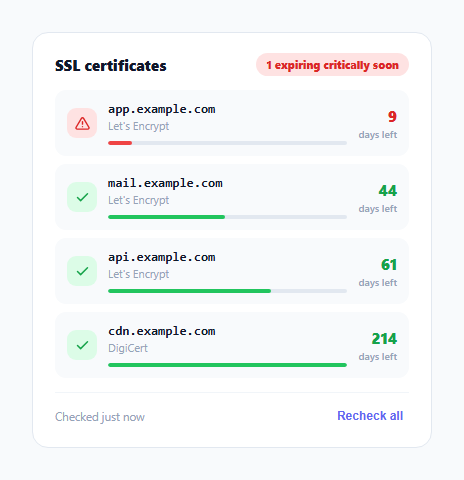
An expired SSL certificate is one of the most avoidable outages in production — the fix is trivial (renew it) but the failure mode is total (browsers block the whole site with a hard error). This widget exists to make expiry impossible to miss: a list of monitored domains sorted soonest-expiring-first, each with a days-remaining count colored against two thresholds, and a summary badge that surfaces the single worst case at the top of the tile.
Sorting by urgency, not by domain name or list order
render() calls DOMAINS.slice().sort(...) on every render, ordering domains by ascending daysLeft rather than showing them in whatever order they happen to be defined in the array. This is a deliberate choice for a monitoring widget specifically — the domain closest to expiring is the one that needs attention, so it should always be first regardless of how many domains are being watched or what order they were added in. The .slice() before .sort() avoids mutating the original DOMAINS array in place, keeping the underlying data order stable even though the rendered order changes.
Two thresholds, three states
stateFor() uses WARN_THRESHOLD (21 days) and CRIT_THRESHOLD (10 days) as the only two numbers driving every color decision in the widget — the icon background, the days-left text color, and the progress track fill color all derive from the same stateFor(d.daysLeft) call per domain, so there's exactly one place to adjust if your organization's renewal policy uses different lead times.
The progress track encodes elapsed lifetime, not urgency directly
Each domain's track fill width is daysLeft / VALIDITY_WINDOW_DAYS — the *fraction of a typical certificate's total lifetime* still remaining, not a fraction of the warning threshold. VALIDITY_WINDOW_DAYS defaults to 90 (a common lifetime for short-lived certificates like those issued by Let's Encrypt), so a cert with 60 days left shows a track roughly two-thirds full, giving a sense of "how much of this certificate's life is used up" at a glance, distinct from the days-left number itself which answers "how much time until action is required."
A summary badge that surfaces the worst case, not an average
The header badge never averages or sums anything across domains — it finds the single worst (minimum) daysLeft value and bases its text and color entirely on that one domain's state, then further distinguishes "N expiring critically soon" from "N expiring soon" based on whether any domain has crossed the critical threshold. A monitoring summary that averaged expiry across many healthy domains could mask one single domain about to expire — showing the worst case first is the only representation that can't hide an urgent problem behind a comfortable-looking average.
Build with AI
Build, Understand, Optimize, and Extend It With AI
Paste this snippet's HTML, CSS, and JS into an AI coding assistant like Claude and ask it to explain exactly why the summary badge is based on the single worst-case domain's expiry rather than an average across all monitored domains, and what failure mode that design choice specifically prevents. The same assistant can help optimize it — for instance asking whether re-sorting the full array on every render is worth optimizing away for a very large number of monitored domains, or whether the thresholds should be configurable per-domain rather than global constants. It's also useful for extending the widget: ask it to add automatic renewal-triggering integration for a specific certificate authority's API, group domains by their issuing CA, or add a notification/webhook when a domain crosses the critical threshold. Treat the code less like a finished artifact and more like a starting point for a conversation.
Prompt to recreate it
Copy this into your AI assistant of choice to build the effect from scratch, or as a jumping-off point for your own variant:
Build an "SSL certificate expiry monitor" dashboard widget in HTML, CSS, and vanilla JavaScript — no charting library.

Requirements:
- Maintain monitored domains as a plain array of objects, each with a hostname, a certificate issuer name, and a number of days remaining until expiry.
- Always render the list sorted so the domain with the fewest days remaining appears first, recomputing this sort order fresh on every render without permanently mutating the original underlying array's order.
- Classify every domain into exactly one of three states (healthy, warning, critical) using two numeric day thresholds, and use that single classification consistently to color that domain's icon, its days-remaining number, and a small horizontal progress track — all three visual elements for one domain must always agree on its state.
- The progress track's fill proportion must represent the fraction of a typical total certificate lifetime (a separate constant, such as 90 days) still remaining — not a fraction of the warning threshold — so it communicates "how much of this certificate's life is used up" as a value distinct from the raw days-remaining number shown next to it.
- Add a single summary indicator at the top of the widget that reflects only the single most urgent (soonest-expiring) domain's state, not an average or count-based blend across all domains, so one domain in trouble can never be hidden by many healthy ones.
- Add a "recheck" button that simulates re-querying certificate status (a brief loading state is enough — no real network call required) and updates every domain's days-remaining value and the whole widget's rendering afterward.
Want to tighten it up first? Run this prompt through the AI Prompt Studio to score it across 8 quality dimensions, catch anti-patterns, and tune the wording for Claude, ChatGPT, or Gemini before you paste it in.
Step by step
How to Use
- 1Read the summary badge firstIt always reflects the single worst-case domain, not an average — green means every domain is healthy, amber or red means at least one needs attention.
- 2Scan the sorted listDomains are always ordered soonest-expiring-first, so the one at the top needs the most urgent attention.
- 3Click Recheck allSimulates a fresh certificate check in the demo; wire this to your real monitoring API to actually re-query expiry dates.
- 4Populate DOMAINS with real dataReplace the array with results from your certificate monitoring service or a periodic openssl/TLS handshake check, using the same { host, issuer, daysLeft } shape.
- 5Adjust the warning thresholdsEdit WARN_THRESHOLD and CRIT_THRESHOLD to match your team's actual renewal lead time policy.
- 6Set VALIDITY_WINDOW_DAYS to your typical cert lifetimeUse 90 for short-lived certificate authorities, or up to 397 for longer-lived certificates, so the progress track proportion reads correctly.
Real-world uses
Common Use Cases
Got questions?
Frequently Asked Questions
It computes worst as the minimum daysLeft across all domains and bases the badge's color and text entirely on that single value via stateFor(worst), rather than averaging. This ensures one domain about to expire is never hidden behind a comfortable average across many healthy domains.
DOMAINS.slice().sort() is called fresh inside render() so the displayed order always reflects the current daysLeft values, even after a recheck changes them — and .slice() first avoids mutating the original array, so the underlying data order stays stable regardless of how many times the widget re-renders.
It shows daysLeft divided by VALIDITY_WINDOW_DAYS — the fraction of a typical certificate's total lifetime still remaining, not a fraction of the warning threshold. This gives a sense of how much of the certificate's life is used up, distinct from the raw days-left number shown alongside it.
Edit the two constants WARN_THRESHOLD and CRIT_THRESHOLD near the top of the JS — every color decision in the widget (icon background, days-left text, progress fill) derives from the same stateFor() function using these two numbers, so changing them updates every visual consistently.
Replace the static DOMAINS array with data fetched from your monitoring service's API (or a periodic TLS handshake / openssl check against each host), keeping the same { host, issuer, daysLeft } object shape, and call render() after each fetch. Wire the Recheck button's click handler to trigger that fetch instead of the demo's setTimeout simulation.
Yes — DOMAINS is a plain array of objects; add more entries or extra fields (such as an explicit expiresAt date) and extend the template string in render() to display them. The sort and threshold logic will apply automatically to any number of domains.