You Might Also Like
Learn Coding Visually
Learn to code with interactive, live-preview playgrounds — HTML, CSS, JavaScript, React & more.
 HTML Playground42 lessons · Click-based · Live preview
 CSS PlaygroundLearn CSS with a live editor
 JavaScript Playground60 lessons · DOM · Async · Canvas
 React PlaygroundLearn React with a live code editor
 GSAP PlaygroundLearn GSAP animation interactively
 SVG Playground44 lessons · shapes · paths · animation
 SCSS Playground45 lessons · Sass modules · tokens
 Tailwind PlaygroundLearn Tailwind CSS with a live editor
 Bootstrap 5 Playground50 lessons · live preview
Scroll-Scrubbed GLB Motion Trail — Free GSAP ScrollTrigger + Three.js Skeletal Animation
Scroll-Scrubbed GLB Motion Trail · Scroll · Plain HTML, CSS & JS · Live preview
What's included
Features
About this UI Snippet
Scroll-Scrubbed GLB Motion Trail — Three Independent Rigs, One Shared Clip
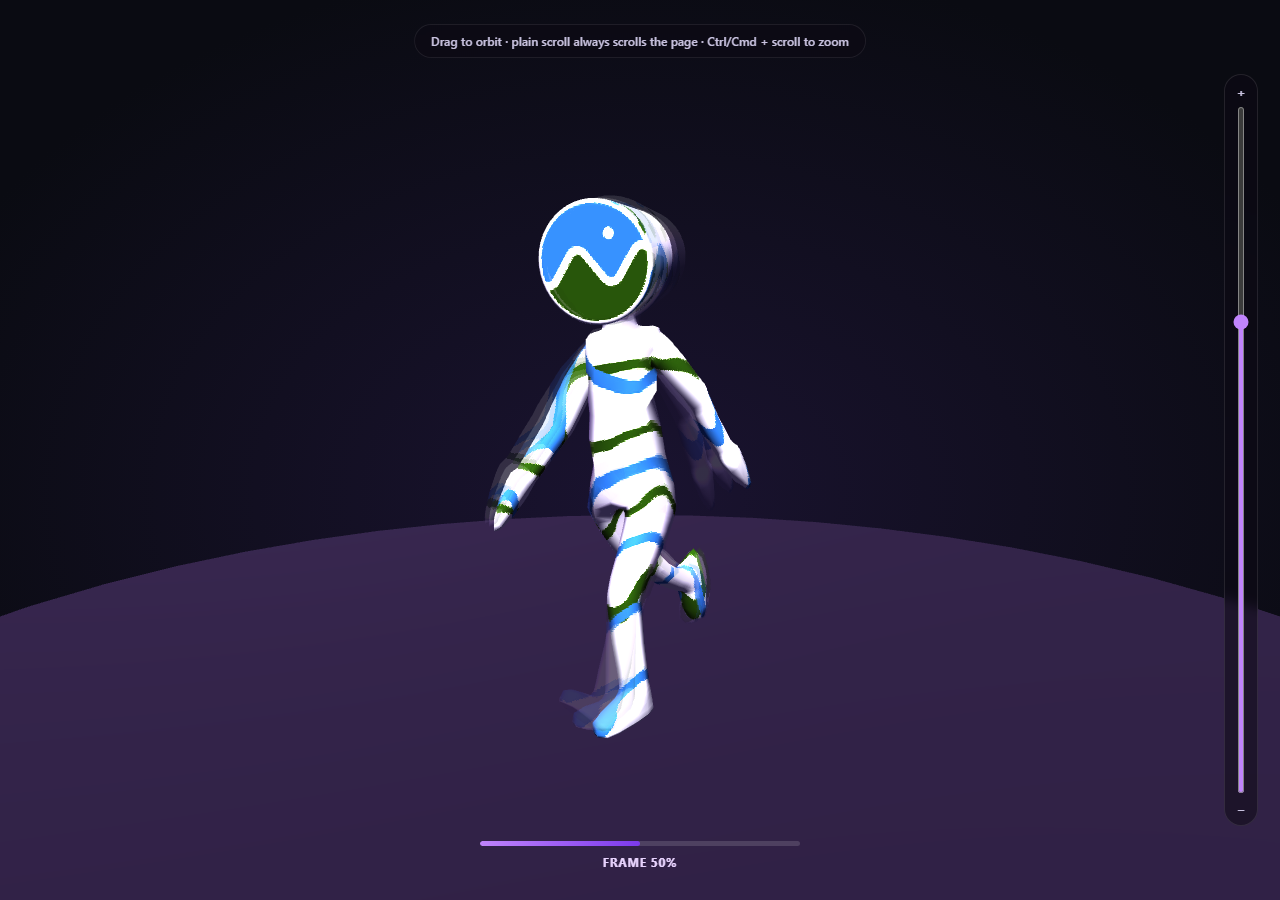
A single scrubbed skeletal pose reads clearly, but it loses all sense of *motion* — you can't tell which way a limb was moving a moment ago. This snippet fixes that by cloning the same rigged model three times, giving each clone its own independent AnimationMixer, and scrubbing all three from the same scroll position at slightly staggered offsets — producing a real, readable motion trail built entirely from genuine baked animation data, not a fake shader-based afterimage effect.
Why `SkeletonUtils.clone()`, not `Object3D.clone()`
A skinned mesh's pose depends on its skeleton — a hierarchy of bone objects the mesh's vertices are weighted against. Three.js's plain Object3D.clone() performs a shallow clone that does *not* correctly rebuild an independent skeleton and re-bind the cloned mesh to it; all clones would end up sharing (and fighting over) the same bones. THREE.SkeletonUtils.clone() — loaded here as a fourth Three.js addon script — exists specifically to solve this, producing a real, independently-posable rig from a single source scene.
Three mixers, one shared clip
Each of the three cloned rigs gets its own THREE.AnimationMixer and its own clipAction() built from the exact same loaded AnimationClip — the animation *data* is shared (there's only one clip, decoded once), but each mixer's playback time is entirely independent, which is what lets the trailing ghosts sit at a different point in the clip than the live rig.
`mixer.setTime()`, offset per rig
setClipTime(progress) calls rig.mixer.setTime() for all three rigs on every scroll update, but subtracts each rig's own lag value (a small fraction of the clip's duration) from the current scroll progress before converting to clip time. The live rig has lag = 0; the two ghosts trail 4.5% and 9% of the clip behind it — close enough to read as a genuine, connected motion trail rather than three disconnected poses.
Translucent, non-depth-writing ghost materials
Each ghost rig's mesh materials are cloned (never shared with the live rig or each other), tinted toward purple, and set to a low opacity with depthWrite = false — the last part matters because a fully opaque, depth-writing ghost mesh directly overlapping the live mesh would produce ugly z-fighting artifacts; disabling depth writes on the translucent ghosts lets them blend cleanly behind and around the live pose instead.
The unpaused-action rule still applies, per rig
Every rig's action.play() call is left unpaused for the same reason as the single-rig walk-cycle snippet: pausing an AnimationAction also blocks Three.js's internal pose evaluation inside setTime(), not just its own per-frame advance. Since the render loop never calls any rig's mixer.update(delta), nothing auto-advances any of the three rigs on its own — scroll's setTime() calls remain the only thing driving all three.
A different asset than the Fox turntable snippet, deliberately
This snippet loads Khronos' Cesium Man sample asset rather than the Fox used in scroll-scrubbed GLB walk cycle — a different real skeletal rig and clip, specifically to demonstrate the technique generalizes rather than being tied to one specific sample file.
Zoom is opt-in, not a hijacked scroll wheel
OrbitControls' built-in wheel-zoom is turned off, with zoom reimplemented as a slider plus Ctrl/Cmd + scroll, exactly like every other snippet in this family, so a plain scroll always advances the page.
Customizing it
Adjust RIG_COUNT and GHOST_LAG for a longer or tighter trail, swap MODEL_URL for any other animated .glb, or pair this with scroll GLB camera flythrough for a longer scroll narrative around a real animated character.
Build with AI
Build, Understand, Optimize, and Extend It With AI
Paste this snippet's HTML, CSS, and JS into an AI coding assistant like Claude and ask it to explain exactly why SkeletonUtils.clone() is required (instead of a plain Object3D clone) to give multiple copies of a skinned rig independently-scrubbable poses, and how offsetting each rig's mixer.setTime() call by a fraction of the clip's duration produces a coherent trailing motion trail rather than disconnected ghost poses. It's also useful for extending the demo — ask it to fade each ghost's opacity based on scroll velocity so the trail lengthens during fast scrolling and shortens when scrolling slowly, add a fourth "lead" ghost slightly ahead of the live rig previewing upcoming motion, or color-code the trail by joint speed instead of a flat tint. Use the conversation to build real intuition for multi-instance skeletal animation scrubbing before applying the same motion-trail technique to your own animated glTF character.
Prompt to recreate it
Copy this into your AI assistant of choice to build the effect from scratch, or as a jumping-off point for your own variant:
Build a "scroll-scrubbed skeletal motion trail" demo in plain HTML, CSS, and JavaScript using Three.js (core, GLTFLoader, OrbitControls, AnimationMixer, and the SkeletonUtils addon, all loaded from a CDN with no bundler) plus GSAP with its ScrollTrigger plugin.

Requirements:
- A pinned full-viewport Three.js scene (GSAP ScrollTrigger pin: true) with an intro section before it and an outro section after, lit with a key light and a cooler fill light, plus a simple ground plane.
- Load a real .glb model using THREE.GLTFLoader from a genuine, freely-licensed, CDN-hosted glTF binary that ships an embedded skeletal AnimationClip with real full-body motion (e.g. a walk or run cycle) — do not fabricate the animation in code, and do not substitute a primitive geometry.
- After loading, measure the model's bounding box and compute an auto-fit scale factor rather than using a hardcoded scale number.
- Create at least three independent clones of the loaded rigged scene using a skeleton-aware cloning utility (equivalent to Three.js's SkeletonUtils.clone()) rather than a plain shallow object clone, since a skinned mesh's pose depends on its skeleton being correctly and independently rebuilt per clone. Apply the same auto-fit scale to every clone.
- Build a separate THREE.AnimationMixer and clipAction for each cloned rig, all built from the same single loaded AnimationClip, and call .play() on each action without pausing it (the render loop will never call mixer.update(delta); playback is driven entirely by explicit setTime() calls instead).
- Treat one rig as the "live" rig (fully opaque) and the rest as trailing "ghost" rigs: clone and modify each ghost's mesh materials to be translucent with depth-writing disabled and a distinct tint color, so they visually trail behind the live pose without z-fighting against it.
- Using ScrollTrigger's scrub option, on every scroll update call setTime() on every rig's mixer, using the same current scroll progress value but subtracting a small, distinct fixed lag amount per ghost rig (a fraction of the clip's total duration) before converting to clip time — so the ghosts consistently trail a bit behind the live rig's pose throughout the entire scrub, forming a readable, connected motion trail rather than disconnected poses, fully reversible when scrolling back up.
- Set up OrbitControls on the camera with damping enabled so a visitor can click-and-drag the canvas to freely orbit the camera at any time, completely independently of the scroll-driven animation scrubbing, with no pause-while-dragging logic needed since the animation only touches the mixers and OrbitControls only touches the camera.
- Turn off OrbitControls' own wheel-zoom and instead implement zoom as an explicit opt-in gesture: a vertical range-input slider next to the canvas, plus Ctrl/Cmd + scroll wheel — a plain scroll must do nothing and pass through to the page normally.
- Handle the GLTFLoader's error callback by logging the real error and substituting a simple placeholder mesh so the scene is never blank if the model fails to load, and handle the case where the loaded model has no animations at all without throwing.
Want to tighten it up first? Run this prompt through the AI Prompt Studio to score it across 8 quality dimensions, catch anti-patterns, and tune the wording for Claude, ChatGPT, or Gemini before you paste it in.
Step by step
How to Use
- 1Add all six CDN scriptsthree.min.js, GLTFLoader.js, OrbitControls.js, SkeletonUtils.js, gsap, and ScrollTrigger.
- 2Paste HTML, CSS, and JSThe Cesium Man rig loads at frame 0, with two faint ghost poses layered behind it.
- 3Scroll into the pinned sectionAll three rigs scrub forward together, the ghosts trailing slightly behind.
- 4Scroll back upThe whole trail scrubs backward exactly, since setTime is direction-agnostic.
- 5Drag on the canvas at any pointThe camera orbits freely and independently — the trail keeps scrubbing normally.
- 6Use the slider or Ctrl/Cmd + scroll to zoomPlain scroll always advances the page; zoom is a separate, opt-in gesture.
- 7Swap in your own animated .glbUpdate MODEL_URL — SkeletonUtils.clone() works on any skinned rig.
Real-world uses
Common Use Cases
Got questions?
Frequently Asked Questions
A skinned mesh's pose is driven by its skeleton — a hierarchy of bone Object3D instances the mesh's vertices are weighted against. Three.js's built-in Object3D.clone() only performs a shallow copy that does not correctly rebuild an independent skeleton or re-bind the cloned mesh's skin to it, so multiple clones made that way would all end up sharing (and visually fighting over) the exact same bones. SkeletonUtils.clone(), loaded as its own addon script, exists specifically to produce a real, independently-posable rig from one source scene.
Each rig stores a small lag value — a fixed fraction of the clip's total duration. Every scroll update calls mixer.setTime() on all three rigs using the same current scroll progress, but subtracts that rig's own lag before converting to clip time first. Because all three lag values are fixed fractions of the same clip, the trail's spacing stays visually consistent throughout the entire scrub, whether scrolling forward or backward.
The ghost rigs occupy nearly the same 3D space as the live rig, just slightly offset in pose. If a translucent ghost mesh still wrote to the depth buffer as if it were opaque, it would incorrectly occlude parts of the live mesh behind it, producing visible z-fighting and flickering artifacts. Disabling depth writes on the ghost materials lets their transparency blend correctly without interfering with what should render in front of or behind them.
Deliberately, to demonstrate the multi-rig scrubbing and SkeletonUtils cloning technique generalizes to any skinned glTF character rig, not just one specific sample asset already used elsewhere in this snippet family. Cesium Man ships its own baked AnimationClip with clean, readable full-body motion, which is what a motion trail needs to look convincing.
Set up the renderer, scene, GLTFLoader call, OrbitControls, and the rigs array (with each rig's mixer, action, and lag) inside a mount effect, keeping them in refs so the ScrollTrigger onUpdate callback can reach current values. Call controls.dispose(), renderer.dispose(), and the ScrollTrigger instance's .kill() in the cleanup function; the mixers themselves need no explicit disposal beyond letting them be garbage-collected.