


Learn Coding Visually
Learn to code with interactive, live-preview playgrounds — HTML, CSS, JavaScript, React & more.
 HTML Playground42 lessons · Click-based · Live preview
 CSS PlaygroundLearn CSS with a live editor
 JavaScript Playground60 lessons · DOM · Async · Canvas
 React PlaygroundLearn React with a live code editor
 GSAP PlaygroundLearn GSAP animation interactively
 SVG Playground44 lessons · shapes · paths · animation
 SCSS Playground45 lessons · Sass modules · tokens
 Tailwind PlaygroundLearn Tailwind CSS with a live editor
 Bootstrap 5 Playground50 lessons · live preview
Lorem Ipsum Generator — Free HTML CSS JS Snippet
Lorem Ipsum Generator · Misc · Plain HTML, CSS & JS · Live preview
What's included
Features
About this UI Snippet
Lorem Ipsum Generator — Randomized Classic Latin Placeholder Text by Paragraph, Sentence or Word
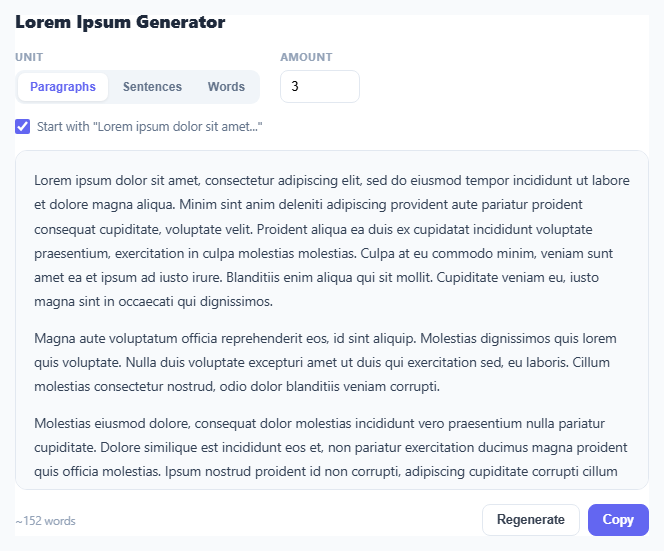
Lorem Ipsum has been the standard filler text for mockups and typography samples since the 1500s (scrambled from Cicero's De Finibus Bonorum et Malorum), precisely because its Latin-looking word shapes and letter distribution don't distract a viewer's eye the way real, readable English would when you're trying to judge a layout rather than read the content. This snippet generates fresh, randomized Lorem Ipsum on demand rather than repeating one fixed static block every time, so a design mockup with several text blocks doesn't end up with obviously identical filler in each one.
A real word pool, not a single fixed string
Most simple lorem generators just repeat one canned paragraph. This one instead keeps a pool of roughly 60 authentic Lorem Ipsum vocabulary words (WORDS) and assembles new sentences and paragraphs from them on every generation by randomly sampling with pick(arr) — arr[Math.floor(Math.random() * arr.length)]. That means clicking Regenerate produces genuinely different text each time, useful when you need several visually distinct placeholder blocks on the same mockup rather than one paragraph copy-pasted repeatedly.
Building sentence structure, not just word soup
genSentence() doesn't merely concatenate random words — it picks a random sentence length within a range, capitalizes the first word, appends a period, and — for sentences long enough to plausibly contain one — inserts a comma at a randomly chosen internal position to break up the clause the way a real sentence would. genParagraph() then strings together a random number of these sentences (3 to 5) into one paragraph. This two-level randomness (sentence count varies per paragraph, word count varies per sentence) is what keeps the generated blocks from having an obviously uniform rhythm.
Three selectable units matching real use cases
Paragraphs, sentences, and words are handled as genuinely distinct generation modes rather than one mode truncated three different ways: word mode returns one flowing block of exactly the requested word count, sentence mode joins the requested number of complete sentences into one paragraph, and paragraph mode produces the requested number of separate <p> blocks. Matching the unit to what you actually need — a single short label's worth of words versus several paragraphs of body copy — avoids having to manually trim or pad generated text after the fact.
The classic opening toggle
Real designers often want the recognizable "Lorem ipsum dolor sit amet, consectetur adipiscing elit..." opening specifically, both as a convention and because stakeholders instantly recognize it as placeholder text rather than mistaking it for a content bug. The start-classic checkbox prepends or substitutes that exact canonical opening onto the first generated unit while leaving everything after it randomized, giving you the familiar signal plus non-repetitive filler for the rest.
Build with AI
Build, Understand, Optimize, and Extend It With AI
Give this snippet's JavaScript to an AI assistant like Claude and ask it to explain the two-level randomness in genSentence() and genParagraph() — why varying both sentence length and paragraph sentence-count matters for making the output feel less uniform than a single fixed template. It's also easy to extend: ask for a "themed" mode that swaps the Latin word pool for a different placeholder vocabulary (like tech buzzwords or "hipster ipsum"), an HTML export option that wraps output in specific heading levels, or a reading-time estimate alongside the word count.
Prompt to recreate it
Copy this into your AI assistant of choice to build the effect from scratch, or as a jumping-off point for your own variant:
Build a Lorem Ipsum placeholder text generator in plain HTML, CSS, and JavaScript, no libraries.

Requirements:
- Maintain a pool of at least 50 real Lorem Ipsum Latin words, and generate new randomized sentences and paragraphs by sampling from that pool on every generation — do not just repeat one fixed static block of text.
- Provide three selectable generation units: paragraphs, sentences, and words, each producing correctly shaped output (separate <p> blocks for paragraphs mode; one joined block of complete sentences for sentences mode; one continuous block of exactly N words for words mode).
- Let the user specify an amount (capped at a reasonable maximum like 50) for whichever unit is selected, regenerating live as the amount or unit changes.
- Randomize sentence length within a reasonable range and occasionally insert a comma at a plausible internal position in longer sentences, so generated text has natural-feeling rhythm rather than uniform word count per sentence.
- Add a toggle to optionally start the output with the traditional "Lorem ipsum dolor sit amet, consectetur adipiscing elit" opening, leaving the rest of the output randomized.
- Include a Regenerate button that produces a fresh random sample at the current settings, a live word-count display, and a copy-to-clipboard button for the plain-text output.
Want to tighten it up first? Run this prompt through the AI Prompt Studio to score it across 8 quality dimensions, catch anti-patterns, and tune the wording for Claude, ChatGPT, or Gemini before you paste it in.
Source Code
<div class="wrap">
  <h2>Lorem Ipsum Generator</h2>

  <div class="controls">
    <div class="ctrl-group">
      <label>Unit</label>
      <div class="seg">
        <button class="seg-btn active" data-unit="paragraphs">Paragraphs</button>
        <button class="seg-btn" data-unit="sentences">Sentences</button>
        <button class="seg-btn" data-unit="words">Words</button>
      </div>
    </div>
    <div class="ctrl-group">
      <label>Amount</label>
      <input type="number" id="amount-input" min="1" max="50" value="3" />
    </div>
  </div>

  <label class="checkbox-row">
    <input type="checkbox" id="start-classic" checked />
    Start with "Lorem ipsum dolor sit amet..."
  </label>

  <div class="output-box" id="output-box"></div>

  <div class="footer-row">
    <span class="stat" id="stat-line"></span>
    <div class="btn-row">
      <button class="btn" id="btn-regenerate">Regenerate</button>
      <button class="btn btn-primary" id="btn-copy">Copy</button>
    </div>
  </div>
</div>
* { box-sizing: border-box; margin: 0; padding: 0; }
body { font-family: system-ui, -apple-system, sans-serif; background: #f8fafc; min-height: 100vh; padding: 28px 20px; }
.wrap { max-width: 680px; margin: 0 auto; background: #fff; border: 1px solid #e2e8f0; border-radius: 16px; padding: 22px; }
h2 { font-size: 18px; font-weight: 800; color: #1e293b; margin-bottom: 16px; }
.controls { display: flex; gap: 20px; flex-wrap: wrap; margin-bottom: 14px; }
.ctrl-group label { display: block; font-size: 11px; font-weight: 700; color: #94a3b8; text-transform: uppercase; letter-spacing: 0.04em; margin-bottom: 6px; }
.seg { display: flex; background: #f1f5f9; border-radius: 9px; padding: 3px; gap: 2px; }
.seg-btn { padding: 7px 12px; border: none; background: none; border-radius: 7px; font-size: 12px; font-weight: 600; color: #64748b; cursor: pointer; }
.seg-btn.active { background: #fff; color: #6366f1; box-shadow: 0 1px 3px rgba(0,0,0,0.08); }
#amount-input { width: 80px; padding: 8px 10px; border: 1.5px solid #e2e8f0; border-radius: 8px; font-size: 13px; }
#amount-input:focus { outline: none; border-color: #6366f1; }
.checkbox-row { display: flex; align-items: center; gap: 7px; font-size: 12.5px; color: #64748b; margin-bottom: 16px; cursor: pointer; user-select: none; }
.checkbox-row input { accent-color: #6366f1; width: 15px; height: 15px; }
.output-box { min-height: 160px; max-height: 340px; overflow-y: auto; padding: 16px 18px; border: 1.5px solid #e2e8f0; border-radius: 12px; background: #f8fafc; font-size: 13.5px; line-height: 1.8; color: #334155; }
.output-box p { margin-bottom: 12px; }
.output-box p:last-child { margin-bottom: 0; }
.footer-row { display: flex; align-items: center; justify-content: space-between; margin-top: 14px; flex-wrap: wrap; gap: 10px; }
.stat { font-size: 11.5px; color: #94a3b8; }
.btn-row { display: flex; gap: 8px; }
.btn { font-size: 12.5px; font-weight: 600; padding: 8px 14px; border-radius: 8px; border: 1.5px solid #e2e8f0; background: #fff; color: #374151; cursor: pointer; }
.btn:hover { border-color: #6366f1; color: #6366f1; }
.btn-primary { background: #6366f1; border-color: #6366f1; color: #fff; }
.btn-primary:hover { background: #4f46e5; color: #fff; }const WORDS = ('lorem ipsum dolor sit amet consectetur adipiscing elit sed do eiusmod tempor incididunt ut labore et dolore magna aliqua enim ad minim veniam quis nostrud exercitation ullamco laboris nisi aliquip ex ea commodo consequat duis aute irure in reprehenderit voluptate velit esse cillum eu fugiat nulla pariatur excepteur sint occaecat cupidatat non proident sunt culpa qui officia deserunt mollit anim id est laborum at vero eos accusamus iusto odio dignissimos ducimus blanditiis praesentium voluptatum deleniti atque corrupti quos quas molestias excepturi sint occaecati cupiditate provident similique').split(' ');
let unit = 'paragraphs';
function pick(arr) { return arr[Math.floor(Math.random() * arr.length)]; }
function randWord() { return pick(WORDS); }
function capitalize(str) { return str.charAt(0).toUpperCase() + str.slice(1); }
function genSentence(minWords, maxWords) {
const count = minWords + Math.floor(Math.random() * (maxWords - minWords + 1));
const words = [];
for (let i = 0; i < count; i++) words.push(randWord());
let sentence = words.join(' ');
if (count > 6) {
const commaPos = 2 + Math.floor(Math.random() * (count - 4));
const parts = sentence.split(' ');
parts[commaPos] = parts[commaPos] + ',';
sentence = parts.join(' ');
}
return capitalize(sentence) + '.';
}
function genParagraph(sentenceCount) {
const sentences = [];
for (let i = 0; i < sentenceCount; i++) sentences.push(genSentence(5, 16));
return sentences.join(' ');
}
function generate() {
const amount = Math.min(50, Math.max(1, Number(document.getElementById('amount-input').value) || 1));
const startClassic = document.getElementById('start-classic').checked;
const outputBox = document.getElementById('output-box');
let html = '';
let wordCount = 0;
if (unit === 'words') {
const words = [];
for (let i = 0; i < amount; i++) words.push(randWord());
let text = capitalize(words.join(' ')) + '.';
if (startClassic) {
const classic = 'Lorem ipsum dolor sit amet, consectetur adipiscing elit';
text = amount <= 8 ? capitalize(WORDS.slice(0, amount).join(' ')) + '.' : classic + ', ' + words.slice(8).join(' ') + '.';
}
html = '<p>' + text + '</p>';
wordCount = amount;
} else if (unit === 'sentences') {
const sentences = [];
for (let i = 0; i < amount; i++) sentences.push(genSentence(6, 14));
if (startClassic) sentences[0] = 'Lorem ipsum dolor sit amet, consectetur adipiscing elit.';
html = '<p>' + sentences.join(' ') + '</p>';
wordCount = sentences.join(' ').split(' ').length;
} else {
const paragraphs = [];
for (let i = 0; i < amount; i++) paragraphs.push(genParagraph(3 + Math.floor(Math.random() * 3)));
if (startClassic) {
paragraphs[0] = 'Lorem ipsum dolor sit amet, consectetur adipiscing elit, sed do eiusmod tempor incididunt ut labore et dolore magna aliqua. ' + paragraphs[0];
}
html = paragraphs.map(p => '<p>' + p + '</p>').join('');
wordCount = paragraphs.join(' ').split(' ').length;
}
outputBox.innerHTML = html;
document.getElementById('stat-line').textContent = '~' + wordCount + ' words';
}
document.querySelectorAll('.seg-btn').forEach(btn => {
btn.addEventListener('click', () => {
document.querySelectorAll('.seg-btn').forEach(b => b.classList.remove('active'));
btn.classList.add('active');
unit = btn.dataset.unit;
generate();
});
});
document.getElementById('amount-input').addEventListener('input', generate);
document.getElementById('start-classic').addEventListener('change', generate);
document.getElementById('btn-regenerate').addEventListener('click', generate);
document.getElementById('btn-copy').addEventListener('click', () => {
navigator.clipboard.writeText(document.getElementById('output-box').innerText);
});
generate();Step by step
How to Use
- 1Choose a unitSelect Paragraphs, Sentences, or Words depending on how much placeholder text you need and in what shape.
- 2Set the amountType a number (up to 50) for how many paragraphs, sentences, or words to generate.
- 3Toggle the classic openingLeave "Start with Lorem ipsum dolor sit amet..." checked for the traditional recognizable opening, or uncheck it for fully randomized text throughout.
- 4Read the generated textThe output box updates immediately whenever you change the unit, amount, or classic-opening toggle.
- 5Click Regenerate for fresh variationProduces a new random sample at the same settings — useful for generating multiple distinct placeholder blocks for different areas of a mockup.
- 6Copy the resultClick Copy to send the plain-text version (without HTML paragraph tags) straight to your clipboard.
Real-world uses
Common Use Cases
Got questions?
Frequently Asked Questions
Lorem Ipsum's scrambled Latin looks enough like natural text to approximate real letter and word-length distribution for layout purposes, but because it isn't actually readable prose, it doesn't distract a viewer's attention onto the content itself the way real English sentences would when the goal is evaluating a visual layout.
No — unlike many simple lorem generators that repeat one fixed static block, this one randomly assembles new sentences and paragraphs from a pool of about 60 real Lorem Ipsum words on every generation, so clicking Regenerate produces genuinely different text each time.
Words mode returns one continuous block of exactly the requested word count. Sentences mode joins the requested number of complete, independently generated sentences into a single paragraph. Paragraphs mode produces the requested number of separate paragraph blocks, each containing several randomly generated sentences.
When checked, the very recognizable "Lorem ipsum dolor sit amet, consectetur adipiscing elit..." opening is used to start the first generated unit — a convention that signals to anyone viewing a mockup that the text is intentional placeholder, not a content bug. Unchecking it produces fully randomized text with no fixed opening.
The amount input is capped at 50, which at paragraph granularity produces a substantial multi-screen block of text, more than enough for any realistic mockup or testing scenario without risking runaway output.