Learn Coding Visually
Learn to code with interactive, live-preview playgrounds — HTML, CSS, JavaScript, React & more.
 HTML Playground42 lessons · Click-based · Live preview
 CSS PlaygroundLearn CSS with a live editor
 JavaScript Playground60 lessons · DOM · Async · Canvas
 React PlaygroundLearn React with a live code editor
 GSAP PlaygroundLearn GSAP animation interactively
 SVG Playground44 lessons · shapes · paths · animation
 SCSS Playground45 lessons · Sass modules · tokens
 Tailwind PlaygroundLearn Tailwind CSS with a live editor
 Bootstrap 5 Playground50 lessons · live preview
Input Mask Fields — Auto-Format Inputs HTML CSS JS
Input Mask Fields · Forms · Plain HTML, CSS & JS · Live preview
What's included
Features
About this UI Snippet
Input Mask Fields — Live Auto-Formatting for Phone, Card, Date & Currency
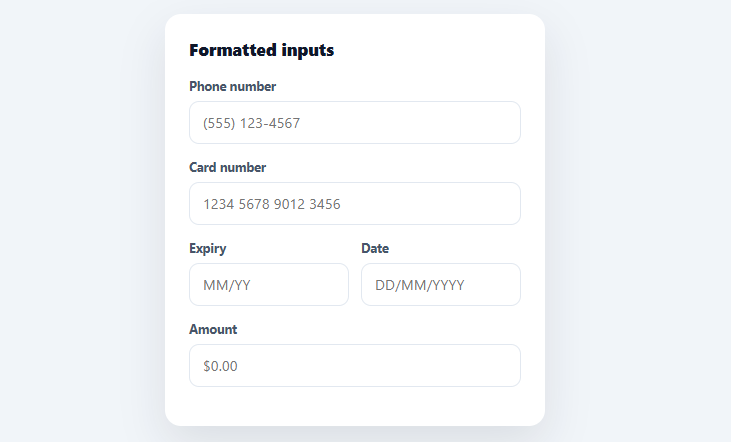
An input mask formats a value as the user types — adding the parentheses and dashes to a phone number, the spaces to a card number, the slashes to a date — so the field is always readable and the user never has to type punctuation. This snippet builds a reusable masking system in plain HTML, CSS, and vanilla JavaScript, with five ready-made masks (phone, card number, expiry, date, currency) driven by a single data-mask attribute.
One attribute, any mask
Every masked input just declares data-mask="phone" (or card, expiry, date, currency), and a single setup loop wires the matching formatter to its input event. The masks live in a MASKS object where each entry is a pure function: it takes the raw typed value and returns the formatted display string. This keeps the system extensible — adding a new mask (SSN, IBAN, license plate) is one function in the object plus the attribute on the field, with no per-field code.
Format from digits, not from keystrokes
The robust way to mask is to strip the value down to its raw characters and re-build the formatted string from scratch on every input — rather than trying to insert punctuation at the caret per keystroke. The phone mask, for example, removes all non-digits, caps at 10, then assembles (555) 123-4567 from whatever digits remain. This "extract then reformat" approach handles every editing case correctly: typing, pasting a pre-formatted number, deleting from the middle, or selecting and replacing — because the output is always derived from the clean underlying value, not from the messy intermediate state.
The five built-in masks
*Phone* builds US-style (area) prefix-line progressively as digits arrive. *Card number* groups 16 digits into four space-separated blocks (the standard for readability and matching the printed card). *Expiry* inserts the MM/YY slash after two digits. *Date* assembles DD/MM/YYYY with slashes. *Currency* strips to digits and a decimal point, adds thousands separators with a regex, caps the decimals at two, and prefixes $. Each caps its length so the user can't overflow the format. These cover the inputs that most need masking — the ones where unformatted entry is hardest to read and most error-prone.
Caret handling
Re-rendering the whole value on every keystroke risks throwing the caret to the end mid-edit. The snippet preserves the end-of-string case (the common one — typing forward) naturally, and best-effort restores the caret position when editing in the middle, so the field feels natural rather than jumpy. Full caret-perfect masking is genuinely hard (it's why libraries exist), but this handles the everyday typing and pasting cases that cover the vast majority of real use.
Mobile keyboards and accessibility
Each field sets the right inputmode (numeric for phone/card/date, decimal for currency) so mobile devices show the appropriate keypad, and type="tel" on the phone field for the same reason. The display value is always the masked, human-readable form; when you submit, strip it back to the raw value (the FAQs show how) so your backend stores clean data. tabular-nums keeps the digits evenly spaced as they format.
Build with AI
Build, Understand, Optimize, and Extend It With AI
You do not need to reason through every regex in the MASKS object unaided. Paste this snippet's HTML, CSS, and JS into an AI coding assistant like Claude and ask it to explain exactly how the currency mask's thousands-separator regex works on the split integer and decimal parts, or why the extract-then-reformat approach (stripping to raw characters and rebuilding the string from scratch on every input event) is more robust than inserting punctuation at the caret position directly. The same assistant can help optimize it — ask whether the caret-restoration logic in the shared input listener could be made more accurate for mid-string edits, since right now it is explicitly a best-effort approximation. It is just as useful for extending the system: ask it to add a new mask function for an SSN, IBAN, or postal code following the same data-mask attribute convention, wire up server-side stripping of the formatted value before submit, or add per-mask validation that flags an incomplete phone number or expired card date. Treat the code less like a finished artifact and more like a starting point for a conversation.
Prompt to recreate it
Copy this into your AI assistant of choice to build the effect from scratch, or as a jumping-off point for your own variant:
Build a set of self-formatting input fields in plain HTML, CSS, and JavaScript using a single data-mask attribute convention — no input-masking library.

Requirements:
- A MASKS object where each key (phone, card, expiry, date, currency) maps to a pure function that takes the input's raw current value and returns a fully formatted display string; do not try to insert characters at the caret position — instead strip the value down to its meaningful raw characters (digits, or digits plus a decimal point for currency) and rebuild the entire formatted string from that clean value on every call.
- The phone mask must progressively build a US-style format like (555) 123-4567 as digits arrive, capping at 10 digits.
- The card mask must group up to 16 digits into space-separated blocks of 4.
- The expiry mask must insert a slash after the second digit to produce MM/YY, capping at 4 digits.
- The date mask must insert slashes after the second and fourth digits to produce DD/MM/YYYY, capping at 8 digits.
- The currency mask must strip to digits and at most one decimal point, insert comma thousands separators into the integer portion with a regex, cap the decimal portion at two digits, and prefix a dollar sign.
- A single setup loop must query every element with a data-mask attribute, look up its formatter function by the attribute's value, and attach one input event listener that: reads whether the caret was at the end of the string before formatting, replaces the input's value with the formatter's output, and if the caret was not at the end, restores the selection to approximately the same position (best-effort) rather than always jumping to the end.
- Each field must set the appropriate inputmode (numeric or decimal) so mobile devices show the correct keypad.
Want to tighten it up first? Run this prompt through the AI Prompt Studio to score it across 8 quality dimensions, catch anti-patterns, and tune the wording for Claude, ChatGPT, or Gemini before you paste it in.
Step by step
How to Use
- 1Paste HTML, CSS, and JSA form renders with phone, card, expiry, date, and currency fields, each formatting as you type.
- 2Type a phone numberEnter digits — parentheses and a dash appear automatically as "(555) 123-4567" without typing any punctuation.
- 3Try the card fieldType 16 digits and they group into four space-separated blocks; expiry inserts the slash after two digits.
- 4Test currencyType numbers and a $ prefix, thousands commas, and two-decimal cap appear automatically.
- 5Add your own maskAdd a function to the MASKS object (raw value → formatted string) and a data-mask attribute on the field.
- 6Strip on submitBefore sending, remove the formatting (value.replace(/\D/g, '')) so your backend stores the clean raw value.
Real-world uses
Common Use Cases
Got questions?
Frequently Asked Questions
Strip the formatting before sending: for digit-only masks, value.replace(/\D/g, '') gives the clean digits (e.g. "5551234567"); for currency, value.replace(/[^\d.]/g, '') gives the number. Always store and validate the raw value server-side — the mask is a display concern, so never persist the formatted string with its punctuation.
Add a function to the MASKS object keyed by a name — it receives the raw input value and returns the formatted string (strip to the allowed characters, cap the length, and insert the separators). Then put data-mask="ssn" on the field. The setup loop wires it automatically; no other code changes.
Inserting punctuation per keystroke breaks on paste, mid-string deletion, and selection-replace, because the intermediate value is messy. Stripping to the raw characters and reformatting from scratch produces a correct result for every editing action, since the output is always derived from clean data. The only tricky part is caret restoration, which this handles for the common cases.
It preserves the natural forward-typing case (caret at end) perfectly and makes a best-effort restore when editing mid-string. Truly caret-perfect masking across every edit and locale is hard — it's the main reason dedicated masking libraries exist. For most forms (where users type left-to-right and occasionally paste) this is more than sufficient; for complex cases, layer a library on top of the same mask functions.
In React, make the input controlled — hold the value in useState and set it to mask(e.target.value) in onChange; in Vue, use a watcher or computed setter on the v-model; in Angular, apply the mask in the (input) handler or a custom directive. The mask functions are pure and port unchanged — they take a raw string and return a formatted one regardless of framework.