Learn Coding Visually
Learn to code with interactive, live-preview playgrounds — HTML, CSS, JavaScript, React & more.
 HTML Playground42 lessons · Click-based · Live preview
 CSS PlaygroundLearn CSS with a live editor
 JavaScript Playground60 lessons · DOM · Async · Canvas
 React PlaygroundLearn React with a live code editor
 GSAP PlaygroundLearn GSAP animation interactively
 SVG Playground44 lessons · shapes · paths · animation
 SCSS Playground45 lessons · Sass modules · tokens
 Tailwind PlaygroundLearn Tailwind CSS with a live editor
 Bootstrap 5 Playground50 lessons · live preview
Developer Hero with Typing Code Window — Free HTML CSS JS Snippet
Developer Hero with Typing Code Window · Heroes · Plain HTML, CSS & JS · Live preview
What's included
Features
About this UI Snippet
Developer Hero with Typing Code Window — Real Character-by-Character Typing
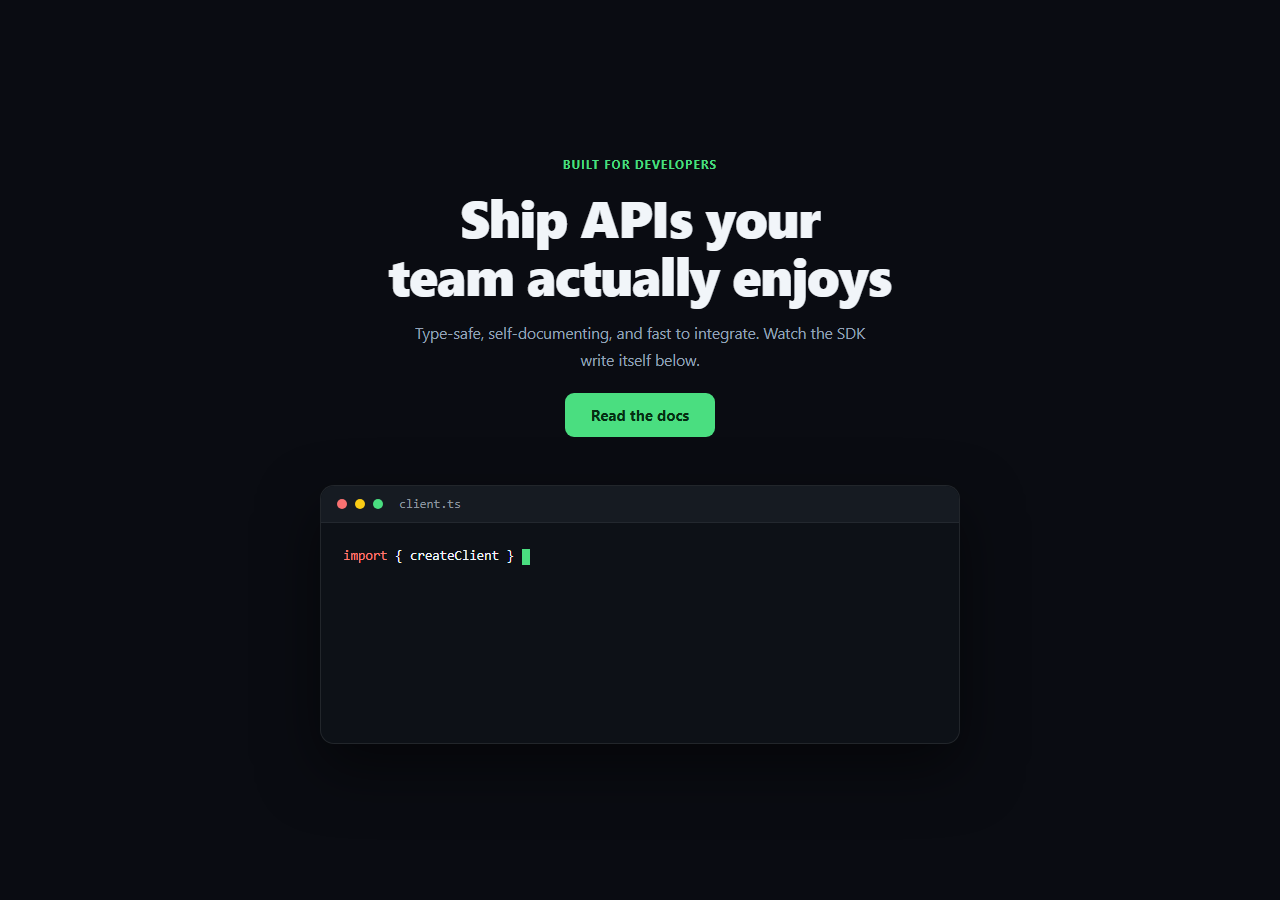
Developer-tool landing pages lean hard on a "code window" centerpiece — but a static screenshot doesn't demonstrate anything. This snippet types syntax-highlighted code into a fake editor window one real character at a time via setTimeout, then erases it and cycles to the next snippet, looping indefinitely.
Typing through HTML safely
Each snippet is authored as an HTML string with token <span> elements already baked in for syntax coloring (.tok-kw, .tok-fn, .tok-str, etc.). The naive approach — typing the raw HTML string character by character — would render broken half-tags mid-animation. Instead, htmlUpTo(html, count) walks the string, and whenever it encounters a <, it copies the *entire* tag to the next > in one step without incrementing the visible character count, only incrementing count for actual text characters. That's what lets the highlighting colors appear correctly *as* each character is typed, instead of the markup only rendering once typing finishes.
Variable typing speed, real timers
Each character's delay is randomized between 18–48ms (18 + Math.random() * 30) via a fresh setTimeout scheduled at the end of the previous one — a real recursive timer chain, not a CSS steps() animation with a fixed cadence, which is why the rhythm feels slightly human rather than mechanically uniform.
A full type → pause → erase → next-snippet cycle
After the last character types, a 2.2s pause lets the reader actually read the finished snippet, then eraseCurrentSnippet() runs the same character-count logic in reverse — decrementing charIndex on a fast timer — before advancing snippetIndex and starting the next snippet's type-in. This is a genuinely stateful loop (snippetIndex, charIndex, and a live typingTimer handle), not a looping GIF-style CSS animation.
A blinking cursor that's actually decorative-only
The blinking block cursor (.cwh-cursor) is a separate always-blinking element via CSS @keyframes, positioned after the code with display: inline-block — it doesn't need to sync with the typing logic because it visually reads as "waiting to type here" regardless of whether a character just landed.
Realistic editor chrome
The three colored dots and a filename tab (which updates per snippet) sell the "real editor window" framing that makes the typing animation land as a live demo rather than an abstract text effect.
Customizing it
Add more snippets to the snippets array (each just needs a filename and pre-marked-up html), adjust the per-character delay range or the pause/erase timings, or swap the color tokens for a different syntax theme. Pair it with typing code for a standalone version, or startup hero for a non-developer alternative layout.
Build with AI
Build, Understand, Optimize, and Extend It With AI
Instead of guessing why this typing effect doesn't render broken tags mid-animation, paste this snippet's HTML, CSS, and JS into an AI coding assistant like Claude and ask it to explain exactly how htmlUpTo() walks a marked-up HTML string and only advances the "typed" character count on real text characters, copying whole tags through in a single step whenever it encounters one. The same assistant can help you extend it — ask it to add a third or fourth snippet with its own syntax-colored tokens, convert the randomized setTimeout delay into a configurable typing-speed prop, or add a subtle syntax-highlighting flash effect on newly typed tokens. It's also useful for hardening the approach: ask whether the recursive setTimeout chain should be replaced with requestAnimationFrame for smoother timing on very fast typing speeds, or how to pause the whole loop when the tab is backgrounded using the Page Visibility API. Treat the code less like a finished artifact and more like a starting point for a conversation.
Prompt to recreate it
Copy this into your AI assistant of choice to build the effect from scratch, or as a jumping-off point for your own variant:
Build a developer-tool hero section in plain HTML, CSS, and vanilla JavaScript featuring a fake code editor window where syntax-highlighted code types itself character by character and cycles through multiple snippets (no library, no CDN, no real code highlighter dependency).

Requirements:
- A hero with headline, subheading, and CTA above a fake editor window styled with a top bar containing three colored traffic-light dots and a filename label, and a code area below it with monospace font.
- Author at least two code snippets as data (each with a filename and an HTML string containing pre-applied syntax-highlighting <span> elements for keywords, function names, strings, and comments with distinct colors) rather than plain unstyled text.
- Implement the typing effect with a function that reveals a marked-up HTML string up to a given number of visible (non-tag) characters — walking the string character by character, and whenever it encounters an opening angle bracket, copying the entire tag through to its closing bracket in a single step without counting it toward the visible character total, so the syntax-highlighting spans render correctly as text is revealed instead of only appearing once typing finishes.
- Drive the actual typing with a recursive setTimeout chain (not a CSS animation) where each character's delay is randomized within a small range for a more natural, non-mechanical typing rhythm, and update the filename label to match whichever snippet is currently active.
- After a snippet finishes typing, pause for roughly 2 seconds, then erase it character by character on a fast timer, and once fully erased, advance to the next snippet in the array (wrapping back to the first after the last) and begin typing it — looping indefinitely.
- Add a separately blinking cursor element (via a CSS keyframe animation) after the code that blinks continuously regardless of typing state.
Want to tighten it up first? Run this prompt through the AI Prompt Studio to score it across 8 quality dimensions, catch anti-patterns, and tune the wording for Claude, ChatGPT, or Gemini before you paste it in.
Step by step
How to Use
- 1Paste HTML, CSS, and JSThe first snippet begins typing automatically on load.
- 2Watch it type, pause, and eraseAfter finishing, it pauses ~2.2s, erases, then types the next snippet.
- 3Add your own snippetPush a { filename, html } object onto the snippets array with token spans.
- 4Adjust typing speedChange the 18 + Math.random() * 30 range in step().
- 5Adjust pause durationChange the 2200ms delay before eraseCurrentSnippet() is called.
- 6Restyle the tokensEdit .tok-kw, .tok-fn, .tok-str, .tok-com, .tok-prop colors.
Real-world uses
Common Use Cases
Got questions?
Frequently Asked Questions
Each snippet is authored with syntax-highlighting spans already in its HTML string. Rather than typing that raw string character by character (which would render broken half-open tags), htmlUpTo() walks the string and, whenever it hits a '<', copies the entire tag through to its closing '>' in one step without counting it toward the visible character total — only real text characters increment the count. That's why colors appear correctly as each character lands instead of only after typing finishes.
It's a real recursive setTimeout chain: step() increments charIndex, re-renders the revealed HTML, and schedules itself again with a randomized 18-48ms delay if there are characters left. Because each delay is randomized rather than fixed, the rhythm doesn't feel mechanically uniform the way a CSS steps() animation would.
After the last character of a snippet types, a setTimeout pauses for 2200ms so the reader can read it, then eraseCurrentSnippet() runs the same htmlUpTo() logic in reverse on a fast timer to visually delete the text. Once charIndex reaches 0, snippetIndex advances (wrapping via modulo) and typeCurrentSnippet() starts the next snippet — a real state machine with snippetIndex, charIndex, and a live typingTimer handle, not a looping GIF or CSS animation.
Push a new object onto the snippets array with a filename string and an html string containing your code with .tok-kw/.tok-fn/.tok-str/.tok-com/.tok-prop spans around the parts you want colored. No other JavaScript changes are needed — the typing and erase logic reads from the array by index.
The block cursor is a separate element driven purely by a CSS @keyframes opacity animation, deliberately decoupled from the typing state. It reads correctly either way — as "actively writing" during typing or "waiting to continue" during the pause — without needing extra JavaScript to toggle it on and off in sync with the typing timers.