Source Code
<div class="page">
  <div class="card">
    <div class="card-header">
      <div class="header-left">
        <h2 class="title">My Tasks</h2>
        <span class="count-badge" id="countBadge">0 left</span>
      </div>
      <div class="filters">
        <button class="filter-btn active" data-filter="all">All</button>
        <button class="filter-btn" data-filter="active">Active</button>
        <button class="filter-btn" data-filter="done">Done</button>
      </div>
    </div>

    <form class="add-form" id="addForm">
      <input class="add-input" id="addInput" type="text" placeholder="Add a new task…" maxlength="80" autocomplete="off" aria-label="New task" />
      <button type="submit" class="add-btn" aria-label="Add task">
        <svg width="14" height="14" viewBox="0 0 24 24" fill="none" stroke="currentColor" stroke-width="2.8" stroke-linecap="round"><line x1="12" y1="5" x2="12" y2="19"/><line x1="5" y1="12" x2="19" y2="12"/></svg>
      </button>
    </form>

    <ul class="task-list" id="taskList" role="list" aria-label="Task list" aria-live="polite"></ul>

    <div class="empty-state" id="emptyState" hidden>
      <svg width="40" height="40" viewBox="0 0 24 24" fill="none" stroke="currentColor" stroke-width="1.5" stroke-linecap="round"><rect x="3" y="3" width="18" height="18" rx="4"/><path d="M9 12l2 2 4-4"/></svg>
      <p>No tasks here yet</p>
    </div>

    <div class="card-footer">
      <span class="footer-text" id="footerText"></span>
      <button class="clear-btn" id="clearDoneBtn">Clear done</button>
    </div>
  </div>
</div>*{box-sizing:border-box;margin:0;padding:0}
body{font-family:system-ui,sans-serif;background:linear-gradient(135deg,#f0f9ff 0%,#f5f3ff 100%);min-height:100vh;display:flex;align-items:center;justify-content:center;padding:20px}
.card{background:#fff;border-radius:20px;width:100%;max-width:460px;box-shadow:0 16px 50px rgba(99,102,241,.1);overflow:hidden}
.card-header{display:flex;align-items:center;justify-content:space-between;padding:20px 20px 16px;gap:12px;flex-wrap:wrap}
.header-left{display:flex;align-items:center;gap:10px}
.title{font-size:18px;font-weight:800;color:#1e293b}
.count-badge{font-size:11px;font-weight:700;color:#6366f1;background:#eef2ff;border-radius:20px;padding:2px 8px}
.filters{display:flex;gap:4px}
.filter-btn{font-size:11px;font-weight:600;padding:4px 10px;border-radius:20px;border:1px solid #e2e8f0;background:transparent;color:#64748b;cursor:pointer;transition:all .15s;font-family:inherit}
.filter-btn.active{background:#6366f1;border-color:#6366f1;color:#fff}
.add-form{display:flex;gap:8px;padding:0 16px 14px;border-bottom:1px solid #f1f5f9}
.add-input{flex:1;padding:10px 14px;font-size:13px;border:1.5px solid #e2e8f0;border-radius:10px;outline:none;color:#1e293b;background:#f8fafc;transition:border-color .2s;font-family:inherit}
.add-input:focus{border-color:#6366f1;background:#fff}
.add-btn{width:38px;height:38px;background:#6366f1;border:none;border-radius:10px;color:#fff;display:flex;align-items:center;justify-content:center;cursor:pointer;flex-shrink:0;transition:background .15s,transform .1s}
.add-btn:hover{background:#4f46e5}
.add-btn:active{transform:scale(.93)}
/* Task list */
.task-list{list-style:none;padding:6px 10px;min-height:60px;max-height:320px;overflow-y:auto;display:flex;flex-direction:column;gap:4px}
/* Task item */
.task-item{
display:flex;align-items:center;gap:10px;
padding:10px 12px;border-radius:10px;
background:#f8fafc;border:1px solid #f1f5f9;
transition:background .15s,border-color .15s;
animation:slideIn .28s cubic-bezier(.34,1.56,.64,1);
position:relative;overflow:hidden;
}
.task-item.done-state{background:#f0fdf4;border-color:#bbf7d0}
.task-item.removing{animation:slideOut .25s ease forwards}
@keyframes slideIn{
from{opacity:0;transform:translateY(-12px) scale(.97)}
to{opacity:1;transform:none}
}
@keyframes slideOut{
to{opacity:0;transform:translateX(20px) scale(.96);max-height:0;margin:0;padding:0;border-width:0}
}
.check-btn{width:20px;height:20px;border-radius:6px;border:2px solid #cbd5e1;background:transparent;cursor:pointer;display:flex;align-items:center;justify-content:center;flex-shrink:0;transition:background .2s,border-color .2s;color:#fff;font-size:11px}
.task-item.done-state .check-btn{background:#10b981;border-color:#10b981}
.task-text{flex:1;font-size:13px;color:#334155;transition:color .2s,text-decoration .2s}
.task-item.done-state .task-text{color:#94a3b8;text-decoration:line-through}
.delete-btn{opacity:0;width:22px;height:22px;border-radius:6px;background:none;border:none;color:#94a3b8;cursor:pointer;display:flex;align-items:center;justify-content:center;transition:opacity .15s,background .15s,color .15s;flex-shrink:0}
.task-item:hover .delete-btn{opacity:1}
.delete-btn:hover{background:#fee2e2;color:#ef4444}
/* Empty + footer */
.empty-state{display:flex;flex-direction:column;align-items:center;gap:8px;padding:28px;color:#94a3b8;font-size:13px}
.card-footer{display:flex;align-items:center;justify-content:space-between;padding:10px 16px;border-top:1px solid #f1f5f9}
.footer-text{font-size:11px;color:#94a3b8}
.clear-btn{font-size:11px;color:#6366f1;background:none;border:none;cursor:pointer;font-weight:600;font-family:inherit;padding:4px 8px;border-radius:6px;transition:background .15s}
.clear-btn:hover{background:#eef2ff}let tasks = [
{ id: 1, text: 'Design landing page mockup', done: false },
{ id: 2, text: 'Review pull request #42', done: true },
{ id: 3, text: 'Write unit tests for API module', done: false },
{ id: 4, text: 'Update project documentation', done: false },
];
let nextId = 5;
let filter = 'all';
const list = document.getElementById('taskList');
const addForm = document.getElementById('addForm');
const addInput = document.getElementById('addInput');
const countBadge = document.getElementById('countBadge');
const footerText = document.getElementById('footerText');
const emptyState = document.getElementById('emptyState');
const clearDoneBtn = document.getElementById('clearDoneBtn');
function getFiltered(){
if(filter === 'active') return tasks.filter(t => !t.done);
if(filter === 'done') return tasks.filter(t => t.done);
return tasks;
}
function render(){
const shown = getFiltered();
const total = tasks.length;
const doneCount = tasks.filter(t => t.done).length;
const leftCount = total - doneCount;
countBadge.textContent = leftCount + ' left';
footerText.textContent = total ? `${doneCount} of ${total} complete` : '';
emptyState.hidden = shown.length > 0;
// Remove deleted items with animation
list.querySelectorAll('.task-item').forEach(el => {
if(!shown.find(t => t.id === +el.dataset.id)){
el.classList.add('removing');
el.addEventListener('animationend', () => el.remove(), {once:true});
}
});
// Add new items
shown.forEach((task, i) => {
if(list.querySelector(`[data-id="${task.id}"]`)) return;
const li = document.createElement('li');
li.className = 'task-item' + (task.done ? ' done-state' : '');
li.dataset.id = task.id;
li.style.animationDelay = i * 30 + 'ms';
li.innerHTML = `
<button class="check-btn" aria-label="${task.done ? 'Mark incomplete' : 'Mark complete'}">${task.done ? '✓' : ''}</button>
<span class="task-text">${task.text}</span>
<button class="delete-btn" aria-label="Delete task">
<svg width="12" height="12" viewBox="0 0 24 24" fill="none" stroke="currentColor" stroke-width="2.5" stroke-linecap="round"><line x1="18" y1="6" x2="6" y2="18"/><line x1="6" y1="6" x2="18" y2="18"/></svg>
</button>`;
li.querySelector('.check-btn').addEventListener('click', () => toggleDone(task.id));
li.querySelector('.delete-btn').addEventListener('click', () => deleteTask(task.id));
list.appendChild(li);
});
// Update existing items' done state
list.querySelectorAll('.task-item').forEach(el => {
const t = tasks.find(t => t.id === +el.dataset.id);
if(!t) return;
const wasOk = el.classList.contains('done-state') === t.done;
if(!wasOk){
el.classList.toggle('done-state', t.done);
const cb = el.querySelector('.check-btn');
cb.textContent = t.done ? '✓' : '';
cb.setAttribute('aria-label', t.done ? 'Mark incomplete' : 'Mark complete');
}
});
}
function toggleDone(id){ tasks = tasks.map(t => t.id===id ? {...t,done:!t.done} : t); render(); }
function deleteTask(id){
const el = list.querySelector(`[data-id="${id}"]`);
if(el){ el.classList.add('removing'); el.addEventListener('animationend', () => { tasks = tasks.filter(t => t.id!==id); render(); }, {once:true}); }
}
addForm.addEventListener('submit', e => {
e.preventDefault();
const text = addInput.value.trim();
if(!text) return;
tasks.unshift({ id: nextId++, text, done: false });
addInput.value = '';
render();
});
clearDoneBtn.addEventListener('click', () => {
tasks.filter(t => t.done).forEach(t => deleteTask(t.id));
});
document.querySelectorAll('.filter-btn').forEach(btn => {
btn.addEventListener('click', () => {
filter = btn.dataset.filter;
document.querySelectorAll('.filter-btn').forEach(b => b.classList.toggle('active', b === btn));
list.innerHTML = '';
render();
});
});
render();Learn Coding Visually
Learn to code with interactive, live-preview playgrounds — HTML, CSS, JavaScript, React & more.
 HTML Playground42 lessons · Click-based · Live preview
 CSS PlaygroundLearn CSS with a live editor
 JavaScript Playground60 lessons · DOM · Async · Canvas
 React PlaygroundLearn React with a live code editor
 GSAP PlaygroundLearn GSAP animation interactively
 SVG Playground44 lessons · shapes · paths · animation
 SCSS Playground45 lessons · Sass modules · tokens
 Tailwind PlaygroundLearn Tailwind CSS with a live editor
 Bootstrap 5 Playground50 lessons · live preview
Animated Task List — Add, Complete & Delete HTML CSS JS
Animated Task List · Animations · Plain HTML, CSS & JS · Live preview
What's included
Features
@keyframes slideIn with cubic-bezier(.34,1.56,.64,1) (spring overshoot) + staggered delay (i * 30ms) creates a cascading ripple on list population..removing class triggers @keyframes slideOut — slides right + collapses max-height to 0. State array updates in the animationend callback, keeping DOM and data in sync..done-state: green checkbox fill, strikethrough text, light green card background — all CSS transitions, zero JS style changes.render() is the single source of truth.opacity: 0 by default; opacity: 1 on .task-item:hover. Keyboard users can tab to the button directly since it's always in the focus order.deleteTask on each completed item — each one gets its own slide-out animation independently.<ul aria-live="polite"> announces additions and deletions to screen readers without interrupting ongoing speech.About this UI Snippet
Animated Task List — Slide-In/Out Keyframes, Filter Tabs & Optimistic State Update
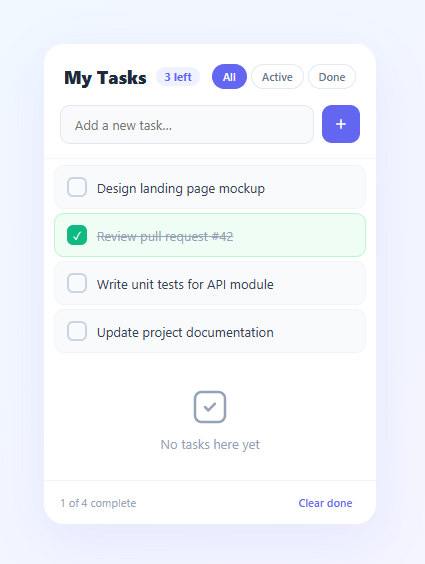
Animated lists are a foundational interaction pattern in modern web apps — tasks that slide in when added, check off with a strikethrough, and slide out when deleted make state changes feel tangible rather than instantaneous. This snippet builds a complete animated task manager: a slide-in @keyframes for new items, a CSS transition for done state (strikethrough + green border), a slide-out animation on delete, filter tabs (All / Active / Done), a live "tasks left" counter, and a "Clear done" bulk action — all in plain HTML, CSS, and vanilla JavaScript.
Animation patterns for lists are tricky because adding, removing, and updating items need separate animation strategies that coexist without flickering.
Slide-in animation for new tasks
New items use animation: slideIn .28s cubic-bezier(.34,1.56,.64,1) — a spring-overshoot easing that gives the item a slight bounce on entry. The translateY(-12px) scale(.97) start state gives the impression of the item dropping in from slightly above. When multiple items are shown (e.g., on filter change), each gets a staggered animation-delay of i * 30ms — a ripple cascade that makes the full list feel alive.
Slide-out animation on delete
Rather than immediately removing the DOM element, the delete handler adds a .removing class and listens for animationend. The animation slides the item right and collapses its height: transform: translateX(20px) scale(.96), opacity: 0, max-height: 0, padding: 0. Transitioning max-height to 0 smoothly closes the gap in the list without a jump. Crucially, the actual state array (tasks.filter) runs after the animation completes — the DOM removal and state removal are in sync.
Filter tabs without full re-render
The filter buttons switch the filter variable and clear the list, then call render(). The render function computes which items should be visible and adds only the ones not already in the DOM — an incremental DOM approach. Items that were removed by filter change are handled by the "remove deleted items" loop that also runs on each render pass. This prevents flicker from a full list teardown on every filter switch.
Live counter with ARIA live region
The <ul> has aria-live="polite" — screen readers announce additions and removals. The count badge reads "X left" (active task count) and the footer shows "X of Y complete" — two levels of progress feedback. Pair with a progress bar if you want a visual completion percentage bar across the top.
Build with AI
Build, Understand, Optimize, and Extend It With AI
You don't have to trace the DOM-diffing logic by hand — paste this snippet's HTML, CSS, and JS into an AI coding assistant like Claude and ask it to explain exactly how render() decides which task-item elements to leave alone, which to create, and which to mark "removing" without ever tearing down and rebuilding the whole list, and why the actual tasks array is only spliced inside the animationend callback rather than immediately on delete. The same assistant is useful for optimizing it — asking whether querying list.querySelectorAll('.task-item') on every render call scales well once the list grows into the hundreds, or whether a keyed map lookup would be faster. It's just as good for extending the list: ask it to add drag-to-reorder using the Pointer Events API while preserving the existing slide animations, persist tasks to localStorage so they survive a refresh, or add due dates with an overdue-highlight state layered on top of the existing done-state styling. Treat the code less like a finished artifact and more like a starting point for a conversation.
Prompt to recreate it
Copy this into your AI assistant of choice to build the effect from scratch, or as a jumping-off point for your own variant:
Build an animated task list in plain HTML, CSS, and JavaScript — no libraries, with incremental DOM updates (not a full re-render) driving slide-in and slide-out keyframe animations.

Requirements:
- A single array of task objects (id, text, done) as the source of truth, an add form, filter buttons (All/Active/Done), a live "X left" counter badge, a footer completion summary, and a "Clear done" bulk action.
- Write one render function that: computes which tasks should currently be visible given the active filter, hides/removes any rendered list items whose task no longer belongs in that filtered view, creates DOM nodes only for tasks not already present in the list (checking by a data-id attribute, not recreating existing nodes), and updates the done/not-done visual state of existing nodes in place without recreating them.
- New task items must play a spring-overshoot slide-in keyframe animation (translateY plus scale, easing with an overshoot cubic-bezier) when first inserted, and when several appear at once (e.g. after switching filters) each one must be staggered with an increasing animation-delay so they cascade in rather than popping in simultaneously.
- Deleting a task (individually or via "Clear done") must not remove it from the DOM or the underlying array immediately. Instead, add a "removing" class that triggers a slide-out keyframe animating opacity, a horizontal translate, and the element's max-height/padding down to zero, and only splice the task out of the underlying array inside that animation's animationend event — so the visual removal and the data removal stay in sync.
- Toggling a task's done state must update a "done" class that drives CSS transitions only (background color, checkbox fill, strikethrough text) — no JavaScript-driven style changes for that part.
- Mark the task list container with aria-live="polite" so additions and removals are announced to screen readers without needing extra JavaScript.
Want to tighten it up first? Run this prompt through the AI Prompt Studio to score it across 8 quality dimensions, catch anti-patterns, and tune the wording for Claude, ChatGPT, or Gemini before you paste it in.
Step by step
How to Use
- 1Paste HTML, CSS, and JSA task list card renders with four pre-loaded tasks, filter tabs, an add input, and a footer with completion stats.
- 2Type a task and press EnterThe new task slides in from above with a spring bounce animation. The counter updates immediately.
- 3Click the checkbox to complete a taskThe checkbox fills green, the text gets a strikethrough and turns grey, and the card background turns light green — all via CSS class toggle.
- 4Hover and click the delete buttonThe × button appears on hover. Clicking it slides the item to the right and collapses its height before removing it from the DOM.
- 5Use the filter tabs"Active" shows only incomplete tasks. "Done" shows only completed tasks. "All" shows everything. The list re-renders with a staggered slide-in for visible items.
- 6Click "Clear done"All completed tasks animate out simultaneously. The counter and footer stats update after all animations complete.
Real-world uses
Common Use Cases
Got questions?
Frequently Asked Questions
On every state change, call localStorage.setItem('tasks', JSON.stringify(tasks)). On load, initialise: let tasks = JSON.parse(localStorage.getItem('tasks') || 'null') || defaultTasks.
Add draggable="true" to each .task-item. Use dragstart, dragover, and drop events to track the dragged item and its target. On drop, splice the tasks array and call render(). For a polished version, see the drag sort list snippet.
Add a dueDate property to each task object. Render it as a <time> element inside the list item. Add a date picker input to the add form. Highlight overdue tasks with a red background by comparing task.dueDate < new Date().toISOString().
Use useState for the tasks array. The add handler calls setTasks(prev => [newTask, ...prev]). Toggle done: setTasks(prev => prev.map(t => t.id === id ? {...t, done: !t.done} : t)). Delete: setTasks(prev => prev.filter(t => t.id !== id)). CSS animations still trigger because the DOM element is newly mounted on each add.