Source Code
<div class="atc-wrap">
  <div class="atc-event">
    <span class="atc-event-date">SAT, JUL 12 · 6:30 PM</span>
    <h3>Product Launch Webinar</h3>
  </div>

  <div class="atc-menu-wrap" id="atcWrap">
    <button type="button" class="atc-trigger" id="atcTrigger" aria-haspopup="menu" aria-expanded="false">
      <svg width="16" height="16" viewBox="0 0 24 24" fill="none" stroke="currentColor" stroke-width="2" stroke-linecap="round" stroke-linejoin="round"><rect x="3" y="4" width="18" height="18" rx="2"/><line x1="16" y1="2" x2="16" y2="6"/><line x1="8" y1="2" x2="8" y2="6"/><line x1="3" y1="10" x2="21" y2="10"/></svg>
      Add to calendar
      <svg class="atc-caret" width="13" height="13" viewBox="0 0 24 24" fill="none" stroke="currentColor" stroke-width="2.6" stroke-linecap="round" stroke-linejoin="round"><polyline points="6 9 12 15 18 9"/></svg>
    </button>

    <div class="atc-menu" id="atcMenu" role="menu">
      <a href="#" role="menuitem" data-cal="google"><span class="atc-ico">📅</span> Google Calendar</a>
      <a href="#" role="menuitem" data-cal="outlook"><span class="atc-ico">📧</span> Outlook</a>
      <a href="#" role="menuitem" data-cal="office365"><span class="atc-ico">🗓️</span> Office 365</a>
      <a href="#" role="menuitem" data-cal="yahoo"><span class="atc-ico">🟣</span> Yahoo</a>
      <a href="#" role="menuitem" data-cal="ics"><span class="atc-ico">🍎</span> Apple / .ics file</a>
    </div>
  </div>
</div>*{box-sizing:border-box;margin:0;padding:0}
body{font-family:system-ui,-apple-system,sans-serif;background:#f1f5f9;min-height:100vh;display:flex;align-items:flex-start;justify-content:center;padding:60px 24px}
.atc-wrap{background:#fff;border-radius:16px;padding:22px;width:100%;max-width:340px;box-shadow:0 18px 44px rgba(15,23,42,.1);text-align:center}
.atc-event-date{font-size:11.5px;font-weight:800;color:#6366f1;letter-spacing:.04em}
.atc-event h3{font-size:18px;font-weight:800;color:#0f172a;margin:6px 0 18px}
.atc-menu-wrap{position:relative;display:inline-block;width:100%}
.atc-trigger{width:100%;display:flex;align-items:center;justify-content:center;gap:8px;background:#6366f1;color:#fff;border:none;border-radius:10px;padding:12px;font-size:14px;font-weight:700;cursor:pointer;transition:background .15s}
.atc-trigger:hover{background:#4f46e5}
.atc-caret{margin-left:2px;transition:transform .2s}
.atc-menu-wrap.open .atc-caret{transform:rotate(180deg)}
.atc-menu{position:absolute;top:calc(100% + 7px);left:0;right:0;background:#fff;border:1px solid #e2e8f0;border-radius:12px;box-shadow:0 18px 44px rgba(15,23,42,.16);padding:6px;z-index:20;
opacity:0;transform:translateY(-6px) scale(.98);transform-origin:top center;pointer-events:none;transition:opacity .15s,transform .15s}
.atc-menu-wrap.open .atc-menu{opacity:1;transform:translateY(0) scale(1);pointer-events:all}
.atc-menu a{display:flex;align-items:center;gap:10px;padding:10px 11px;border-radius:8px;font-size:13.5px;font-weight:600;color:#1e293b;text-decoration:none;transition:background .12s}
.atc-menu a:hover{background:#eef2ff}
.atc-ico{font-size:15px;width:18px;text-align:center}// Event details — swap for your real event.
var EVENT = {
title: 'Product Launch Webinar',
description: 'Join us for the live product launch and Q&A.',
location: 'Online · link sent on registration',
start: '2026-07-12T18:30:00', // local time
end: '2026-07-12T19:30:00',
};
var wrap = document.getElementById('atcWrap');
var trigger = document.getElementById('atcTrigger');
function toUTC(local) {
// Convert a local ISO string to calendar UTC format: YYYYMMDDTHHMMSSZ
return new Date(local).toISOString().replace(/[-:]/g, '').replace(/\.\d{3}/, '');
}
function buildUrl(type) {
var s = toUTC(EVENT.start), e = toUTC(EVENT.end);
var t = encodeURIComponent(EVENT.title);
var d = encodeURIComponent(EVENT.description);
var l = encodeURIComponent(EVENT.location);
if (type === 'google')
return 'https://calendar.google.com/calendar/render?action=TEMPLATE&text=' + t + '&dates=' + s + '/' + e + '&details=' + d + '&location=' + l;
if (type === 'outlook' || type === 'office365') {
var base = type === 'outlook' ? 'https://outlook.live.com/calendar/0/deeplink/compose' : 'https://outlook.office.com/calendar/0/deeplink/compose';
return base + '?path=/calendar/action/compose&rru=addevent&subject=' + t + '&body=' + d + '&location=' + l +
'&startdt=' + encodeURIComponent(EVENT.start) + '&enddt=' + encodeURIComponent(EVENT.end);
}
if (type === 'yahoo')
return 'https://calendar.yahoo.com/?v=60&title=' + t + '&st=' + s + '&et=' + e + '&desc=' + d + '&in_loc=' + l;
return null; // ics handled separately
}
function downloadIcs() {
var ics = [
'BEGIN:VCALENDAR', 'VERSION:2.0', 'PRODID:-//FWD Tools//ATC//EN', 'BEGIN:VEVENT',
'UID:' + Date.now() + '@fwdtools',
'DTSTAMP:' + toUTC(new Date().toISOString()),
'DTSTART:' + toUTC(EVENT.start),
'DTEND:' + toUTC(EVENT.end),
'SUMMARY:' + EVENT.title,
'DESCRIPTION:' + EVENT.description,
'LOCATION:' + EVENT.location,
'END:VEVENT', 'END:VCALENDAR',
].join('\r\n');
var blob = new Blob([ics], { type: 'text/calendar' });
var a = document.createElement('a');
a.href = URL.createObjectURL(blob);
a.download = 'event.ics';
a.click();
URL.revokeObjectURL(a.href);
}
function open() { wrap.classList.add('open'); trigger.setAttribute('aria-expanded', 'true'); }
function close() { wrap.classList.remove('open'); trigger.setAttribute('aria-expanded', 'false'); }
trigger.addEventListener('click', function () {
wrap.classList.contains('open') ? close() : open();
});
document.getElementById('atcMenu').addEventListener('click', function (e) {
var item = e.target.closest('[data-cal]');
if (!item) return;
e.preventDefault();
var type = item.dataset.cal;
if (type === 'ics') { downloadIcs(); }
else { window.open(buildUrl(type), '_blank', 'noopener'); }
close();
});
document.addEventListener('click', function (e) {
if (!wrap.contains(e.target)) close();
});
document.addEventListener('keydown', function (e) {
if (e.key === 'Escape') close();
});Learn Coding Visually
Learn to code with interactive, live-preview playgrounds — HTML, CSS, JavaScript, React & more.
 HTML Playground42 lessons · Click-based · Live preview
 CSS PlaygroundLearn CSS with a live editor
 JavaScript Playground60 lessons · DOM · Async · Canvas
 React PlaygroundLearn React with a live code editor
 GSAP PlaygroundLearn GSAP animation interactively
 SVG Playground44 lessons · shapes · paths · animation
 SCSS Playground45 lessons · Sass modules · tokens
 Tailwind PlaygroundLearn Tailwind CSS with a live editor
 Bootstrap 5 Playground50 lessons · live preview
Add to Calendar Button — Google/Outlook/ICS UI
Add to Calendar Button · Buttons · Plain HTML, CSS & JS · Live preview
What's included
Features
About this UI Snippet
Add to Calendar Button — Multi-Provider Event Links & .ics Download
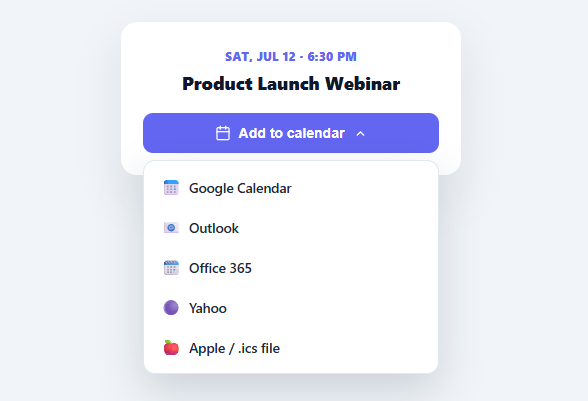
"Add to calendar" is the single most effective way to stop people forgetting an event they signed up for — but doing it right means supporting every major calendar app, because you never know whether your attendee lives in Google Calendar, Outlook, or Apple Calendar. This snippet builds a complete add-to-calendar dropdown in plain HTML, CSS, and vanilla JavaScript: pre-filled event links for Google, Outlook, Office 365, and Yahoo, plus a downloadable .ics file that works with Apple Calendar and everything else.
One event object, every provider
All the event details — title, description, location, start, and end — live in a single EVENT object. Each menu choice builds the right URL or file from it, so updating the event is a one-place change. The web providers (Google, Outlook, Office 365, Yahoo) each have their own URL format with their own parameter names and date encoding, and buildUrl() handles those differences in one function: Google and Yahoo take UTC timestamps in their dates/st/et params, while Outlook and Office 365 take ISO datetimes in startdt/enddt. Getting these formats exactly right is the fiddly part most hand-rolled implementations get wrong, and it's done here for you.
The .ics file covers Apple and everything else
Apple Calendar has no "add event" URL scheme, so the universal answer is an .ics file — the iCalendar standard that every calendar app on every platform can import. downloadIcs() assembles a minimal valid VCALENDAR/VEVENT block with the event fields and the required UTC timestamps, wraps it in a Blob, and triggers a download via a temporary object URL (revoked immediately after to avoid a memory leak). Opening that file adds the event to whatever calendar the user's device defaults to — Apple Calendar on a Mac or iPhone, or any desktop client.
Timezone handling, done correctly
Calendar URLs and .ics files want UTC timestamps in the compact YYYYMMDDTHHMMSSZ format. toUTC() parses the local ISO start/end times and converts them through Date's toISOString(), stripping the separators and milliseconds. This means you author the event in plain local time and the conversion to the calendar-required format happens automatically — the most common source of "the event landed an hour off" bugs is skipping this conversion, which this snippet does for you.
A proper accessible dropdown
The trigger carries aria-haspopup="menu" and a toggled aria-expanded, the menu is role="menu" with role="menuitem" links, and it closes on an outside click or the Escape key — the standard menu pattern. The panel animates in with opacity and transform only (never height), so it stays smooth across every framework export, and web-provider links open in a new tab with noopener for safety while the .ics choice downloads in place.
Why support so many providers
It's tempting to ship only a Google Calendar link, but that abandons every Outlook and Apple user — a large share of any audience. Offering all the major web providers plus the universal .ics file means essentially everyone can add your event in one click, which directly improves attendance for webinars, sales, and appointments.
Build with AI
Build, Understand, Optimize, and Extend It With AI
You don't have to compare calendar URL formats by hand — paste this snippet's HTML, CSS, and JS into an AI coding assistant like Claude and ask it to explain exactly why toUTC strips separators and milliseconds from an ISO string, and why Google/Yahoo need UTC dates in their URL while Outlook and Office 365 take a different parameter format entirely. The same assistant is useful for optimizing it — asking whether the .ics Blob and object URL cleanup in downloadIcs is handling the revokeObjectURL timing correctly across browsers, or whether the menu's outside-click and Escape listeners could be consolidated. It's just as good for extending the button: ask it to add an RRULE line to the .ics output for recurring events, support multiple time zones with a VTIMEZONE block, or generate all five calendar links server-side from one event object shared with a confirmation email. Treat the code less like a finished artifact and more like a starting point for a conversation.
Prompt to recreate it
Copy this into your AI assistant of choice to build the effect from scratch, or as a jumping-off point for your own variant:
Build an "add to calendar" dropdown button in plain HTML, CSS, and JavaScript — no libraries, supporting Google Calendar, Outlook, Office 365, Yahoo, and a downloadable .ics file, all generated from one shared event data object.

Requirements:
- A single JavaScript object holding the event's title, description, location, start time, and end time in local ISO format, used as the single source of truth for every calendar target.
- A URL-building function that returns a correctly formatted link for each web provider: Google Calendar's render endpoint expects UTC timestamps in a single "dates" parameter joined by a slash; Yahoo expects separate start/end UTC parameters; Outlook and Office 365 use their own deeplink compose endpoints with different parameter names (startdt/enddt) and do not require the UTC conversion. Get each provider's specific parameter names and encoding right, not a single generic format.
- A UTC conversion helper that takes a local ISO datetime string and produces the compact YYYYMMDDTHHMMSSZ format required by calendar URLs and the .ics standard, by converting through the Date object's ISO output and stripping dashes, colons, and milliseconds.
- An .ics file generator that assembles a valid VCALENDAR/VEVENT block (with UID, DTSTAMP, DTSTART, DTEND, SUMMARY, DESCRIPTION, LOCATION using CRLF line endings), wraps it in a Blob with a text/calendar MIME type, creates a temporary object URL, triggers a download via a hidden anchor click, and revokes the object URL immediately after to avoid a memory leak.
- A dropdown trigger button with aria-haspopup and aria-expanded, a menu with role="menu" and role="menuitem" links, closing on outside click, Escape key, and after a selection is made — animated with opacity/transform only, never height or display toggling mid-transition.
- Web-provider menu items should open their generated URL in a new tab with rel=noopener; the .ics item should trigger the file download without navigating away from the page.
Want to tighten it up first? Run this prompt through the AI Prompt Studio to score it across 8 quality dimensions, catch anti-patterns, and tune the wording for Claude, ChatGPT, or Gemini before you paste it in.
Step by step
How to Use
- 1Paste HTML, CSS, and JSAn event card with an "Add to calendar" button renders. Click it to open the provider menu.
- 2Pick a providerChoose Google, Outlook, Office 365, or Yahoo — a pre-filled event opens in a new tab ready to save.
- 3Download the .icsChoose "Apple / .ics file" to download a universal calendar file that imports into Apple Calendar or any client.
- 4Edit the event detailsUpdate the EVENT object's title, description, location, start, and end — every provider link and the .ics rebuild from it.
- 5Check the timezoneAuthor start/end in local ISO time; toUTC() converts them to the UTC format calendars require automatically.
- 6Drop it into your pagePlace the button on an event, webinar, or booking confirmation page so attendees can save the date in one click.
Real-world uses
Common Use Cases
Got questions?
Frequently Asked Questions
Apple Calendar has no "add event" URL scheme, so a downloadable .ics file (the iCalendar standard) is the only way to support Apple users — and it works as a universal fallback for any calendar app on any platform. Offering web links for Google/Outlook/Yahoo plus the .ics means essentially every attendee can add your event in one click.
Author the start/end in local ISO time (e.g. 2026-07-12T18:30:00) and let toUTC() convert to the UTC YYYYMMDDTHHMMSSZ format calendars expect. For an event in a specific timezone that differs from the visitor's, include the timezone offset in the ISO string (…T18:30:00-04:00) so the conversion anchors to the right moment regardless of where the visitor is.
For the .ics file, add an RRULE line to the VEVENT (e.g. RRULE:FREQ=WEEKLY;COUNT=8 for eight weekly occurrences). The web-provider URLs have limited recurrence support, so for recurring events the .ics file is the most reliable option — most apps honor its RRULE on import.
In the .ics file, add a VALARM block inside the VEVENT (BEGIN:VALARM, ACTION:DISPLAY, TRIGGER:-PT30M, END:VALARM for a 30-minute-before reminder). Web-provider URLs generally don't accept reminder parameters, so reminders are an .ics-only feature on import.
In React, pass the event as a prop and compute the provider URLs with useMemo, generating the .ics in the click handler; in Vue, use a computed for the URLs; in Angular, use component methods. The URL-building and .ics-generation functions are framework-agnostic — only the dropdown open/close state moves into each framework's reactivity.