Learn Coding Visually
Learn to code with interactive, live-preview playgrounds — HTML, CSS, JavaScript, React & more.
 HTML Playground42 lessons · Click-based · Live preview
 CSS PlaygroundLearn CSS with a live editor
 JavaScript Playground60 lessons · DOM · Async · Canvas
 React PlaygroundLearn React with a live code editor
 GSAP PlaygroundLearn GSAP animation interactively
 SVG Playground44 lessons · shapes · paths · animation
 SCSS Playground45 lessons · Sass modules · tokens
 Tailwind PlaygroundLearn Tailwind CSS with a live editor
 Bootstrap 5 Playground50 lessons · live preview
Virtualized Table — Windowed Row Rendering HTML CSS JS
Virtualized Table (Windowed Rendering) · Tables · Plain HTML, CSS & JS · Live preview
What's included
Features
About this UI Snippet
Virtualized Table — Real Windowed Rendering for Thousands of Rows
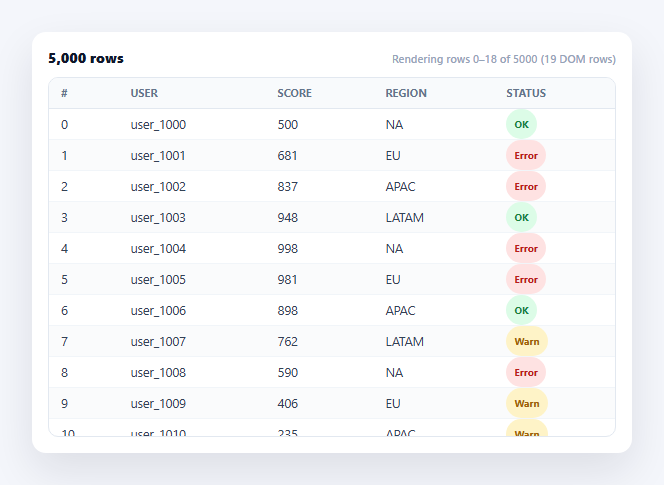
Rendering five thousand <tr> elements into the DOM at once is slow to build, slow to lay out, and heavy on memory — most of those rows are never on screen at any given moment. Virtualization (also called windowing) fixes this by keeping only the rows that are actually visible, plus a small buffer, in the DOM at all times, while a spacer element fakes the full scrollable height so the scrollbar still behaves correctly. This snippet implements genuine windowed rendering over 5,000 generated rows in plain HTML, CSS, and vanilla JavaScript — no library, no shortcuts.
A full-height spacer, a tiny real table
The scroll container holds a .vrt-spacer sized to TOTAL_ROWS * ROW_HEIGHT pixels — the height the table *would* be if every row were rendered — so the browser's native scrollbar reflects the true scrollable distance. Inside it, the actual <table> is absolutely positioned and, at any moment, contains only a couple dozen <tr>s. The spacer is what makes the scrollbar honest while the DOM stays cheap.
Real scroll-position math, not a fixed slice
On every scroll event, renderWindow() reads scroller.scrollTop and converts that pixel offset into a row index with Math.floor((scrollTop - HEADER_HEIGHT) / ROW_HEIGHT) — genuine arithmetic tying the scroll position to which row is first visible, not a hardcoded window that never moves. visibleCount is derived from the viewport's actual clientHeight divided by the fixed row height, so the number of rows rendered adapts if the container is resized.
A buffer so fast scrolling doesn't flash blank rows
Rendering exactly the visible rows and nothing else would show a flicker of empty space during a fast scroll, since the new rows for the next frame haven't rendered yet. BUFFER pads startIndex and endIndex by a few extra rows on each side, so there's always a small overrun of already-rendered content beyond the viewport edge to scroll into before the next renderWindow() call catches up.
Absolute positioning to land rows at their true offset
Because only a slice of the data is ever in the DOM, the rendered <tbody> can't simply start at the top of the container — row 3,000 needs to visually sit 3,000 row-heights down. The <table>'s top style is set to startIndex * ROW_HEIGHT on every render, placing the small set of real rows at the exact pixel offset the full dataset would have put them, so scrolling feels seamless even though the underlying DOM content is constantly being swapped out.
Sticky header, live row count
The header stays position: sticky within the scroll container so column labels remain visible regardless of scroll position, and a live label reports exactly which row indices and how many actual DOM rows are rendered at any moment — useful for seeing the technique work, and a good sanity check that it never renders anywhere close to all 5,000 rows.
Customizing it
Swap fixed-height rows for variable heights (requires tracking cumulative offsets instead of a constant multiply), add horizontal virtualization for very wide tables, or combine with a frozen columns table for pinned columns on a huge dataset. Pair with an infinite scroll table if the data is paginated from a server instead of generated upfront.
Build with AI
Build, Understand, Optimize, and Extend It With AI
Rather than deriving the windowing math yourself, paste this snippet's HTML, CSS, and JS into an AI coding assistant like Claude and ask it to explain exactly why the spacer element needs to be sized to the full virtual content height even though the real table inside it only ever contains a couple dozen rows, and how the startIndex * ROW_HEIGHT positioning keeps those few real rows landing at the same pixel offsets the full unrendered dataset would occupy. The same assistant can help you extend it — ask it to support variable row heights using a cumulative offset lookup instead of a fixed multiply, add horizontal virtualization for a table with hundreds of columns, or wire the data source to a paginated API instead of an in-memory array. It's also useful for verifying correctness: ask it to reason through what happens at the very first and very last scroll positions to confirm the buffer and clamping never render a negative or out-of-bounds row index. Treat the code less like a finished artifact and more like a starting point for a conversation.
Prompt to recreate it
Copy this into your AI assistant of choice to build the effect from scratch, or as a jumping-off point for your own variant:
Build a "virtualized table" (windowed row rendering) in plain HTML, CSS, and JavaScript with no library — a table over 5,000+ generated data rows that never has more than a small window of actual <tr> elements in the DOM at once.

Requirements:
- Generate a large in-memory array of at least 5,000 row objects with a loop, not hand-written data.
- Put the table inside a fixed-height, vertically scrollable container, and inside that container add a separate "spacer" element whose height is set (in JavaScript, from the row count times a fixed row height in pixels) to the full height the table would occupy if every row were actually rendered — this is what keeps the native scrollbar's size and travel distance representative of the true dataset length even though most rows never exist in the DOM.
- On every scroll event on the container, compute the current scroll offset, convert it into a first-visible row index using real division by the fixed row height (not a hardcoded or approximate value), and compute how many rows fit in the container's current viewport height.
- Pad the computed start and end row indices with a small buffer of extra rows on each side (an overscan), so a fast scroll doesn't visibly flash empty space before the next render catches up, and clamp both indices so they never go below 0 or beyond the total row count.
- Render only that slice of the data array into the table body on each scroll event (replacing the previous slice entirely), and absolutely position the table element's vertical offset to startIndex times the row height, so the small set of currently-rendered rows lines up exactly where the full unrendered dataset would have placed them.
- Add a sticky table header that stays visible within the scroll container regardless of scroll position, and a small live label showing which row index range and how many actual DOM rows are currently rendered, to make the virtualization technique visibly verifiable.
- Recalculate the visible row count on window resize, not just on scroll, since the container's viewport height can change independently of scrolling.
Want to tighten it up first? Run this prompt through the AI Prompt Studio to score it across 8 quality dimensions, catch anti-patterns, and tune the wording for Claude, ChatGPT, or Gemini before you paste it in.
Step by step
How to Use
- 1Paste HTML, CSS, and JS5,000 rows are generated in an array and the first window renders inside a fixed-height scroll container.
- 2Scroll the tableOnly the visible rows plus a small buffer exist in the DOM at any moment — check the live row-range label.
- 3Scroll to the very bottomThe scrollbar reaches its true end because the spacer element reflects the full 5,000-row height.
- 4Scroll quicklyThe buffer of extra rows above and below the viewport prevents blank flashes during fast scrolling.
- 5Resize the windowvisibleCount recalculates from the container's live clientHeight, so the rendered window adapts.
- 6Swap in your own dataReplace DATA and TOTAL_ROWS — the windowing math works for any row count.
Real-world uses
Common Use Cases
Got questions?
Frequently Asked Questions
The browser computes scrollbar size and thumb position from the scrollable content's actual height. Since only a tiny slice of rows is ever rendered, without a spacer sized to the full virtual height (TOTAL_ROWS * ROW_HEIGHT) the scrollbar would reflect only the few rendered rows, making it impossible to scroll to the middle or end of the real dataset.
Without it, the rendered window would exactly match the visible viewport, so a fast scroll could outrun the scroll event handler and briefly show blank space before renderWindow catches up. Padding startIndex and endIndex by a few rows on each side keeps a small overrun of already-rendered rows just out of view, ready to scroll into immediately.
Precompute a cumulative offset array where offsets[i] is the sum of all row heights before row i, then binary-search that array for the row index whose offset is closest to scrollTop instead of using a constant division. It is more work than fixed-height virtualization but the windowing logic (buffer, absolute positioning) stays conceptually the same.
Infinite scroll typically loads more data from a server as the user nears the bottom and keeps appending it to a growing DOM, so the DOM size still increases over time. This virtualized table already has all the data in memory and instead swaps which small slice is rendered as you scroll — the DOM never grows past a couple dozen rows regardless of how far you scroll or how large the dataset is.
The math is framework-agnostic: keep scrollTop in state, derive startIndex/endIndex with the same formulas in a memoized calculation, and render only DATA.slice(startIndex, endIndex) mapped to row components with the table absolutely positioned via a computed top style. Libraries like react-window or react-virtual implement this exact pattern with additional ergonomics if you want to skip hand-rolling it.