Learn Coding Visually
Learn to code with interactive, live-preview playgrounds — HTML, CSS, JavaScript, React & more.
 HTML Playground42 lessons · Click-based · Live preview
 CSS PlaygroundLearn CSS with a live editor
 JavaScript Playground60 lessons · DOM · Async · Canvas
 React PlaygroundLearn React with a live code editor
 GSAP PlaygroundLearn GSAP animation interactively
 SVG Playground44 lessons · shapes · paths · animation
 SCSS Playground45 lessons · Sass modules · tokens
 Tailwind PlaygroundLearn Tailwind CSS with a live editor
 Bootstrap 5 Playground50 lessons · live preview
Scroll Position Memory Across Tab Switches — Each Panel Remembers Where You Left Off
Scroll Position Memory Across Tab Switches · Scroll · Plain HTML, CSS & JS · Live preview
What's included
Features
About this UI Snippet
Scroll Position Memory Across Tabs — Getting the Timing Right
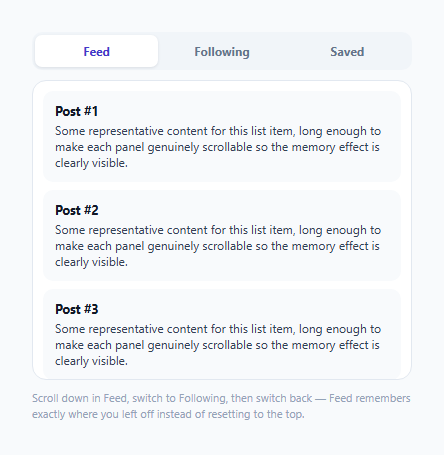
Switching tabs and finding your scroll position reset to the top is a small but genuinely annoying UX papercut — you were fifteen posts deep in a feed, glanced at another tab, and now you're scrolling back down from scratch. The fix is conceptually simple (remember a number, restore it later) but has exactly one timing detail that determines whether it actually works: *when* you save and *when* you restore.
One scroll position per panel, stored independently
scrollMemory is a plain object keyed by tab name, holding each panel's last known scrollTop value. There's no shared or global scroll state — each panel's memory is entirely independent of the others, which is what allows switching between three, five, or any number of tabs to correctly preserve each one's own distinct scroll position simultaneously, not just "the last tab you were on before this one."
Saving happens at the exact moment a panel is about to be hidden, not earlier
switchTab() reads activePanel.scrollTop and writes it into scrollMemory as the very first thing it does — *before* hiding that panel. This is deliberate: it would be tempting to instead save scroll position continuously via a debounced scroll event listener, but that adds unnecessary complexity and a class of subtle staleness bugs (what if the debounce hasn't fired yet at the exact moment of a fast tab switch?) for zero actual benefit — the only moment that genuinely matters is the last one before the panel disappears, so that's the only moment the code reads it.
Restoring happens only after the panel becomes visible again, not before
Setting scrollTop on an element while it's still hidden (or display: none) is unreliable — a hidden element generally has no meaningful scrollable viewport to apply a scroll position to yet. switchTab() unhides the incoming panel (nextPanel.hidden = false) *before* setting its scrollTop, guaranteeing the browser has a genuinely visible, laid-out scrollable element to apply the restored position to at the moment it's set, rather than trying to restore scroll on an element that isn't rendered yet.
Why this is simpler than it might first seem
There's no scroll-tracking library, no requestAnimationFrame loop, no MutationObserver — the entire mechanism is two lines: read scrollTop right before hiding, write scrollTop right after showing. The apparent complexity of "remembering scroll position" mostly comes from getting these two moments right, not from the storage mechanism itself, which is intentionally as plain as possible.
Build with AI
Build, Understand, Optimize, and Extend It With AI
Ask an AI assistant to explain precisely why setting scrollTop on a hidden element is unreliable across browsers, and why saving scroll position at the moment of switching (rather than via a continuously-running scroll listener) is both simpler and avoids a real staleness edge case. It's also worth asking for a version that persists scroll memory across full page reloads using sessionStorage, or one that also handles a dynamically added/removed set of tabs rather than a fixed, known set of three.
Prompt to recreate it
Copy this into your AI assistant of choice to build the effect from scratch, or as a jumping-off point for your own variant:
Build a tabbed interface where each panel independently remembers and restores its own scroll position when switching between tabs, using HTML, CSS, and vanilla JavaScript — no external library.

Requirements:
- At least three tabs, each with its own scrollable panel containing enough list content to require scrolling to see it all.
- Store each panel's scroll position independently, keyed by its own tab identifier, in a plain in-memory object — not a single shared "last scroll position" value.
- When switching tabs, save the outgoing panel's current scroll position at the exact moment just before hiding it (not via a continuously running or debounced scroll listener), then hide it.
- Show the incoming panel, and only AFTER it becomes visible, restore its previously saved scroll position (defaulting to the top if it has never been visited before) — do not attempt to set scroll position while the panel is still hidden.
- Verify the pattern works correctly regardless of the order tabs are switched in, and that each tab's scroll memory remains independently correct even after switching through several other tabs in between visits to it.
- Keep tab button ARIA state (aria-selected) correctly in sync with whichever panel is currently visible.
Want to tighten it up first? Run this prompt through the AI Prompt Studio to score it across 8 quality dimensions, catch anti-patterns, and tune the wording for Claude, ChatGPT, or Gemini before you paste it in.
Step by step
How to Use
- 1Scroll down in the Feed tabScroll partway through the list of feed items.
- 2Switch to the Following tabIt opens at its own top (or wherever it was last left, on a subsequent visit) — Feed's scroll position is saved the instant you switch away from it.
- 3Switch back to FeedIt restores to exactly the scroll position you left it at, rather than resetting to the top.
- 4Scroll in Following, then check Saved, then return to FollowingEach panel maintains its own independent scroll memory simultaneously — switching through multiple tabs doesn't interfere with any of their individually remembered positions.
- 5Adapt scrollMemory for your own tabbed contentApply the same save-on-hide, restore-after-show pattern to any tabbed or panel-swapping UI where scroll position should persist per panel.
Real-world uses
Common Use Cases
Got questions?
Frequently Asked Questions
Continuously tracking scroll via a debounced listener adds unnecessary complexity and a class of subtle staleness bugs if a fast tab switch happens before the debounce fires. Since the only moment that actually matters is the very last one before the panel disappears, reading scrollTop at exactly that moment is simpler and strictly correct — there's no benefit to tracking it any earlier or more frequently.
Setting scrollTop on a hidden (or display:none) element is unreliable, since the element generally has no meaningful scrollable viewport at that point. Unhiding the panel first guarantees the browser has a genuinely visible, laid-out element to apply the restored scroll position to.
Each tab's scroll position is stored independently in the scrollMemory object, keyed by that tab's own name. Switching through several tabs in any order preserves every one of their individual scroll positions simultaneously — there is no single shared value that gets overwritten by whichever tab was visited most recently.
scrollMemory[nextTab] is undefined the first time, and the code falls back to 0 (the top) via the || 0 default — so a panel with no prior recorded scroll position simply opens at its natural starting point.
Yes — the scrollMemory object and the save/restore logic are entirely generic and keyed by tab name, so the same mechanism scales to any number of tabs without any structural changes.
Serialize the scrollMemory object to sessionStorage (or localStorage, depending on how long you want it to persist) whenever it changes, and read it back to initialize scrollMemory on page load — the save/restore timing logic itself would remain unchanged.