Learn Coding Visually
Learn to code with interactive, live-preview playgrounds — HTML, CSS, JavaScript, React & more.
 HTML Playground42 lessons · Click-based · Live preview
 CSS PlaygroundLearn CSS with a live editor
 JavaScript Playground60 lessons · DOM · Async · Canvas
 React PlaygroundLearn React with a live code editor
 GSAP PlaygroundLearn GSAP animation interactively
 SVG Playground44 lessons · shapes · paths · animation
 SCSS Playground45 lessons · Sass modules · tokens
 Tailwind PlaygroundLearn Tailwind CSS with a live editor
 Bootstrap 5 Playground50 lessons · live preview
Scroll-Synced Margin Annotations — IntersectionObserver Footnote Highlighting
Scroll-Synced Margin Annotations · Scroll · Plain HTML, CSS & JS · Live preview
What's included
Features
About this UI Snippet
Scroll-Synced Margin Annotations — Reader and Notes Kept in Sync
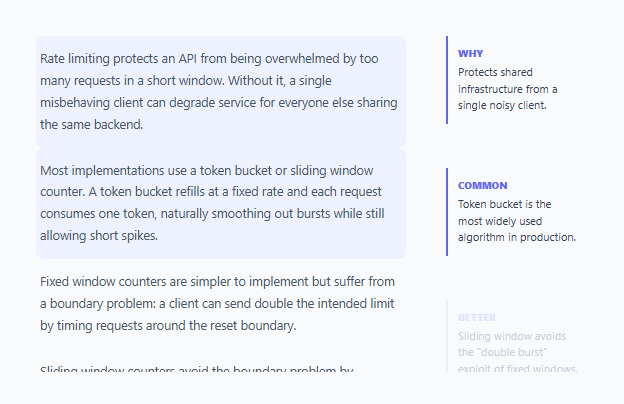
Academic papers and annotated articles have long used side-margin notes to add commentary without interrupting the main text's flow. This snippet recreates that print convention on the web, but adds something print can't: the margin note for whichever paragraph is currently in view lights up automatically as the reader scrolls, so the connection between text and annotation stays visually obvious without the reader having to hunt for it.
Why IntersectionObserver instead of scroll position math
An older approach would listen to the article panel's scroll event and manually compare each paragraph's getBoundingClientRect() against the viewport on every scroll tick — expensive to run at 60fps and easy to get subtly wrong. This snippet instead creates a single IntersectionObserver scoped to the scrollable article panel via root: article, and lets the browser itself efficiently report exactly when each <p data-note> crosses a 60%-visible threshold, firing a callback only when that actually changes rather than on every scroll frame.
A Map, not a loop, connects paragraphs to their notes
Each paragraph carries a data-note="n1" attribute, and each margin note carries a matching data-target="n1". Rather than searching the DOM for a match every time the observer fires, a Map (noteByTarget) is built once up front, so each intersection callback does an O(1) lookup — noteByTarget.get(entry.target.dataset.note) — instead of re-querying the DOM on every scroll-triggered change.
Not every paragraph needs an annotation
Only some <p> elements in the article carry a data-note attribute — plain paragraphs without one are simply never observed and never get an "active" highlight, which mirrors how real annotated texts work: a note calls out a *specific* claim or definition, not every sentence, and the highlighting logic in this snippet naturally reflects that same selectivity.
The threshold controls how "in view" has to be before it counts
threshold: 0.6 means a paragraph must be at least 60% visible within the scrollable article panel before its callback fires as intersecting — tuning this number changes how eagerly the highlight anticipates a paragraph coming into view versus waiting until it's substantially read. A lower threshold highlights earlier (as soon as a small sliver appears); a higher one waits until the paragraph dominates the visible area.
Build with AI
Build, Understand, Optimize, and Extend It With AI
Ask an AI assistant to explain why IntersectionObserver's threshold and root options are the right tool here compared to a scroll-event-and-getBoundingClientRect approach, and what tradeoffs come from choosing a low versus high threshold value for when a note should activate. It's also worth asking for a version that auto-scrolls the margin-notes column to keep the active note in view, or one that supports multiple simultaneous notes per paragraph rendered as a small stacked group.
Prompt to recreate it
Copy this into your AI assistant of choice to build the effect from scratch, or as a jumping-off point for your own variant:
Build a two-column reading layout in HTML, CSS and vanilla JavaScript where margin annotations on the right highlight in sync with whichever paragraph is currently in view in a scrollable article on the left — no external libraries.

Requirements:
- A scrollable article column of paragraphs, where only some paragraphs carry a data-note identifier attribute marking them as having an associated annotation.
- A separate scrollable margin-notes column, where each note element carries a matching data-target attribute referencing one paragraph's data-note value.
- Use the IntersectionObserver API, scoped to the article column as its root, to detect when an annotated paragraph becomes at least 60% visible within that scrollable column — do not use scroll event listeners with manual position calculations.
- When an annotated paragraph becomes sufficiently visible, apply a highlighted visual state to both that paragraph and its matching margin note simultaneously; when it scrolls back out of view, remove the highlight from both.
- Build an efficient paragraph-to-note lookup (e.g. a Map) once up front rather than searching the DOM inside the observer's callback on every intersection change.
- Ensure paragraphs without a data-note attribute are never observed and never produce a highlight, since not every paragraph needs an annotation.
Want to tighten it up first? Run this prompt through the AI Prompt Studio to score it across 8 quality dimensions, catch anti-patterns, and tune the wording for Claude, ChatGPT, or Gemini before you paste it in.
Step by step
How to Use
- 1Tag paragraphs with data-noteAdd data-note="n1" (or any unique id) to any <p> in the article that should have a matching margin annotation.
- 2Add a matching .note with data-targetEach margin note needs a data-target attribute matching the paragraph's data-note value exactly.
- 3Leave un-annotated paragraphs plainParagraphs without a data-note attribute are never observed and never trigger a highlight — use this to be selective about what gets called out.
- 4Adjust the intersection thresholdChange the 0.6 value in the IntersectionObserver options to control how much of a paragraph must be visible before its note activates.
- 5Style the active statesCustomize .active-para and .note.active in the CSS panel to match your reading layout's color scheme.
Real-world uses
Common Use Cases
Got questions?
Frequently Asked Questions
IntersectionObserver lets the browser efficiently notify your code only when a paragraph's visibility actually crosses the specified threshold, rather than running expensive getBoundingClientRect() calculations on every single scroll event, which can fire dozens of times per second.
Both paragraphs' matching notes will be marked active simultaneously — the observer callback runs independently for every entry that crosses the threshold, so multiple simultaneous highlights are expected and handled correctly, not treated as a conflict.
Yes — any .note whose data-target never matches an observed paragraph's data-note simply never activates; extra unmatched notes are harmless but pointless, so keep the sets aligned intentionally.
Yes — the two columns scroll independently and the sync only cares about which paragraph is intersecting within the article's own scroll root; the notes column's own scroll position is unaffected unless you add your own auto-scroll-to-active-note behavior.
The IntersectionObserver options include root: article, which tells the browser to measure intersection against that specific scrollable element's bounds rather than the default (the browser viewport) — necessary since the article scrolls inside its own container, not the page.
Yes — inside the observer callback, when a note becomes active you can call note.scrollIntoView({ behavior: "smooth", block: "center" }) on the notes column to keep the highlighted note visible as the reader scrolls further.