NPS Survey Widget — Free HTML CSS JS Snippet

NPS Survey Widget · Cards · Plain HTML, CSS & JS · Live preview

Share & Support

What's included

Features

Industry-standard 0–10 NPS scale with segment classification
Three contextual follow-up questions (detractor/passive/promoter)
Colour-coded selection: red, amber, and green per segment
Score recap badge on the comment screen for context
Skip option to collect score without requiring a comment
Animated score selection with brief transition delay
Three-screen flow: score → comment → thank-you
Single submit() function for clean API integration

About this UI Snippet

NPS Survey Widget — 0–10 Score Scale, Contextual Follow-Up & Thank-You State
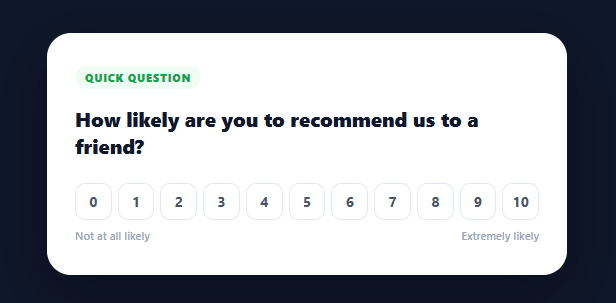
Screenshot of the NPS Survey Widget snippet rendered live

A Net Promoter Score (NPS) survey widget is one of the most commonly used customer feedback instruments in SaaS and e-commerce — alongside the poll widget and the inline helpful feedback widget. The NPS question — "How likely are you to recommend us to a friend?" — classifies respondents as detractors (0–6), passives (7–8), or promoters (9–10), and the follow-up question is tailored to each group for maximum qualitative insight. This snippet provides a complete, polished three-screen NPS widget: the scoring scale, a contextual follow-up, and a thank-you screen.

The NPS classification model

The industry-standard NPS scale runs from 0 to 10. Scores 0–6 are detractors (dissatisfied customers who may churn or leave negative reviews), 7–8 are passives (satisfied but not enthusiastic), and 9–10 are promoters (loyal advocates). The NPS score itself is computed as (promoters% − detractors%). The widget uses a getType() function to classify any selected score into one of the three groups, which then drives the follow-up question and the colour coding.

Dynamic follow-up questions

Each respondent segment gets a different qualitative follow-up question: detractors are asked what would improve their experience, passives what would make them more likely to recommend, and promoters what they love most. This three-way targeting yields far richer qualitative data than a single fixed question and shows respondents that the product team actually read their segment context.

The colour system

Selected score buttons animate to a segment colour: red for detractors, amber for passives, green for promoters — for a stars-based rating instead of a 0–10 scale, see the star rating. This visual feedback confirms the selection and immediately communicates which zone the score falls in, making the three-group model intuitive for users who have not heard of NPS.

Three-screen flow

The widget uses three display-toggled screens in one card container: the score screen, the comment screen (which shows the score recap and tailored question), and the thank-you screen. A brief timeout after score selection makes the transition feel intentional rather than abrupt. The comment screen shows a recap badge so users are reminded of their score as they write.

Skip option

The comment screen offers a Skip link so users who do not want to write a comment can still complete the survey. Forcing a comment reduces completion rates significantly; the skip respects user time while still collecting the numeric score.

Production integration

The submit() function is the single place to call your feedback API with { score, comment }, making wiring straightforward. In a real product the widget is typically shown once per user per period (tracked in localStorage or a backend flag) and submitted to an analytics or CRM endpoint.

Step by step

How to Use

  1. 1
    Click a scoreClick any number from 0 to 10. The selected number highlights in red, amber, or green based on the detractor/passive/promoter classification.
  2. 2
    Answer the follow-upThe widget shows a question tailored to your score group: improvement for detractors, likelihood for passives, love for promoters.
  3. 3
    Submit or skipType a comment and click Submit, or click Skip to submit just the numeric score. The thank-you screen confirms the response.
  4. 4
    Wire to your APIIn the submit() function, POST { score, comment } to your feedback endpoint. Store the score with a userId and timestamp for NPS calculation.
  5. 5
    Control when it appearsShow the widget after a trigger (a completed purchase, a milestone, or a time-based rule). Track shown/responded in localStorage or your backend to avoid surveying the same user repeatedly.
  6. 6
    Export for your frameworkClick "React" for a component with score state and screen management in useState. Click "Vue" for a Vue 3 SFC with reactive state.

Real-world uses

Common Use Cases

Post-feature or post-onboarding SaaS survey
Show the NPS widget after a user completes onboarding, reaches a key milestone, or uses a new feature for the first time. The tailored follow-up questions give product and CX teams actionable qualitative data alongside the numeric score, driving roadmap decisions and churn prevention.
E-commerce post-purchase satisfaction survey
Trigger the widget on the order-confirmation page or in a post-delivery email. The score and follow-up comment feed directly into customer success workflows: detractors get a proactive support outreach, promoters get an invite to leave a review or join a referral programme.
Embedded in-app feedback button
Mount the widget in a slide-out panel triggered by a "Share feedback" button in your app header or sidebar. This always-available placement captures feedback at the moment of experience rather than in an external survey email, yielding higher completion rates and more relevant comments.
Quarterly relationship NPS programme
Send the widget to your entire user base on a quarterly cadence for relationship NPS (measuring overall sentiment rather than a specific interaction). Track segment shifts over time to measure the impact of product improvements, pricing changes, and support initiatives on customer loyalty.
Extend with heatmap and trend analytics
Store each response with a timestamp, user segment, and plan tier. Build a score-distribution heatmap to see where respondents cluster, and chart the NPS trend over time to connect product releases to sentiment changes. The three-group breakdown reveals which segment is driving the overall score movement.
Study a multi-screen widget with state-driven rendering
The three-screen flow using display-toggle is a common SaaS micro-flow pattern: collect input, confirm/qualify, acknowledge. The score classification logic, colour system, and tailored question map are all clean examples of data-driven UI that respond to user input rather than showing a one-size-fits-all flow.

Got questions?

Frequently Asked Questions

NPS = (percentage of promoters) − (percentage of detractors). Passives are excluded from the calculation but tracked separately because they are at risk of moving to either group. To compute it: NPS = (count of 9–10 scores / total responses × 100) − (count of 0–6 scores / total responses × 100). The result is a number between −100 and +100, where anything above 0 is net-positive and above 50 is considered excellent.

A single fixed follow-up question works poorly across all three segments. Detractors have a different problem than promoters — asking a happy promoter "what would improve your experience?" is a misfire that feels tone-deaf. Tailored questions surface the most relevant qualitative data from each group: detractor responses drive the support and retention queue, passive responses inform feature investment, and promoter responses generate testimonial and referral content.

Store a flag in localStorage (e.g., nps_submitted: true and nps_shown_at: timestamp) after the survey is shown or completed. On load, check these values — if the user has already responded, never show it again; if they dismissed it, enforce a cooldown of 30–90 days before showing again. For higher-precision control use a backend flag tied to the user record so the suppression survives device changes.

Store score (number|null) and screen ("score" | "comment" | "thank") in useState. Build the scale as an array .map(), setting score in state on click and transitioning screen after a setTimeout. Derive the NPS type and colours from the score value. The comment screen reads score from state to show the recap and select the follow-up question. submit() posts to your API and sets screen to "thank". For the Tailwind version, click "Tailwind" to get the same markup with utility classes instead of a scoped stylesheet.

NPS Survey Widget — Export as HTML, React, Vue, Angular & Tailwind

HTML
<!DOCTYPE html>
<html lang="en">
<head>
  <meta charset="UTF-8" />
  <meta name="viewport" content="width=device-width, initial-scale=1.0" />
  <title>NPS Survey Widget</title>
  <style>
    * { box-sizing: border-box; margin: 0; padding: 0; }
    body { font-family: system-ui, sans-serif; background: #0f172a; min-height: 100vh; display: flex; align-items: center; justify-content: center; padding: 24px; }
    .wrap { width: 100%; max-width: 520px; }
    .card { background: #fff; border-radius: 24px; padding: 32px 28px; box-shadow: 0 20px 60px rgba(0,0,0,0.35); }
    .badge { background: #f0fdf4; color: #16a34a; font-size: 11px; font-weight: 800; text-transform: uppercase; letter-spacing: 0.8px; padding: 4px 10px; border-radius: 20px; display: inline-block; margin-bottom: 16px; }
    .q { font-size: 20px; font-weight: 800; color: #0f172a; line-height: 1.35; margin-bottom: 24px; }
    .numbers { display: flex; gap: 6px; margin-bottom: 8px; }
    .num { flex: 1; aspect-ratio: 1; display: flex; align-items: center; justify-content: center; border-radius: 10px; border: 1.5px solid #e2e8f0; font-size: 14px; font-weight: 700; color: #475569; cursor: pointer; transition: all 0.15s; background: #fff; }
    .num:hover { border-color: #6366f1; color: #6366f1; background: #f5f3ff; transform: translateY(-2px); }
    .num.selected { color: #fff; border-color: transparent; transform: translateY(-2px); box-shadow: 0 4px 12px rgba(0,0,0,0.2); }
    .scale-labels { display: flex; justify-content: space-between; font-size: 11px; color: #94a3b8; font-weight: 600; }
    .score-recap { display: flex; align-items: center; gap: 10px; margin-bottom: 16px; }
    .recap-score { width: 42px; height: 42px; border-radius: 12px; display: flex; align-items: center; justify-content: center; font-size: 18px; font-weight: 900; color: #fff; flex-shrink: 0; }
    .recap-label { font-size: 13px; color: #475569; }
    .recap-type { font-weight: 700; }
    .comment { width: 100%; border: 1.5px solid #e2e8f0; border-radius: 12px; padding: 12px 14px; font-size: 14px; font-family: inherit; color: #1e293b; outline: none; resize: vertical; transition: border-color 0.15s; }
    .comment:focus { border-color: #6366f1; }
    .submit { width: 100%; background: #6366f1; color: #fff; border: none; padding: 13px; border-radius: 12px; font-size: 15px; font-weight: 800; cursor: pointer; margin-top: 12px; transition: background 0.15s; }
    .submit:hover { background: #4f46e5; }
    .skip { display: block; width: 100%; background: none; border: none; color: #94a3b8; font-size: 13px; font-weight: 600; cursor: pointer; margin-top: 10px; padding: 4px; }
    .skip:hover { color: #475569; }
    .thank-icon { font-size: 48px; margin-bottom: 12px; }
    .thank-sub { font-size: 14px; color: #64748b; margin-top: 10px; line-height: 1.5; }
  </style>
</head>
<body>
  <div class="wrap">
    <div class="card" id="card">
      <div class="screen" id="scoreScreen">
        <span class="badge">Quick question</span>
        <h2 class="q">How likely are you to recommend us to a friend?</h2>
        <div class="scale">
          <div class="numbers" id="numbers"></div>
          <div class="scale-labels">
            <span>Not at all likely</span>
            <span>Extremely likely</span>
          </div>
        </div>
      </div>
      <div class="screen" id="commentScreen" style="display:none">
        <div class="score-recap" id="recap"></div>
        <h2 class="q" id="followUpQ"></h2>
        <textarea class="comment" id="comment" placeholder="Tell us more…" rows="3"></textarea>
        <button class="submit" onclick="submit()">Submit feedback</button>
        <button class="skip" onclick="submit(true)">Skip</button>
      </div>
      <div class="screen" id="thankScreen" style="display:none">
        <div class="thank-icon">💜</div>
        <h2 class="q">Thank you for your feedback!</h2>
        <p class="thank-sub">Your response helps us make the product better for everyone.</p>
      </div>
    </div>
  </div>
  <script>
    var score = null;
    var followUpMap = {
      detractor: 'What could we do to improve your experience?',
      passive:   'What would make you more likely to recommend us?',
      promoter:  'What do you love most about the product?'
    };
    var colorMap = {
      detractor: '#ef4444',
      passive:   '#f59e0b',
      promoter:  '#22c55e'
    };
    
    function getType(n) {
      return n <= 6 ? 'detractor' : n <= 8 ? 'passive' : 'promoter';
    }
    
    function buildScale() {
      var el = document.getElementById('numbers');
      for (var i = 0; i <= 10; i++) {
        var btn = document.createElement('div');
        btn.className = 'num';
        btn.textContent = i;
        btn.dataset.n = i;
        btn.onclick = (function(n) { return function() { selectScore(n); }; })(i);
        el.appendChild(btn);
      }
    }
    
    function selectScore(n) {
      score = n;
      document.querySelectorAll('.num').forEach(function(el) {
        var v = parseInt(el.dataset.n);
        var type = getType(n);
        el.classList.toggle('selected', v === n);
        if (v === n) el.style.background = colorMap[type];
        else el.style.background = '';
      });
      setTimeout(function() { showComment(n); }, 350);
    }
    
    function showComment(n) {
      var type = getType(n);
      var typeLabel = type.charAt(0).toUpperCase() + type.slice(1);
      document.getElementById('recap').innerHTML =
        '<div class="recap-score" style="background:' + colorMap[type] + '">' + n + '</div>' +
        '<div class="recap-label">You selected <span class="recap-type">' + typeLabel + '</span></div>';
      document.getElementById('followUpQ').textContent = followUpMap[type];
      document.getElementById('scoreScreen').style.display = 'none';
      document.getElementById('commentScreen').style.display = 'block';
    }
    
    function submit(skip) {
      var comment = skip ? '' : document.getElementById('comment').value.trim();
      document.getElementById('commentScreen').style.display = 'none';
      document.getElementById('thankScreen').style.display = 'block';
      // In production: POST { score, comment } to your feedback endpoint
    }
    
    buildScale();
  </script>
</body>
</html>
Tailwind
<!DOCTYPE html>
<html lang="en">
<head>
  <meta charset="UTF-8" />
  <meta name="viewport" content="width=device-width, initial-scale=1.0" />
  <title>NPS Survey Widget</title>
  <!-- Tailwind CSS v3+ — arbitrary value classes (e.g. bg-[#0f172a]) are valid -->
  <script src="https://cdn.tailwindcss.com"></script>
  <style>
    * {
      box-sizing: border-box; margin: 0; padding: 0;
    }

    body {
      font-family: system-ui, sans-serif; background: #0f172a; min-height: 100vh; display: flex; align-items: center; justify-content: center; padding: 24px;
    }

    .numbers {
      display: flex; gap: 6px; margin-bottom: 8px;
    }

    .num {
      flex: 1; aspect-ratio: 1; display: flex; align-items: center; justify-content: center; border-radius: 10px; border: 1.5px solid #e2e8f0; font-size: 14px; font-weight: 700; color: #475569; cursor: pointer; transition: all 0.15s; background: #fff;
    }

    .num:hover {
      border-color: #6366f1; color: #6366f1; background: #f5f3ff; transform: translateY(-2px);
    }

    .num.selected {
      color: #fff; border-color: transparent; transform: translateY(-2px); box-shadow: 0 4px 12px rgba(0,0,0,0.2);
    }

    .recap-score {
      width: 42px; height: 42px; border-radius: 12px; display: flex; align-items: center; justify-content: center; font-size: 18px; font-weight: 900; color: #fff; flex-shrink: 0;
    }

    .recap-label {
      font-size: 13px; color: #475569;
    }

    .recap-type {
      font-weight: 700;
    }

    .comment {
      width: 100%; border: 1.5px solid #e2e8f0; border-radius: 12px; padding: 12px 14px; font-size: 14px; font-family: inherit; color: #1e293b; outline: none; resize: vertical; transition: border-color 0.15s;
    }

    .comment:focus {
      border-color: #6366f1;
    }
  </style>
</head>
<body>
  <div class="w-full max-w-[520px]">
    <div class="bg-[#fff] rounded-3xl py-8 px-7 shadow-[0_20px_60px_rgba(0,0,0,0.35)]" id="card">
      <div class="screen" id="scoreScreen">
        <span class="bg-[#f0fdf4] text-[#16a34a] text-[11px] font-extrabold uppercase tracking-[0.8px] py-1 px-2.5 rounded-[20px] inline-block mb-4">Quick question</span>
        <h2 class="text-xl font-extrabold text-[#0f172a] leading-[1.35] mb-6">How likely are you to recommend us to a friend?</h2>
        <div class="scale">
          <div class="numbers" id="numbers"></div>
          <div class="flex justify-between text-[11px] text-[#94a3b8] font-semibold">
            <span>Not at all likely</span>
            <span>Extremely likely</span>
          </div>
        </div>
      </div>
      <div class="screen" id="commentScreen" style="display:none">
        <div class="flex items-center gap-2.5 mb-4" id="recap"></div>
        <h2 class="text-xl font-extrabold text-[#0f172a] leading-[1.35] mb-6" id="followUpQ"></h2>
        <textarea class="comment" id="comment" placeholder="Tell us more…" rows="3"></textarea>
        <button class="w-full bg-[#6366f1] text-[#fff] border-0 p-[13px] rounded-xl text-[15px] font-extrabold cursor-pointer mt-3 [transition:background_0.15s] hover:bg-[#4f46e5]" onclick="submit()">Submit feedback</button>
        <button class="block w-full bg-transparent border-0 text-[#94a3b8] text-[13px] font-semibold cursor-pointer mt-2.5 p-1 hover:text-[#475569]" onclick="submit(true)">Skip</button>
      </div>
      <div class="screen" id="thankScreen" style="display:none">
        <div class="text-5xl mb-3">💜</div>
        <h2 class="text-xl font-extrabold text-[#0f172a] leading-[1.35] mb-6">Thank you for your feedback!</h2>
        <p class="text-sm text-[#64748b] mt-2.5 leading-normal">Your response helps us make the product better for everyone.</p>
      </div>
    </div>
  </div>
  <script>
    var score = null;
    var followUpMap = {
      detractor: 'What could we do to improve your experience?',
      passive:   'What would make you more likely to recommend us?',
      promoter:  'What do you love most about the product?'
    };
    var colorMap = {
      detractor: '#ef4444',
      passive:   '#f59e0b',
      promoter:  '#22c55e'
    };
    
    function getType(n) {
      return n <= 6 ? 'detractor' : n <= 8 ? 'passive' : 'promoter';
    }
    
    function buildScale() {
      var el = document.getElementById('numbers');
      for (var i = 0; i <= 10; i++) {
        var btn = document.createElement('div');
        btn.className = 'num';
        btn.textContent = i;
        btn.dataset.n = i;
        btn.onclick = (function(n) { return function() { selectScore(n); }; })(i);
        el.appendChild(btn);
      }
    }
    
    function selectScore(n) {
      score = n;
      document.querySelectorAll('.num').forEach(function(el) {
        var v = parseInt(el.dataset.n);
        var type = getType(n);
        el.classList.toggle('selected', v === n);
        if (v === n) el.style.background = colorMap[type];
        else el.style.background = '';
      });
      setTimeout(function() { showComment(n); }, 350);
    }
    
    function showComment(n) {
      var type = getType(n);
      var typeLabel = type.charAt(0).toUpperCase() + type.slice(1);
      document.getElementById('recap').innerHTML =
        '<div class="recap-score" style="background:' + colorMap[type] + '">' + n + '</div>' +
        '<div class="recap-label">You selected <span class="recap-type">' + typeLabel + '</span></div>';
      document.getElementById('followUpQ').textContent = followUpMap[type];
      document.getElementById('scoreScreen').style.display = 'none';
      document.getElementById('commentScreen').style.display = 'block';
    }
    
    function submit(skip) {
      var comment = skip ? '' : document.getElementById('comment').value.trim();
      document.getElementById('commentScreen').style.display = 'none';
      document.getElementById('thankScreen').style.display = 'block';
      // In production: POST { score, comment } to your feedback endpoint
    }
    
    buildScale();
  </script>
</body>
</html>
React
import React, { useEffect } from 'react';

// CSS — optionally move to NPSSurveyWidget.module.css
const css = `
* { box-sizing: border-box; margin: 0; padding: 0; }
body { font-family: system-ui, sans-serif; background: #0f172a; min-height: 100vh; display: flex; align-items: center; justify-content: center; padding: 24px; }
.wrap { width: 100%; max-width: 520px; }
.card { background: #fff; border-radius: 24px; padding: 32px 28px; box-shadow: 0 20px 60px rgba(0,0,0,0.35); }
.badge { background: #f0fdf4; color: #16a34a; font-size: 11px; font-weight: 800; text-transform: uppercase; letter-spacing: 0.8px; padding: 4px 10px; border-radius: 20px; display: inline-block; margin-bottom: 16px; }
.q { font-size: 20px; font-weight: 800; color: #0f172a; line-height: 1.35; margin-bottom: 24px; }
.numbers { display: flex; gap: 6px; margin-bottom: 8px; }
.num { flex: 1; aspect-ratio: 1; display: flex; align-items: center; justify-content: center; border-radius: 10px; border: 1.5px solid #e2e8f0; font-size: 14px; font-weight: 700; color: #475569; cursor: pointer; transition: all 0.15s; background: #fff; }
.num:hover { border-color: #6366f1; color: #6366f1; background: #f5f3ff; transform: translateY(-2px); }
.num.selected { color: #fff; border-color: transparent; transform: translateY(-2px); box-shadow: 0 4px 12px rgba(0,0,0,0.2); }
.scale-labels { display: flex; justify-content: space-between; font-size: 11px; color: #94a3b8; font-weight: 600; }
.score-recap { display: flex; align-items: center; gap: 10px; margin-bottom: 16px; }
.recap-score { width: 42px; height: 42px; border-radius: 12px; display: flex; align-items: center; justify-content: center; font-size: 18px; font-weight: 900; color: #fff; flex-shrink: 0; }
.recap-label { font-size: 13px; color: #475569; }
.recap-type { font-weight: 700; }
.comment { width: 100%; border: 1.5px solid #e2e8f0; border-radius: 12px; padding: 12px 14px; font-size: 14px; font-family: inherit; color: #1e293b; outline: none; resize: vertical; transition: border-color 0.15s; }
.comment:focus { border-color: #6366f1; }
.submit { width: 100%; background: #6366f1; color: #fff; border: none; padding: 13px; border-radius: 12px; font-size: 15px; font-weight: 800; cursor: pointer; margin-top: 12px; transition: background 0.15s; }
.submit:hover { background: #4f46e5; }
.skip { display: block; width: 100%; background: none; border: none; color: #94a3b8; font-size: 13px; font-weight: 600; cursor: pointer; margin-top: 10px; padding: 4px; }
.skip:hover { color: #475569; }
.thank-icon { font-size: 48px; margin-bottom: 12px; }
.thank-sub { font-size: 14px; color: #64748b; margin-top: 10px; line-height: 1.5; }
`;

export default function NPSSurveyWidget() {
  // Auto-generated escape hatch: the original snippet's vanilla JS runs once
  // after mount and queries the rendered DOM. For idiomatic React, lift this
  // into state + handlers.
  useEffect(() => {
    const _listeners = [];
    const _originalAddEventListener = EventTarget.prototype.addEventListener;
    EventTarget.prototype.addEventListener = function(type, listener, options) {
      _listeners.push({ target: this, type, listener, options });
      return _originalAddEventListener.call(this, type, listener, options);
    };
    var score = null;
    var followUpMap = {
      detractor: 'What could we do to improve your experience?',
      passive:   'What would make you more likely to recommend us?',
      promoter:  'What do you love most about the product?'
    };
    var colorMap = {
      detractor: '#ef4444',
      passive:   '#f59e0b',
      promoter:  '#22c55e'
    };
    
    function getType(n) {
      return n <= 6 ? 'detractor' : n <= 8 ? 'passive' : 'promoter';
    }
    
    function buildScale() {
      var el = document.getElementById('numbers');
      for (var i = 0; i <= 10; i++) {
        var btn = document.createElement('div');
        btn.className = 'num';
        btn.textContent = i;
        btn.dataset.n = i;
        btn.onclick = (function(n) { return function() { selectScore(n); }; })(i);
        el.appendChild(btn);
      }
    }
    
    function selectScore(n) {
      score = n;
      document.querySelectorAll('.num').forEach(function(el) {
        var v = parseInt(el.dataset.n);
        var type = getType(n);
        el.classList.toggle('selected', v === n);
        if (v === n) el.style.background = colorMap[type];
        else el.style.background = '';
      });
      setTimeout(function() { showComment(n); }, 350);
    }
    
    function showComment(n) {
      var type = getType(n);
      var typeLabel = type.charAt(0).toUpperCase() + type.slice(1);
      document.getElementById('recap').innerHTML =
        '<div class="recap-score" style="background:' + colorMap[type] + '">' + n + '</div>' +
        '<div class="recap-label">You selected <span class="recap-type">' + typeLabel + '</span></div>';
      document.getElementById('followUpQ').textContent = followUpMap[type];
      document.getElementById('scoreScreen').style.display = 'none';
      document.getElementById('commentScreen').style.display = 'block';
    }
    
    function submit(skip) {
      var comment = skip ? '' : document.getElementById('comment').value.trim();
      document.getElementById('commentScreen').style.display = 'none';
      document.getElementById('thankScreen').style.display = 'block';
      // In production: POST { score, comment } to your feedback endpoint
    }
    
    buildScale();
    // Cleanup: restore addEventListener and remove all listeners
    return () => {
      EventTarget.prototype.addEventListener = _originalAddEventListener;
      for (const { target, type, listener, options } of _listeners) {
        target.removeEventListener(type, listener, options);
      }
    };

    // Expose handlers used by inline JSX events to the global scope
    if (typeof submit === 'function') window.submit = submit;
  }, []);

  return (
    <>
      <style>{css}</style>
      <div className="wrap">
        <div className="card" id="card">
          <div className="screen" id="scoreScreen">
            <span className="badge">Quick question</span>
            <h2 className="q">How likely are you to recommend us to a friend?</h2>
            <div className="scale">
              <div className="numbers" id="numbers"></div>
              <div className="scale-labels">
                <span>Not at all likely</span>
                <span>Extremely likely</span>
              </div>
            </div>
          </div>
          <div className="screen" id="commentScreen" style={{ display: 'none' }}>
            <div className="score-recap" id="recap"></div>
            <h2 className="q" id="followUpQ"></h2>
            <textarea className="comment" id="comment" placeholder="Tell us more…" rows="3"></textarea>
            <button className="submit" onClick={(event) => { submit() }}>Submit feedback</button>
            <button className="skip" onClick={(event) => { submit(true) }}>Skip</button>
          </div>
          <div className="screen" id="thankScreen" style={{ display: 'none' }}>
            <div className="thank-icon">💜</div>
            <h2 className="q">Thank you for your feedback!</h2>
            <p className="thank-sub">Your response helps us make the product better for everyone.</p>
          </div>
        </div>
      </div>
    </>
  );
}
React + Tailwind
import React, { useEffect } from 'react';
// Requires Tailwind CSS v3+ — https://tailwindcss.com/docs/installation
// Arbitrary value classes (e.g. bg-[#0f172a]) are valid Tailwind v3+

export default function NPSSurveyWidget() {
  // Auto-generated escape hatch: the original snippet's vanilla JS runs once
  // after mount and queries the rendered DOM. For idiomatic React, lift this
  // into state + handlers.
  useEffect(() => {
    const _listeners = [];
    const _originalAddEventListener = EventTarget.prototype.addEventListener;
    EventTarget.prototype.addEventListener = function(type, listener, options) {
      _listeners.push({ target: this, type, listener, options });
      return _originalAddEventListener.call(this, type, listener, options);
    };
    var score = null;
    var followUpMap = {
      detractor: 'What could we do to improve your experience?',
      passive:   'What would make you more likely to recommend us?',
      promoter:  'What do you love most about the product?'
    };
    var colorMap = {
      detractor: '#ef4444',
      passive:   '#f59e0b',
      promoter:  '#22c55e'
    };
    
    function getType(n) {
      return n <= 6 ? 'detractor' : n <= 8 ? 'passive' : 'promoter';
    }
    
    function buildScale() {
      var el = document.getElementById('numbers');
      for (var i = 0; i <= 10; i++) {
        var btn = document.createElement('div');
        btn.className = 'num';
        btn.textContent = i;
        btn.dataset.n = i;
        btn.onclick = (function(n) { return function() { selectScore(n); }; })(i);
        el.appendChild(btn);
      }
    }
    
    function selectScore(n) {
      score = n;
      document.querySelectorAll('.num').forEach(function(el) {
        var v = parseInt(el.dataset.n);
        var type = getType(n);
        el.classList.toggle('selected', v === n);
        if (v === n) el.style.background = colorMap[type];
        else el.style.background = '';
      });
      setTimeout(function() { showComment(n); }, 350);
    }
    
    function showComment(n) {
      var type = getType(n);
      var typeLabel = type.charAt(0).toUpperCase() + type.slice(1);
      document.getElementById('recap').innerHTML =
        '<div class="recap-score" style="background:' + colorMap[type] + '">' + n + '</div>' +
        '<div class="recap-label">You selected <span class="recap-type">' + typeLabel + '</span></div>';
      document.getElementById('followUpQ').textContent = followUpMap[type];
      document.getElementById('scoreScreen').style.display = 'none';
      document.getElementById('commentScreen').style.display = 'block';
    }
    
    function submit(skip) {
      var comment = skip ? '' : document.getElementById('comment').value.trim();
      document.getElementById('commentScreen').style.display = 'none';
      document.getElementById('thankScreen').style.display = 'block';
      // In production: POST { score, comment } to your feedback endpoint
    }
    
    buildScale();
    // Cleanup: restore addEventListener and remove all listeners
    return () => {
      EventTarget.prototype.addEventListener = _originalAddEventListener;
      for (const { target, type, listener, options } of _listeners) {
        target.removeEventListener(type, listener, options);
      }
    };

    // Expose handlers used by inline JSX events to the global scope
    if (typeof submit === 'function') window.submit = submit;
  }, []);

  return (
    <>
      <style>{`
* {
  box-sizing: border-box; margin: 0; padding: 0;
}

body {
  font-family: system-ui, sans-serif; background: #0f172a; min-height: 100vh; display: flex; align-items: center; justify-content: center; padding: 24px;
}

.numbers {
  display: flex; gap: 6px; margin-bottom: 8px;
}

.num {
  flex: 1; aspect-ratio: 1; display: flex; align-items: center; justify-content: center; border-radius: 10px; border: 1.5px solid #e2e8f0; font-size: 14px; font-weight: 700; color: #475569; cursor: pointer; transition: all 0.15s; background: #fff;
}

.num:hover {
  border-color: #6366f1; color: #6366f1; background: #f5f3ff; transform: translateY(-2px);
}

.num.selected {
  color: #fff; border-color: transparent; transform: translateY(-2px); box-shadow: 0 4px 12px rgba(0,0,0,0.2);
}

.recap-score {
  width: 42px; height: 42px; border-radius: 12px; display: flex; align-items: center; justify-content: center; font-size: 18px; font-weight: 900; color: #fff; flex-shrink: 0;
}

.recap-label {
  font-size: 13px; color: #475569;
}

.recap-type {
  font-weight: 700;
}

.comment {
  width: 100%; border: 1.5px solid #e2e8f0; border-radius: 12px; padding: 12px 14px; font-size: 14px; font-family: inherit; color: #1e293b; outline: none; resize: vertical; transition: border-color 0.15s;
}

.comment:focus {
  border-color: #6366f1;
}
      `}</style>
      <div className="w-full max-w-[520px]">
        <div className="bg-[#fff] rounded-3xl py-8 px-7 shadow-[0_20px_60px_rgba(0,0,0,0.35)]" id="card">
          <div className="screen" id="scoreScreen">
            <span className="bg-[#f0fdf4] text-[#16a34a] text-[11px] font-extrabold uppercase tracking-[0.8px] py-1 px-2.5 rounded-[20px] inline-block mb-4">Quick question</span>
            <h2 className="text-xl font-extrabold text-[#0f172a] leading-[1.35] mb-6">How likely are you to recommend us to a friend?</h2>
            <div className="scale">
              <div className="numbers" id="numbers"></div>
              <div className="flex justify-between text-[11px] text-[#94a3b8] font-semibold">
                <span>Not at all likely</span>
                <span>Extremely likely</span>
              </div>
            </div>
          </div>
          <div className="screen" id="commentScreen" style={{ display: 'none' }}>
            <div className="flex items-center gap-2.5 mb-4" id="recap"></div>
            <h2 className="text-xl font-extrabold text-[#0f172a] leading-[1.35] mb-6" id="followUpQ"></h2>
            <textarea className="comment" id="comment" placeholder="Tell us more…" rows="3"></textarea>
            <button className="w-full bg-[#6366f1] text-[#fff] border-0 p-[13px] rounded-xl text-[15px] font-extrabold cursor-pointer mt-3 [transition:background_0.15s] hover:bg-[#4f46e5]" onClick={(event) => { submit() }}>Submit feedback</button>
            <button className="block w-full bg-transparent border-0 text-[#94a3b8] text-[13px] font-semibold cursor-pointer mt-2.5 p-1 hover:text-[#475569]" onClick={(event) => { submit(true) }}>Skip</button>
          </div>
          <div className="screen" id="thankScreen" style={{ display: 'none' }}>
            <div className="text-5xl mb-3">💜</div>
            <h2 className="text-xl font-extrabold text-[#0f172a] leading-[1.35] mb-6">Thank you for your feedback!</h2>
            <p className="text-sm text-[#64748b] mt-2.5 leading-normal">Your response helps us make the product better for everyone.</p>
          </div>
        </div>
      </div>
    </>
  );
}
Vue
<template>
  <div class="wrap">
    <div class="card" id="card">
      <div class="screen" id="scoreScreen">
        <span class="badge">Quick question</span>
        <h2 class="q">How likely are you to recommend us to a friend?</h2>
        <div class="scale">
          <div class="numbers" id="numbers"></div>
          <div class="scale-labels">
            <span>Not at all likely</span>
            <span>Extremely likely</span>
          </div>
        </div>
      </div>
      <div class="screen" id="commentScreen" style="display:none">
        <div class="score-recap" id="recap"></div>
        <h2 class="q" id="followUpQ"></h2>
        <textarea class="comment" id="comment" placeholder="Tell us more…" rows="3"></textarea>
        <button class="submit" @click="submit()">Submit feedback</button>
        <button class="skip" @click="submit(true)">Skip</button>
      </div>
      <div class="screen" id="thankScreen" style="display:none">
        <div class="thank-icon">💜</div>
        <h2 class="q">Thank you for your feedback!</h2>
        <p class="thank-sub">Your response helps us make the product better for everyone.</p>
      </div>
    </div>
  </div>
</template>

<script setup>
import { onMounted } from 'vue';

var score = null;
var followUpMap = {
  detractor: 'What could we do to improve your experience?',
  passive:   'What would make you more likely to recommend us?',
  promoter:  'What do you love most about the product?'
};
var colorMap = {
  detractor: '#ef4444',
  passive:   '#f59e0b',
  promoter:  '#22c55e'
};
function getType(n) {
  return n <= 6 ? 'detractor' : n <= 8 ? 'passive' : 'promoter';
}
function buildScale() {
  var el = document.getElementById('numbers');
  for (var i = 0; i <= 10; i++) {
    var btn = document.createElement('div');
    btn.className = 'num';
    btn.textContent = i;
    btn.dataset.n = i;
    btn.onclick = (function(n) { return function() { selectScore(n); }; })(i);
    el.appendChild(btn);
  }
}
function selectScore(n) {
  score = n;
  document.querySelectorAll('.num').forEach(function(el) {
    var v = parseInt(el.dataset.n);
    var type = getType(n);
    el.classList.toggle('selected', v === n);
    if (v === n) el.style.background = colorMap[type];
    else el.style.background = '';
  });
  setTimeout(function() { showComment(n); }, 350);
}
function showComment(n) {
  var type = getType(n);
  var typeLabel = type.charAt(0).toUpperCase() + type.slice(1);
  document.getElementById('recap').innerHTML =
    '<div class="recap-score" style="background:' + colorMap[type] + '">' + n + '</div>' +
    '<div class="recap-label">You selected <span class="recap-type">' + typeLabel + '</span></div>';
  document.getElementById('followUpQ').textContent = followUpMap[type];
  document.getElementById('scoreScreen').style.display = 'none';
  document.getElementById('commentScreen').style.display = 'block';
}
function submit(skip) {
  var comment = skip ? '' : document.getElementById('comment').value.trim();
  document.getElementById('commentScreen').style.display = 'none';
  document.getElementById('thankScreen').style.display = 'block';
  // In production: POST { score, comment } to your feedback endpoint
}

onMounted(() => {
  buildScale();
});
</script>

<style scoped>
* { box-sizing: border-box; margin: 0; padding: 0; }
body { font-family: system-ui, sans-serif; background: #0f172a; min-height: 100vh; display: flex; align-items: center; justify-content: center; padding: 24px; }
.wrap { width: 100%; max-width: 520px; }
.card { background: #fff; border-radius: 24px; padding: 32px 28px; box-shadow: 0 20px 60px rgba(0,0,0,0.35); }
.badge { background: #f0fdf4; color: #16a34a; font-size: 11px; font-weight: 800; text-transform: uppercase; letter-spacing: 0.8px; padding: 4px 10px; border-radius: 20px; display: inline-block; margin-bottom: 16px; }
.q { font-size: 20px; font-weight: 800; color: #0f172a; line-height: 1.35; margin-bottom: 24px; }
.numbers { display: flex; gap: 6px; margin-bottom: 8px; }
.num { flex: 1; aspect-ratio: 1; display: flex; align-items: center; justify-content: center; border-radius: 10px; border: 1.5px solid #e2e8f0; font-size: 14px; font-weight: 700; color: #475569; cursor: pointer; transition: all 0.15s; background: #fff; }
.num:hover { border-color: #6366f1; color: #6366f1; background: #f5f3ff; transform: translateY(-2px); }
.num.selected { color: #fff; border-color: transparent; transform: translateY(-2px); box-shadow: 0 4px 12px rgba(0,0,0,0.2); }
.scale-labels { display: flex; justify-content: space-between; font-size: 11px; color: #94a3b8; font-weight: 600; }
.score-recap { display: flex; align-items: center; gap: 10px; margin-bottom: 16px; }
.recap-score { width: 42px; height: 42px; border-radius: 12px; display: flex; align-items: center; justify-content: center; font-size: 18px; font-weight: 900; color: #fff; flex-shrink: 0; }
.recap-label { font-size: 13px; color: #475569; }
.recap-type { font-weight: 700; }
.comment { width: 100%; border: 1.5px solid #e2e8f0; border-radius: 12px; padding: 12px 14px; font-size: 14px; font-family: inherit; color: #1e293b; outline: none; resize: vertical; transition: border-color 0.15s; }
.comment:focus { border-color: #6366f1; }
.submit { width: 100%; background: #6366f1; color: #fff; border: none; padding: 13px; border-radius: 12px; font-size: 15px; font-weight: 800; cursor: pointer; margin-top: 12px; transition: background 0.15s; }
.submit:hover { background: #4f46e5; }
.skip { display: block; width: 100%; background: none; border: none; color: #94a3b8; font-size: 13px; font-weight: 600; cursor: pointer; margin-top: 10px; padding: 4px; }
.skip:hover { color: #475569; }
.thank-icon { font-size: 48px; margin-bottom: 12px; }
.thank-sub { font-size: 14px; color: #64748b; margin-top: 10px; line-height: 1.5; }
</style>
Angular
// @ts-nocheck
// Note: vanilla JS DOM manipulation is preserved as-is inside ngAfterViewInit().
// For idiomatic Angular, replace document.getElementById() with @ViewChild() refs
// and move state into component properties with two-way binding.
import { Component, AfterViewInit, ViewEncapsulation } from '@angular/core';
import { CommonModule } from '@angular/common';

@Component({
  selector: 'app-n-p-s-survey-widget',
  standalone: true,
  imports: [CommonModule],
  encapsulation: ViewEncapsulation.None,
  template: `
    <div class="wrap">
      <div class="card" id="card">
        <div class="screen" id="scoreScreen">
          <span class="badge">Quick question</span>
          <h2 class="q">How likely are you to recommend us to a friend?</h2>
          <div class="scale">
            <div class="numbers" id="numbers"></div>
            <div class="scale-labels">
              <span>Not at all likely</span>
              <span>Extremely likely</span>
            </div>
          </div>
        </div>
        <div class="screen" id="commentScreen" style="display:none">
          <div class="score-recap" id="recap"></div>
          <h2 class="q" id="followUpQ"></h2>
          <textarea class="comment" id="comment" placeholder="Tell us more…" rows="3"></textarea>
          <button class="submit" (click)="submit()">Submit feedback</button>
          <button class="skip" (click)="submit(true)">Skip</button>
        </div>
        <div class="screen" id="thankScreen" style="display:none">
          <div class="thank-icon">💜</div>
          <h2 class="q">Thank you for your feedback!</h2>
          <p class="thank-sub">Your response helps us make the product better for everyone.</p>
        </div>
      </div>
    </div>
  `,
  styles: [`
    * { box-sizing: border-box; margin: 0; padding: 0; }
    body { font-family: system-ui, sans-serif; background: #0f172a; min-height: 100vh; display: flex; align-items: center; justify-content: center; padding: 24px; }
    .wrap { width: 100%; max-width: 520px; }
    .card { background: #fff; border-radius: 24px; padding: 32px 28px; box-shadow: 0 20px 60px rgba(0,0,0,0.35); }
    .badge { background: #f0fdf4; color: #16a34a; font-size: 11px; font-weight: 800; text-transform: uppercase; letter-spacing: 0.8px; padding: 4px 10px; border-radius: 20px; display: inline-block; margin-bottom: 16px; }
    .q { font-size: 20px; font-weight: 800; color: #0f172a; line-height: 1.35; margin-bottom: 24px; }
    .numbers { display: flex; gap: 6px; margin-bottom: 8px; }
    .num { flex: 1; aspect-ratio: 1; display: flex; align-items: center; justify-content: center; border-radius: 10px; border: 1.5px solid #e2e8f0; font-size: 14px; font-weight: 700; color: #475569; cursor: pointer; transition: all 0.15s; background: #fff; }
    .num:hover { border-color: #6366f1; color: #6366f1; background: #f5f3ff; transform: translateY(-2px); }
    .num.selected { color: #fff; border-color: transparent; transform: translateY(-2px); box-shadow: 0 4px 12px rgba(0,0,0,0.2); }
    .scale-labels { display: flex; justify-content: space-between; font-size: 11px; color: #94a3b8; font-weight: 600; }
    .score-recap { display: flex; align-items: center; gap: 10px; margin-bottom: 16px; }
    .recap-score { width: 42px; height: 42px; border-radius: 12px; display: flex; align-items: center; justify-content: center; font-size: 18px; font-weight: 900; color: #fff; flex-shrink: 0; }
    .recap-label { font-size: 13px; color: #475569; }
    .recap-type { font-weight: 700; }
    .comment { width: 100%; border: 1.5px solid #e2e8f0; border-radius: 12px; padding: 12px 14px; font-size: 14px; font-family: inherit; color: #1e293b; outline: none; resize: vertical; transition: border-color 0.15s; }
    .comment:focus { border-color: #6366f1; }
    .submit { width: 100%; background: #6366f1; color: #fff; border: none; padding: 13px; border-radius: 12px; font-size: 15px; font-weight: 800; cursor: pointer; margin-top: 12px; transition: background 0.15s; }
    .submit:hover { background: #4f46e5; }
    .skip { display: block; width: 100%; background: none; border: none; color: #94a3b8; font-size: 13px; font-weight: 600; cursor: pointer; margin-top: 10px; padding: 4px; }
    .skip:hover { color: #475569; }
    .thank-icon { font-size: 48px; margin-bottom: 12px; }
    .thank-sub { font-size: 14px; color: #64748b; margin-top: 10px; line-height: 1.5; }
  `]
})
export class NPSSurveyWidgetComponent implements AfterViewInit {
  ngAfterViewInit(): void {
    var score = null;
    var followUpMap = {
      detractor: 'What could we do to improve your experience?',
      passive:   'What would make you more likely to recommend us?',
      promoter:  'What do you love most about the product?'
    };
    var colorMap = {
      detractor: '#ef4444',
      passive:   '#f59e0b',
      promoter:  '#22c55e'
    };
    
    function getType(n) {
      return n <= 6 ? 'detractor' : n <= 8 ? 'passive' : 'promoter';
    }
    
    function buildScale() {
      var el = document.getElementById('numbers');
      for (var i = 0; i <= 10; i++) {
        var btn = document.createElement('div');
        btn.className = 'num';
        btn.textContent = i;
        btn.dataset.n = i;
        btn.onclick = (function(n) { return function() { selectScore(n); }; })(i);
        el.appendChild(btn);
      }
    }
    
    function selectScore(n) {
      score = n;
      document.querySelectorAll('.num').forEach(function(el) {
        var v = parseInt(el.dataset.n);
        var type = getType(n);
        el.classList.toggle('selected', v === n);
        if (v === n) el.style.background = colorMap[type];
        else el.style.background = '';
      });
      setTimeout(function() { showComment(n); }, 350);
    }
    
    function showComment(n) {
      var type = getType(n);
      var typeLabel = type.charAt(0).toUpperCase() + type.slice(1);
      document.getElementById('recap').innerHTML =
        '<div class="recap-score" style="background:' + colorMap[type] + '">' + n + '</div>' +
        '<div class="recap-label">You selected <span class="recap-type">' + typeLabel + '</span></div>';
      document.getElementById('followUpQ').textContent = followUpMap[type];
      document.getElementById('scoreScreen').style.display = 'none';
      document.getElementById('commentScreen').style.display = 'block';
    }
    
    function submit(skip) {
      var comment = skip ? '' : document.getElementById('comment').value.trim();
      document.getElementById('commentScreen').style.display = 'none';
      document.getElementById('thankScreen').style.display = 'block';
      // In production: POST { score, comment } to your feedback endpoint
    }
    
    buildScale();

    // Bind inline-handler functions to the component so the template can call them
    Object.assign(this, { getType, buildScale, selectScore, showComment, submit });
  }
}