Learn Coding Visually
Learn to code with interactive, live-preview playgrounds — HTML, CSS, JavaScript, React & more.
 HTML Playground42 lessons · Click-based · Live preview
 CSS PlaygroundLearn CSS with a live editor
 JavaScript Playground60 lessons · DOM · Async · Canvas
 React PlaygroundLearn React with a live code editor
 GSAP PlaygroundLearn GSAP animation interactively
 SVG Playground44 lessons · shapes · paths · animation
 SCSS Playground45 lessons · Sass modules · tokens
 Tailwind PlaygroundLearn Tailwind CSS with a live editor
 Bootstrap 5 Playground50 lessons · live preview
Nested Sidebar Navigation with Active-Path Auto-Expand — Real grid-template-rows Animation
Nested Sidebar Nav with Active Path Auto-Expand · Navigation · Plain HTML, CSS & JS · Live preview
What's included
Features
About this UI Snippet
Nested Sidebar Nav — Auto-Expanding Exactly the Active Path, Nothing Else
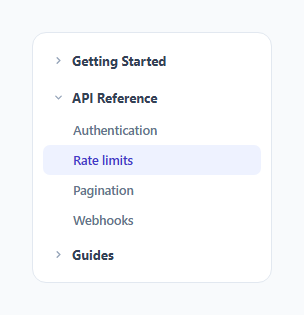
A collapsible sidebar with several top-level groups is only genuinely useful if it opens to the right place automatically — a user landing on a "Rate limits" documentation page shouldn't have to manually click open "API Reference" themselves just to see where they currently are in the site structure. This snippet computes that on load: it finds whichever link is marked active, walks up to its containing group, and expands only that one group, leaving every sibling group collapsed.
Finding the active group from the active link, not the reverse
expandActivePath() starts from nav.querySelector('.tree-link.active') — the link, not the group — and calls .closest('.tree-group') on it to find its containing parent group. This direction matters: the active state genuinely belongs on the *link* (it's the specific page the user is on), and the group's open/closed state is *derived* from that, not the other way around. If a different link becomes active later (e.g. after a client-side route change), re-running the same lookup would correctly find and expand its new containing group without any group-specific logic needing to change.
Smooth open/close via the same grid-template-rows trick used elsewhere in this library
Rather than animating height (which requires a fixed pixel target CSS can't compute from auto) or a hard display toggle (which can't animate at all), .tree-children uses grid-template-rows: 0fr at rest and 1fr when its group has the .open class — the same fractional-grid-row animation technique used by this library's CSS-only accordion, applied here to a JavaScript-driven nested nav instead of a pure-CSS checkbox hack.
Building the required overflow wrapper dynamically, not by hand in the markup
The grid-row-collapse technique needs an inner wrapper with overflow: hidden so content visually clips as the row shrinks toward zero. Rather than requiring that wrapper <div> to be written by hand around every group's links in the HTML, the setup code moves each group's existing child links into a wrapper it creates programmatically on load — keeping the authored HTML markup simpler (flat <a> tags directly inside .tree-children) while still getting the wrapper structure the animation technique actually needs underneath.
Only one group opens automatically — the rest wait for a deliberate click
expandActivePath() only ever calls setGroupOpen(group, true) for the one group containing the active link; every other group is left in its default collapsed state. This keeps the sidebar's initial state focused and uncluttered — showing exactly "here's where you are" rather than expanding everything and asking the user to scan a wall of open sections to find their current location themselves.
Build with AI
Build, Understand, Optimize, and Extend It With AI
Ask an AI assistant to explain why deriving the active group from the active link (rather than hardcoding which group should be open) is the more maintainable approach, especially in a single-page app where the active page can change without a full reload. It's also worth asking for a version that persists which groups a user has manually opened across page loads using localStorage, or one that supports a second level of nesting (groups within groups) while keeping the same active-path auto-expand logic working correctly.
Prompt to recreate it
Copy this into your AI assistant of choice to build the effect from scratch, or as a jumping-off point for your own variant:
Build a nested, collapsible sidebar navigation tree in HTML, CSS and vanilla JavaScript that automatically expands only the group containing the current page's active link on load — no external libraries.

Requirements:
- Several top-level collapsible groups, each with a clickable header button and a list of link children, where clicking any header toggles that specific group's expanded/collapsed state independently of the others.
- Mark exactly one link across the whole tree as the "active" link (representing the current page). On page load, without any user interaction, automatically expand only the single group that contains this active link — all other groups must remain collapsed by default.
- Animate each group's expand/collapse using CSS grid-template-rows transitioning between 0fr and 1fr (not max-height or display toggling), so the animation always matches the actual content height with no hardcoded pixel guess.
- Keep each group header's aria-expanded attribute accurate for both the automatic active-path expansion and any subsequent manual toggling by the user.
- Write the function that determines which group to expand so that it derives the answer from which link is currently marked active (e.g. by walking up from the active link to its containing group), rather than hardcoding a specific group as the one to open — so the same logic would correctly find a different group if a different link were marked active instead.
Want to tighten it up first? Run this prompt through the AI Prompt Studio to score it across 8 quality dimensions, catch anti-patterns, and tune the wording for Claude, ChatGPT, or Gemini before you paste it in.
Step by step
How to Use
- 1Mark the current page's link with class="active" and data-active="true"The active link's containing group is automatically found and expanded on load — no manual group-opening needed.
- 2Click any group header to expand/collapse it manuallyGroups can also be freely opened and closed independently by the user at any time, in addition to the automatic active-path expansion.
- 3Add or remove nav groups and links freelyAny number of .tree-group blocks with their own .tree-parent and .tree-children are picked up automatically.
- 4Re-run expandActivePath() after a route changeIn a single-page app, call expandActivePath() again after updating which link has the .active class, so the sidebar stays in sync with client-side navigation.
- 5Adjust the animation speedChange the grid-template-rows transition duration on .tree-children in the CSS panel.
Real-world uses
Common Use Cases
Got questions?
Frequently Asked Questions
It looks up whichever link currently has the .active class, then walks up the DOM using .closest('.tree-group') to find that link's containing parent group, and expands only that one group — the active state is read from the link and used to derive the group's state, not the reverse.
Only the one group containing the active link is automatically expanded on load; every other group remains in its default collapsed state until a user manually clicks to open it.
max-height requires guessing a fixed pixel value taller than the tallest possible content, which either clips real content or creates an uneven animation pace; grid-template-rows animating between 0fr and 1fr always sizes to the content's exact real height with no guessing, the same technique used by this library's CSS-only accordion snippets.
It keeps the authored markup simpler — plain <a> links directly inside .tree-children — while still providing the overflow:hidden wrapper the grid-row-collapse animation technique needs underneath, moving that structural detail into the setup code rather than requiring every author to remember to add it by hand.
Update which link has the .active class to match the new current page, then call expandActivePath() again — it will find the new active link's containing group and expand it the same way it did on initial load.
Yes — the automatic active-path expansion only sets the initial state; every group remains fully independently togglable by clicking its header at any time afterward, including the one that was auto-expanded.