Learn Coding Visually
Learn to code with interactive, live-preview playgrounds — HTML, CSS, JavaScript, React & more.
 HTML Playground42 lessons · Click-based · Live preview
 CSS PlaygroundLearn CSS with a live editor
 JavaScript Playground60 lessons · DOM · Async · Canvas
 React PlaygroundLearn React with a live code editor
 GSAP PlaygroundLearn GSAP animation interactively
 SVG Playground44 lessons · shapes · paths · animation
 SCSS Playground45 lessons · Sass modules · tokens
 Tailwind PlaygroundLearn Tailwind CSS with a live editor
 Bootstrap 5 Playground50 lessons · live preview
DNS Propagation Checker Widget — Free HTML CSS JS Snippet
DNS Propagation Checker Widget · Dashboards · Plain HTML, CSS & JS · Live preview
What's included
Features
About this UI Snippet
DNS Propagation Checker Widget — Staggered Resolver Checks & Live Progress Bar
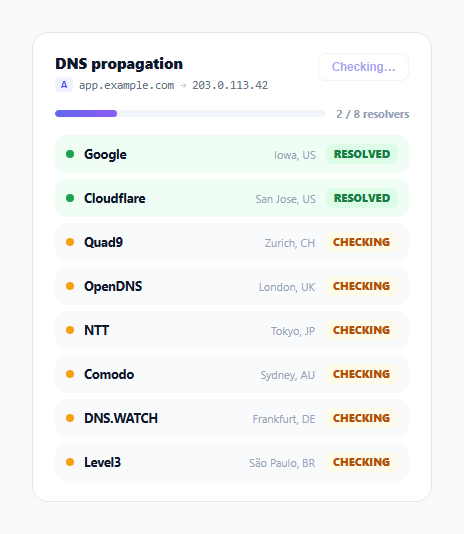
After changing a DNS record, the honest answer to "is it live yet" is "it depends which resolver you ask" — propagation isn't instantaneous or uniform, it trickles out across the world's DNS resolvers over minutes to hours depending on TTLs and caching. This widget models that reality directly: instead of a single pass/fail check, it queries a list of named global resolvers one at a time with staggered, realistic delays, letting each one settle into a "resolved" state independently while an overall progress bar tracks how much of the world has caught up.
Staggered delays that mimic real geographic variance
Each resolver object carries its own delay value in RESOLVERS, deliberately spread from 600ms (Google's well-connected Iowa infrastructure) to 4100ms (a resolver on the other side of the world) rather than resolving all eight simultaneously. runCheck() schedules one setTimeout per resolver at its own delay, so the list visibly fills in from nearest/fastest to farthest/slowest — the same pattern a real propagation check exhibits, where nearby resolvers with recently-refreshed caches often update well before ones on a different continent.
A pulsing dot signals "still checking," not silence
Rows in the pending state get a resolver-dot with a pulse keyframe animation (opacity oscillating via animation: pulse 1s ease-in-out infinite), giving each unresolved row a subtle heartbeat that communicates "this is actively being checked" rather than looking stalled or broken while its timer counts down. Once a resolver's timer fires, the dot switches to solid green and the pulse animation implicitly stops (since .propagated no longer carries the pending class that triggers it).
Progress text and bar color both shift at full completion
updateProgress() writes a "X / Y resolvers" count that, only once done === total, appends " — fully propagated" and swaps the bar's gradient from indigo-purple to green via a .complete class — a single extra piece of state (full completion) gets its own distinct visual treatment rather than the bar simply reaching 100% width in the same color it always was, making the "done" moment more noticeable at a glance.
Recheck cancels in-flight timers before restarting
Clicking #recheckBtn calls timers.forEach(clearTimeout) before scheduling a fresh batch — without this, clicking recheck mid-check would leave the previous run's timers still pending, potentially firing state updates against rows that buildRows() had already replaced, or double-counting doneCount from two overlapping runs. The button also disables itself for the duration of a check, since a real DNS lookup service would reasonably rate-limit or simply be unable to serve overlapping check requests from the same client.
Row entrance uses a fade-and-rise reveal, not an instant list swap
buildRows() inserts all rows with opacity: 0 and adds the .shown class inside a requestAnimationFrame callback, the same two-step technique used elsewhere in this library to guarantee the initial hidden state actually paints before the transition to visible begins — otherwise the browser could coalesce both style writes and skip the fade-in entirely.
Build with AI
Build, Understand, Optimize, and Extend It With AI
Paste this snippet's HTML, CSS, and JS into an AI coding assistant like Claude and ask it to explain exactly why runCheck() clears all previously scheduled timers before starting a new batch, and what visible bug would appear if that cleanup line were removed and a user clicked recheck mid-check. The same assistant can help optimize it — for instance asking how to replace the setTimeout-based simulation with real DNS-over-HTTPS fetch calls to public resolver APIs while preserving the same staggered-reveal UI. It's also useful for extending the widget: ask it to add a per-resolver "copy resolved IP" button, support checking multiple record types (A, CNAME, MX, TXT) in tabs, or add a subtle warning state for resolvers that time out entirely. Treat the code less like a finished artifact and more like a starting point for a conversation.
Prompt to recreate it
Copy this into your AI assistant of choice to build the effect from scratch, or as a jumping-off point for your own variant:
Build a "DNS propagation checker" dashboard widget in HTML, CSS, and vanilla JavaScript — no framework, no real network calls (simulate with timers).

Requirements:
- Show the DNS record being checked (type, hostname, target value) in the widget header, and a "Recheck" button.
- Maintain a list of at least six named DNS resolvers (each with a name, location, and IP), and render one row per resolver showing a status dot, its name, its location, and a status label starting as "Checking."
- Each resolver row must transition from a pending state to a resolved state at its own individually staggered delay (not all resolvers completing simultaneously) — the pending state's status dot must have a pulsing CSS animation, and the resolved state must switch it to a solid, differently colored dot with updated status text.
- Maintain an overall progress bar and a "X / Y resolvers" text counter that update as each individual resolver completes; once every resolver has completed, both the bar and the counter text must switch to a distinct "fully propagated" visual treatment not used at any earlier point.
- The Recheck button must disable itself while a check is running, and clicking it (after a check finishes) must cancel every previously scheduled timer from the prior run before rebuilding the resolver list and starting a completely fresh staggered check — explain in a comment why failing to cancel old timers before starting a new run could cause incorrect state updates.
- Newly built resolver rows should fade and rise into view rather than appearing instantly.
Want to tighten it up first? Run this prompt through the AI Prompt Studio to score it across 8 quality dimensions, catch anti-patterns, and tune the wording for Claude, ChatGPT, or Gemini before you paste it in.
Step by step
How to Use
- 1Watch resolvers resolve one at a timeEach resolver row switches from a pulsing "Checking" state to a solid green "Resolved" state at its own staggered delay, simulating real-world propagation timing.
- 2Watch the progress bar and textThe bar fills and the count updates as each resolver completes, turning green with a "fully propagated" label once all resolvers are done.
- 3Click "Recheck"Cancels any in-flight timers, rebuilds the resolver list, and reruns the staggered check from the start — the button disables itself for the duration.
- 4Replace the record being checkedUpdate the record type, hostname, and target value shown in the header .record-line.
- 5Replace RESOLVERS with real lookupsSwap the setTimeout-based simulation for real DNS-over-HTTPS queries (for example via Cloudflare's or Google's DoH endpoints) against each named resolver, updating each row when its real response returns.
- 6Export in your formatClick "HTML" for a standalone file, "JSX" for a React component, or "Tailwind" for a Tailwind CSS version.
Real-world uses
Common Use Cases
Got questions?
Frequently Asked Questions
No — RESOLVERS is a static demo array and each resolver "resolves" after a fixed setTimeout delay rather than performing a real network lookup. For production use, replace the timers with real DNS-over-HTTPS queries (Cloudflare's or Google's DoH endpoints, for example) issued to each named resolver and update each row when its actual response arrives.
Each resolver object in RESOLVERS carries its own delay value, deliberately varied to mimic how real DNS propagation is uneven across the world — a nearby, well-connected resolver typically shows an updated record before a resolver on another continent with a different cache refresh schedule.
The button is disabled for the duration of a check, so this cannot happen through the UI. Internally, runCheck() also clears every previously scheduled timer via timers.forEach(clearTimeout) before starting a new batch, which prevents a stale in-flight run from firing state updates after a fresh check has already rebuilt the resolver list.
Rows with the pending class include a resolver-dot element with a CSS animation: pulse 1s ease-in-out infinite rule that oscillates its opacity. Once a resolver's timer fires, the row loses the pending class and gains propagated, which switches the dot to a solid green fill with no animation, visually distinguishing "still checking" from "confirmed resolved."
updateProgress() only adds the .complete class — which swaps the bar's gradient from indigo-purple to green — once the done count equals the total resolver count. Reserving the fully-complete color exclusively for the fully-complete state makes that specific moment stand out more clearly than if the bar simply approached 100% in its normal color.
Add or remove objects in the RESOLVERS array, each with a name, loc, ip, and delay. The row-building, progress-counting, and staggered-timer logic all iterate over this array directly, so no other code changes are needed to change the resolver count.