You Might Also Like
Learn Coding Visually
Learn to code with interactive, live-preview playgrounds — HTML, CSS, JavaScript, React & more.
 HTML Playground42 lessons · Click-based · Live preview
 CSS PlaygroundLearn CSS with a live editor
 JavaScript Playground60 lessons · DOM · Async · Canvas
 React PlaygroundLearn React with a live code editor
 GSAP PlaygroundLearn GSAP animation interactively
 SVG Playground44 lessons · shapes · paths · animation
 SCSS Playground45 lessons · Sass modules · tokens
 Tailwind PlaygroundLearn Tailwind CSS with a live editor
 Bootstrap 5 Playground50 lessons · live preview
Canvas Generative Truchet Pattern — Free Procedural Tile Art Snippet
Canvas Generative Truchet Pattern · Animations · Plain HTML, CSS & JS · Live preview
What's included
Features
About this UI Snippet
Canvas Generative Truchet Pattern — Complexity From One Coin Flip Per Tile
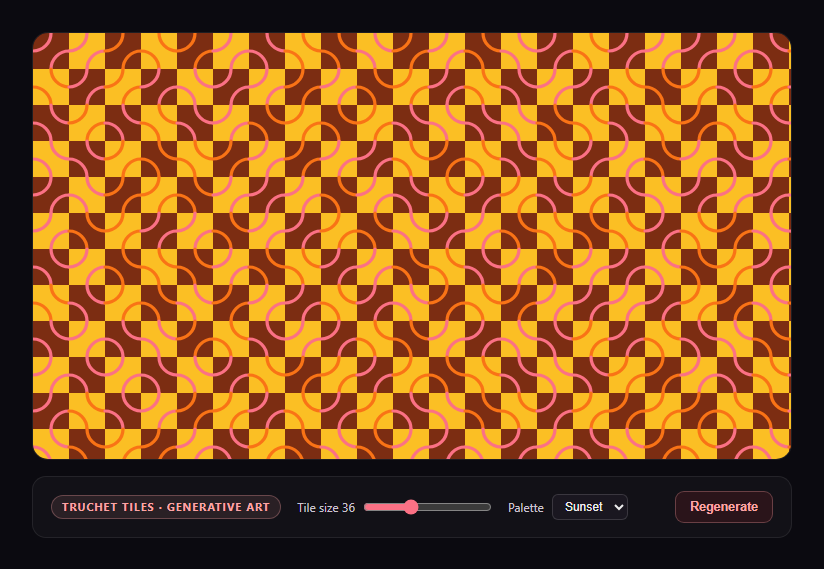
Truchet tiles are one of the oldest tricks in generative art: take a simple square tile with an asymmetric decoration, place it in a grid with a random rotation per cell, and the *emergent* large-scale pattern looks far more complex than the simple per-tile rule that produced it. This snippet implements the classic quarter-circle-arc variant from scratch on canvas.
Two tile variants, chosen independently per cell
Each square cell is filled with one of exactly two possible tiles: a quarter-circle arc connecting the top-left and bottom-right corner pair, or the same arc mirrored to connect the top-right and bottom-left pair instead. drawTile() draws whichever variant it's told to; render() picks the variant for every single grid cell independently with a coin flip. There is no path-planning, no maze-solving algorithm, and no lookahead between neighboring cells — the maze-like continuity you see emerging across many tiles is a byproduct of how frequently adjacent arcs happen to line up, not something explicitly constructed.
A seeded PRNG for reproducible regeneration
Rather than relying on Math.random() directly (which can't be replayed), the pattern uses a small hand-rolled mulberry32-style generator seeded from a single 32-bit integer. Because every call to rand() is a deterministic function of the current internal seed state, re-running render() with the same starting seed reproduces an identical tiling — which is what lets the tile-size and palette controls re-render the *same* pattern at a new scale/color instead of generating an unrelated new layout every time you touch a slider, while the Regenerate button explicitly reseeds for a genuinely new layout.
Checkerboard background alternation for depth
Background fill color alternates by (gx + gy) % 2 — a simple checkerboard parity check — layered underneath the arcs, which are drawn with a random pick from the remaining palette colors. That combination is what keeps the pattern from reading as flat: two independent random processes (arc orientation and arc/background color selection) overlaid on the grid.
For other from-scratch generative canvas art, see canvas noise terrain generator, which uses continuous Perlin noise instead of discrete tile rules.
Build with AI
Build, Understand, Optimize, and Extend It With AI
Paste this snippet's HTML, CSS, and JS into an AI coding assistant like Claude and ask it to explain why picking each tile's arc orientation completely independently (no lookahead, no shared state between neighbors) is enough to produce a convincing maze-like pattern, and why the seeded PRNG is what allows the Tile size and Palette controls to re-render the same layout instead of generating a new one on every interaction. It's a great snippet to extend with an assistant — ask for additional tile variants (straight lines, diagonals, or a mix of arc and straight tiles chosen per cell), an animated version where tiles flip orientation on a staggered timer, or a real solvable-maze mode using a recursive-backtracker algorithm instead of independent coin flips.
Prompt to recreate it
Copy this into your AI assistant of choice to build the effect from scratch, or as a jumping-off point for your own variant:
Build a "generative Truchet tile pattern" in plain HTML, CSS, and JavaScript using only the Canvas 2D API and a hand-rolled seeded pseudo-random number generator — no external generative-art or noise library.

Requirements:
- Implement a small seeded PRNG (e.g. a mulberry32-style integer-hash generator) that produces a deterministic, replayable sequence of pseudo-random floats from a given 32-bit integer seed — not Math.random() directly, since it must be exactly reproducible when re-run with the same seed.
- Draw a grid of square tiles filling the canvas. Each tile is one of exactly two visual variants: a quarter-circle arc connecting the top-left/bottom-right corner pair, or the mirrored arc connecting the top-right/bottom-left corner pair — choose which variant to draw for each grid cell independently via a coin-flip from the seeded PRNG, with no coordination or lookahead between neighboring cells (the maze-like continuity should be a pure emergent side effect of independent random choices, not explicitly constructed).
- Fill each tile's background with a color chosen by alternating a simple checkerboard parity check on the cell's grid coordinates, and stroke each tile's arc with a color independently randomly chosen from a small palette, drawn on top of the background.
- Provide at least 2-3 selectable color palettes (arrays of hex colors) via a dropdown, and a tile-size slider. Changing the tile size or palette should reset the PRNG to the currently active seed and re-render the SAME tile layout at the new size/colors (i.e. these controls replay, not regenerate).
- Provide a separate "Regenerate" button that picks a brand-new random seed and re-renders, producing a genuinely different tile layout.
- Handle window resize by recalculating how many grid columns/rows are needed to fill the new canvas dimensions and re-rendering, and scale for devicePixelRatio so arcs render crisply on high-DPI displays.
Want to tighten it up first? Run this prompt through the AI Prompt Studio to score it across 8 quality dimensions, catch anti-patterns, and tune the wording for Claude, ChatGPT, or Gemini before you paste it in.
Step by step
How to Use
- 1Paste HTML, CSS, and JSA grid of randomly oriented Truchet tiles renders immediately.
- 2Adjust Tile sizeRe-renders the same seed at coarser or finer granularity.
- 3Change PaletteSwitch between Sunset, Ocean, and Mono color sets.
- 4Click RegenerateReseeds the PRNG for an entirely new tile layout.
- 5Observe emergent pathsMaze-like continuous lines appear with no explicit path logic.
- 6Resize the windowThe grid recalculates to fill the new canvas size.
Real-world uses
Common Use Cases
Got questions?
Frequently Asked Questions
A Truchet tile is a simple square tile with an asymmetric internal decoration — here, a quarter-circle arc connecting one pair of adjacent corners. When many such tiles are placed in a grid with randomly chosen orientations, the arcs from neighboring tiles frequently connect, producing continuous, maze-like curved paths across the whole grid despite each tile being decided completely independently.
No. Every tile's arc orientation is chosen with an independent coin flip in render(), with zero awareness of its neighbors' choices. The maze-like continuous paths you perceive across the pattern are a purely visual, emergent byproduct of how often adjacent arcs happen to align — this is the entire point of Truchet tiling as a technique: complexity from simple, uncoordinated local rules.
Math.random() cannot be replayed — you can't ask it to reproduce the exact same sequence of values later. The hand-rolled mulberry32-style generator here is seeded from one integer, and every call deterministically advances from that seed, so re-running the render function with the same starting seed always reproduces the exact same tile layout, which is what lets the Tile size and Palette controls re-render the current pattern rather than jumping to an unrelated new one.
Changing size or palette resets the PRNG to the last snapshotted seed before re-rendering, replaying the identical sequence of random choices at the new tile size or color set. Regenerate instead assigns a brand-new random seed value before rendering, which is the only control that actually produces a different tile layout.
Yes, but it requires a different generation approach — a real maze algorithm (recursive backtracker, Prim's, or Kruskal's) that tracks visited cells and explicitly avoids creating cycles, then maps its wall/passage decisions onto tile orientations. The random-coin-flip approach here optimizes for a visually rich, unsolvable-maze aesthetic rather than a single guaranteed path between two points.