You Might Also Like
Learn Coding Visually
Learn to code with interactive, live-preview playgrounds — HTML, CSS, JavaScript, React & more.
 HTML Playground42 lessons · Click-based · Live preview
 CSS PlaygroundLearn CSS with a live editor
 JavaScript Playground60 lessons · DOM · Async · Canvas
 React PlaygroundLearn React with a live code editor
 GSAP PlaygroundLearn GSAP animation interactively
 SVG Playground44 lessons · shapes · paths · animation
 SCSS Playground45 lessons · Sass modules · tokens
 Tailwind PlaygroundLearn Tailwind CSS with a live editor
 Bootstrap 5 Playground50 lessons · live preview
Canvas ASCII Art Converter — Free Live Pixel-to-Character Demo
Canvas ASCII Art Converter · Animations · Plain HTML, CSS & JS · Live preview
What's included
Features
About this UI Snippet
Canvas ASCII Art Converter — Sampling Pixels Into Characters
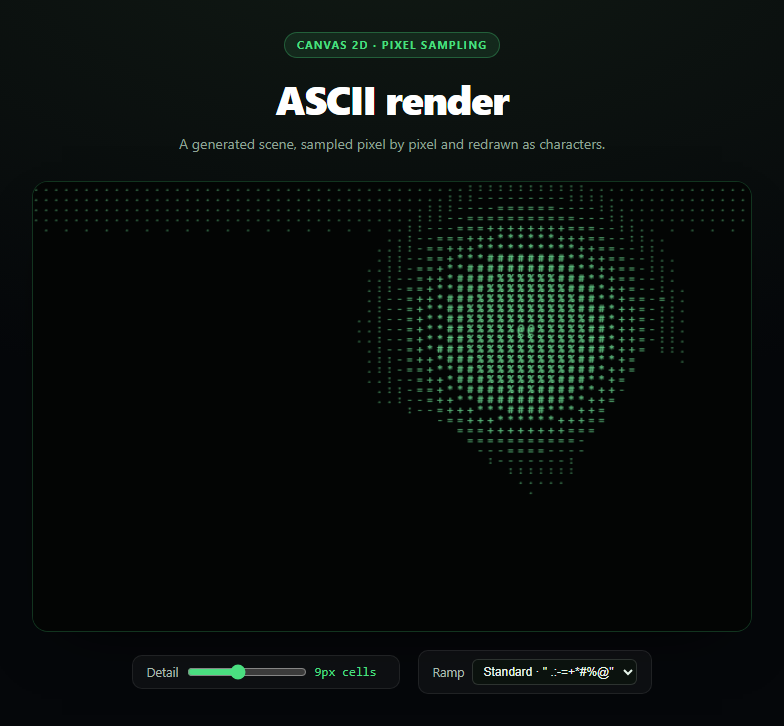
ASCII art conversion is the classic canvas exercise that never gets old: take an image, read its pixel brightness in a grid, and swap every cell for a character whose visual weight matches that brightness. This snippet builds the whole pipeline from scratch with the 2D canvas API — no image upload, no external asset, and no library — by first painting a procedural "source image" onto an offscreen canvas and then sampling it.
A source image with nothing to load
Because a sandboxed snippet has nowhere reliable to host a photo, paintSourceImage() draws one instead: a vertical sky gradient, a radial-gradient sun with real falloff, a jagged mountain silhouette built from a sine-perturbed polygon, and a scatter of star dots. The point isn't the scene itself — it's that the source has genuine light-to-dark range for the sampler to react to, the same way a real photo would.
Sampling with getImageData
sctx.getImageData(0, 0, W, H).data returns a flat array of RGBA bytes, four per pixel. The render loop walks the canvas in cell-sized steps, looks up the pixel at each cell's top-left corner, and converts it to brightness with the standard luminance weighting r * 0.299 + g * 0.587 + b * 0.114. That single formula is doing the real work: it accounts for the eye being more sensitive to green than red or blue, so the resulting brightness value tracks perceived lightness rather than raw pixel average.
Mapping brightness to a character ramp
Each ramp — from " .:-=+*#%@" for a classic terminal look to block glyphs or plain binary — is ordered from visually lightest to densest. Math.floor(brightness * (ramp.length - 1)) picks an index along that ramp, so bright pixels become sparse punctuation and dark pixels become dense glyphs (or vice versa, depending on which end you treat as "ink"). The character is then drawn with ctx.fillText directly at the cell's coordinates, so the ASCII output lives entirely on the same canvas — no overlaid <pre> block, no HTML text nodes to keep in sync.
Density as a live control
The detail slider changes cell — the sampling and glyph size — from 4px (fine detail, more characters, closer to the source image) up to 16px (chunky, poster-like). Because render() re-samples and redraws from scratch on every change, dragging the slider gives instant, correct feedback rather than an approximation. The ramp selector swaps the character set entirely, which changes not just the look but the perceived contrast, since block glyphs read as much denser at the same brightness threshold than punctuation does.
Extending it
Swap the procedural source for a real <img> drawn with ctx.drawImage (still same-origin or CORS-enabled) to convert actual photos; add color by keeping the sampled RGB instead of forcing green; or drive the source from a live video element for a real-time ASCII webcam feed. Pair it with a matrix rain background for a retro terminal page, or a noise background for a grittier texture layer underneath.
Build with AI
Build, Understand, Optimize, and Extend It With AI
Paste this snippet's HTML, CSS, and JS into an AI coding assistant like Claude and ask it to walk through why the luminance formula weights green highest when converting a pixel to a single brightness value, and how getImageData's flat RGBA byte array maps back to an (x, y) coordinate for each sampled cell. The same assistant is useful for extending the effect: ask it to wire up a real img or video element as the source via drawImage instead of the procedural scene, add a color mode that keeps each cell's sampled RGB instead of a fixed tint, or add a "invert ramp" toggle so bright areas render dense instead of sparse. It can also help you reason about performance — ask whether reading getImageData once per render versus once per cell matters at this scale, and how the approach would need to change to sample a live video feed at 30fps instead of a static or slowly-changing canvas. Treat the code less like a finished artifact and more like a starting point for a conversation.
Prompt to recreate it
Copy this into your AI assistant of choice to build the effect from scratch, or as a jumping-off point for your own variant:
Build a live "canvas ASCII art converter" in plain HTML, CSS, and JavaScript using only the Canvas 2D API — no image upload and no external asset.

Requirements:
- Since there is no external image to load, paint a procedural "source image" onto an offscreen canvas using canvas primitives: a gradient background, at least one radial-gradient glow, a filled polygon silhouette, and some scattered dot detail — enough to produce real brightness variation across the frame.
- Sample that offscreen canvas with getImageData once per render, and for each grid cell of a configurable pixel size, read the RGBA values at that cell's top-left pixel and convert them to a single brightness value using the standard luminance weighting (roughly 0.299 red, 0.587 green, 0.114 blue), not a flat average of the three channels.
- Map the normalized 0-1 brightness to an index into a string "ramp" of characters ordered from visually sparse to visually dense (e.g. " .:-=+*#%@"), and draw the resulting character directly onto the visible canvas at the cell's coordinates with fillText, skipping cells that map to a blank/space character.
- Provide a range input that controls the cell size (roughly 4px to 16px), and a select dropdown offering at least two alternate character ramps (for example block-shading glyphs and a binary 0/1 ramp). Both controls should trigger a full re-sample and redraw immediately on change.
- Style it as a dark terminal-like panel with a monospace font for the glyphs, and re-paint the procedural source every few seconds (new random star positions, for example) on a timer so the output has subtle ongoing life even without user interaction.
Want to tighten it up first? Run this prompt through the AI Prompt Studio to score it across 8 quality dimensions, catch anti-patterns, and tune the wording for Claude, ChatGPT, or Gemini before you paste it in.
Step by step
How to Use
- 1Paste HTML, CSS, and JSA procedural scene renders as green ASCII characters on load.
- 2Drag the Detail sliderCell size (and glyph size) changes; the canvas re-samples instantly.
- 3Switch the RampChoose punctuation, block glyphs, or binary — contrast changes with it.
- 4Watch it refreshThe source scene repaints every few seconds with new stars.
- 5Swap the sourceReplace paintSourceImage with ctx.drawImage(yourImg, 0, 0).
- 6Add colorUse the sampled r/g/b directly instead of a fixed green tint.
Real-world uses
Common Use Cases
Got questions?
Frequently Asked Questions
A self-contained snippet has no reliable place to host or fetch an external photo, and doing so would break the "no dependencies" constraint. paintSourceImage draws a gradient sky, a radial sun, a jagged mountain silhouette and stars directly with canvas primitives, which gives getImageData genuine brightness variation to sample without needing any asset to load.
Each sampled pixel's red, green and blue values are combined with the luminance formula r*0.299 + g*0.587 + b*0.114, which weights green highest to match human perception. That 0-255 value is normalized to 0-1 and used to index into the current character ramp, so darker pixels pick characters further along the ramp toward its densest glyph.
Yes. Replace the body of paintSourceImage with sctx.drawImage(yourImageElement, 0, 0, W, H) once the image has loaded (listen for its load event, or use an already-decoded Image). Everything downstream — sampling, the ramp mapping, and the render loop — works unchanged because it only reads pixel data from the offscreen canvas.
render() re-samples and redraws the entire canvas from scratch on every input event rather than incrementally patching it, and at these resolutions (a few hundred cells) that full pass is cheap for the 2D canvas API. There is no accumulated state to get out of sync, so every slider position is always drawn correctly rather than approximated.
Instead of forcing a fixed green rgba() fill for every character, use the sampled r, g and b values directly — for example ctx.fillStyle = 'rgb(' + r + ',' + g + ',' + b + ')' before the fillText call. The brightness-to-character mapping stays the same; only the fill color changes, which turns the effect from a monochrome terminal look into a full ASCII-mosaic version of the source image.