



Learn Coding Visually
Learn to code with interactive, live-preview playgrounds — HTML, CSS, JavaScript, React & more.
 HTML Playground42 lessons · Click-based · Live preview
 CSS PlaygroundLearn CSS with a live editor
 JavaScript Playground60 lessons · DOM · Async · Canvas
 React PlaygroundLearn React with a live code editor
 GSAP PlaygroundLearn GSAP animation interactively
 SVG Playground44 lessons · shapes · paths · animation
 SCSS Playground45 lessons · Sass modules · tokens
 Tailwind PlaygroundLearn Tailwind CSS with a live editor
 Bootstrap 5 Playground50 lessons · live preview
Bootstrap Tag Input Field — Free HTML CSS JS Snippet
Bootstrap Tag Input Field · Forms · Plain HTML, CSS & JS · Live preview
What's included
Features
About this UI Snippet
Bootstrap Tag Input Field — HTML, CSS & JavaScript
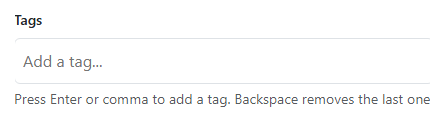
This snippet makes a single element, #bstagContainer, carry the real Bootstrap form-control class so it inherits Bootstrap's own border, padding, and focus-ring styling exactly like a normal text input — but instead of containing text directly, it holds a flex-wrapped row of tag pills plus one small borderless <input class="bstag-input"> at the end, styled with border: 0, outline: 0, and a transparent background so it visually disappears into the container and looks like part of the same field.
The core logic lives in addTag(): on Enter or comma (checked in a single keydown listener, with e.preventDefault() stopping the comma from being typed literally into the input), it trims the current input value, checks for a case-insensitive duplicate against the tags array with tags.some(t => t.toLowerCase() === value.toLowerCase()), and either silently rejects the duplicate — flashing a temporary #bstagError message via showDuplicateError(), which clears any previous pending setTimeout before scheduling a new one so rapid duplicate attempts don't cause the message to flicker off early — or pushes the value into tags and calls renderTag() to insert a new .bstag-pill span before the input element with container.insertBefore(pill, input). Inserting before the input, rather than appending to the end of the container, is what keeps the typing cursor visually anchored at the end of the tag row instead of jumping around as pills are added.
Backspace handling checks two conditions together: the key must be Backspace and the input must already be empty. That guard matters because without it, backspacing through actual typed characters would also delete a tag the instant the input hit zero characters mid-edit — instead, the tag-removal branch only fires when there's nothing left to delete from the text itself, so removeTag(tags[tags.length - 1]) runs only on a genuinely empty input, matching how chip inputs in real apps like email "To:" fields behave.
Each pill stores its own value in a data-value attribute, and removeTag() looks the matching pill up with CSS.escape(value) inside the attribute selector — necessary because a tag value could contain characters like quotes that would otherwise break a naively-interpolated CSS selector string. A delegated click listener on the container handles pill removal via .bstag-pill-remove, and separately, clicking empty space inside the container (not on a pill) focuses the hidden-looking input, so the whole field behaves like one clickable text box rather than requiring a pixel-precise click on the tiny input itself. Finally, a blur listener commits any unsubmitted typed text as a tag when focus leaves the field, so clicking away after typing a value without pressing Enter doesn't silently discard it.
Build with AI
Build, Understand, Optimize, and Extend It With AI
Hand this snippet's HTML, CSS, and JS to an AI coding assistant like Claude and ask it to add a hidden input that serializes the tag list for real form submission, or to add a max-tags limit that disables further input once reached. It's also worth asking for autocomplete suggestions drawn from a predefined tag list as the user types.
Prompt to recreate it
Copy this into your AI assistant of choice to build the effect from scratch, or as a jumping-off point for your own variant:
Build a Bootstrap 5.3 tag input field, using the real Bootstrap CDN framework (bootstrap.min.css and bootstrap.bundle.min.js) — the outer container itself must be a genuine Bootstrap form-control element, not custom CSS made to resemble one.

Requirements:
- A container styled as a single Bootstrap form-control that holds both rendered tag pills and one small borderless text input at the end, so the whole thing looks like one unified field.
- Pressing Enter or typing a comma while text is in the input must convert that text into a removable pill (with an x button) inserted before the input, then clear the input for the next tag.
- Typing a tag that already exists (case-insensitively) must be rejected with a visible temporary error message, without creating a duplicate pill.
- Pressing Backspace only when the input is already empty must remove the most recently added tag — it must never interfere with normal text editing while there is still text in the input.
- Clicking anywhere in the empty space of the container (not directly on a pill or the input) must focus the input.
- Losing focus (blur) while there is unsubmitted text in the input must commit that text as a tag rather than discarding it.
Want to tighten it up first? Run this prompt through the AI Prompt Studio to score it across 8 quality dimensions, catch anti-patterns, and tune the wording for Claude, ChatGPT, or Gemini before you paste it in.
Source Code
<div class="container py-5 d-flex justify-content-center">
  <div class="bstag-card">
    <label class="form-label small fw-semibold" for="bstagInput">Tags</label>
    <div class="form-control bstag-container d-flex flex-wrap align-items-center gap-1" id="bstagContainer">
      <input type="text" id="bstagInput" class="bstag-input" placeholder="Add a tag...">
    </div>
    <div class="small text-muted mt-1">Press Enter or comma to add a tag. Backspace removes the last one.</div>
    <div class="small text-danger mt-1 d-none" id="bstagError">That tag has already been added.</div>
  </div>
</div>
.bstag-card { width: 420px; }
.bstag-container { min-height: 46px; height: auto; padding: .35rem .5rem; cursor: text; }
.bstag-input { border: 0; outline: 0; flex: 1 1 80px; min-width: 80px; padding: .15rem 0; background: transparent; }
.bstag-pill { display: inline-flex; align-items: center; gap: .35rem; background: #eef1f4; color: #212529; border-radius: 999px; padding: .2rem .55rem; font-size: .85rem; white-space: nowrap; }
.bstag-pill-remove { cursor: pointer; font-weight: 700; color: #6c757d; }
.bstag-pill-remove:hover { color: #dc3545; }const container = document.getElementById('bstagContainer');
const input = document.getElementById('bstagInput');
const errorMsg = document.getElementById('bstagError');
let tags = [];
function showDuplicateError() {
errorMsg.classList.remove('d-none');
clearTimeout(showDuplicateError._t);
showDuplicateError._t = setTimeout(() => errorMsg.classList.add('d-none'), 1800);
}
function addTag(rawValue) {
const value = rawValue.trim();
if (!value) return;
const exists = tags.some(t => t.toLowerCase() === value.toLowerCase());
if (exists) {
showDuplicateError();
input.value = '';
return;
}
tags.push(value);
renderTag(value);
input.value = '';
}
function renderTag(value) {
const pill = document.createElement('span');
pill.className = 'bstag-pill';
pill.dataset.value = value;
pill.innerHTML = '<span>' + value + '</span><span class="bstag-pill-remove" role="button" aria-label="Remove tag">×</span>';
container.insertBefore(pill, input);
}
function removeTag(value) {
tags = tags.filter(t => t !== value);
const pill = container.querySelector('.bstag-pill[data-value="' + CSS.escape(value) + '"]');
if (pill) pill.remove();
}
input.addEventListener('keydown', e => {
if (e.key === 'Enter' || e.key === ',') {
e.preventDefault();
addTag(input.value);
} else if (e.key === 'Backspace' && input.value === '' && tags.length > 0) {
// Backspace on an already-empty input removes the most recently added
// tag, mirroring how removable-chip inputs behave in most real apps.
const last = tags[tags.length - 1];
removeTag(last);
}
});
container.addEventListener('click', e => {
const remove = e.target.closest('.bstag-pill-remove');
if (remove) {
const pill = remove.closest('.bstag-pill');
removeTag(pill.dataset.value);
return;
}
if (e.target === container) input.focus();
});
// Losing focus with unsubmitted text still in the input commits it as a
// tag, rather than discarding a value the user clearly intended to add.
input.addEventListener('blur', () => {
if (input.value.trim()) addTag(input.value);
});Step by step
How to Use
- 1Load the snippetAn empty Bootstrap-styled field appears with just a blinking cursor and placeholder text "Add a tag...".
- 2Type "design" and press EnterThe text becomes a gray rounded pill labeled "design" with an × button, and the input clears for the next tag.
- 3Type "css," with a trailing commaThe comma itself triggers tag creation immediately, without needing to press Enter.
- 4Type "design" again and press EnterA red message appears below the field noting the tag already exists, and no duplicate pill is created.
- 5Press Backspace with the input emptyThe most recently added pill is removed entirely, letting you delete tags without clicking their × buttons.
- 6Click anywhere in the empty space of the fieldThe cursor focuses into the hidden input immediately, even though you didn't click exactly on it.
Real-world uses
Common Use Cases
Got questions?
Frequently Asked Questions
This snippet keeps tags only in the in-memory tags array for the demo. For a real form, you would add a hidden input whose value is updated to tags.join(",") (or a JSON string) every time addTag() or removeTag() runs, so the final list submits with the rest of the form.
Yes. In React, hold tags in useState and map it to pill elements in JSX instead of manually creating DOM nodes with renderTag(); in Vue, use a reactive array with v-for over the pills; in Angular, keep tags as a component array property and use *ngFor, calling the same Enter/comma/backspace logic from (keydown) bindings.
Comparison is case-insensitive — typing "Design" after "design" is already added will be rejected, since addTag() lowercases both the new value and every existing tag before comparing them with Array.some().
No — the Backspace handler only removes the last tag when input.value is already an empty string, so it never interferes with normal character-by-character editing of the text currently being typed.
A blur listener checks whether the input still has unsubmitted trimmed text and, if so, commits it as a tag automatically via the same addTag() function used for Enter and comma, rather than losing it silently.
Replace the form-control class on the container with Tailwind utilities like flex flex-wrap items-center gap-1 rounded-md border px-2 py-1, and rebuild .bstag-pill as a Tailwind inline-flex items-center gap-1 rounded-full bg-gray-100 px-2 py-0.5 text-sm span — all JS logic for adding, removing, and deduping tags stays exactly the same.