



Learn Coding Visually
Learn to code with interactive, live-preview playgrounds — HTML, CSS, JavaScript, React & more.
 HTML Playground42 lessons · Click-based · Live preview
 CSS PlaygroundLearn CSS with a live editor
 JavaScript Playground60 lessons · DOM · Async · Canvas
 React PlaygroundLearn React with a live code editor
 GSAP PlaygroundLearn GSAP animation interactively
 SVG Playground44 lessons · shapes · paths · animation
 SCSS Playground45 lessons · Sass modules · tokens
 Tailwind PlaygroundLearn Tailwind CSS with a live editor
 Bootstrap 5 Playground50 lessons · live preview
Bootstrap Search With Recent Searches — Free HTML CSS JS Snippet
Bootstrap Search With Recent Searches · Forms · Plain HTML, CSS & JS · Live preview
What's included
Features
About this UI Snippet
Bootstrap Search With Recent Searches — HTML, CSS & JavaScript
The recent-searches list is real persisted state, not an in-memory array that resets on reload — readRecent()/writeRecent() wrap localStorage, both guarded with try/catch so a private browsing mode or a blocked storage API degrades to "no history" instead of throwing and breaking the search box entirely. addRecent() does the two things a recent-searches list actually needs to get right: it case-insensitively removes any existing entry matching the new query before unshifting it back to the front, so searching the same term twice moves it to the top rather than creating a duplicate, and it caps the list at 5 with slice(0, 5) so it can never grow without bound.
The dropdown only ever shows on an *empty* input focused — checked in both the focus and input listeners — which mirrors how recent-searches UI works almost everywhere: it's a shortcut for starting a new search, not a suggestion list competing with what's already been typed. A document-level click listener closes the dropdown the moment a click lands outside .bsrecent-card, the standard pattern for any popover that needs to dismiss on an outside click without needing a backdrop element.
Build with AI
Build, Understand, Optimize, and Extend It With AI
Hand this snippet to an AI coding assistant like Claude and ask it to add arrow-key navigation through the recent-searches dropdown (matching bootstrap-search-autocomplete-suggestions's keyboard pattern), or to add a per-item remove button so a single recent search can be deleted without clearing the whole list.
Prompt to recreate it
Copy this into your AI assistant of choice to build the effect from scratch, or as a jumping-off point for your own variant:
Build a Bootstrap 5.3 search input with a recent-searches dropdown, using the real Bootstrap CDN framework (bootstrap.min.css and bootstrap.bundle.min.js), not custom CSS made to resemble it.

Requirements:
- A single search input. Focusing it while empty shows a dropdown of recent searches persisted in localStorage, with a "Clear" action.
- Pressing Enter with a non-empty value runs the search and saves that query to the recent list: case-insensitively remove any existing identical entry first, then add it to the front, capped at 5 total entries.
- Clicking a recent search item fills the input with that query and re-runs the search the same way pressing Enter does.
- The dropdown must close when the input gains real text (don't show recent searches over active typing) and when a click happens anywhere outside the search box.
- Guard every localStorage read and write with try/catch so the search box still works if storage is blocked or unavailable.
Want to tighten it up first? Run this prompt through the AI Prompt Studio to score it across 8 quality dimensions, catch anti-patterns, and tune the wording for Claude, ChatGPT, or Gemini before you paste it in.
Source Code
<div class="container py-5 d-flex justify-content-center">
<div class="card bsrecent-card">
<div class="card-body p-3 position-relative">
<input type="search" class="form-control" id="bsrecentInput" placeholder="Search documentation..." autocomplete="off">
<div class="bsrecent-dropdown d-none" id="bsrecentDropdown">
<div class="d-flex justify-content-between align-items-center px-2 py-1">
<span class="small fw-semibold text-muted">Recent searches</span>
<button type="button" class="btn btn-link btn-sm p-0" id="bsrecentClear">Clear</button>
</div>
<ul class="list-unstyled mb-0" id="bsrecentList"></ul>
</div>
<p class="small text-muted mt-2 mb-0" id="bsrecentStatus"> </p>
</div>
</div>
</div>.bsrecent-card { width: 380px; max-width: 100%; border: 1px solid #eceef1; border-radius: 14px; }
.bsrecent-dropdown {
position: absolute; left: 12px; right: 12px; top: 58px; z-index: 5;
background: #fff; border: 1px solid #e5e7eb; border-radius: 10px;
box-shadow: 0 8px 20px rgba(20,22,28,.08); padding: 4px 0;
}
.bsrecent-item {
display: flex; align-items: center; gap: 8px; padding: 7px 12px;
font-size: 13.5px; cursor: pointer;
}
.bsrecent-item:hover { background: #f8f9fb; }const KEY = 'bsrecent-searches-demo';
const input = document.getElementById('bsrecentInput');
const dropdown = document.getElementById('bsrecentDropdown');
const list = document.getElementById('bsrecentList');
const status = document.getElementById('bsrecentStatus');
function readRecent() {
try { return JSON.parse(localStorage.getItem(KEY)) || []; } catch (e) { return []; }
}
function writeRecent(arr) {
try { localStorage.setItem(KEY, JSON.stringify(arr)); } catch (e) { /* storage unavailable — recent list just won't persist */ }
}
function renderDropdown() {
const recent = readRecent();
if (recent.length === 0) {
dropdown.classList.add('d-none');
return;
}
list.innerHTML = recent.map(q =>
'<li class="bsrecent-item" data-query="' + q.replace(/"/g, '"') + '">🕑 ' + q + '</li>'
).join('');
dropdown.classList.remove('d-none');
}
function addRecent(query) {
const trimmed = query.trim();
if (!trimmed) return;
let recent = readRecent().filter(q => q.toLowerCase() !== trimmed.toLowerCase());
recent.unshift(trimmed);
recent = recent.slice(0, 5);
writeRecent(recent);
}
function runSearch(query) {
addRecent(query);
status.textContent = 'Searching for "' + query + '"...';
input.blur();
}
input.addEventListener('focus', () => {
if (input.value.trim() === '') renderDropdown();
});
input.addEventListener('input', () => {
if (input.value.trim() === '') renderDropdown(); else dropdown.classList.add('d-none');
});
input.addEventListener('keydown', e => {
if (e.key === 'Enter' && input.value.trim()) runSearch(input.value);
});
list.addEventListener('click', e => {
const item = e.target.closest('.bsrecent-item');
if (!item) return;
input.value = item.dataset.query;
runSearch(item.dataset.query);
});
document.getElementById('bsrecentClear').addEventListener('click', e => {
e.stopPropagation();
writeRecent([]);
dropdown.classList.add('d-none');
});
document.addEventListener('click', e => {
if (!e.target.closest('.bsrecent-card')) dropdown.classList.add('d-none');
});Step by step
How to Use
- 1Load the snippetThe search box is empty with no dropdown showing yet — there's no history.
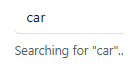
- 2Type a search and press EnterThe status line shows the search ran, and that query is now saved to recent history.
- 3Clear the input and focus it againA dropdown appears listing that search under "Recent searches".
- 4Run two more different searchesEach one is added to the top of the list, most recent first, up to 5 entries.
- 5Click a recent search from the dropdownIt fills the input and re-runs immediately, and moves back to the top of the list.
- 6Click "Clear"The whole recent-searches list empties, and the dropdown won't reappear until a new search is run.
Real-world uses
Common Use Cases
Got questions?
Frequently Asked Questions
Recent searches are inherently per-device, per-browser convenience state — localStorage is the right tool since it persists without needing an account or a network request just to remember what someone searched five minutes ago.
localStorage is sometimes blocked or cleared aggressively in private/incognito modes — the try/catch around readRecent/writeRecent means the search box still works perfectly, it simply won't remember anything between page loads.
Yes. Move the recent array into component state, initialize it by reading localStorage once in a mount hook, and write to localStorage inside the same addRecent-equivalent function that also updates state — the dedup-and-cap logic carries over unchanged.
This snippet models the recent-searches interaction itself; runSearch() is the single place to call your real search function or API with the query, in addition to (or instead of) the demo status message.